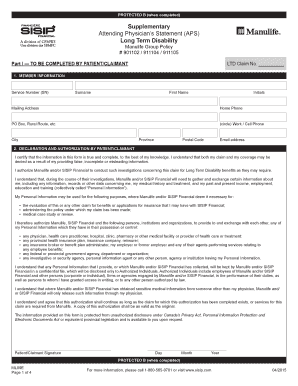
Attending Physicians Statement APS Form


What is the Attending Physicians Statement APS
The Attending Physicians Statement (APS) is a critical document in the context of disability claims, particularly for those applying for benefits under the Manulife ML09E disability SISIP program. This statement is completed by a medical professional who has treated the individual making the claim. It provides essential information regarding the claimant's medical condition, treatment history, and overall ability to perform daily activities or work-related tasks. The APS serves as a key piece of evidence that helps insurance companies assess the validity of a disability claim.
How to use the Attending Physicians Statement APS
To effectively use the Attending Physicians Statement, claimants should ensure that their physician completes the form accurately and comprehensively. It is important to provide the physician with all necessary details about the disability claim, including specific symptoms, limitations, and any treatments that have been administered. Once completed, the APS should be submitted alongside other required documentation to the insurance provider. This helps to strengthen the claim and provides a clearer picture of the claimant's health status.
Steps to complete the Attending Physicians Statement APS
Completing the Attending Physicians Statement involves several key steps:
- Schedule an appointment with your treating physician to discuss your disability and the need for the APS.
- Provide your physician with details regarding your condition and the impact it has on your daily life and work.
- Ensure that your physician fills out all sections of the APS, including medical history, current treatment, and prognosis.
- Review the completed APS for accuracy and completeness before submission.
- Submit the APS along with your disability claim and any other required documents to the insurance company.
Legal use of the Attending Physicians Statement APS
The Attending Physicians Statement is a legally recognized document that plays a significant role in the disability claims process. It must be completed truthfully and accurately, as any misrepresentation can lead to penalties or denial of the claim. Insurance companies rely on the APS to make informed decisions regarding the eligibility of the claimant for benefits. Therefore, it is crucial to ensure that the information provided is supported by medical evidence and aligns with the claimant's medical records.
Eligibility Criteria
Eligibility for benefits under the Manulife ML09E disability SISIP program typically requires that claimants demonstrate a significant inability to perform their job duties due to a medical condition. The Attending Physicians Statement is essential in establishing this eligibility. Claimants must provide documentation of their medical condition, treatment history, and any limitations they face in their daily activities. The APS helps verify these claims and supports the overall application for disability benefits.
Required Documents
When submitting a disability claim under the Manulife ML09E program, several documents are typically required. These may include:
- The completed Attending Physicians Statement.
- Medical records related to the condition.
- Any previous disability claims or relevant insurance documentation.
- Personal identification and proof of income.
Gathering these documents in advance can help streamline the claims process and ensure that all necessary information is available for review.
Quick guide on how to complete attending physicians statement aps
Complete Attending Physicians Statement APS effortlessly on any device
Digital document management has become increasingly popular among businesses and individuals. It offers an ideal eco-friendly substitute for traditional printed and signed documents, allowing you to obtain the necessary form and securely save it online. airSlate SignNow provides all the tools you need to create, edit, and eSign your documents quickly without delays. Manage Attending Physicians Statement APS on any device with airSlate SignNow's Android or iOS applications and streamline any document-centric process today.
The simplest way to edit and eSign Attending Physicians Statement APS without stress
- Obtain Attending Physicians Statement APS and click on Get Form to begin.
- Use the tools we offer to complete your document.
- Emphasize important sections of your documents or redact sensitive information with tools that airSlate SignNow specifically provides for that purpose.
- Create your signature using the Sign tool, which takes mere seconds and carries the same legal validity as a traditional wet ink signature.
- Review the details and click on the Done button to save your modifications.
- Choose how you would like to send your form, via email, text message (SMS), or invitation link, or download it to your computer.
Purge concerns of lost or misplaced files, tedious form hunting, or mistakes that necessitate printing new document copies. airSlate SignNow addresses your document management needs in just a few clicks from any preferred device. Modify and eSign Attending Physicians Statement APS and ensure outstanding communication at every stage of your form creation process with airSlate SignNow.
Create this form in 5 minutes or less
Create this form in 5 minutes!
How to create an eSignature for the attending physicians statement aps
How to create an electronic signature for a PDF online
How to create an electronic signature for a PDF in Google Chrome
How to create an e-signature for signing PDFs in Gmail
How to create an e-signature right from your smartphone
How to create an e-signature for a PDF on iOS
How to create an e-signature for a PDF on Android
People also ask
-
What is the Manulife ML09E disability SISIP?
The Manulife ML09E disability SISIP is a specialized insurance product designed to provide financial support to individuals who are unable to work due to disability. It offers a range of benefits tailored to meet the needs of policyholders, ensuring they receive adequate coverage during challenging times.
-
How does the Manulife ML09E disability SISIP work?
The Manulife ML09E disability SISIP provides monthly income benefits to eligible individuals who are unable to perform their job due to a disability. After a waiting period, policyholders can receive payments that help cover living expenses, ensuring financial stability while they recover.
-
What are the eligibility requirements for the Manulife ML09E disability SISIP?
To qualify for the Manulife ML09E disability SISIP, applicants typically need to demonstrate that they have a valid disability that prevents them from working. Additional criteria may include age, employment status, and medical documentation to support the claim.
-
What are the key benefits of the Manulife ML09E disability SISIP?
The Manulife ML09E disability SISIP offers several key benefits, including income replacement, coverage for rehabilitation services, and access to mental health support. These features ensure that policyholders receive comprehensive assistance during their recovery process.
-
How much does the Manulife ML09E disability SISIP cost?
The cost of the Manulife ML09E disability SISIP varies based on factors such as age, occupation, and coverage amount. It's essential to get a personalized quote to understand the pricing structure and find a plan that fits your budget.
-
Can I integrate the Manulife ML09E disability SISIP with other insurance products?
Yes, the Manulife ML09E disability SISIP can often be integrated with other insurance products for comprehensive coverage. This allows policyholders to create a tailored insurance portfolio that meets their specific needs and provides additional financial security.
-
How do I file a claim for the Manulife ML09E disability SISIP?
Filing a claim for the Manulife ML09E disability SISIP involves submitting a claim form along with necessary medical documentation to support your disability. It's advisable to contact Manulife's customer service for guidance on the claims process to ensure a smooth experience.
Get more for Attending Physicians Statement APS
- Deer processing order forms
- Claim for damge cargo from shipping company form
- Omni eye services post op report form
- I131a form
- Prescription universal claim form
- Non relative child witness to domestic ct gov jud ct form
- Property joint ownership agreement template form
- Property joint venture agreement template form
Find out other Attending Physicians Statement APS
- How To Sign Arkansas Doctors Document
- How Do I Sign Florida Doctors Word
- Can I Sign Florida Doctors Word
- How Can I Sign Illinois Doctors PPT
- How To Sign Texas Doctors PDF
- Help Me With Sign Arizona Education PDF
- How To Sign Georgia Education Form
- How To Sign Iowa Education PDF
- Help Me With Sign Michigan Education Document
- How Can I Sign Michigan Education Document
- How Do I Sign South Carolina Education Form
- Can I Sign South Carolina Education Presentation
- How Do I Sign Texas Education Form
- How Do I Sign Utah Education Presentation
- How Can I Sign New York Finance & Tax Accounting Document
- How Can I Sign Ohio Finance & Tax Accounting Word
- Can I Sign Oklahoma Finance & Tax Accounting PPT
- How To Sign Ohio Government Form
- Help Me With Sign Washington Government Presentation
- How To Sign Maine Healthcare / Medical PPT