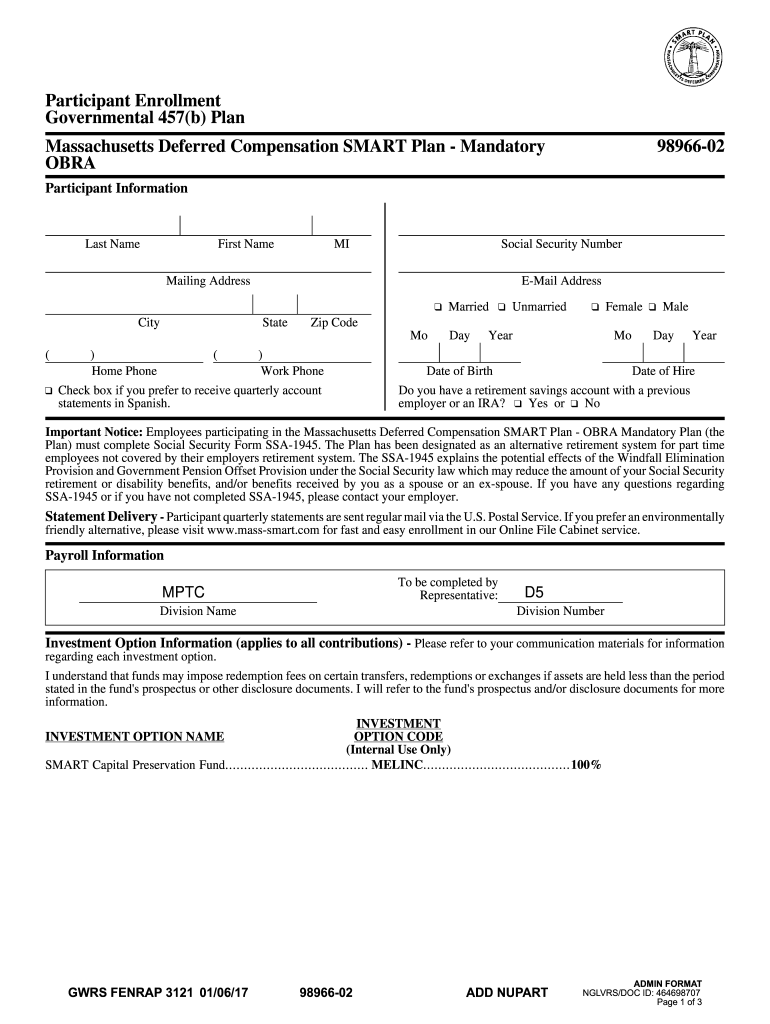
The Plan Has Been Designated as an Alternative Retirement System for Part Time Form


Understanding the Smart Plan as an Alternative Retirement System for Part-Time Employees
The Smart Plan compensation mandatory is designed to serve as an alternative retirement system specifically for part-time employees in Massachusetts. This plan allows eligible employees to save for retirement through payroll deductions, ensuring they have a financial safety net when they retire. The plan is structured to provide benefits similar to traditional retirement plans, making it a viable option for part-time workers who may not have access to employer-sponsored retirement plans.
Eligibility Criteria for the Smart Plan
To participate in the Smart Plan, part-time employees must meet specific eligibility criteria. Generally, employees must be working in a part-time capacity for a Massachusetts public employer. The plan is aimed at providing retirement savings options for those who may not qualify for full-time benefits. It is essential for employees to confirm their eligibility status to ensure they can benefit from the plan.
Steps to Complete the Smart Plan Enrollment Process
Enrolling in the Smart Plan involves several straightforward steps. First, eligible employees should obtain the Smart Plan form, typically referred to as the Smart Plan Form 98966 01. Once the form is completed, it should be submitted to the designated HR department or benefits administrator. Employees may need to provide personal information and select their contribution amounts. It is crucial to double-check all entries for accuracy before submission to avoid delays in processing.
Required Documents for Enrollment in the Smart Plan
When enrolling in the Smart Plan, employees must prepare certain documents to facilitate the process. Key documents include proof of employment, personal identification, and any previous retirement plan statements if applicable. Having these documents ready will expedite the enrollment process and ensure compliance with the plan's requirements.
Legal Use of the Smart Plan
The Smart Plan operates under specific legal frameworks that govern retirement savings in Massachusetts. It is essential for employees to understand their rights and responsibilities under this plan. The plan complies with state and federal regulations, providing a secure environment for retirement savings. Employees should familiarize themselves with the legal aspects to make informed decisions regarding their participation.
Filing Deadlines and Important Dates for the Smart Plan
Employees should be aware of critical deadlines associated with the Smart Plan. These dates often include enrollment periods, contribution deadlines, and any required documentation submission dates. Staying informed about these timelines is vital to ensure continuous participation and to maximize retirement savings opportunities.
Quick guide on how to complete the plan has been designated as an alternative retirement system for part time
Complete The Plan Has Been Designated As An Alternative Retirement System For Part Time effortlessly on any device
Online document management has become increasingly popular among businesses and individuals. It offers an ideal eco-friendly substitute for traditional printed and signed documents, as you can easily locate the necessary form and securely keep it online. airSlate SignNow equips you with all the resources you require to create, modify, and eSign your documents quickly without delays. Manage The Plan Has Been Designated As An Alternative Retirement System For Part Time on any device with airSlate SignNow's Android or iOS applications and simplify any document-related task today.
The easiest method to edit and eSign The Plan Has Been Designated As An Alternative Retirement System For Part Time effortlessly
- Locate The Plan Has Been Designated As An Alternative Retirement System For Part Time and click Get Form to begin.
- Use the tools available to fill out your form.
- Emphasize important sections of your documents or redact sensitive information with tools specifically provided by airSlate SignNow for that purpose.
- Create your eSignature using the Sign feature, which takes only seconds and carries the same legal validity as an old-fashioned wet ink signature.
- Review the details and then click the Done button to save your changes.
- Select how you wish to send your form—via email, SMS, invite link, or download it to your computer.
No more lost or misplaced documents, tedious form hunting, or errors that require printing new copies. airSlate SignNow addresses your document management needs with just a few clicks from any device you prefer. Modify and eSign The Plan Has Been Designated As An Alternative Retirement System For Part Time and ensure effective communication at every stage of your form preparation process with airSlate SignNow.
Create this form in 5 minutes or less
Create this form in 5 minutes!
How to create an eSignature for the the plan has been designated as an alternative retirement system for part time
How to create an electronic signature for a PDF online
How to create an electronic signature for a PDF in Google Chrome
How to create an e-signature for signing PDFs in Gmail
How to create an e-signature right from your smartphone
How to create an e-signature for a PDF on iOS
How to create an e-signature for a PDF on Android
People also ask
-
What is the smart plan compensation mandatory feature in airSlate SignNow?
The smart plan compensation mandatory feature in airSlate SignNow ensures that all necessary compensation documents are signed and processed efficiently. This feature streamlines the workflow, making it easier for businesses to manage compensation agreements while maintaining compliance.
-
How does the smart plan compensation mandatory feature benefit my business?
By utilizing the smart plan compensation mandatory feature, businesses can reduce the time spent on document management and enhance accuracy in compensation agreements. This leads to improved operational efficiency and ensures that all parties are aligned on compensation terms.
-
Is there a cost associated with the smart plan compensation mandatory feature?
The smart plan compensation mandatory feature is included in the pricing plans of airSlate SignNow. Depending on the plan you choose, you can access this feature along with other essential tools designed to optimize your document signing process.
-
Can I integrate the smart plan compensation mandatory feature with other software?
Yes, airSlate SignNow allows for seamless integration with various software applications, enhancing the functionality of the smart plan compensation mandatory feature. This integration helps streamline your workflow and ensures that all compensation documents are easily accessible.
-
What types of documents can I manage with the smart plan compensation mandatory feature?
The smart plan compensation mandatory feature can be used to manage a variety of documents, including employment contracts, commission agreements, and bonus structures. This versatility ensures that all compensation-related documents are handled efficiently.
-
How secure is the smart plan compensation mandatory feature?
Security is a top priority for airSlate SignNow. The smart plan compensation mandatory feature includes robust encryption and compliance measures to protect sensitive compensation information, ensuring that your documents are safe and secure.
-
Can I customize the smart plan compensation mandatory feature to fit my business needs?
Absolutely! The smart plan compensation mandatory feature is customizable, allowing you to tailor it to your specific business requirements. This flexibility ensures that you can create a compensation management process that aligns with your organizational goals.
Get more for The Plan Has Been Designated As An Alternative Retirement System For Part Time
Find out other The Plan Has Been Designated As An Alternative Retirement System For Part Time
- How To Integrate Sign in Banking
- How To Use Sign in Banking
- Help Me With Use Sign in Banking
- Can I Use Sign in Banking
- How Do I Install Sign in Banking
- How To Add Sign in Banking
- How Do I Add Sign in Banking
- How Can I Add Sign in Banking
- Can I Add Sign in Banking
- Help Me With Set Up Sign in Government
- How To Integrate eSign in Banking
- How To Use eSign in Banking
- How To Install eSign in Banking
- How To Add eSign in Banking
- How To Set Up eSign in Banking
- How To Save eSign in Banking
- How To Implement eSign in Banking
- How To Set Up eSign in Construction
- How To Integrate eSign in Doctors
- How To Use eSign in Doctors