Medicare Reimbursement Account Claim Form and Instructions 2020-2026


What is the Medicare Reimbursement Account Claim Form?
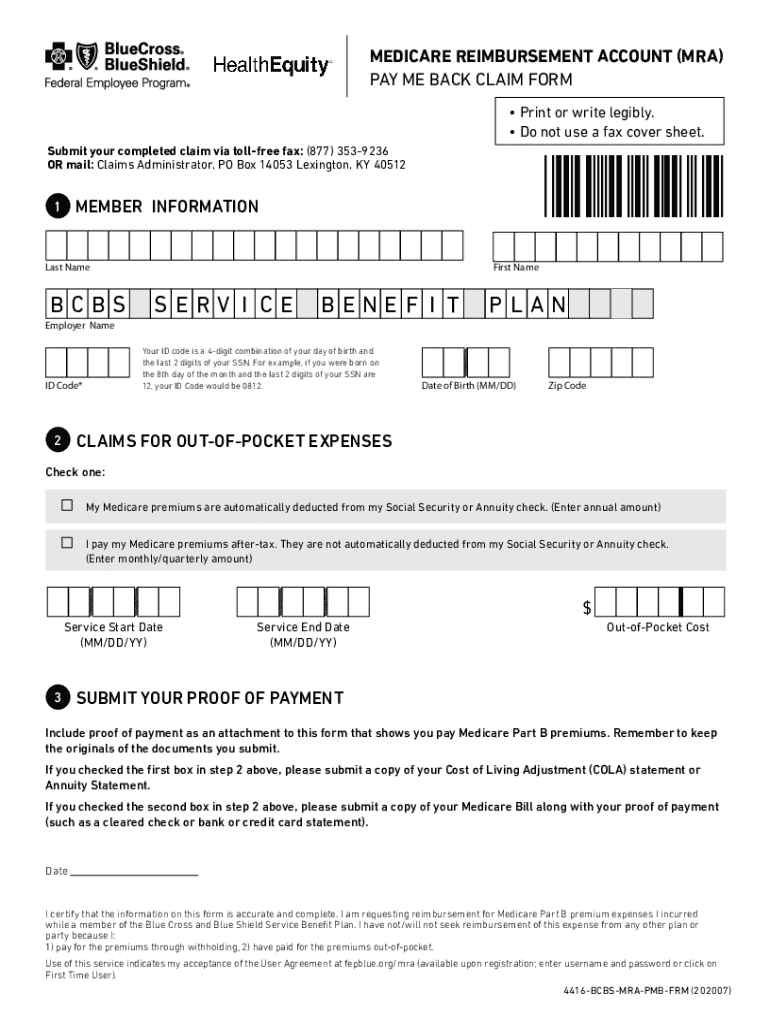
The Medicare Reimbursement Account Claim Form, often referred to as the 4416 BCBS MRA PMB Form, is a crucial document for individuals seeking reimbursement for eligible medical expenses under their Medicare plans. This form is specifically designed for Blue Cross Blue Shield members who utilize a Medicare Reimbursement Account (MRA). It allows members to submit claims for out-of-pocket expenses that qualify for reimbursement, ensuring they receive the financial support they are entitled to.
How to Use the Medicare Reimbursement Account Claim Form
Using the 4416 BCBS MRA PMB Form involves several straightforward steps. First, gather all necessary documentation related to your medical expenses, including receipts and any relevant billing statements. Next, accurately complete the form by providing personal information, details of the expenses, and any other required data. After filling out the form, review it carefully to ensure all information is correct. Finally, submit the completed form along with your supporting documents as per the submission guidelines provided by Blue Cross Blue Shield.
Steps to Complete the Medicare Reimbursement Account Claim Form
Completing the 4416 BCBS MRA PMB Form requires attention to detail. Follow these steps:
- Gather receipts and documentation for all medical expenses you wish to claim.
- Fill in your personal information, including your name, address, and Medicare number.
- List each expense, including the date, type of service, and amount paid.
- Attach all necessary documents to support your claim.
- Review the form for accuracy before submission.
Required Documents for Submission
When submitting the 4416 BCBS MRA PMB Form, it is essential to include specific documents to support your claim. Required documents typically include:
- Receipts for all medical expenses being claimed.
- Billing statements from healthcare providers.
- Any additional documentation that may be requested by Blue Cross Blue Shield.
Form Submission Methods
The 4416 BCBS MRA PMB Form can be submitted through various methods, ensuring flexibility for users. Members can choose to submit the form online through the Blue Cross Blue Shield member portal, by mailing a physical copy to the designated address, or in some cases, delivering it in person to a local office. Each method has its own processing times, so members should consider their preferred method based on urgency.
Eligibility Criteria for the Medicare Reimbursement Account Claim Form
To be eligible for submitting the 4416 BCBS MRA PMB Form, individuals must be enrolled in a Blue Cross Blue Shield Medicare plan that includes a Medicare Reimbursement Account. Additionally, the expenses claimed must fall within the parameters set by Medicare guidelines, meaning they should be for services that are covered under the plan. It is important to review the specific eligibility requirements outlined by Blue Cross Blue Shield to ensure compliance.
Quick guide on how to complete medicare reimbursement account claim form and instructions
Effortlessly prepare Medicare Reimbursement Account Claim Form And Instructions on any device
Digital document management has become increasingly favored by companies and individuals alike. It offers a superb environmentally friendly alternative to traditional printed and signed documents, allowing you to find the right form and securely keep it online. airSlate SignNow provides all the resources you need to create, edit, and electronically sign your files quickly and efficiently. Manage Medicare Reimbursement Account Claim Form And Instructions on any device using the airSlate SignNow applications for Android or iOS and enhance your document-related processes today.
Steps to modify and electronically sign Medicare Reimbursement Account Claim Form And Instructions effortlessly
- Find Medicare Reimbursement Account Claim Form And Instructions and click on Get Form to begin.
- Make use of the tools available to fill out your document.
- Emphasize important sections of the documents or redact confidential information with tools specifically provided by airSlate SignNow for that purpose.
- Create your electronic signature with the Sign feature, which takes just seconds and carries the same legal authority as a conventional wet ink signature.
- Review all the details and click on the Done button to save your changes.
- Select your preferred method of delivering your form, whether by email, text message (SMS), or invitation link, or download it to your computer.
Eliminate concerns about lost or misplaced documents, tedious form searches, or errors that necessitate printing new copies. airSlate SignNow addresses all your document management needs with just a few clicks from any device you choose. Modify and eSign Medicare Reimbursement Account Claim Form And Instructions while ensuring effective communication at every stage of your form preparation journey with airSlate SignNow.
Create this form in 5 minutes or less
Find and fill out the correct medicare reimbursement account claim form and instructions
Create this form in 5 minutes!
How to create an eSignature for the medicare reimbursement account claim form and instructions
How to create an electronic signature for a PDF online
How to create an electronic signature for a PDF in Google Chrome
How to create an e-signature for signing PDFs in Gmail
How to create an e-signature right from your smartphone
How to create an e-signature for a PDF on iOS
How to create an e-signature for a PDF on Android
People also ask
-
What is the 4416 bcbs mra pmb frm?
The 4416 bcbs mra pmb frm is a specific form used in the healthcare industry for managing Medicare risk adjustment. It helps organizations streamline their documentation processes and ensure compliance with regulations. By utilizing airSlate SignNow, businesses can easily send and eSign this form, enhancing efficiency.
-
How does airSlate SignNow support the 4416 bcbs mra pmb frm?
airSlate SignNow provides a user-friendly platform that allows businesses to create, send, and eSign the 4416 bcbs mra pmb frm seamlessly. The solution is designed to simplify the signing process, ensuring that all parties can complete the form quickly and securely. This enhances overall productivity and reduces turnaround times.
-
What are the pricing options for using airSlate SignNow with the 4416 bcbs mra pmb frm?
airSlate SignNow offers flexible pricing plans that cater to different business needs, including those requiring the 4416 bcbs mra pmb frm. You can choose from monthly or annual subscriptions, with options that scale based on the number of users and features needed. This ensures that you only pay for what you use.
-
What features does airSlate SignNow offer for the 4416 bcbs mra pmb frm?
Key features of airSlate SignNow for the 4416 bcbs mra pmb frm include customizable templates, automated workflows, and secure cloud storage. These features help streamline the signing process and ensure that all documents are easily accessible and compliant with industry standards. Additionally, real-time tracking allows you to monitor the status of your forms.
-
What are the benefits of using airSlate SignNow for the 4416 bcbs mra pmb frm?
Using airSlate SignNow for the 4416 bcbs mra pmb frm offers numerous benefits, including increased efficiency, reduced paper usage, and enhanced security. The platform allows for quick eSigning, which accelerates the overall process and minimizes delays. Furthermore, it ensures that sensitive information is protected through advanced encryption.
-
Can airSlate SignNow integrate with other software for the 4416 bcbs mra pmb frm?
Yes, airSlate SignNow can integrate with various software applications, making it easier to manage the 4416 bcbs mra pmb frm alongside your existing tools. This includes CRM systems, document management software, and more. These integrations help create a cohesive workflow, improving overall efficiency.
-
Is airSlate SignNow compliant with regulations for the 4416 bcbs mra pmb frm?
Absolutely, airSlate SignNow is designed to comply with industry regulations, ensuring that the 4416 bcbs mra pmb frm is handled securely and appropriately. The platform adheres to standards such as HIPAA and eSignature laws, providing peace of mind for businesses in the healthcare sector. Compliance is a top priority for us.
Get more for Medicare Reimbursement Account Claim Form And Instructions
- Bpvrcompliancedolstatenjus form
- Worksheet for reemployment and eligibility assessment rea your name your social security no lwd dol state nj form
- Nj employee suggestion template form
- Claim petition form
- Atlantic county probation form
- New jersey employers compensation form
- Nj perc representation form
- New jersey stationary renewal online form
Find out other Medicare Reimbursement Account Claim Form And Instructions
- How To eSign Maryland Insurance PPT
- Can I eSign Arkansas Life Sciences PDF
- How Can I eSign Arkansas Life Sciences PDF
- Can I eSign Connecticut Legal Form
- How Do I eSign Connecticut Legal Form
- How Do I eSign Hawaii Life Sciences Word
- Can I eSign Hawaii Life Sciences Word
- How Do I eSign Hawaii Life Sciences Document
- How Do I eSign North Carolina Insurance Document
- How Can I eSign Hawaii Legal Word
- Help Me With eSign Hawaii Legal Document
- How To eSign Hawaii Legal Form
- Help Me With eSign Hawaii Legal Form
- Can I eSign Hawaii Legal Document
- How To eSign Hawaii Legal Document
- Help Me With eSign Hawaii Legal Document
- How To eSign Illinois Legal Form
- How Do I eSign Nebraska Life Sciences Word
- How Can I eSign Nebraska Life Sciences Word
- Help Me With eSign North Carolina Life Sciences PDF