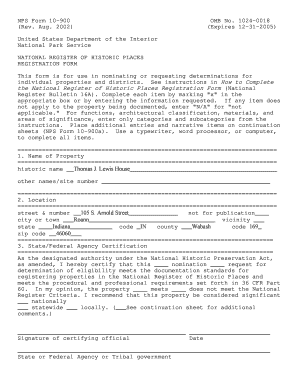
The National Register of Historic Places Registration Form National in


What is the National Register of Historic Places Registration Form
The National Register of Historic Places Registration Form is a crucial document used to nominate properties for inclusion in the National Register of Historic Places. This register is maintained by the National Park Service and aims to recognize and protect sites of historical, architectural, archaeological, and cultural significance across the United States. Completing this form is essential for property owners and preservationists who wish to ensure their sites receive the recognition and protection they deserve.
How to use the National Register of Historic Places Registration Form
Using the National Register of Historic Places Registration Form involves several steps. First, gather all necessary information about the property, including its history, architectural style, and significance. Next, fill out the form accurately, providing detailed descriptions and supporting documentation. Once completed, submit the form to the appropriate state historic preservation office for review. It is important to follow the specific guidelines provided by the National Park Service to ensure a smooth submission process.
Steps to complete the National Register of Historic Places Registration Form
Completing the National Register of Historic Places Registration Form requires careful attention to detail. Here are the steps to follow:
- Research the property’s history and significance.
- Gather supporting documents, such as photographs and maps.
- Fill out the registration form, ensuring all sections are completed.
- Review the form for accuracy and completeness.
- Submit the form to your state historic preservation office.
Key elements of the National Register of Historic Places Registration Form
The National Register of Historic Places Registration Form includes several key elements that must be addressed for a successful nomination. These elements typically include:
- Property name and location.
- Owner information.
- Significance of the property, including historical and architectural details.
- Photographs and maps that illustrate the property’s context.
- Statement of significance that articulates why the property is worthy of preservation.
Eligibility Criteria
To be eligible for inclusion in the National Register, properties must meet specific criteria. These criteria assess the property's age, integrity, and significance. Generally, a property must be at least fifty years old and possess historical or architectural significance. Additionally, it should retain enough integrity to convey its historical importance. Understanding these criteria is essential for property owners and preservationists when preparing their nomination.
Form Submission Methods
The National Register of Historic Places Registration Form can be submitted through various methods. Typically, submissions are made via mail to the appropriate state historic preservation office. Some states may also allow electronic submissions, which can streamline the process. It is important to check with the specific state office for their preferred submission method and any additional requirements.
Quick guide on how to complete the national register of historic places registration form national in
Complete [SKS] effortlessly on any device
Digital document management has gained traction among businesses and individuals alike. It offers a superb eco-friendly substitute for conventional printed and signed documents, enabling you to locate the correct form and store it securely online. airSlate SignNow equips you with all the tools necessary to create, modify, and eSign your documents rapidly without delays. Manage [SKS] on any device using airSlate SignNow's Android or iOS applications and enhance any document-focused workflow today.
How to modify and eSign [SKS] smoothly
- Obtain [SKS] and then select Get Form to begin.
- Utilize the tools we offer to fill out your document.
- Indicate pertinent sections of the documents or obscure sensitive information with tools that airSlate SignNow specializes in for that purpose.
- Create your signature with the Sign tool, which takes mere seconds and possesses the same legal validity as a traditional wet ink signature.
- Review the information and then click on the Done button to save your changes.
- Choose your preferred method to share your form, whether by email, text message (SMS), invitation link, or download it to your computer.
Eliminate the worry of lost or misfiled documents, annoying form searches, or mistakes that necessitate printing new copies. airSlate SignNow fulfills all your document management needs with just a few clicks from any device you choose. Edit and eSign [SKS] and ensure effective communication at every step of your form preparation journey using airSlate SignNow.
Create this form in 5 minutes or less
Related searches to The National Register Of Historic Places Registration Form National In
Create this form in 5 minutes!
How to create an eSignature for the the national register of historic places registration form national in
How to create an electronic signature for a PDF online
How to create an electronic signature for a PDF in Google Chrome
How to create an e-signature for signing PDFs in Gmail
How to create an e-signature right from your smartphone
How to create an e-signature for a PDF on iOS
How to create an e-signature for a PDF on Android
People also ask
-
What is The National Register Of Historic Places Registration Form National In?
The National Register Of Historic Places Registration Form National In is a document used to nominate properties for inclusion in the National Register of Historic Places. This form helps preserve historical sites by ensuring they receive the recognition and protection they deserve. Completing this form accurately is crucial for the nomination process.
-
How can airSlate SignNow assist with The National Register Of Historic Places Registration Form National In?
airSlate SignNow provides an efficient platform for completing and eSigning The National Register Of Historic Places Registration Form National In. With its user-friendly interface, you can easily fill out the form, gather necessary signatures, and submit it electronically, streamlining the entire process.
-
What are the pricing options for using airSlate SignNow for The National Register Of Historic Places Registration Form National In?
airSlate SignNow offers various pricing plans to accommodate different needs, starting with a free trial. For users needing to complete The National Register Of Historic Places Registration Form National In, the paid plans provide additional features such as advanced integrations and enhanced security, ensuring a cost-effective solution.
-
What features does airSlate SignNow offer for The National Register Of Historic Places Registration Form National In?
airSlate SignNow includes features like customizable templates, real-time collaboration, and secure cloud storage, all of which are beneficial for completing The National Register Of Historic Places Registration Form National In. These features enhance the efficiency of document management and ensure that all necessary information is captured accurately.
-
Is airSlate SignNow secure for handling The National Register Of Historic Places Registration Form National In?
Yes, airSlate SignNow prioritizes security and compliance, making it a safe choice for handling The National Register Of Historic Places Registration Form National In. The platform uses encryption and secure data storage to protect sensitive information, ensuring that your documents remain confidential and secure.
-
Can I integrate airSlate SignNow with other tools for The National Register Of Historic Places Registration Form National In?
Absolutely! airSlate SignNow offers integrations with various applications, allowing you to streamline your workflow when completing The National Register Of Historic Places Registration Form National In. Whether you use CRM systems or cloud storage solutions, these integrations enhance productivity and ease of use.
-
What are the benefits of using airSlate SignNow for The National Register Of Historic Places Registration Form National In?
Using airSlate SignNow for The National Register Of Historic Places Registration Form National In provides numerous benefits, including time savings, reduced paperwork, and improved accuracy. The platform simplifies the eSigning process, making it easier to manage and submit your registration forms efficiently.
Get more for The National Register Of Historic Places Registration Form National In
Find out other The National Register Of Historic Places Registration Form National In
- How To Sign Wyoming Real Estate Operating Agreement
- Sign Massachusetts Police Quitclaim Deed Online
- Sign Police Word Missouri Computer
- Sign Missouri Police Resignation Letter Fast
- Sign Ohio Police Promissory Note Template Easy
- Sign Alabama Courts Affidavit Of Heirship Simple
- How To Sign Arizona Courts Residential Lease Agreement
- How Do I Sign Arizona Courts Residential Lease Agreement
- Help Me With Sign Arizona Courts Residential Lease Agreement
- How Can I Sign Arizona Courts Residential Lease Agreement
- Sign Colorado Courts LLC Operating Agreement Mobile
- Sign Connecticut Courts Living Will Computer
- How Do I Sign Connecticut Courts Quitclaim Deed
- eSign Colorado Banking Rental Application Online
- Can I eSign Colorado Banking Medical History
- eSign Connecticut Banking Quitclaim Deed Free
- eSign Connecticut Banking Business Associate Agreement Secure
- Sign Georgia Courts Moving Checklist Simple
- Sign Georgia Courts IOU Mobile
- How Can I Sign Georgia Courts Lease Termination Letter