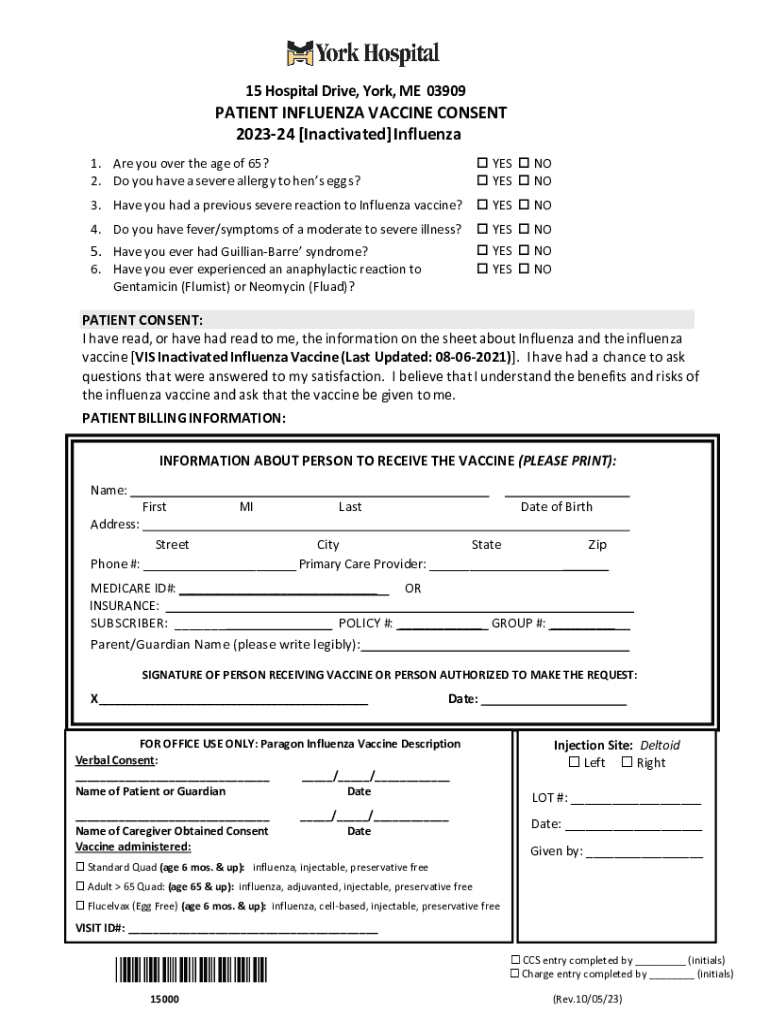
York Hospital PATIENT Influenza Vaccine Consent Form


What is the York Hospital PATIENT Influenza Vaccine Consent
The York Hospital PATIENT Influenza Vaccine Consent is a formal document that grants permission for a patient to receive the influenza vaccine. This consent is crucial for ensuring that patients understand the benefits and potential risks associated with the vaccine. It typically includes information about the vaccine's effectiveness, possible side effects, and the importance of vaccination in preventing influenza outbreaks. By signing this consent form, patients acknowledge that they have received adequate information and agree to proceed with the vaccination.
How to use the York Hospital PATIENT Influenza Vaccine Consent
To use the York Hospital PATIENT Influenza Vaccine Consent, patients should first review the document thoroughly to understand its contents. It is important to ensure that all personal information is accurately filled out, including the patient's name, date of birth, and contact details. After reviewing the information and addressing any questions with a healthcare provider, the patient can sign the form. This signed consent is then submitted to the healthcare provider or clinic administering the vaccine, confirming the patient's willingness to receive the influenza vaccine.
Steps to complete the York Hospital PATIENT Influenza Vaccine Consent
Completing the York Hospital PATIENT Influenza Vaccine Consent involves several straightforward steps:
- Obtain the consent form from your healthcare provider or clinic.
- Read the entire document carefully to understand the vaccine's purpose and potential risks.
- Fill in required personal information accurately.
- Consult with your healthcare provider if you have any questions or concerns.
- Sign and date the form to indicate your consent.
- Submit the completed form to the healthcare provider or clinic administering the vaccine.
Key elements of the York Hospital PATIENT Influenza Vaccine Consent
Key elements of the York Hospital PATIENT Influenza Vaccine Consent include:
- Patient Information: Details such as name, date of birth, and contact information.
- Vaccine Information: Description of the influenza vaccine, including its purpose and effectiveness.
- Risks and Benefits: A summary of potential side effects and the benefits of vaccination.
- Consent Statement: A declaration that the patient understands the information provided and agrees to receive the vaccine.
- Signature and Date: The patient's signature and the date of consent.
Legal use of the York Hospital PATIENT Influenza Vaccine Consent
The York Hospital PATIENT Influenza Vaccine Consent is legally binding once signed by the patient. It serves to protect both the patient and the healthcare provider by documenting the patient's informed consent to receive the vaccine. This legal framework ensures that patients are aware of their rights and the implications of receiving the vaccine. Additionally, the consent form may be used in compliance with healthcare regulations and policies, establishing a clear record of the patient's agreement.
State-specific rules for the York Hospital PATIENT Influenza Vaccine Consent
State-specific rules regarding the York Hospital PATIENT Influenza Vaccine Consent may vary, reflecting local laws and regulations governing vaccination practices. Some states may require additional information or specific wording in the consent form. It is essential for patients to be aware of their state's requirements to ensure compliance. Healthcare providers should also stay informed about any changes in state regulations that may affect the consent process for administering the influenza vaccine.
Quick guide on how to complete york hospital patient influenza vaccine consent
Complete York Hospital PATIENT Influenza Vaccine Consent effortlessly on any device
Digital document management has become increasingly popular among businesses and individuals. It offers an ideal eco-friendly substitute to conventional printed and signed documents, as you can obtain the appropriate form and securely store it online. airSlate SignNow equips you with all the tools necessary to create, modify, and electronically sign your documents swiftly without delays. Manage York Hospital PATIENT Influenza Vaccine Consent on any device with airSlate SignNow Android or iOS applications and enhance any document-centric process today.
How to modify and eSign York Hospital PATIENT Influenza Vaccine Consent with ease
- Locate York Hospital PATIENT Influenza Vaccine Consent and click Get Form to initiate.
- Utilize the tools we offer to complete your document.
- Highlight important sections of your documents or obscure sensitive data with tools that airSlate SignNow provides specifically for that purpose.
- Create your signature using the Sign feature, which takes moments and holds exactly the same legal validity as a conventional wet ink signature.
- Review the information and click on the Done button to save your changes.
- Choose how you would like to send your form, by email, text message (SMS), or invitation link, or download it to your computer.
Eliminate the worry of lost files, tedious form searching, or errors that necessitate printing new document copies. airSlate SignNow fulfills all your document management needs in just a few clicks from any device of your choice. Modify and eSign York Hospital PATIENT Influenza Vaccine Consent and ensure outstanding communication at every stage of the document preparation process with airSlate SignNow.
Create this form in 5 minutes or less
Create this form in 5 minutes!
How to create an eSignature for the york hospital patient influenza vaccine consent
How to create an electronic signature for a PDF online
How to create an electronic signature for a PDF in Google Chrome
How to create an e-signature for signing PDFs in Gmail
How to create an e-signature right from your smartphone
How to create an e-signature for a PDF on iOS
How to create an e-signature for a PDF on Android
People also ask
-
What is the York Hospital PATIENT Influenza Vaccine Consent?
The York Hospital PATIENT Influenza Vaccine Consent is a digital document that allows patients to provide their consent for receiving the influenza vaccine. This streamlined process ensures that all necessary information is captured efficiently, making it easier for healthcare providers to manage patient records.
-
How does airSlate SignNow facilitate the York Hospital PATIENT Influenza Vaccine Consent process?
airSlate SignNow simplifies the York Hospital PATIENT Influenza Vaccine Consent process by enabling healthcare providers to send, sign, and store consent forms electronically. This reduces paperwork and enhances the overall patient experience, ensuring that consent is obtained quickly and securely.
-
Is there a cost associated with using airSlate SignNow for York Hospital PATIENT Influenza Vaccine Consent?
Yes, there is a cost associated with using airSlate SignNow, but it is designed to be a cost-effective solution for healthcare providers. Pricing varies based on the features and number of users, making it accessible for hospitals and clinics looking to streamline their consent processes.
-
What features does airSlate SignNow offer for managing York Hospital PATIENT Influenza Vaccine Consent?
airSlate SignNow offers features such as customizable templates, real-time tracking, and secure cloud storage for York Hospital PATIENT Influenza Vaccine Consent. These features help ensure that consent forms are completed accurately and stored safely, enhancing compliance and efficiency.
-
Can airSlate SignNow integrate with other systems for York Hospital PATIENT Influenza Vaccine Consent?
Yes, airSlate SignNow can integrate with various healthcare management systems to streamline the York Hospital PATIENT Influenza Vaccine Consent process. This integration allows for seamless data transfer and helps maintain accurate patient records across platforms.
-
What are the benefits of using airSlate SignNow for York Hospital PATIENT Influenza Vaccine Consent?
Using airSlate SignNow for York Hospital PATIENT Influenza Vaccine Consent offers numerous benefits, including improved efficiency, reduced paperwork, and enhanced patient satisfaction. The electronic consent process ensures that patients can easily provide their consent from any device, making it more convenient for everyone involved.
-
How secure is the York Hospital PATIENT Influenza Vaccine Consent process with airSlate SignNow?
The York Hospital PATIENT Influenza Vaccine Consent process with airSlate SignNow is highly secure, utilizing encryption and secure cloud storage to protect sensitive patient information. Compliance with healthcare regulations ensures that patient data remains confidential and secure throughout the consent process.
Get more for York Hospital PATIENT Influenza Vaccine Consent
- Geometry assignment find the measure of each angle indicated worksheet answers 42316009 form
- Citizens arrest minnesota form
- Uniform residential appraisal report fillable 100066901
- Choctaw casino self ban form choctaw nation gaming
- Sampletemplates com reviews form
- Ohio military reserve uniform
- Hp fs 9040 writing a food safety plan form
- Restricted gift agreement template form
Find out other York Hospital PATIENT Influenza Vaccine Consent
- How To eSign Hawaii Banking PDF
- How Can I eSign Hawaii Banking Document
- How Do I eSign Hawaii Banking Document
- How Do I eSign Hawaii Banking Document
- Help Me With eSign Hawaii Banking Document
- How To eSign Hawaii Banking Document
- Can I eSign Hawaii Banking Presentation
- Can I Sign Iowa Courts Form
- Help Me With eSign Montana Banking Form
- Can I Sign Kentucky Courts Document
- How To eSign New York Banking Word
- Can I eSign South Dakota Banking PPT
- How Can I eSign South Dakota Banking PPT
- How Do I eSign Alaska Car Dealer Form
- How To eSign California Car Dealer Form
- Can I eSign Colorado Car Dealer Document
- How Can I eSign Colorado Car Dealer Document
- Can I eSign Hawaii Car Dealer Word
- How To eSign Hawaii Car Dealer PPT
- How To eSign Hawaii Car Dealer PPT