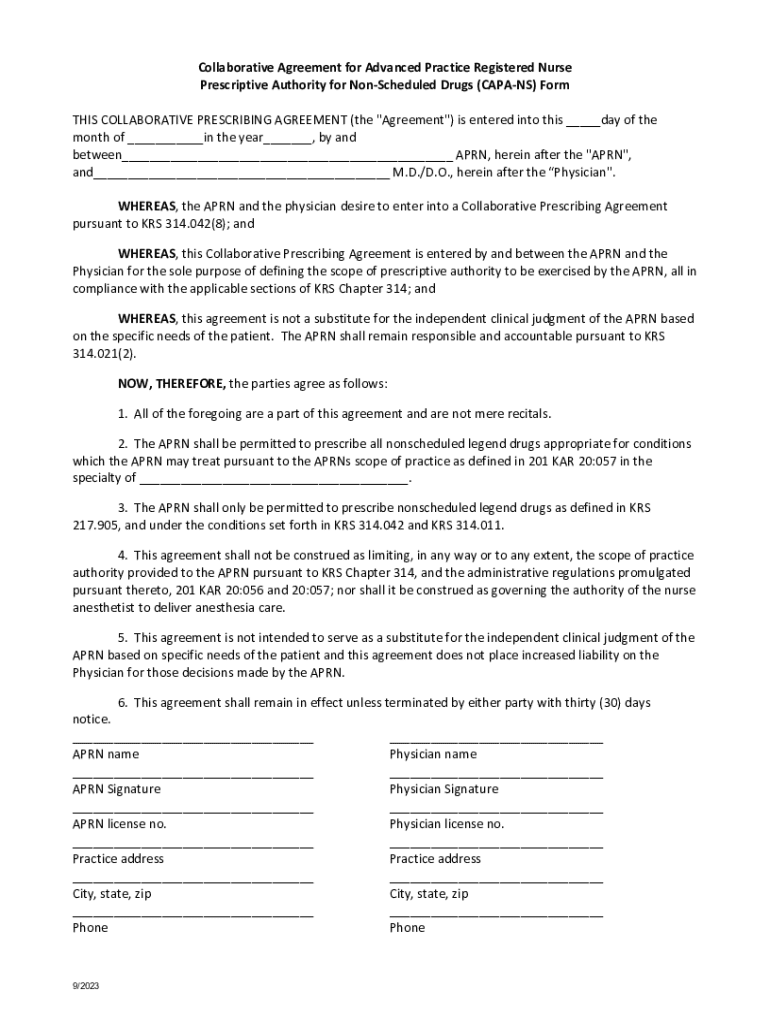
Common Collaborative Agreement CAPA NS Form KBN 2023-2026


What is the Common Collaborative Agreement CAPA NS Form KBN
The Common Collaborative Agreement CAPA NS Form KBN is a legal document designed for nurse practitioners in the United States. This form outlines the collaborative practice agreement between a nurse practitioner and a supervising physician. It serves to clarify the roles, responsibilities, and scope of practice for nurse practitioners, ensuring compliance with state regulations. Understanding this form is essential for both nurse practitioners and physicians to facilitate effective collaboration in patient care.
Key Elements of the Common Collaborative Agreement CAPA NS Form KBN
Several key elements are crucial for the effectiveness of the Common Collaborative Agreement CAPA NS Form KBN. These include:
- Identification of Parties: The form must clearly identify the nurse practitioner and the supervising physician involved in the agreement.
- Scope of Practice: It should define the specific services and procedures the nurse practitioner is authorized to perform.
- Collaboration Guidelines: The agreement should outline how the nurse practitioner and physician will collaborate on patient care.
- Emergency Protocols: It must specify protocols for emergency situations and how they will be handled.
- Duration and Review: The agreement should state the duration of the collaboration and the process for regular review and updates.
Steps to Complete the Common Collaborative Agreement CAPA NS Form KBN
Completing the Common Collaborative Agreement CAPA NS Form KBN involves several important steps:
- Gather Necessary Information: Collect information about the nurse practitioner, supervising physician, and practice details.
- Define Scope of Practice: Clearly outline the services the nurse practitioner will provide under the agreement.
- Draft the Agreement: Use the collected information to draft the form, ensuring all key elements are included.
- Review and Revise: Both parties should review the agreement for accuracy and completeness, making any necessary revisions.
- Sign the Document: Once both parties are satisfied, sign the agreement to make it legally binding.
Legal Use of the Common Collaborative Agreement CAPA NS Form KBN
The Common Collaborative Agreement CAPA NS Form KBN has specific legal implications. It is essential for ensuring that the nurse practitioner operates within the legal framework established by state laws. This form protects both the nurse practitioner and the supervising physician by clearly delineating responsibilities and expectations. Compliance with the agreement helps to mitigate legal risks associated with the practice of nursing and ensures adherence to state regulations.
State-Specific Rules for the Common Collaborative Agreement CAPA NS Form KBN
Each state in the U.S. has its own regulations regarding collaborative agreements for nurse practitioners. It is important to be aware of the specific rules that apply in your state. These may include:
- Supervision Requirements: Some states require a certain number of hours of supervision or collaboration.
- Prescriptive Authority: Regulations may vary regarding the nurse practitioner's ability to prescribe medications.
- Documentation Standards: States may have specific requirements for how the agreement must be documented and maintained.
How to Obtain the Common Collaborative Agreement CAPA NS Form KBN
The Common Collaborative Agreement CAPA NS Form KBN can typically be obtained through the state board of nursing or relevant professional organizations. Many states provide downloadable forms on their official websites. Additionally, consulting with legal professionals or nursing associations can provide guidance on obtaining and completing the form correctly. It is crucial to ensure that the version used is the most current and compliant with state regulations.
Quick guide on how to complete common collaborative agreement capa ns form kbn
Complete Common Collaborative Agreement CAPA NS Form KBN easily on any device
Digital document management has become common among businesses and individuals. It offers an ideal eco-friendly alternative to traditional printed and signed documents, allowing you to acquire the appropriate form and securely store it online. airSlate SignNow provides you with all the tools necessary to create, modify, and electronically sign your documents quickly without delays. Manage Common Collaborative Agreement CAPA NS Form KBN on any platform using airSlate SignNow's Android or iOS applications and enhance any document-centric process today.
The easiest way to modify and electronically sign Common Collaborative Agreement CAPA NS Form KBN effortlessly
- Obtain Common Collaborative Agreement CAPA NS Form KBN and click on Get Form to begin.
- Utilize the tools we offer to complete your form.
- Highlight important sections of your documents or obscure sensitive information with tools specifically provided by airSlate SignNow for that purpose.
- Create your electronic signature using the Sign feature, which takes moments and carries the same legal significance as a conventional wet ink signature.
- Review all the details and click on the Done button to save your changes.
- Select how you prefer to share your form, whether by email, SMS, invite link, or download it to your computer.
Say goodbye to lost or mislaid documents, tedious form searches, or errors that necessitate printing new document copies. airSlate SignNow meets all your document management needs in just a few clicks from any device of your choice. Modify and electronically sign Common Collaborative Agreement CAPA NS Form KBN to ensure effective communication at every stage of the form preparation process with airSlate SignNow.
Create this form in 5 minutes or less
Find and fill out the correct common collaborative agreement capa ns form kbn
Create this form in 5 minutes!
How to create an eSignature for the common collaborative agreement capa ns form kbn
How to create an electronic signature for a PDF online
How to create an electronic signature for a PDF in Google Chrome
How to create an e-signature for signing PDFs in Gmail
How to create an e-signature right from your smartphone
How to create an e-signature for a PDF on iOS
How to create an e-signature for a PDF on Android
People also ask
-
What is capa ns and how does it work with airSlate SignNow?
Capa ns is a feature within airSlate SignNow that allows users to manage and track document workflows efficiently. It streamlines the process of sending, signing, and storing documents, ensuring that all parties can easily access and complete their tasks. With capa ns, businesses can enhance their document management capabilities.
-
How much does airSlate SignNow with capa ns cost?
The pricing for airSlate SignNow with capa ns varies based on the plan you choose. We offer flexible pricing options to accommodate businesses of all sizes, ensuring that you get the best value for your investment. For detailed pricing information, please visit our pricing page.
-
What are the key features of capa ns in airSlate SignNow?
Capa ns includes features such as customizable templates, real-time tracking, and automated reminders. These tools help streamline the signing process and improve overall efficiency. Additionally, capa ns integrates seamlessly with other airSlate SignNow features to enhance your document management experience.
-
What benefits does capa ns provide for businesses?
Capa ns offers numerous benefits, including increased productivity, reduced turnaround times, and improved document security. By utilizing capa ns, businesses can ensure that their document workflows are efficient and compliant. This leads to better customer satisfaction and a more organized approach to document management.
-
Can capa ns integrate with other software applications?
Yes, capa ns can integrate with various software applications, enhancing its functionality. This allows businesses to connect their existing tools and streamline their workflows. Popular integrations include CRM systems, project management tools, and cloud storage services.
-
Is capa ns suitable for small businesses?
Absolutely! Capa ns is designed to cater to businesses of all sizes, including small businesses. Its user-friendly interface and cost-effective pricing make it an ideal solution for small teams looking to improve their document management processes without breaking the bank.
-
How secure is the capa ns feature in airSlate SignNow?
Capa ns prioritizes security by implementing advanced encryption and compliance measures. This ensures that all documents are protected during transmission and storage. Businesses can trust that their sensitive information is safe when using capa ns within airSlate SignNow.
Get more for Common Collaborative Agreement CAPA NS Form KBN
Find out other Common Collaborative Agreement CAPA NS Form KBN
- How To eSign Maryland Courts Medical History
- eSign Michigan Courts Lease Agreement Template Online
- eSign Minnesota Courts Cease And Desist Letter Free
- Can I eSign Montana Courts NDA
- eSign Montana Courts LLC Operating Agreement Mobile
- eSign Oklahoma Sports Rental Application Simple
- eSign Oklahoma Sports Rental Application Easy
- eSign Missouri Courts Lease Agreement Template Mobile
- Help Me With eSign Nevada Police Living Will
- eSign New York Courts Business Plan Template Later
- Can I eSign North Carolina Courts Limited Power Of Attorney
- eSign North Dakota Courts Quitclaim Deed Safe
- How To eSign Rhode Island Sports Quitclaim Deed
- Help Me With eSign Oregon Courts LLC Operating Agreement
- eSign North Dakota Police Rental Lease Agreement Now
- eSign Tennessee Courts Living Will Simple
- eSign Utah Courts Last Will And Testament Free
- eSign Ohio Police LLC Operating Agreement Mobile
- eSign Virginia Courts Business Plan Template Secure
- How To eSign West Virginia Courts Confidentiality Agreement