Alberta Disposition of Capital Property AT1 Schedule 18 Alberta Corporate Income Tax Return Schedule 18 Alberta Dispositions of 2019-2026


Understanding the Alberta Disposition of Capital Property AT1 Schedule
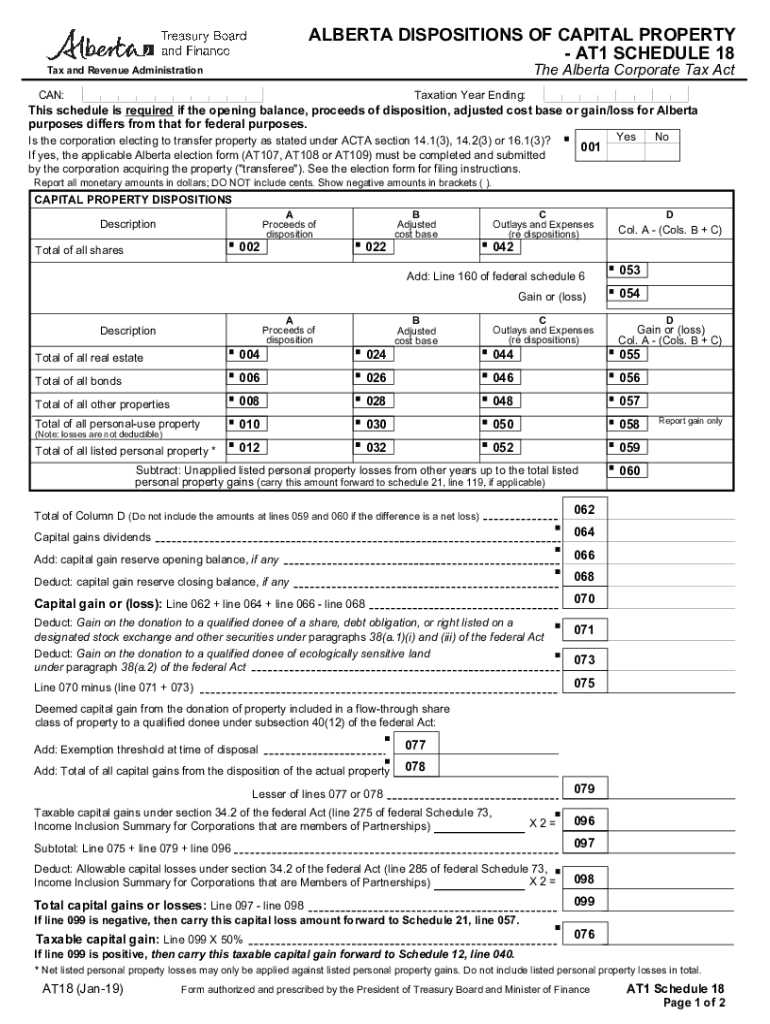
The Alberta Disposition of Capital Property AT1 Schedule is a crucial component of the Alberta Corporate Income Tax Return. It is specifically designed for reporting capital gains or losses from the sale or transfer of capital property. This schedule helps businesses accurately calculate their tax obligations related to capital property transactions. Understanding this form is essential for compliance with Alberta's tax regulations and for ensuring that all relevant capital dispositions are reported correctly.
Steps to Complete the AT1 Schedule for Capital Property Dispositions
Completing the Alberta Disposition of Capital Property AT1 Schedule involves several key steps:
- Gather necessary documentation: Collect all relevant documents related to the capital property, including purchase agreements, sale contracts, and any other supporting materials.
- Determine the adjusted cost base: Calculate the adjusted cost base (ACB) of the property, which is essential for determining the capital gain or loss.
- Report proceeds of disposition: Enter the total proceeds from the sale or transfer of the capital property on the schedule.
- Calculate capital gains or losses: Subtract the ACB from the proceeds of disposition to determine the capital gain or loss.
- Complete additional sections: Fill out any other required sections of the AT1 Schedule as applicable to your specific situation.
Obtaining the Alberta AT1 Schedule
The Alberta Disposition of Capital Property AT1 Schedule can be obtained from the Alberta government's official website or through authorized tax professionals. It is available in a fillable format, making it easier for users to complete the form digitally. Ensure that you have the most recent version of the schedule to comply with current tax regulations.
Legal Considerations for Using the AT1 Schedule
When using the Alberta Disposition of Capital Property AT1 Schedule, it is important to be aware of the legal implications of reporting capital gains and losses. Accurate reporting is essential to avoid potential penalties for non-compliance. Familiarize yourself with Alberta's tax laws regarding capital property to ensure that you meet all legal requirements. Consulting with a tax professional can provide additional guidance on legal obligations.
Key Elements of the AT1 Schedule
The Alberta Disposition of Capital Property AT1 Schedule includes several key elements that users must understand:
- Identification of the property: Clearly identify the capital property being reported.
- Proceeds of disposition: Report the amount received from the sale or transfer of the property.
- Adjusted cost base: Provide the ACB, which is critical for calculating gains or losses.
- Capital gain or loss calculation: Include the result of the calculation, which impacts overall tax liability.
Filing Deadlines for the AT1 Schedule
Filing deadlines for the Alberta Disposition of Capital Property AT1 Schedule align with the corporate income tax return deadlines. It is important to submit the AT1 Schedule by the due date to avoid late fees and penalties. Generally, corporate tax returns in Alberta are due six months after the end of the fiscal year. Be aware of these deadlines to ensure timely compliance.
Quick guide on how to complete alberta disposition of capital property at1 schedule 18 alberta corporate income tax return schedule 18 alberta dispositions of
Complete Alberta Disposition Of Capital Property AT1 Schedule 18 Alberta Corporate Income Tax Return Schedule 18 Alberta Dispositions Of effortlessly on any device
Digital document management has become prevalent among businesses and individuals. It presents an ideal eco-friendly substitute for conventional printed and signed documents, allowing you to locate the correct form and securely archive it online. airSlate SignNow equips you with all the resources required to create, modify, and electronically sign your documents quickly and without delays. Manage Alberta Disposition Of Capital Property AT1 Schedule 18 Alberta Corporate Income Tax Return Schedule 18 Alberta Dispositions Of on any device using airSlate SignNow Android or iOS applications and enhance any document-focused task now.
How to modify and electronically sign Alberta Disposition Of Capital Property AT1 Schedule 18 Alberta Corporate Income Tax Return Schedule 18 Alberta Dispositions Of with ease
- Obtain Alberta Disposition Of Capital Property AT1 Schedule 18 Alberta Corporate Income Tax Return Schedule 18 Alberta Dispositions Of and click Get Form to begin.
- Utilize the features we offer to complete your form.
- Emphasize pertinent sections of your documents or obscure sensitive information with tools provided by airSlate SignNow specifically for that purpose.
- Generate your signature using the Sign tool, which takes moments and carries the same legal validity as a traditional wet ink signature.
- Review the details and click the Done button to save your changes.
- Select your preferred method to send your form, whether by email, SMS, or invitation link, or download it to your computer.
Eliminate worries about lost or misplaced files, tedious form searching, or errors that necessitate reprinting new document copies. airSlate SignNow addresses your requirements in document management with just a few clicks from any device you choose. Alter and electronically sign Alberta Disposition Of Capital Property AT1 Schedule 18 Alberta Corporate Income Tax Return Schedule 18 Alberta Dispositions Of and ensure effective communication at every step of your form preparation journey with airSlate SignNow.
Create this form in 5 minutes or less
Find and fill out the correct alberta disposition of capital property at1 schedule 18 alberta corporate income tax return schedule 18 alberta dispositions of
Create this form in 5 minutes!
How to create an eSignature for the alberta disposition of capital property at1 schedule 18 alberta corporate income tax return schedule 18 alberta dispositions of
How to create an electronic signature for a PDF online
How to create an electronic signature for a PDF in Google Chrome
How to create an e-signature for signing PDFs in Gmail
How to create an e-signature right from your smartphone
How to create an e-signature for a PDF on iOS
How to create an e-signature for a PDF on Android
People also ask
-
What is the at1 form and how does it work?
The at1 form is a digital document that allows users to collect signatures and manage approvals efficiently. With airSlate SignNow, you can create, send, and eSign the at1 form seamlessly, ensuring a smooth workflow for your business.
-
How much does it cost to use the at1 form with airSlate SignNow?
airSlate SignNow offers various pricing plans that cater to different business needs. The cost to use the at1 form depends on the plan you choose, but all options provide a cost-effective solution for managing your documents and signatures.
-
What features are included with the at1 form?
The at1 form includes features such as customizable templates, real-time tracking, and secure eSigning capabilities. These features enhance the efficiency of document management and ensure that your at1 form is processed quickly and securely.
-
Can I integrate the at1 form with other applications?
Yes, airSlate SignNow allows you to integrate the at1 form with various applications such as Google Drive, Salesforce, and more. This integration capability helps streamline your workflow and enhances productivity by connecting your favorite tools.
-
What are the benefits of using the at1 form for my business?
Using the at1 form can signNowly reduce the time spent on document processing and improve accuracy. With airSlate SignNow, you can automate workflows, minimize errors, and enhance collaboration, leading to increased efficiency for your business.
-
Is the at1 form secure for sensitive information?
Absolutely! The at1 form created with airSlate SignNow is designed with security in mind. It employs advanced encryption and compliance measures to protect sensitive information, ensuring that your documents remain confidential and secure.
-
How can I track the status of my at1 form?
You can easily track the status of your at1 form through the airSlate SignNow dashboard. The platform provides real-time updates on document progress, allowing you to see when it has been viewed, signed, or completed.
Get more for Alberta Disposition Of Capital Property AT1 Schedule 18 Alberta Corporate Income Tax Return Schedule 18 Alberta Dispositions Of
Find out other Alberta Disposition Of Capital Property AT1 Schedule 18 Alberta Corporate Income Tax Return Schedule 18 Alberta Dispositions Of
- How Do I Sign Rhode Island Real Estate Form
- Can I Sign Vermont Real Estate Document
- How To Sign Wyoming Orthodontists Document
- Help Me With Sign Alabama Courts Form
- Help Me With Sign Virginia Police PPT
- How To Sign Colorado Courts Document
- Can I eSign Alabama Banking PPT
- How Can I eSign California Banking PDF
- How To eSign Hawaii Banking PDF
- How Can I eSign Hawaii Banking Document
- How Do I eSign Hawaii Banking Document
- How Do I eSign Hawaii Banking Document
- Help Me With eSign Hawaii Banking Document
- How To eSign Hawaii Banking Document
- Can I eSign Hawaii Banking Presentation
- Can I Sign Iowa Courts Form
- Help Me With eSign Montana Banking Form
- Can I Sign Kentucky Courts Document
- How To eSign New York Banking Word
- Can I eSign South Dakota Banking PPT