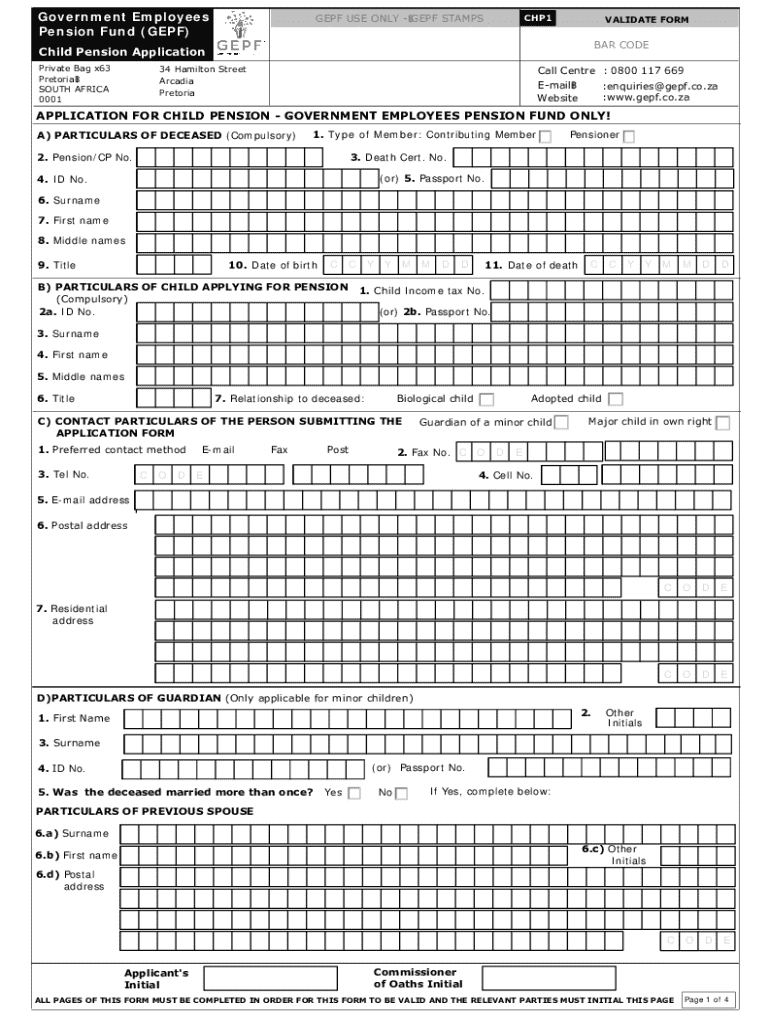
CHP1 Child Pension Application 2022-2026


What is the CHP1 Child Pension Application
The CHP1 Child Pension Application is a formal document used to apply for child pension benefits under the Government Employees Pension Fund (GEPF) in the United States. This application is specifically designed for children of deceased members who are eligible for pension benefits. The form collects essential information about the applicant and the deceased member to determine eligibility and ensure the correct processing of benefits. Understanding the purpose of this application is crucial for beneficiaries to navigate the pension system effectively.
Steps to complete the CHP1 Child Pension Application
Completing the CHP1 Child Pension Application involves several important steps to ensure accuracy and compliance. Begin by gathering necessary personal information, including the child's details and the deceased member's pension information. Next, carefully fill out the application form, ensuring all sections are completed. It is essential to provide supporting documents, such as the death certificate and proof of relationship to the deceased member. Once the form is completed, review it for any errors before submission to avoid delays in processing.
Required Documents
To successfully submit the CHP1 Child Pension Application, certain documents are required. These typically include:
- A certified copy of the deceased member's death certificate
- Proof of relationship, such as a birth certificate or adoption papers
- Identification documents for the applicant, like a government-issued ID
- Any previous pension documentation related to the deceased member
Having these documents ready can streamline the application process and help ensure that all necessary information is provided.
Form Submission Methods
The CHP1 Child Pension Application can be submitted through various methods, allowing flexibility for applicants. The primary submission methods include:
- Online submission through the GEPF's designated portal
- Mailing the completed form and documents to the appropriate pension office
- In-person submission at designated pension offices or service centers
Choosing the right submission method can depend on personal preference and urgency, as online submissions may offer quicker processing times.
Eligibility Criteria
Eligibility for the CHP1 Child Pension Application is determined by specific criteria set forth by the GEPF. Generally, children of deceased members are eligible if they meet the following conditions:
- The child must be under the age of eighteen, or up to twenty-three if enrolled in an accredited educational institution
- The child must be financially dependent on the deceased member
- All required documentation must be submitted with the application
Understanding these criteria is vital for applicants to ensure they qualify for the benefits sought.
How to obtain the CHP1 Child Pension Application
The CHP1 Child Pension Application can be obtained through several avenues. Applicants can download the form directly from the GEPF website in PDF format. Additionally, physical copies of the application may be available at local pension offices or service centers. It is advisable to ensure that the most current version of the form is used to avoid any issues during the application process.
Quick guide on how to complete chp1 child pension application
Finalize CHP1 Child Pension Application effortlessly on any device
Digital document management has gained traction among businesses and individuals. It offers an ideal environmentally friendly alternative to traditional printed and signed documents, enabling you to locate the necessary form and securely save it online. airSlate SignNow provides all the resources you need to create, modify, and electronically sign your documents swiftly without delays. Manage CHP1 Child Pension Application on any platform with airSlate SignNow Android or iOS applications and streamline any document-related task today.
Steps to modify and electronically sign CHP1 Child Pension Application with ease
- Locate CHP1 Child Pension Application and click Get Form to begin.
- Utilize the features we offer to fill out your document.
- Select important sections of your documents or redact sensitive information with tools that airSlate SignNow provides specifically for that purpose.
- Create your electronic signature using the Sign feature, which takes mere seconds and holds the same legal validity as a conventional wet ink signature.
- Review all the details and click on the Done button to save your modifications.
- Decide how you want to send your form, whether by email, SMS, or invite link, or download it to your computer.
Eliminate concerns about lost or misfiled documents, tedious form searches, or mistakes that require reprinting new document copies. airSlate SignNow addresses all your document management needs in just a few clicks from any device of your choice. Modify and electronically sign CHP1 Child Pension Application and ensure excellent communication at every stage of the form preparation process with airSlate SignNow.
Create this form in 5 minutes or less
Find and fill out the correct chp1 child pension application
Create this form in 5 minutes!
How to create an eSignature for the chp1 child pension application
How to create an electronic signature for a PDF online
How to create an electronic signature for a PDF in Google Chrome
How to create an e-signature for signing PDFs in Gmail
How to create an e-signature right from your smartphone
How to create an e-signature for a PDF on iOS
How to create an e-signature for a PDF on Android
People also ask
-
What is the gepf child pension application process?
The gepf child pension application process involves submitting the necessary documentation to verify eligibility. You can complete the application online through our platform, making it easier and faster. Our solution streamlines the process, ensuring that you can track your application status in real-time.
-
How much does the gepf child pension application cost?
The cost of the gepf child pension application varies depending on the services you choose. airSlate SignNow offers a cost-effective solution that allows you to manage your applications without hidden fees. We provide transparent pricing to help you budget effectively.
-
What features does airSlate SignNow offer for the gepf child pension application?
airSlate SignNow provides a range of features for the gepf child pension application, including eSigning, document templates, and secure storage. Our platform is designed to simplify the application process, ensuring that all your documents are easily accessible and securely stored. You can also collaborate with others in real-time.
-
How can airSlate SignNow benefit my gepf child pension application?
Using airSlate SignNow for your gepf child pension application can signNowly reduce the time and effort required to complete the process. Our user-friendly interface allows for quick document preparation and signing, which can lead to faster approvals. Additionally, our platform enhances security and compliance, giving you peace of mind.
-
Is airSlate SignNow compatible with other applications for the gepf child pension application?
Yes, airSlate SignNow integrates seamlessly with various applications that can assist in the gepf child pension application process. This includes document management systems and cloud storage services, allowing you to streamline your workflow. Our integrations help you maintain efficiency and organization.
-
Can I track my gepf child pension application status with airSlate SignNow?
Absolutely! airSlate SignNow allows you to track the status of your gepf child pension application in real-time. You will receive notifications at each stage of the process, ensuring you are always informed about your application's progress. This feature enhances transparency and keeps you updated.
-
What support does airSlate SignNow provide for the gepf child pension application?
airSlate SignNow offers comprehensive support for users navigating the gepf child pension application. Our customer service team is available to assist you with any questions or issues you may encounter. We also provide resources and guides to help you understand the application process better.
Get more for CHP1 Child Pension Application
Find out other CHP1 Child Pension Application
- How To eSign Hawaii Government Word
- Can I eSign Hawaii Government Word
- How To eSign Hawaii Government Document
- How To eSign Hawaii Government Document
- How Can I eSign Hawaii Government Document
- Can I eSign Hawaii Government Document
- How Can I eSign Hawaii Government Document
- How To eSign Hawaii Government Document
- How To eSign Hawaii Government Form
- How Can I eSign Hawaii Government Form
- Help Me With eSign Hawaii Healthcare / Medical PDF
- How To eSign Arizona High Tech Document
- How Can I eSign Illinois Healthcare / Medical Presentation
- Can I eSign Hawaii High Tech Document
- How Can I eSign Hawaii High Tech Document
- How Do I eSign Hawaii High Tech Document
- Can I eSign Hawaii High Tech Word
- How Can I eSign Hawaii High Tech Form
- How Do I eSign New Mexico Healthcare / Medical Word
- How To eSign Washington High Tech Presentation