Tay Referral 2017-2026


What is the Tay Referral
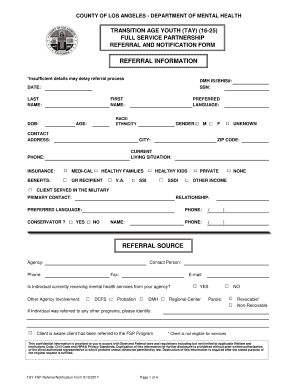
The Tay Referral is a specific form used in the mental health sector to facilitate the process of referring individuals to appropriate services. This form is designed to ensure that clients receive the necessary support and treatment tailored to their unique needs. It typically includes information about the individual's mental health status, background, and the specific services being requested. Understanding the purpose and structure of the Tay Referral is crucial for both providers and clients in navigating the mental health system effectively.
How to use the Tay Referral
Using the Tay Referral involves several key steps to ensure that the referral process is smooth and effective. First, the referring party should complete the form with accurate and detailed information about the client. This includes personal details, the nature of the mental health concerns, and any relevant medical history. After filling out the form, it should be submitted to the appropriate mental health service provider. It is essential to follow up to confirm that the referral has been received and to discuss any next steps with the client.
Steps to complete the Tay Referral
Completing the Tay Referral involves a systematic approach to ensure all necessary information is captured. Here are the steps to follow:
- Gather all relevant information about the client, including personal details and mental health history.
- Fill out the Tay Referral form, ensuring accuracy and clarity in each section.
- Review the completed form for any errors or omissions.
- Submit the form to the designated mental health service provider, either electronically or via mail.
- Follow up with the provider to confirm receipt and discuss the next steps in the referral process.
Legal use of the Tay Referral
The Tay Referral must be used in compliance with relevant laws and regulations governing mental health services. This includes adherence to privacy laws, such as HIPAA, which protect the confidentiality of client information. Ensuring that the referral is completed and submitted legally is essential to safeguard the rights of the individual being referred. It is advisable for providers to stay informed about any changes in legal requirements that may affect the use of the Tay Referral.
Key elements of the Tay Referral
Key elements of the Tay Referral include several critical components that must be accurately filled out to ensure a successful referral process. These elements typically consist of:
- Client's personal information, including name, date of birth, and contact details.
- A detailed description of the mental health concerns being addressed.
- Information about previous treatments or interventions the client may have received.
- The specific services being requested through the referral.
- Signature of the referring party, confirming the accuracy of the information provided.
Examples of using the Tay Referral
Examples of using the Tay Referral can illustrate its practical applications in various scenarios. For instance, a primary care physician may use the Tay Referral to connect a patient experiencing anxiety with a mental health specialist. Another example could involve a school counselor referring a student struggling with depression to a local mental health clinic. These examples highlight the importance of the Tay Referral in facilitating access to necessary mental health services.
Quick guide on how to complete fsp tay referral form 2017 2019
Utilize the simpler approach to manage your Tay Referral
The traditional methods of filling out and approving documents require an excessively long time when compared to contemporary document management tools. You previously needed to look for appropriate social forms, print them, fill in all the information, and mail them. Now, you can locate, complete, and sign your Tay Referral in one browser tab with airSlate SignNow. Completing your Tay Referral has never been easier.
Steps to finalize your Tay Referral with airSlate SignNow
- Access the category page necessary and find your state-specific Tay Referral. Alternatively, utilize the search bar.
- Verify the version of the form by reviewing it.
- Click Get form and enter editing mode.
- Fill out your document with the required information using the editing tools available.
- Review the included information and click the Sign tool to confirm your form.
- Select the most suitable method to create your signature: generate it, sketch your signature, or upload an image of it.
- Click DONE to apply the changes.
- Download the document to your device or go to Sharing settings to send it digitally.
Efficient online solutions like airSlate SignNow streamline the process of completing and submitting your forms. Give it a try to discover how long document management and approval processes are meant to take. You will save a signNow amount of time.
Create this form in 5 minutes or less
Find and fill out the correct fsp tay referral form 2017 2019
FAQs
-
How do I fill out the CAT Application Form 2017?
CAT 2017 registration opened on August 9, 2017 will close on September 20 at 5PM. CAT online registration form and application form is a single document divided in 5 pages and is to be completed online. The 1st part of CAT online registration form requires your personal details. After completing your online registration, IIMs will send you CAT 2017 registration ID. With this unique ID, you will login to online registration form which will also contain application form and registration form.CAT Registration and application form will require you to fill up your academic details, uploading of photograph, signature and requires category certificates as per the IIMs prescribed format for CAT registration. CAT online application form 2017 consists of programme details on all the 20 IIMs. Candidates have to tick by clicking on the relevant programmes of the IIMs for which they wish to attend the personal Interview Process.
-
How do I fill out a CLAT 2019 application form?
Hi thereFirst of all, let me tell you some important points:CLAT 2019 has gone OFFLINE this yearBut the application forms for CLAT 2019 have to be filled ONLINEThe payment of the application fees also should be made onlineNow, kindly note the important dates:Note the details regarding the application fees:Here, if you want the Previous Year Question papers, Rs.500 would be added to the application fees.Apart from this, there would be bank transaction charges added to the application fees.The application fees is non-refundable.Note one important point here that before you fill the application form, check for your eligibility.To know the complete details of filling the application form along with other information like the eligibility - in terms of age, educational qualification, list of NLUs participating and the seats offered under each category, CLAT Reservation policies, CLAT exam pattern, marking scheme, syllabus, important documents required to be kept ready before filling the form, kindly go to the link below:How to fill CLAT 2019 Application form? Registration OPEN | All you need to knowTo know how to prepare for one of the very important section of CLAT exam, GK and Current Affairs, kindly go to the link below:How to prepare GK & Current Affairs for CLAT 2019To practice, daily MCQs on Current Affairs, kindly go to the link below:#CLAT2019 | #AILET2019 | #DULLB2019 | GK and Current Affairs Series: 5 in 10 Series: Day 12For any other queries, kindly write to us at mailateasyway@gmail.comThanks & Regards!
-
How do I fill out the NEET 2019 application form?
Expecting application form of NEET2019 will be same as that of NEET2018, follow the instructions-For Feb 2019 Exam:EventsDates (Announced)Release of application form-1st October 2018Application submission last date-31st October 2018Last date to pay the fee-Last week of October 2018Correction Window Open-1st week of November 2018Admit card available-1st week of January 2019Exam date-3rd February to 17th February 2019Answer key & OMR release-Within a week after examAnnouncement of result-1st week of March 2019Counselling begins-2nd week of June 2019For May 2019 Exam:EventsDates (Announced)Application form Release-2nd week of March 2019Application submission last date-2nd week of April 2019Last date to pay the fee-2nd week of April 2019Correction Window Open-3rd week of April 2019Admit card available-1st week of May 2019Exam date-12th May to 26th May 2019Answer key & OMR release-Within a week after examAnnouncement of result-1st week of June 2019Counselling begins-2nd week of June 2019NEET 2019 Application FormCandidates should fill the application form as per the instructions given in the information bulletin. Below we are providing NEET 2019 application form details:The application form will be issued through online mode only.No application will be entertained through offline mode.NEET UG registration 2019 will be commenced from the 1st October 2018 (Feb Exam) & second week of March 2018 (May Exam).Candidates should upload the scanned images of recent passport size photograph and signature.After filling the application form completely, a confirmation page will be generated. Download it.There will be no need to send the printed confirmation page to the board.Application Fee:General and OBC candidates will have to pay Rs. 1400/- as an application fee.The application fee for SC/ST and PH candidates will be Rs. 750/-.Fee payment can be done through credit/debit card, net banking, UPI and e-wallet.Service tax will also be applicable.CategoryApplication FeeGeneral/OBC-1400/-SC/ST/PH-750/-Step 1: Fill the Application FormGo the official portal of the conducting authority (Link will be given above).Click on “Apply Online” link.A candidate has to read all the instruction and then click on “Proceed to Apply Online NEET (UG) 2019”.Step 1.1: New RegistrationFill the registration form carefully.Candidates have to fill their name, Mother’s Name, Father’s Name, Category, Date of Birth, Gender, Nationality, State of Eligibility (for 15% All India Quota), Mobile Number, Email ID, Aadhaar card number, etc.After filling all the details, two links will be given “Preview &Next” and “Reset”.If candidate satisfied with the filled information, then they have to click on “Next”.After clicking on Next Button, the information submitted by the candidate will be displayed on the screen. If information correct, click on “Next” button, otherwise go for “Back” button.Candidates may note down the registration number for further procedure.Now choose the strong password and re enter the password.Choose security question and feed answer.Enter the OTP would be sent to your mobile number.Submit the button.Step 1.2: Login & Application Form FillingLogin with your Registration Number and password.Fill personal details.Enter place of birth.Choose the medium of question paper.Choose examination centres.Fill permanent address.Fill correspondence address.Fill Details (qualification, occupation, annual income) of parents and guardians.Choose the option for dress code.Enter security pin & click on save & draft.Now click on preview and submit.Now, review your entries.Then. click on Final Submit.Step 2: Upload Photo and SignatureStep 2 for images upload will be appeared on screen.Now, click on link for Upload photo & signature.Upload the scanned images.Candidate should have scanned images of his latest Photograph (size of 10 Kb to 100 Kb.Signature(size of 3 Kb to 20 Kb) in JPEG format only.Step 3: Fee PaymentAfter uploading the images, candidate will automatically go to the link for fee payment.A candidate has to follow the instruction & submit the application fee.Choose the Bank for making payment.Go for Payment.Candidate can pay the fee through Debit/Credit Card/Net Banking/e-wallet (CSC).Step 4: Take the Printout of Confirmation PageAfter the fee payment, a candidate may take the printout of the confirmation page.Candidates may keep at least three copies of the confirmation page.Note:Must retain copy of the system generated Self Declaration in respect of candidates from J&K who have opted for seats under 15% All India Quota.IF any queries, feel free to comment..best of luck
-
How do I fill out the Delhi Polytechnic 2017 form?
Delhi Polytechnic (CET DELHI) entrance examination form has been published. You can visit Welcome to CET Delhi and fill the online form. For more details you can call @ 7042426818
-
How can I fill out the BITSAT Application Form 2019?
BITSAT 2019 Application Forms are available online. Students who are eligible for the admission test can apply online before 20 March 2018, 5 pm.Click here to apply for BITSAT 2019Step 1: Follow the link given aboveStep 2: Fill online application formPersonal Details12th Examination DetailsTest Centre PreferencesStep 3: Upload scanned photograph (4 kb to 50 kb) and signature ( 1 kb to 30 kb).Step 4: Pay application fee either through online payment mode or through e-challan (ICICI Bank)BITSAT-2019 Application FeeMale Candidates - Rs. 3150/-Female Candidates - Rs. 2650/-Thanks!
Create this form in 5 minutes!
How to create an eSignature for the fsp tay referral form 2017 2019
How to make an eSignature for the Fsp Tay Referral Form 2017 2019 online
How to create an electronic signature for your Fsp Tay Referral Form 2017 2019 in Google Chrome
How to create an eSignature for putting it on the Fsp Tay Referral Form 2017 2019 in Gmail
How to create an eSignature for the Fsp Tay Referral Form 2017 2019 straight from your mobile device
How to generate an electronic signature for the Fsp Tay Referral Form 2017 2019 on iOS
How to generate an electronic signature for the Fsp Tay Referral Form 2017 2019 on Android devices
People also ask
-
What is Tay Referral and how does it work with airSlate SignNow?
Tay Referral is a unique program designed to reward users for referring new customers to airSlate SignNow. By sharing your referral link, you can earn incentives for each person who signs up and utilizes our eSigning solutions. This program not only benefits you but also introduces others to the streamlined document signing experience offered by airSlate SignNow.
-
How much does it cost to participate in the Tay Referral program?
Participating in the Tay Referral program is completely free! There are no upfront costs associated with referring others to airSlate SignNow. You can earn rewards simply by sharing the benefits of our easy-to-use eSigning platform with your network.
-
What features of airSlate SignNow are highlighted in the Tay Referral program?
The Tay Referral program emphasizes the diverse features of airSlate SignNow, including its user-friendly interface, secure eSigning capabilities, and document management tools. By referring others, you can showcase how these features simplify the signing process and enhance business efficiency.
-
Are there any limits to the rewards I can earn through Tay Referral?
There are no strict limits to the rewards you can earn through the Tay Referral program. The more you share airSlate SignNow with your network, the more opportunities you have to earn incentives. It's a great way to maximize your benefits while helping others discover our powerful eSigning solution.
-
How do I track my referrals and rewards in the Tay Referral program?
You can easily track your referrals and rewards through your airSlate SignNow account dashboard. The dashboard provides real-time updates on the status of your referrals and any incentives earned, making it simple to stay informed about your Tay Referral activity.
-
What are the benefits of using airSlate SignNow as part of the Tay Referral program?
Using airSlate SignNow offers numerous benefits, including expedited document signing, enhanced security, and improved collaboration. With the Tay Referral program, you can enjoy additional rewards while helping others access these advantages, creating a win-win situation for everyone involved.
-
Can I integrate airSlate SignNow with other applications while using the Tay Referral program?
Yes, airSlate SignNow seamlessly integrates with various applications such as Google Drive, Salesforce, and more. By promoting these integrations through the Tay Referral program, you can highlight how users can enhance their workflows and improve productivity with our eSigning solution.
Get more for Tay Referral
- Berg balance scale smcfallprevention org form
- Homeowner assistance form
- El campo high school transcript request echs ecisd form
- Lahipp application form
- Exemplaar bestemd voor de klant form
- Completed by form
- Form it 203 gr att a schedule a new york state group
- Part 106 credits against new york state personal income tax form
Find out other Tay Referral
- eSign Maine Lawers Resignation Letter Easy
- eSign Louisiana Lawers Last Will And Testament Mobile
- eSign Louisiana Lawers Limited Power Of Attorney Online
- eSign Delaware Insurance Work Order Later
- eSign Delaware Insurance Credit Memo Mobile
- eSign Insurance PPT Georgia Computer
- How Do I eSign Hawaii Insurance Operating Agreement
- eSign Hawaii Insurance Stock Certificate Free
- eSign New Hampshire Lawers Promissory Note Template Computer
- Help Me With eSign Iowa Insurance Living Will
- eSign North Dakota Lawers Quitclaim Deed Easy
- eSign Ohio Lawers Agreement Computer
- eSign North Dakota Lawers Separation Agreement Online
- How To eSign North Dakota Lawers Separation Agreement
- eSign Kansas Insurance Moving Checklist Free
- eSign Louisiana Insurance Promissory Note Template Simple
- eSign Texas Lawers Contract Fast
- eSign Texas Lawers Lease Agreement Free
- eSign Maine Insurance Rental Application Free
- How Can I eSign Maryland Insurance IOU