Get Pediatric Symptom Checklist PSC 35 Scoring Sheet 2021-2026


Understanding the Pediatric Symptom Checklist PSC 35 Scoring Sheet
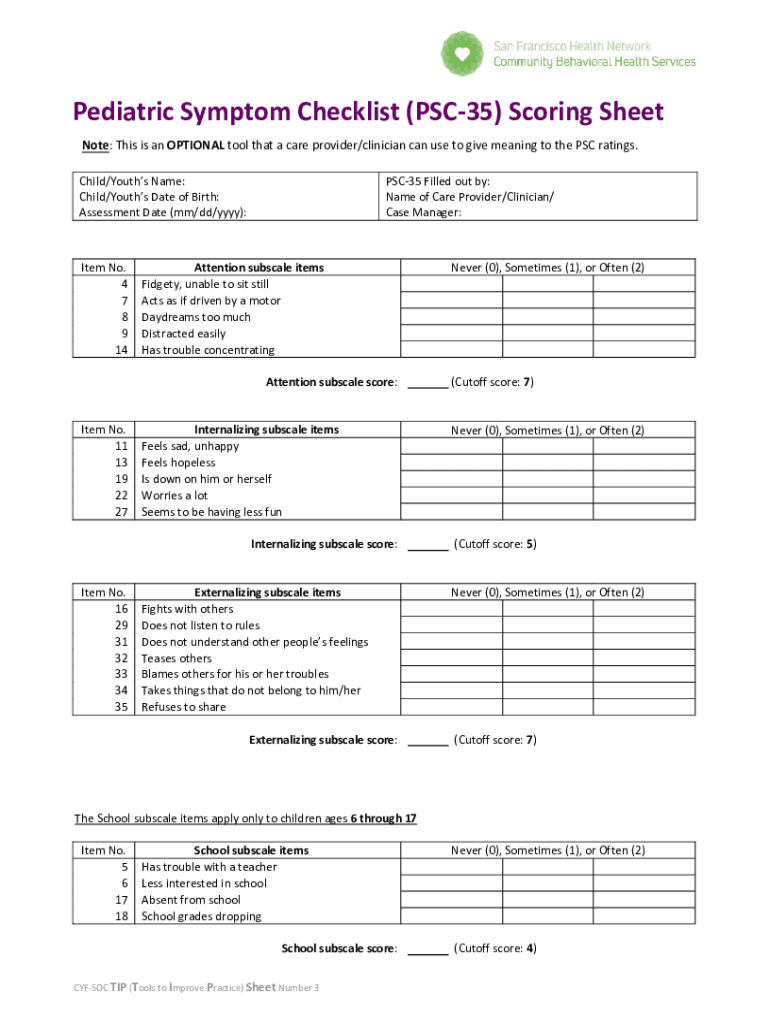
The Pediatric Symptom Checklist PSC 35 is a valuable tool designed to help healthcare providers assess the emotional and behavioral health of children. This scoring sheet consists of thirty-five items that parents or guardians can complete, providing insights into a child's symptoms and functioning. The checklist is particularly useful for identifying potential issues that may require further evaluation or intervention.
The PSC 35 is structured to cover various domains, including emotional well-being, behavioral issues, and social functioning. Each item is rated based on frequency, allowing for a comprehensive overview of the child's health. The results can guide healthcare professionals in making informed decisions regarding referrals, treatment options, and additional assessments.
How to Utilize the Pediatric Symptom Checklist PSC 35 Scoring Sheet
Using the PSC 35 scoring sheet is straightforward. Parents or guardians should read each statement carefully and indicate how often the child exhibits the behavior described. The response options typically include "not true," "somewhat true," and "very true." Once completed, the scores for each item are tallied to produce an overall score.
This overall score helps identify whether the child may be at risk for emotional or behavioral difficulties. Higher scores indicate a greater likelihood of issues that may need to be addressed. It is essential to discuss the results with a healthcare provider to determine the next steps in care or intervention.
Obtaining the Pediatric Symptom Checklist PSC 35 Scoring Sheet
The PSC 35 scoring sheet can be easily accessed through various healthcare providers, pediatric offices, and educational institutions. Additionally, many organizations offer the checklist in downloadable formats, including PDF versions. This accessibility ensures that parents and guardians can obtain the form conveniently and use it as needed.
It is advisable to check with local healthcare resources or online platforms that specialize in pediatric health to find the most current version of the PSC 35 scoring sheet. Ensuring you have the latest version is crucial for accurate assessment and scoring.
Steps to Complete the Pediatric Symptom Checklist PSC 35 Scoring Sheet
Completing the PSC 35 scoring sheet involves several key steps:
- Gather the necessary materials, including the PSC 35 scoring sheet and a writing instrument.
- Read each statement carefully, considering the child's behavior over the past month.
- Circle the response that best reflects the frequency of each behavior.
- Tally the scores for each item to calculate the total score.
- Review the score with a healthcare provider to discuss any concerns or next steps.
Following these steps ensures that the scoring process is thorough and accurate, leading to better insights into the child's health.
Key Components of the Pediatric Symptom Checklist PSC 35 Scoring Sheet
The PSC 35 scoring sheet includes several critical components that enhance its effectiveness:
- Item Descriptions: Each item provides clear descriptions of behaviors or symptoms to assess.
- Response Scale: The three-point scale allows for nuanced responses, capturing the frequency of behaviors.
- Total Score Calculation: A simple method for tallying scores provides a quick overview of the child's health status.
- Interpretation Guidelines: The scoring sheet often includes guidelines for interpreting scores, aiding in understanding the results.
These components work together to create a comprehensive tool for assessing pediatric health and guiding further action if necessary.
Legal Considerations for Using the Pediatric Symptom Checklist PSC 35 Scoring Sheet
When utilizing the PSC 35 scoring sheet, it is important to consider legal and ethical guidelines regarding confidentiality and informed consent. Healthcare providers must ensure that the information collected is kept confidential and used solely for the intended purpose of assessing the child's health.
Additionally, obtaining consent from a parent or guardian before administering the checklist is essential. This practice not only complies with legal standards but also fosters trust between healthcare providers and families. Understanding these legal aspects ensures that the use of the PSC 35 scoring sheet is both ethical and compliant with regulations.
Quick guide on how to complete get pediatric symptom checklist psc 35 scoring sheet
Effortlessly Prepare Get Pediatric Symptom Checklist PSC 35 Scoring Sheet on Any Device
Managing documents online has gained traction among businesses and individuals alike. It serves as an ideal environmentally friendly substitute for traditional printed and signed documents, enabling you to access the required form and securely store it online. airSlate SignNow equips you with all the necessary tools to swiftly create, modify, and electronically sign your documents without delays. Manage Get Pediatric Symptom Checklist PSC 35 Scoring Sheet on any device using airSlate SignNow's Android or iOS applications and streamline any document-related process today.
How to Modify and Electronically Sign Get Pediatric Symptom Checklist PSC 35 Scoring Sheet with Ease
- Locate Get Pediatric Symptom Checklist PSC 35 Scoring Sheet and click Get Form to begin.
- Utilize the tools provided to complete your document.
- Emphasize pertinent sections of the documents or obscure sensitive information with specific tools offered by airSlate SignNow.
- Create your signature using the Sign tool, which only takes a few seconds and holds the same legal validity as a conventional wet ink signature.
- Review all details and press the Done button to save your changes.
- Select your preferred method for sharing your form, whether by email, SMS, invitation link, or download it to your computer.
Eliminate worries about lost or misplaced documents, tedious form searches, or errors that necessitate printing new document copies. airSlate SignNow fulfills your document management needs in just a few clicks from any device you choose. Modify and electronically sign Get Pediatric Symptom Checklist PSC 35 Scoring Sheet and guarantee effective communication at every stage of the form preparation process with airSlate SignNow.
Create this form in 5 minutes or less
Find and fill out the correct get pediatric symptom checklist psc 35 scoring sheet
Create this form in 5 minutes!
How to create an eSignature for the get pediatric symptom checklist psc 35 scoring sheet
How to create an electronic signature for a PDF online
How to create an electronic signature for a PDF in Google Chrome
How to create an e-signature for signing PDFs in Gmail
How to create an e-signature right from your smartphone
How to create an e-signature for a PDF on iOS
How to create an e-signature for a PDF on Android
People also ask
-
What is psc 35 and how does it relate to airSlate SignNow?
PSC 35 refers to a specific pricing plan offered by airSlate SignNow that provides businesses with a cost-effective solution for eSigning and document management. This plan is designed to meet the needs of small to medium-sized enterprises looking for efficient ways to handle their document workflows.
-
What features are included in the psc 35 plan?
The psc 35 plan includes essential features such as unlimited eSignatures, document templates, and real-time tracking of document status. Additionally, users can access advanced security features to ensure their documents are protected throughout the signing process.
-
How does airSlate SignNow's psc 35 plan benefit businesses?
By choosing the psc 35 plan, businesses can streamline their document signing processes, reduce turnaround times, and enhance overall productivity. This plan allows teams to collaborate more effectively, ensuring that important documents are signed and returned quickly.
-
Is there a free trial available for the psc 35 plan?
Yes, airSlate SignNow offers a free trial for the psc 35 plan, allowing prospective customers to explore its features and benefits without any commitment. This trial period helps businesses assess how the solution can fit into their existing workflows.
-
Can the psc 35 plan integrate with other software?
Absolutely! The psc 35 plan supports integrations with various third-party applications, including CRM systems and cloud storage services. This flexibility allows businesses to incorporate airSlate SignNow into their existing tech stack seamlessly.
-
What types of documents can be signed using the psc 35 plan?
With the psc 35 plan, users can sign a wide range of documents, including contracts, agreements, and forms. The platform supports various file formats, making it easy to manage and sign documents digitally.
-
How secure is the psc 35 plan for document signing?
The psc 35 plan prioritizes security, employing industry-standard encryption and authentication measures to protect sensitive information. Users can trust that their documents are safe and secure throughout the signing process.
Get more for Get Pediatric Symptom Checklist PSC 35 Scoring Sheet
Find out other Get Pediatric Symptom Checklist PSC 35 Scoring Sheet
- How Do I eSignature Arizona Real Estate PDF
- How To eSignature Arkansas Real Estate Document
- How Do I eSignature Oregon Plumbing PPT
- How Do I eSignature Connecticut Real Estate Presentation
- Can I eSignature Arizona Sports PPT
- How Can I eSignature Wisconsin Plumbing Document
- Can I eSignature Massachusetts Real Estate PDF
- How Can I eSignature New Jersey Police Document
- How Can I eSignature New Jersey Real Estate Word
- Can I eSignature Tennessee Police Form
- How Can I eSignature Vermont Police Presentation
- How Do I eSignature Pennsylvania Real Estate Document
- How Do I eSignature Texas Real Estate Document
- How Can I eSignature Colorado Courts PDF
- Can I eSignature Louisiana Courts Document
- How To Electronic signature Arkansas Banking Document
- How Do I Electronic signature California Banking Form
- How Do I eSignature Michigan Courts Document
- Can I eSignature Missouri Courts Document
- How Can I Electronic signature Delaware Banking PDF