Nc 33 2018-2026


What is the Nc 33
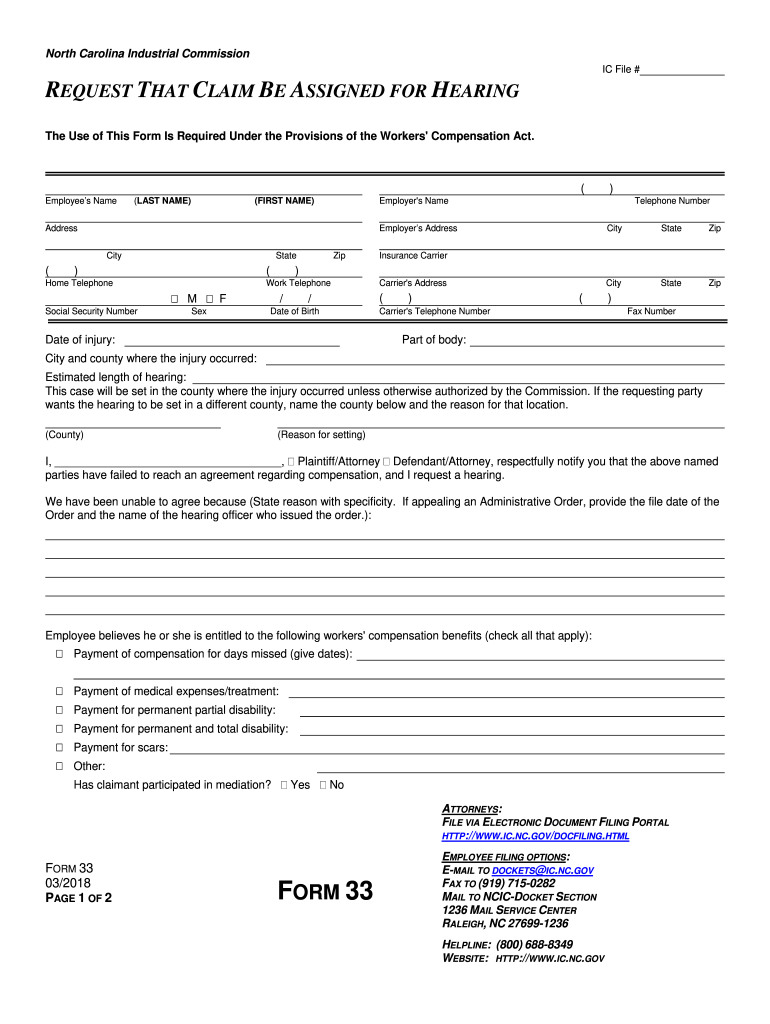
The Nc 33, commonly known as the NC Industrial Commission Form 33, is a legal document used in the context of workers' compensation claims in North Carolina. This form is specifically designed for individuals seeking a hearing regarding their workers' compensation claims. It serves as a formal request to the North Carolina Industrial Commission, allowing claimants to present their cases and seek resolutions for disputes related to their compensation. Understanding the purpose and function of the Nc 33 is crucial for anyone navigating the workers' compensation system in North Carolina.
How to Use the Nc 33
Using the Nc 33 involves several key steps to ensure that the form is completed correctly and submitted appropriately. First, individuals must gather all relevant information regarding their workers' compensation case, including details about the injury, medical treatment, and any previous communications with insurance companies. Next, the form must be filled out accurately, providing clear and concise information about the issues at hand. Once completed, the Nc 33 can be submitted to the North Carolina Industrial Commission either online or by mail, depending on the preferences of the claimant.
Steps to Complete the Nc 33
Completing the Nc 33 requires careful attention to detail. Here are the essential steps:
- Gather necessary documentation, including medical records and correspondence related to the claim.
- Fill out the form with accurate information, ensuring all sections are completed.
- Review the form for any errors or omissions, as inaccuracies can delay the process.
- Submit the completed form to the North Carolina Industrial Commission, either electronically or via postal mail.
By following these steps, claimants can effectively navigate the process of requesting a hearing for their workers' compensation claims.
Legal Use of the Nc 33
The Nc 33 is legally recognized as a valid request for a hearing within the North Carolina workers' compensation system. To ensure its legal standing, the form must be completed in accordance with state regulations and submitted within specified time frames. It is essential for claimants to understand that the Nc 33 not only initiates the hearing process but also establishes a formal record of the issues being contested. Proper use of the form can significantly impact the outcome of a claim.
Key Elements of the Nc 33
Several key elements must be included in the Nc 33 to ensure its effectiveness:
- Claimant Information: Full name, address, and contact details of the individual filing the request.
- Employer Information: Name and address of the employer involved in the workers' compensation claim.
- Details of the Dispute: A clear description of the issues being raised, including any relevant dates and events.
- Requested Relief: Specific outcomes or resolutions the claimant is seeking from the hearing.
Inclusion of these elements ensures that the Nc 33 is comprehensive and provides the necessary information for the Industrial Commission to review the case effectively.
Form Submission Methods
The Nc 33 can be submitted through various methods, providing flexibility for claimants. The primary submission methods include:
- Online Submission: Claimants can complete and submit the form electronically through the North Carolina Industrial Commission's website.
- Mail Submission: The completed form can be printed and mailed to the appropriate address of the Industrial Commission.
- In-Person Submission: Individuals may also choose to deliver the form directly to the Industrial Commission's office.
Each method has its advantages, and claimants should choose the one that best fits their needs and circumstances.
Quick guide on how to complete part of body
Complete Nc 33 effortlessly on any device
Digital document management has become increasingly popular among businesses and individuals. It offers an ideal eco-friendly alternative to conventional printed and signed paperwork, allowing you to obtain the correct form and securely store it online. airSlate SignNow equips you with all the resources needed to create, modify, and electronically sign your documents swiftly without delays. Manage Nc 33 on any platform with airSlate SignNow Android or iOS applications and simplify any document-related task today.
How to modify and electronically sign Nc 33 seamlessly
- Locate Nc 33 and click on Get Form to begin.
- Use the tools we provide to complete your form.
- Emphasize important sections of your documents or obscure sensitive information with tools specifically offered by airSlate SignNow for that purpose.
- Create your signature with the Sign tool, which takes just seconds and carries the same legal validity as a traditional wet ink signature.
- Review the information and click on the Done button to save your changes.
- Choose how you want to send your form: via email, SMS, invite link, or download it to your computer.
Forget about lost or misplaced documents, tedious form searching, or errors that necessitate printing new document copies. airSlate SignNow fulfills your document management needs in just a few clicks from any device you prefer. Modify and electronically sign Nc 33 to ensure excellent communication throughout the document preparation process with airSlate SignNow.
Create this form in 5 minutes or less
Create this form in 5 minutes!
How to create an eSignature for the part of body
How to create an electronic signature for the Part Of Body online
How to generate an electronic signature for the Part Of Body in Chrome
How to generate an eSignature for putting it on the Part Of Body in Gmail
How to make an eSignature for the Part Of Body from your smart phone
How to generate an eSignature for the Part Of Body on iOS devices
How to make an electronic signature for the Part Of Body on Android devices
People also ask
-
What is Nc 33 in relation to airSlate SignNow?
Nc 33 refers to a specific feature set within the airSlate SignNow platform that enhances document management and eSigning capabilities. This feature allows users to streamline their workflows, ensuring that document transactions are both efficient and secure. By utilizing Nc 33, businesses can simplify their signing processes and improve overall productivity.
-
How much does the Nc 33 feature cost with airSlate SignNow?
The Nc 33 feature is included in the comprehensive pricing plans of airSlate SignNow, which offers competitive rates for businesses of all sizes. Depending on the chosen plan, users can access Nc 33 along with other powerful features designed to improve document workflows. For detailed pricing information, visit our pricing page.
-
What are the key features of Nc 33 on airSlate SignNow?
Nc 33 includes a range of features such as customizable templates, secure eSigning, and real-time tracking of document status. These functionalities enable businesses to create a seamless signing experience and monitor the progress of their documents. With Nc 33, users can also integrate with other applications for enhanced productivity.
-
How can Nc 33 benefit my business?
By implementing Nc 33 within the airSlate SignNow platform, businesses can signNowly reduce the time and resources spent on document management. The ease of use and comprehensive eSigning capabilities lead to faster transactions and improved customer satisfaction. Additionally, Nc 33 ensures compliance and security, which are crucial for any business.
-
Is Nc 33 compatible with other software applications?
Yes, Nc 33 is designed to integrate seamlessly with a variety of software applications, enhancing your existing workflows. Popular integrations include CRM systems, project management tools, and cloud storage services. This compatibility allows for a smooth transition and improved efficiency when using airSlate SignNow.
-
What types of documents can I manage with Nc 33?
Nc 33 allows you to manage a wide range of documents, including contracts, agreements, and forms that require signatures. With airSlate SignNow's flexible platform, you can upload, create, and send any document type for eSigning. This versatility makes Nc 33 suitable for various industries and business needs.
-
How secure is the Nc 33 feature in airSlate SignNow?
The Nc 33 feature prioritizes security with advanced encryption protocols and compliance with industry standards. airSlate SignNow ensures that all documents are securely stored and that eSignatures are legally binding. Users can have peace of mind knowing that their sensitive information is protected when using Nc 33.
Get more for Nc 33
- Xactresult restoration estimate form restoration estimate
- Order taken by store form
- Codingmauritius institute of training and developm form
- Transfer of medical records form for the transfer of medical records betweennaeromedical sections of licencing authorities
- Absentee bid form sothebyamp39s
- Rental lease agreement homes form
- Gates millennium scholars program fee waiver request form sophas
- University required health form
Find out other Nc 33
- How Do I Electronic signature Iowa Construction Document
- How Can I Electronic signature South Carolina Charity PDF
- How Can I Electronic signature Oklahoma Doctors Document
- How Can I Electronic signature Alabama Finance & Tax Accounting Document
- How To Electronic signature Delaware Government Document
- Help Me With Electronic signature Indiana Education PDF
- How To Electronic signature Connecticut Government Document
- How To Electronic signature Georgia Government PDF
- Can I Electronic signature Iowa Education Form
- How To Electronic signature Idaho Government Presentation
- Help Me With Electronic signature Hawaii Finance & Tax Accounting Document
- How Can I Electronic signature Indiana Government PDF
- How Can I Electronic signature Illinois Finance & Tax Accounting PPT
- How To Electronic signature Maine Government Document
- How To Electronic signature Louisiana Education Presentation
- How Can I Electronic signature Massachusetts Government PDF
- How Do I Electronic signature Montana Government Document
- Help Me With Electronic signature Louisiana Finance & Tax Accounting Word
- How To Electronic signature Pennsylvania Government Document
- Can I Electronic signature Texas Government PPT