Ems Refusal Form


What is the EMS Refusal Form
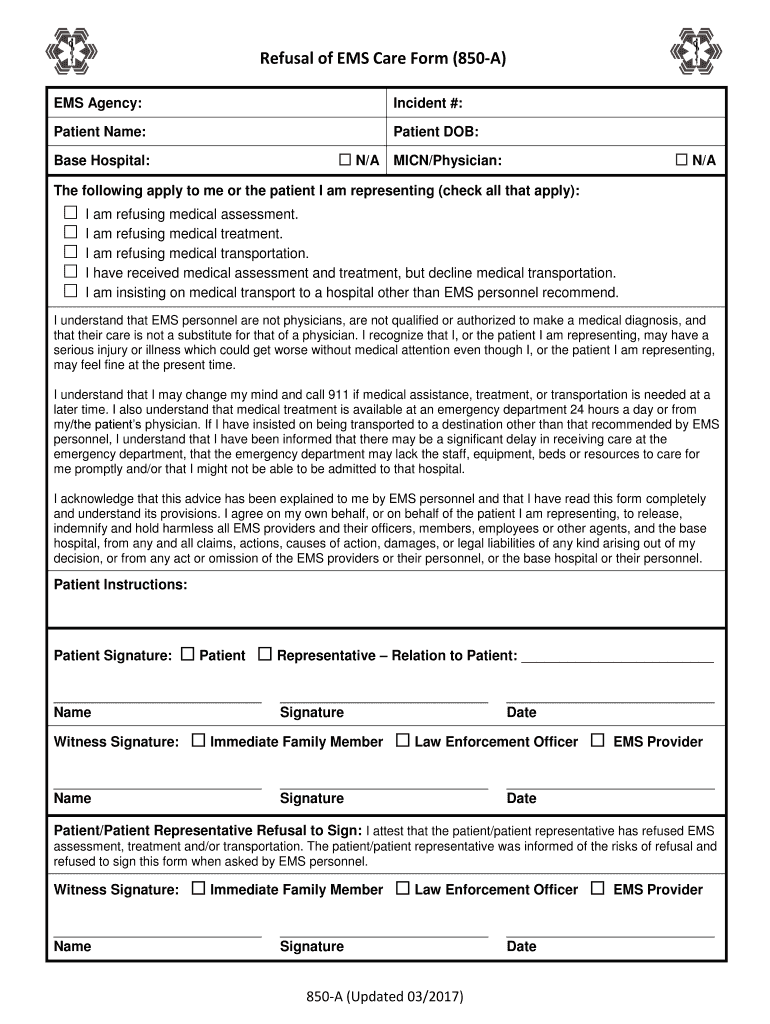
The EMS refusal form is a critical document used by emergency medical services (EMS) to record a patient's decision to decline treatment or transport. This form ensures that the patient's choice is documented, protecting both the patient and the EMS providers. It typically includes essential information such as the patient's name, the date and time of the refusal, and a statement confirming that the patient understands the risks associated with their decision. By using this form, EMS providers can maintain a clear record of the patient's wishes and the circumstances surrounding the refusal.
How to Use the EMS Refusal Form
Using the EMS refusal form involves several key steps to ensure proper documentation. First, the EMS personnel should explain the implications of refusing treatment to the patient. Next, the patient must be given the opportunity to ask questions. Once the patient decides to refuse, they should be asked to sign the form, indicating their understanding of the consequences. It is essential for the EMS personnel to complete the form accurately, documenting the patient's information, the time of refusal, and any relevant details about the situation. This thorough approach helps protect the rights of the patient and the legal standing of the EMS providers.
Key Elements of the EMS Refusal Form
The EMS refusal form contains several key elements that are crucial for its effectiveness. These elements typically include:
- Patient Information: Full name, date of birth, and contact details.
- Incident Details: Date, time, and location of the incident.
- Statement of Refusal: A clear declaration that the patient is refusing treatment.
- Risks Acknowledgment: An acknowledgment that the patient understands the risks involved in refusing care.
- Signature: The patient's signature, along with the date and time, confirming their decision.
Including these elements ensures that the form is legally sound and provides a comprehensive record of the patient's refusal.
Steps to Complete the EMS Refusal Form
Completing the EMS refusal form involves a systematic approach to ensure that all necessary information is accurately captured. The steps include:
- Introduce the form to the patient and explain its purpose.
- Gather the patient's personal information, including their full name and contact details.
- Document the date, time, and location of the incident.
- Clearly state the patient's decision to refuse treatment.
- Ensure the patient acknowledges the risks associated with their decision.
- Obtain the patient's signature, along with the date and time of signing.
- File the completed form in the patient's medical record for future reference.
Following these steps helps ensure that the refusal is documented properly and that the patient's rights are respected.
Legal Use of the EMS Refusal Form
The legal use of the EMS refusal form is vital in protecting both the patient and the EMS providers. When properly completed, the form serves as a legal document that can be used in case of disputes regarding the patient's care. It must comply with local and state regulations governing medical documentation. The form should clearly indicate that the patient was informed of their options and the potential consequences of refusing treatment. This legal protection is essential in maintaining accountability and transparency in emergency medical services.
Quick guide on how to complete ems agency
Complete Ems Refusal Form seamlessly on any device
Electronic document management has become increasingly popular among businesses and individuals. It offers an ideal environmentally friendly alternative to traditional printed and signed documents, allowing you to access the right form and securely store it online. airSlate SignNow equips you with all the tools necessary to create, modify, and eSign your documents swiftly without delays. Handle Ems Refusal Form on any platform with airSlate SignNow's Android or iOS applications and enhance any document-focused operation today.
The easiest way to modify and eSign Ems Refusal Form effortlessly
- Obtain Ems Refusal Form and click on Get Form to begin.
- Make use of the tools we provide to complete your form.
- Select important sections of your documents or redact sensitive information with tools that airSlate SignNow offers specifically for that purpose.
- Generate your signature using the Sign tool, which takes only seconds and carries the same legal validity as a traditional wet ink signature.
- Review all the details and click on the Done button to confirm your changes.
- Choose your preferred method to send your form, whether by email, SMS, invitation link, or download it to your computer.
Eliminate concerns about lost or misplaced files, tedious form searches, or errors that necessitate printing new document copies. airSlate SignNow meets your document management needs in a few clicks from any device you prefer. Modify and eSign Ems Refusal Form to ensure excellent communication at any stage of the form preparation process with airSlate SignNow.
Create this form in 5 minutes or less
Create this form in 5 minutes!
How to create an eSignature for the ems agency
How to generate an eSignature for your Ems Agency in the online mode
How to make an electronic signature for the Ems Agency in Chrome
How to make an electronic signature for signing the Ems Agency in Gmail
How to make an electronic signature for the Ems Agency right from your mobile device
How to make an eSignature for the Ems Agency on iOS
How to create an eSignature for the Ems Agency on Android devices
People also ask
-
What is an Ems Refusal Form and how can airSlate SignNow help?
An Ems Refusal Form is a document used by emergency medical services (EMS) to record a patient's refusal of medical treatment. With airSlate SignNow, you can easily create, send, and eSign your Ems Refusal Form, ensuring a legally binding agreement that streamlines your documentation process.
-
How does pricing work for using airSlate SignNow for Ems Refusal Forms?
airSlate SignNow offers flexible pricing plans that cater to businesses of all sizes. Whether you need a single Ems Refusal Form or a bulk solution for your organization, our plans provide cost-effective options that fit your budget without compromising on features.
-
Can I customize the Ems Refusal Form in airSlate SignNow?
Yes, airSlate SignNow allows you to fully customize your Ems Refusal Form to meet your specific needs. You can add your logo, modify text fields, and create templates that can be reused, making the entire process more efficient.
-
What features does airSlate SignNow offer for Ems Refusal Forms?
airSlate SignNow provides a variety of features for Ems Refusal Forms, including electronic signatures, document templates, and secure cloud storage. These features enhance the speed and security of your document management process, making it easier for you and your clients.
-
Is airSlate SignNow mobile-friendly for signing Ems Refusal Forms?
Absolutely! airSlate SignNow is fully optimized for mobile devices, allowing users to sign Ems Refusal Forms on-the-go. This convenience ensures that you can manage important documents anytime and anywhere, improving accessibility for both you and your clients.
-
What integrations does airSlate SignNow support for Ems Refusal Forms?
airSlate SignNow integrates seamlessly with various applications, including Google Drive, Salesforce, and more. This means you can easily manage your Ems Refusal Forms within the tools you already use, enhancing your workflow efficiency.
-
How secure is the airSlate SignNow platform for Ems Refusal Forms?
Security is a top priority at airSlate SignNow. Our platform employs advanced encryption and compliance with industry standards to protect your Ems Refusal Forms and sensitive information, ensuring that your documents are safe from unauthorized access.
Get more for Ems Refusal Form
- Twitter com patrickbeatty statusfact sheet httpscityofraleigh0drupal blob core form
- Background check authorization form spanish docx
- City code form
- Www brunswickme orgdocumentcenterviewbrunswick police department 85 pleasant street brunswick form
- Clark extension wisc educounty fair informationcounty fair informationextension clark county
- Ok goodwill industries donation receipt form
- Graduate visiting student application forms ok gov
- Www uslegalforms comform library471765assisted living facility disclosure statement dss virginia
Find out other Ems Refusal Form
- How To Sign Arizona Business Operations PDF
- Help Me With Sign Nebraska Business Operations Presentation
- How To Sign Arizona Car Dealer Form
- How To Sign Arkansas Car Dealer Document
- How Do I Sign Colorado Car Dealer PPT
- Can I Sign Florida Car Dealer PPT
- Help Me With Sign Illinois Car Dealer Presentation
- How Can I Sign Alabama Charity Form
- How Can I Sign Idaho Charity Presentation
- How Do I Sign Nebraska Charity Form
- Help Me With Sign Nevada Charity PDF
- How To Sign North Carolina Charity PPT
- Help Me With Sign Ohio Charity Document
- How To Sign Alabama Construction PDF
- How To Sign Connecticut Construction Document
- How To Sign Iowa Construction Presentation
- How To Sign Arkansas Doctors Document
- How Do I Sign Florida Doctors Word
- Can I Sign Florida Doctors Word
- How Can I Sign Illinois Doctors PPT