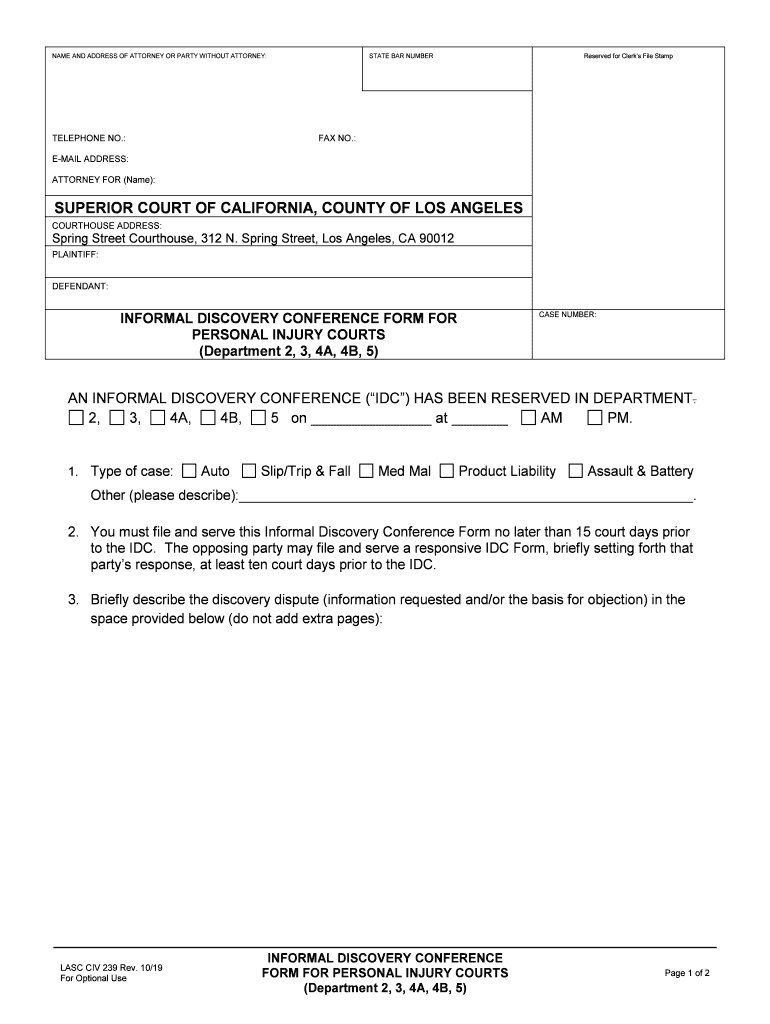
Laciv 239 Form


What is the Lasc Civ 239
The Lasc Civ 239 is a legal form utilized in the California court system, specifically designed for informal discovery conferences. This form is essential for parties involved in litigation to facilitate the exchange of information and documents prior to trial. It aims to streamline the discovery process, allowing both sides to clarify issues, share relevant evidence, and ultimately promote a more efficient resolution of disputes.
How to Use the Lasc Civ 239
Using the Lasc Civ 239 involves several key steps. First, parties must complete the form accurately, ensuring all required information is provided. This includes details about the case, the parties involved, and specific requests for discovery. Once completed, the form should be filed with the court and served to all parties involved in the case. This initiates the informal discovery conference process, which is typically held before a judge or a court-appointed mediator.
Steps to Complete the Lasc Civ 239
Completing the Lasc Civ 239 requires careful attention to detail. Follow these steps:
- Gather necessary case information, including case number and party names.
- Provide a brief description of the issues in dispute.
- List specific discovery requests, including documents or information needed.
- Sign and date the form to verify its accuracy.
- File the completed form with the appropriate court and serve copies to all parties.
Legal Use of the Lasc Civ 239
The Lasc Civ 239 is legally binding once filed with the court. It serves as a formal request for an informal discovery conference, which is recognized by California law. This form helps ensure that both parties are prepared to discuss discovery issues and can lead to more effective case management. Compliance with the rules governing its use is essential to uphold its legal standing.
Key Elements of the Lasc Civ 239
Several key elements must be included in the Lasc Civ 239 for it to be effective:
- Case Information: Accurate case number and party details.
- Discovery Requests: Clear and specific requests for documents or information.
- Signature: The form must be signed by the requesting party or their attorney.
- Date: The date of submission must be included.
Form Submission Methods
The Lasc Civ 239 can be submitted through various methods, ensuring flexibility for users. Options include:
- Online: Many courts allow electronic filing through their websites.
- Mail: The completed form can be mailed to the court clerk’s office.
- In-Person: Parties may also submit the form directly at the courthouse.
Quick guide on how to complete informal discovery conference form la court
Complete Laciv 239 effortlessly on any device
Digital document management has gained popularity among companies and individuals. It serves as an ideal eco-friendly alternative to traditional printed and signed documents, as you can easily locate the right form and securely store it online. airSlate SignNow equips you with all the tools necessary to create, modify, and eSign your documents quickly and efficiently. Manage Laciv 239 on any platform with airSlate SignNow's Android or iOS applications and enhance any document-driven process today.
The most effective method to edit and eSign Laciv 239 effortlessly
- Locate Laciv 239 and click on Get Form to begin.
- Use the tools we offer to fill out your form.
- Highlight key sections of the documents or obscure sensitive information with tools that airSlate SignNow provides specifically for that purpose.
- Create your eSignature using the Sign tool, which takes seconds and holds the same legal validity as a conventional wet ink signature.
- Review all the details and click on the Done button to save your changes.
- Choose how you'd like to send your form, via email, text message (SMS), or invitation link, or download it to your computer.
Eliminate concerns about lost or misplaced documents, tedious form searches, or mistakes that necessitate printing new copies. airSlate SignNow addresses all your document management needs in just a few clicks from any device you prefer. Edit and eSign Laciv 239 and ensure excellent communication at every step of your form preparation journey with airSlate SignNow.
Create this form in 5 minutes or less
Create this form in 5 minutes!
How to create an eSignature for the informal discovery conference form la court
How to create an electronic signature for your Informal Discovery Conference Form La Court in the online mode
How to create an electronic signature for the Informal Discovery Conference Form La Court in Chrome
How to create an eSignature for signing the Informal Discovery Conference Form La Court in Gmail
How to make an eSignature for the Informal Discovery Conference Form La Court from your smart phone
How to generate an electronic signature for the Informal Discovery Conference Form La Court on iOS
How to make an eSignature for the Informal Discovery Conference Form La Court on Android
People also ask
-
What is Laciv 239 and how does it relate to airSlate SignNow?
Laciv 239 is a unique identifier for a specific feature set within airSlate SignNow. This feature enhances document management capabilities, allowing users to send and eSign documents seamlessly. By utilizing Laciv 239, businesses can streamline their workflow and improve efficiency in document handling.
-
How much does airSlate SignNow with Laciv 239 cost?
The pricing for airSlate SignNow that includes the Laciv 239 features is competitive and tailored to fit various business needs. Businesses can choose from different subscription plans that offer flexibility depending on the volume of documents processed. Visit our pricing page for detailed information and to find the plan that best suits your requirements.
-
What benefits does Laciv 239 provide for document signing?
Laciv 239 offers numerous benefits, including enhanced security, faster processing times, and a user-friendly interface. With Laciv 239, businesses can ensure that their documents are signed quickly and accurately, which helps in maintaining compliance and reducing turnaround times. This feature is designed to improve the overall eSigning experience.
-
Can I integrate Laciv 239 with other software?
Yes, Laciv 239 can be easily integrated with various software applications to enhance your workflow. airSlate SignNow supports integrations with popular tools such as CRM systems, cloud storage solutions, and project management software. This flexibility allows businesses to create a seamless document management process.
-
Is Laciv 239 suitable for businesses of all sizes?
Absolutely! Laciv 239 is designed to cater to businesses of all sizes, from startups to large enterprises. Its scalable features ensure that as your business grows, you can continue to rely on airSlate SignNow for your eSigning needs without any hassle.
-
How does Laciv 239 improve document security?
Laciv 239 enhances document security through advanced encryption protocols and secure storage options. By using Laciv 239, businesses can ensure that their documents are protected from unauthorized access and tampering. This focus on security helps organizations maintain trust and integrity in their document management processes.
-
What types of documents can I sign with Laciv 239?
With Laciv 239, you can sign a wide variety of documents, including contracts, agreements, and forms. airSlate SignNow supports multiple document formats, making it easy to manage all your signing needs in one place. This versatility ensures that no matter the document type, you can efficiently handle it using Laciv 239.
Get more for Laciv 239
- Membership form st philips episcopal church brooklyn stphilipsbklyn
- Mega sports camp registration form radiant webtools
- Customer release form
- Dps georgia govdocumentdocumentstate of georgia department of public safety application for form
- Transcript request form cherokee county schools cherokee k12 ga
- Candidate information form doc
- Unit custom camp t shirt order form atlanta area council atlantabsa
- Flash furniture credit application 12 doc form
Find out other Laciv 239
- eSignature Alaska Lease agreement template Online
- eSignature Alaska Lease agreement template Later
- eSignature Massachusetts Lease agreement template Myself
- Can I eSignature Arizona Loan agreement
- eSignature Florida Loan agreement Online
- eSignature Florida Month to month lease agreement Later
- Can I eSignature Nevada Non-disclosure agreement PDF
- eSignature New Mexico Non-disclosure agreement PDF Online
- Can I eSignature Utah Non-disclosure agreement PDF
- eSignature Rhode Island Rental agreement lease Easy
- eSignature New Hampshire Rental lease agreement Simple
- eSignature Nebraska Rental lease agreement forms Fast
- eSignature Delaware Rental lease agreement template Fast
- eSignature West Virginia Rental lease agreement forms Myself
- eSignature Michigan Rental property lease agreement Online
- Can I eSignature North Carolina Rental lease contract
- eSignature Vermont Rental lease agreement template Online
- eSignature Vermont Rental lease agreement template Now
- eSignature Vermont Rental lease agreement template Free
- eSignature Nebraska Rental property lease agreement Later