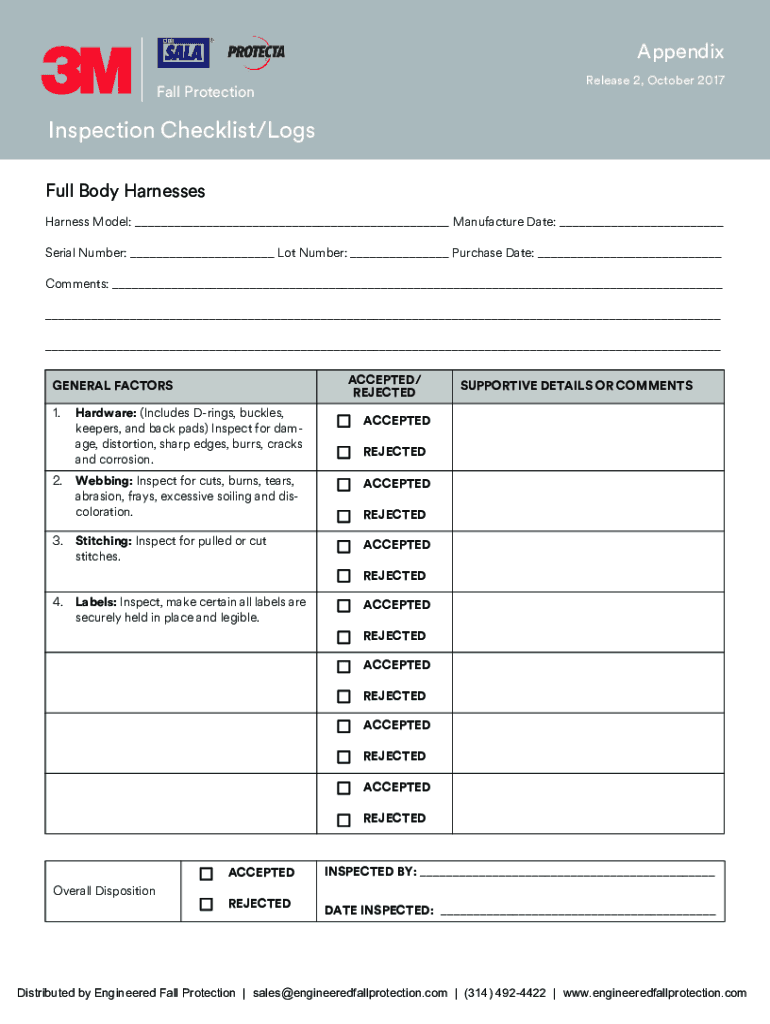
3M Fall Protection Inspection Form


Understanding the 3M Fall Protection Inspection Form
The 3M Fall Protection Inspection Form is a crucial document used to ensure that fall protection equipment is regularly inspected and maintained. This form helps organizations comply with safety regulations and standards, particularly those set by the Occupational Safety and Health Administration (OSHA). It serves as a record of inspections, providing evidence that safety measures are in place to protect workers from falls, which are a leading cause of workplace injuries.
How to Utilize the 3M Fall Protection Inspection Form
Using the 3M Fall Protection Inspection Form involves several straightforward steps. First, gather the necessary equipment and identify the areas where fall protection is required. Next, complete the form by documenting the condition of each piece of equipment, including harnesses, lanyards, and anchors. Ensure that all required fields are filled out accurately, including the date of inspection and the inspector's name. Once completed, the form should be stored securely for future reference and compliance checks.
Steps for Completing the 3M Fall Protection Inspection Form
Completing the 3M Fall Protection Inspection Form requires attention to detail. Follow these steps:
- Begin by entering the date of inspection.
- List all fall protection equipment being inspected.
- Assess each item for damage or wear, noting any issues.
- Document the inspector's name and signature.
- File the completed form in accordance with company policy.
Key Components of the 3M Fall Protection Inspection Form
The key components of the 3M Fall Protection Inspection Form include:
- Equipment Identification: Clearly identify each piece of equipment being inspected.
- Inspection Criteria: Outline specific criteria for assessing the condition of the equipment.
- Inspector Information: Include details about the person conducting the inspection.
- Comments Section: Provide space for additional notes or observations regarding the equipment.
Legal Considerations for the 3M Fall Protection Inspection Form
Using the 3M Fall Protection Inspection Form is essential for legal compliance in the workplace. Employers must adhere to OSHA regulations, which mandate regular inspections of fall protection equipment. Failure to maintain proper records can result in penalties or citations. Therefore, it is vital to keep completed forms accessible for audits and inspections by regulatory bodies.
Obtaining the 3M Fall Protection Inspection Form
The 3M Fall Protection Inspection Form can typically be obtained through official 3M resources or safety equipment suppliers. Many organizations also provide downloadable versions of the form on their websites. Ensure that you are using the most current version to comply with safety standards and regulations.
Create this form in 5 minutes or less
Create this form in 5 minutes!
How to create an eSignature for the 3m fall protection inspection form
How to create an electronic signature for a PDF online
How to create an electronic signature for a PDF in Google Chrome
How to create an e-signature for signing PDFs in Gmail
How to create an e-signature right from your smartphone
How to create an e-signature for a PDF on iOS
How to create an e-signature for a PDF on Android
People also ask
-
What is the 3M Fall Protection Inspection Form?
The 3M Fall Protection Inspection Form is a comprehensive document designed to ensure that fall protection equipment is regularly inspected and maintained. This form helps organizations comply with safety regulations and promotes a safer work environment by documenting the condition of fall protection gear.
-
How can airSlate SignNow help with the 3M Fall Protection Inspection Form?
airSlate SignNow streamlines the process of completing and signing the 3M Fall Protection Inspection Form. With our easy-to-use platform, users can quickly fill out the form, eSign it, and store it securely, ensuring that all inspections are documented efficiently.
-
Is there a cost associated with using the 3M Fall Protection Inspection Form on airSlate SignNow?
While the 3M Fall Protection Inspection Form itself is typically free, using airSlate SignNow may involve subscription fees depending on the features you choose. Our pricing plans are designed to be cost-effective, providing great value for businesses looking to enhance their document management processes.
-
What features does airSlate SignNow offer for the 3M Fall Protection Inspection Form?
airSlate SignNow offers features such as customizable templates, real-time collaboration, and secure eSigning for the 3M Fall Protection Inspection Form. These tools help ensure that your inspection process is efficient, organized, and compliant with safety standards.
-
Can I integrate airSlate SignNow with other software for the 3M Fall Protection Inspection Form?
Yes, airSlate SignNow supports integrations with various software applications, allowing you to connect your workflow for the 3M Fall Protection Inspection Form seamlessly. This integration capability enhances productivity by enabling data transfer between platforms.
-
What are the benefits of using the 3M Fall Protection Inspection Form with airSlate SignNow?
Using the 3M Fall Protection Inspection Form with airSlate SignNow provides numerous benefits, including improved compliance, enhanced safety, and streamlined documentation. Our platform ensures that all inspections are easily accessible and securely stored, reducing the risk of lost paperwork.
-
How does airSlate SignNow ensure the security of the 3M Fall Protection Inspection Form?
airSlate SignNow prioritizes security by employing advanced encryption and secure storage solutions for the 3M Fall Protection Inspection Form. This ensures that your sensitive data remains protected and accessible only to authorized users.
Get more for 3M Fall Protection Inspection Form
- Qualification assessment engineering new zealand form
- Important forms and documents fdle florida department of
- A raisin in the sun act 1 scene 1 pdf form
- Demande de slection permanente catgorie du regroupement form
- Form rml 001 incidentaccident report
- Rcmp grc 2180e vision examination of applicant rcmp grc gc form
- Emergency supplies checklist be prepared form
- Vision form claimsecure
Find out other 3M Fall Protection Inspection Form
- How To eSignature Idaho Affidavit of Title
- eSign Wisconsin Real estate forms Secure
- How To eSign California Real estate investment proposal template
- eSignature Oregon Affidavit of Title Free
- eSign Colorado Real estate investment proposal template Simple
- eSign Louisiana Real estate investment proposal template Fast
- eSign Wyoming Real estate investment proposal template Free
- How Can I eSign New York Residential lease
- eSignature Colorado Cease and Desist Letter Later
- How Do I eSignature Maine Cease and Desist Letter
- How Can I eSignature Maine Cease and Desist Letter
- eSignature Nevada Cease and Desist Letter Later
- Help Me With eSign Hawaii Event Vendor Contract
- How To eSignature Louisiana End User License Agreement (EULA)
- How To eSign Hawaii Franchise Contract
- eSignature Missouri End User License Agreement (EULA) Free
- eSign Delaware Consulting Agreement Template Now
- eSignature Missouri Hold Harmless (Indemnity) Agreement Later
- eSignature Ohio Hold Harmless (Indemnity) Agreement Mobile
- eSignature California Letter of Intent Free