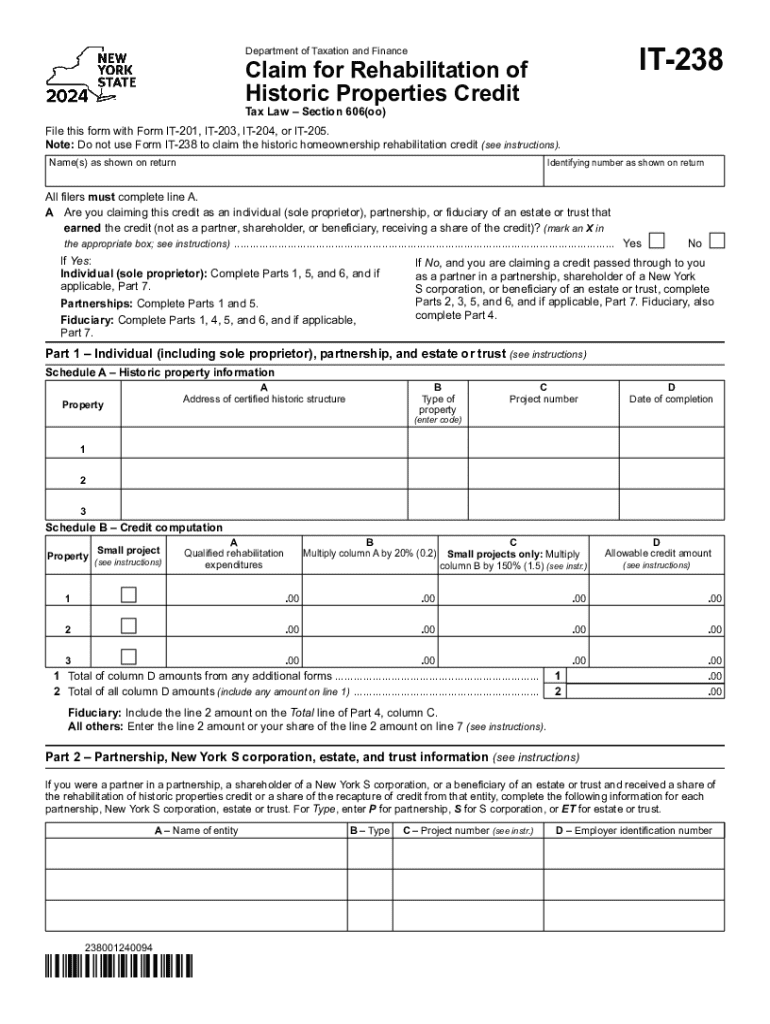
Form it 238 Claim for Rehabilitation of Historic Properties Credit Tax Year 2024-2026


Understanding the Form IT 238 Claim for Rehabilitation of Historic Properties Credit
The Form IT 238 is a tax form used to claim a credit for the rehabilitation of historic properties. This credit is designed to encourage the preservation and restoration of historic buildings in the United States. The form is specifically tailored for taxpayers who have made qualified improvements to a certified historic structure. By completing this form, individuals or businesses can reduce their tax liability, making it a valuable tool for those engaged in historic property restoration.
Steps to Complete the Form IT 238
Completing the Form IT 238 involves several key steps. First, gather all necessary documentation related to the rehabilitation work performed on the historic property. This includes receipts, contracts, and any relevant permits. Next, accurately fill out the form, ensuring that all information is complete and correct. Pay special attention to the sections that detail the costs associated with the rehabilitation, as these will directly impact the credit amount. Finally, review the form for accuracy before submission to avoid delays or potential penalties.
Eligibility Criteria for the Form IT 238
To qualify for the credit claimed on Form IT 238, the property must meet specific eligibility criteria. It must be a certified historic structure, which means it is listed on the National Register of Historic Places or has been determined to be eligible for such listing. Additionally, the rehabilitation work must meet the Secretary of the Interior's Standards for Rehabilitation. Taxpayers must also ensure that they have not previously claimed a credit for the same rehabilitation expenses to maintain compliance with tax regulations.
Required Documents for Submission
When submitting Form IT 238, several documents are required to substantiate the claim. These include proof of ownership of the property, documentation of the rehabilitation expenses, and any applicable tax credits previously claimed. Additionally, a copy of the certification from the appropriate state or federal authority confirming the historic status of the property is necessary. Ensuring that all required documents are included with the form can help facilitate a smoother review process by tax authorities.
Filing Deadlines for Form IT 238
It is crucial to be aware of the filing deadlines associated with Form IT 238. Generally, the form must be submitted along with the taxpayer's annual income tax return. This means that the deadline aligns with the standard tax filing dates, typically April fifteenth for individuals. However, if an extension has been filed, the submission may be delayed accordingly. Staying informed about these deadlines helps ensure that taxpayers can take full advantage of the available credits without incurring penalties.
Form Submission Methods
Form IT 238 can be submitted through various methods, providing flexibility for taxpayers. The form can be filed electronically using tax preparation software that supports e-filing. Alternatively, taxpayers may choose to mail a paper version of the form to the appropriate tax authority. In-person submissions are also an option at designated tax offices. Regardless of the method chosen, it is essential to keep a copy of the submitted form and any supporting documents for personal records.
Create this form in 5 minutes or less
Find and fill out the correct form it 238 claim for rehabilitation of historic properties credit tax year 772089042
Create this form in 5 minutes!
How to create an eSignature for the form it 238 claim for rehabilitation of historic properties credit tax year 772089042
How to create an electronic signature for a PDF online
How to create an electronic signature for a PDF in Google Chrome
How to create an e-signature for signing PDFs in Gmail
How to create an e-signature right from your smartphone
How to create an e-signature for a PDF on iOS
How to create an e-signature for a PDF on Android
People also ask
-
What is 238 credit and how does it relate to airSlate SignNow?
238 credit refers to a specific credit score range that can impact your ability to secure financing. With airSlate SignNow, businesses can streamline their document signing processes, which can help improve financial transactions and potentially enhance creditworthiness over time.
-
How much does airSlate SignNow cost for users with a 238 credit score?
The pricing for airSlate SignNow is competitive and designed to be accessible for all users, including those with a 238 credit score. We offer various plans that cater to different business needs, ensuring that everyone can benefit from our eSigning solutions without breaking the bank.
-
What features does airSlate SignNow offer for businesses concerned about their 238 credit?
airSlate SignNow provides features such as secure eSigning, document templates, and real-time tracking, which can help businesses manage their documents efficiently. These features are particularly beneficial for those with a 238 credit score, as they can facilitate quicker transactions and improve overall business operations.
-
Can airSlate SignNow help improve my business's credit score?
While airSlate SignNow itself does not directly impact your credit score, using our platform can help you manage your documents more effectively. By ensuring timely payments and maintaining organized records, businesses with a 238 credit score can work towards improving their financial standing.
-
What integrations does airSlate SignNow offer for users with a 238 credit score?
airSlate SignNow integrates seamlessly with various applications such as CRM systems, cloud storage, and accounting software. These integrations can help businesses with a 238 credit score streamline their workflows and enhance productivity, making it easier to manage financial documents.
-
Is airSlate SignNow suitable for small businesses with a 238 credit score?
Absolutely! airSlate SignNow is designed to be a cost-effective solution for businesses of all sizes, including small businesses with a 238 credit score. Our user-friendly platform allows small business owners to manage their document signing needs efficiently without incurring high costs.
-
How does airSlate SignNow ensure the security of documents for users with a 238 credit score?
Security is a top priority for airSlate SignNow. We utilize advanced encryption and secure cloud storage to protect your documents, ensuring that businesses with a 238 credit score can sign and send sensitive information safely and confidently.
Get more for Form IT 238 Claim For Rehabilitation Of Historic Properties Credit Tax Year
Find out other Form IT 238 Claim For Rehabilitation Of Historic Properties Credit Tax Year
- How To eSign Vermont Digital contracts
- eSign Vermont Digital contracts Now
- eSign Vermont Digital contracts Later
- How Can I eSign New Jersey Contract of employment
- eSignature Kansas Travel Agency Agreement Now
- How Can I eSign Texas Contract of employment
- eSignature Tennessee Travel Agency Agreement Mobile
- eSignature Oregon Amendment to an LLC Operating Agreement Free
- Can I eSign Hawaii Managed services contract template
- How Do I eSign Iowa Managed services contract template
- Can I eSignature Wyoming Amendment to an LLC Operating Agreement
- eSign Massachusetts Personal loan contract template Simple
- How Do I eSign Massachusetts Personal loan contract template
- How To eSign Mississippi Personal loan contract template
- How Do I eSign Oklahoma Personal loan contract template
- eSign Oklahoma Managed services contract template Easy
- Can I eSign South Carolina Real estate contracts
- eSign Texas Renter's contract Mobile
- How Do I eSign Texas Renter's contract
- eSign Hawaii Sales contract template Myself