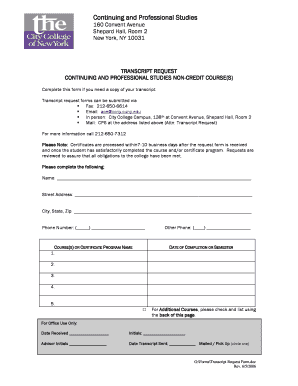
Ccny Transcript Form


What is the CCNY Transcript
The CCNY transcript is an official academic record that documents a student's coursework, grades, and degree progress at the City College of New York (CCNY). This document serves as a comprehensive summary of a student's academic achievements and is often required for various purposes, including transferring to another institution, applying for graduate programs, or seeking employment. The transcript includes essential information such as the courses taken, credits earned, grade point average (GPA), and the degree conferred, if applicable.
How to Obtain the CCNY Transcript
To obtain a CCNY transcript, students can submit a transcript request through the CCNY Office of the Registrar. This process typically involves completing a transcript request form, which can often be found on the CCNY website. Students may need to provide identification details, such as their student ID number and date of birth, to verify their identity. There may be a nominal fee associated with the request, and students can choose to receive their transcripts via mail or electronically, depending on their preference.
Key Elements of the CCNY Transcript
A CCNY transcript contains several key elements that provide a complete overview of a student's academic history. These elements include:
- Student Information: Name, student ID, and contact details.
- Course Details: List of courses taken, including course codes, titles, and credit hours.
- Grades: Grades received for each course, along with the corresponding grade points.
- GPA: Cumulative grade point average calculated based on all completed coursework.
- Degree Information: Details about any degrees awarded, including the date of conferral.
Steps to Complete the CCNY Transcript Request
Completing a CCNY transcript request involves several straightforward steps:
- Visit the CCNY Office of the Registrar's website to access the transcript request form.
- Fill out the necessary personal information, including your name, student ID, and contact details.
- Select the type of transcript you require (official or unofficial) and the delivery method.
- Review the request for accuracy and submit the form, along with any required payment.
- Wait for confirmation of your request and track the status if necessary.
Legal Use of the CCNY Transcript
The CCNY transcript is a legal document that holds significant value in various contexts. It is commonly used for educational purposes, such as applying to other colleges or universities, where it serves as proof of academic performance. Additionally, employers may request transcripts to verify a candidate's educational background during the hiring process. It is important to ensure that the transcript is requested and used in compliance with educational privacy laws, such as the Family Educational Rights and Privacy Act (FERPA).
Digital vs. Paper Version of the CCNY Transcript
Students can choose between digital and paper versions of the CCNY transcript, depending on their needs. The digital transcript is often delivered via secure electronic methods, making it a faster and more convenient option for many. It is typically accepted by most institutions and employers. The paper transcript, while slower to obtain, may be required for specific applications or situations where a physical document is necessary. Both versions are official and carry the same weight in terms of authenticity.
Create this form in 5 minutes or less
Create this form in 5 minutes!
How to create an eSignature for the ccny transcript
How to create an electronic signature for a PDF online
How to create an electronic signature for a PDF in Google Chrome
How to create an e-signature for signing PDFs in Gmail
How to create an e-signature right from your smartphone
How to create an e-signature for a PDF on iOS
How to create an e-signature for a PDF on Android
People also ask
-
What is a CCNY transcript and why is it important?
A CCNY transcript is an official record of a student's academic performance at the City College of New York. It is important for various purposes, including applying for jobs, further education, or transferring to another institution. Having a CCNY transcript ensures that you have a verified record of your achievements.
-
How can I obtain my CCNY transcript using airSlate SignNow?
You can obtain your CCNY transcript by using airSlate SignNow to request and eSign the necessary documents. Our platform simplifies the process, allowing you to securely send and receive your transcript with just a few clicks. This ensures a fast and efficient way to manage your academic records.
-
What are the costs associated with obtaining a CCNY transcript?
The costs for obtaining a CCNY transcript may vary depending on the method of request and delivery. Using airSlate SignNow can help reduce costs by streamlining the eSigning process, making it more affordable and efficient. Check with CCNY for specific pricing details related to transcript requests.
-
What features does airSlate SignNow offer for managing CCNY transcripts?
airSlate SignNow offers features such as secure eSigning, document tracking, and customizable templates for managing CCNY transcripts. These features enhance the user experience by providing a straightforward way to handle academic documents. You can easily manage your transcript requests from any device.
-
Can I integrate airSlate SignNow with other applications for CCNY transcript management?
Yes, airSlate SignNow can be integrated with various applications to enhance your CCNY transcript management. This includes integration with cloud storage services and CRM systems, allowing for seamless document handling. These integrations help streamline your workflow and improve efficiency.
-
What are the benefits of using airSlate SignNow for CCNY transcripts?
Using airSlate SignNow for CCNY transcripts provides numerous benefits, including time savings, enhanced security, and ease of use. The platform allows you to quickly eSign and send your transcripts without the hassle of printing and mailing. This modern approach ensures that your documents are handled securely and efficiently.
-
Is airSlate SignNow compliant with regulations for handling CCNY transcripts?
Yes, airSlate SignNow is compliant with various regulations regarding the handling of educational documents, including CCNY transcripts. Our platform adheres to industry standards for data security and privacy, ensuring that your sensitive information is protected. You can trust airSlate SignNow for secure document management.
Get more for Ccny Transcript
Find out other Ccny Transcript
- Sign Iowa Doctors LLC Operating Agreement Online
- Sign Illinois Doctors Affidavit Of Heirship Secure
- Sign Maryland Doctors Quitclaim Deed Later
- How Can I Sign Maryland Doctors Quitclaim Deed
- Can I Sign Missouri Doctors Last Will And Testament
- Sign New Mexico Doctors Living Will Free
- Sign New York Doctors Executive Summary Template Mobile
- Sign New York Doctors Residential Lease Agreement Safe
- Sign New York Doctors Executive Summary Template Fast
- How Can I Sign New York Doctors Residential Lease Agreement
- Sign New York Doctors Purchase Order Template Online
- Can I Sign Oklahoma Doctors LLC Operating Agreement
- Sign South Dakota Doctors LLC Operating Agreement Safe
- Sign Texas Doctors Moving Checklist Now
- Sign Texas Doctors Residential Lease Agreement Fast
- Sign Texas Doctors Emergency Contact Form Free
- Sign Utah Doctors Lease Agreement Form Mobile
- Sign Virginia Doctors Contract Safe
- Sign West Virginia Doctors Rental Lease Agreement Free
- Sign Alabama Education Quitclaim Deed Online