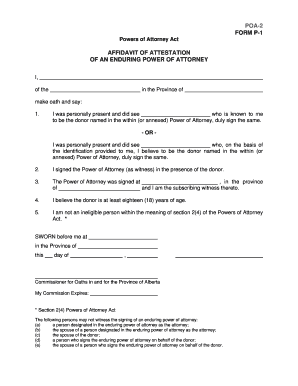
POA 2 FORM P 1 Service Alberta Servicealberta


Understanding the POA 2 FORM P 1
The POA 2 FORM P 1 is a legal document used in the context of power of attorney in Alberta. This form allows an individual to designate another person to act on their behalf in legal or financial matters. It is crucial for ensuring that your wishes are respected when you are unable to make decisions for yourself. The form outlines the specific powers granted to the agent, which can include managing financial affairs, making health care decisions, or handling real estate transactions.
Steps to Complete the POA 2 FORM P 1
Completing the POA 2 FORM P 1 requires careful attention to detail to ensure that all necessary information is accurately provided. Here are the steps to follow:
- Begin by filling out your personal information, including your full name, address, and contact details.
- Clearly identify the individual you are appointing as your agent by providing their name and contact information.
- Specify the powers you wish to grant to your agent. This can be broad or limited based on your preferences.
- Include any specific instructions or limitations regarding the authority of your agent.
- Sign and date the form in the presence of a witness, ensuring that the witness is not the appointed agent.
Obtaining the POA 2 FORM P 1
The POA 2 FORM P 1 can be obtained through various channels. You may find the form available online through government resources or legal websites. Additionally, local legal offices or notary public services often provide copies of this form. It is important to ensure that you are using the most current version of the form to avoid any legal issues.
Legal Uses of the POA 2 FORM P 1
The POA 2 FORM P 1 serves several legal purposes. It is primarily used to grant authority to an agent to make decisions on behalf of the principal when they are incapacitated or unable to manage their affairs. This can include financial decisions, medical care choices, and property management. The legal enforceability of the powers granted depends on the proper execution of the form and adherence to relevant state laws.
Key Elements of the POA 2 FORM P 1
Understanding the key elements of the POA 2 FORM P 1 is essential for effective use. Important components include:
- Principal Information: Details about the individual granting power of attorney.
- Agent Information: Information about the person receiving the authority.
- Powers Granted: A clear description of the specific powers being delegated.
- Signatures: Required signatures of both the principal and a witness to validate the form.
Examples of Using the POA 2 FORM P 1
There are various scenarios in which the POA 2 FORM P 1 may be utilized effectively. For instance, an elderly individual may use this form to appoint a family member to manage their financial affairs as they age. Similarly, someone undergoing medical treatment may designate a trusted friend to make health care decisions on their behalf. These examples highlight the importance of having a reliable agent in place to ensure that personal wishes are respected.
Handy tips for filling out POA 2 FORM P 1 Service Alberta Servicealberta online
Quick steps to complete and e-sign POA 2 FORM P 1 Service Alberta Servicealberta online:
- Use Get Form or simply click on the template preview to open it in the editor.
- Start completing the fillable fields and carefully type in required information.
- Use the Cross or Check marks in the top toolbar to select your answers in the list boxes.
- Utilize the Circle icon for other Yes/No questions.
- Look through the document several times and make sure that all fields are completed with the correct information.
- Insert the current Date with the corresponding icon.
- Add a legally-binding e-signature. Go to Sign -> Add New Signature and select the option you prefer: type, draw, or upload an image of your handwritten signature and place it where you need it.
- Finish filling out the form with the Done button.
- Download your copy, save it to the cloud, print it, or share it right from the editor.
- Check the Help section and contact our Support team if you run into any troubles when using the editor.
We understand how straining completing documents could be. Get access to a GDPR and HIPAA compliant platform for maximum straightforwardness. Use signNow to e-sign and send out POA 2 FORM P 1 Service Alberta Servicealberta for collecting e-signatures.
Create this form in 5 minutes or less
Create this form in 5 minutes!
How to create an eSignature for the poa 2 form p 1 service alberta servicealberta
How to create an electronic signature for a PDF online
How to create an electronic signature for a PDF in Google Chrome
How to create an e-signature for signing PDFs in Gmail
How to create an e-signature right from your smartphone
How to create an e-signature for a PDF on iOS
How to create an e-signature for a PDF on Android
People also ask
-
What is the POA 2 FORM P 1 Service Alberta Servicealberta?
The POA 2 FORM P 1 Service Alberta Servicealberta is a legal document used to grant power of attorney in Alberta. This form allows individuals to appoint someone to make decisions on their behalf, ensuring that their wishes are respected. It is essential for anyone looking to manage their affairs effectively.
-
How can airSlate SignNow help with the POA 2 FORM P 1 Service Alberta Servicealberta?
airSlate SignNow simplifies the process of completing and signing the POA 2 FORM P 1 Service Alberta Servicealberta. Our platform allows users to fill out the form electronically, ensuring accuracy and compliance with legal standards. Additionally, you can eSign the document securely, making it convenient and efficient.
-
What are the pricing options for using airSlate SignNow for the POA 2 FORM P 1 Service Alberta Servicealberta?
airSlate SignNow offers competitive pricing plans that cater to various needs, including individual and business users. You can choose a plan that best fits your requirements for managing the POA 2 FORM P 1 Service Alberta Servicealberta. Our cost-effective solutions ensure you get the best value for your document management needs.
-
What features does airSlate SignNow provide for the POA 2 FORM P 1 Service Alberta Servicealberta?
With airSlate SignNow, you gain access to features such as customizable templates, secure eSigning, and document tracking. These tools enhance your experience when handling the POA 2 FORM P 1 Service Alberta Servicealberta. Our user-friendly interface makes it easy to navigate and complete your documents efficiently.
-
Are there any benefits to using airSlate SignNow for the POA 2 FORM P 1 Service Alberta Servicealberta?
Using airSlate SignNow for the POA 2 FORM P 1 Service Alberta Servicealberta offers numerous benefits, including time savings and enhanced security. You can complete and sign documents from anywhere, reducing the need for physical paperwork. This digital approach also minimizes the risk of errors and ensures your documents are stored securely.
-
Can I integrate airSlate SignNow with other applications for the POA 2 FORM P 1 Service Alberta Servicealberta?
Yes, airSlate SignNow supports integrations with various applications, enhancing your workflow for the POA 2 FORM P 1 Service Alberta Servicealberta. You can connect with popular tools like Google Drive, Dropbox, and more. This flexibility allows you to manage your documents seamlessly across different platforms.
-
Is airSlate SignNow compliant with legal standards for the POA 2 FORM P 1 Service Alberta Servicealberta?
Absolutely! airSlate SignNow is designed to comply with legal standards for electronic signatures and document management. When using our platform for the POA 2 FORM P 1 Service Alberta Servicealberta, you can be confident that your documents meet all necessary legal requirements, ensuring their validity.
Get more for POA 2 FORM P 1 Service Alberta Servicealberta
- Resignation trustee sample form
- Solicitud permiso de estacionamiento en forma de
- For hire passenger vehicle registration form
- Application for duplicate title state of alaska form
- Biology 1913l microbiology laboratory syllabus georgia form
- Get rush copley financial assistance form
- Your cooperation will be appreciated for the admission process of skk graduate school of gsb skku form
- Reset form 538 certificate of use non government
Find out other POA 2 FORM P 1 Service Alberta Servicealberta
- Can I eSignature South Dakota Doctors Lease Agreement Form
- eSignature New Hampshire Government Bill Of Lading Fast
- eSignature Illinois Finance & Tax Accounting Purchase Order Template Myself
- eSignature North Dakota Government Quitclaim Deed Free
- eSignature Kansas Finance & Tax Accounting Business Letter Template Free
- eSignature Washington Government Arbitration Agreement Simple
- Can I eSignature Massachusetts Finance & Tax Accounting Business Plan Template
- Help Me With eSignature Massachusetts Finance & Tax Accounting Work Order
- eSignature Delaware Healthcare / Medical NDA Secure
- eSignature Florida Healthcare / Medical Rental Lease Agreement Safe
- eSignature Nebraska Finance & Tax Accounting Business Letter Template Online
- Help Me With eSignature Indiana Healthcare / Medical Notice To Quit
- eSignature New Jersey Healthcare / Medical Credit Memo Myself
- eSignature North Dakota Healthcare / Medical Medical History Simple
- Help Me With eSignature Arkansas High Tech Arbitration Agreement
- eSignature Ohio Healthcare / Medical Operating Agreement Simple
- eSignature Oregon Healthcare / Medical Limited Power Of Attorney Computer
- eSignature Pennsylvania Healthcare / Medical Warranty Deed Computer
- eSignature Texas Healthcare / Medical Bill Of Lading Simple
- eSignature Virginia Healthcare / Medical Living Will Computer