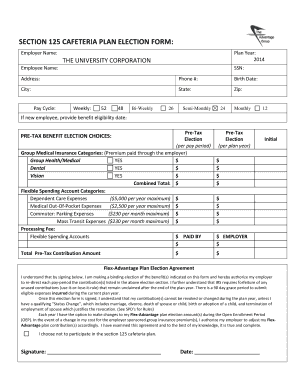
SECTION 125 CAFETERIA PLAN ELECTION FORM Csun 2014


What is the SECTION 125 CAFETERIA PLAN ELECTION FORM Csun
The SECTION 125 CAFETERIA PLAN ELECTION FORM Csun is a document that allows employees to make pre-tax contributions to various benefit plans offered by their employer. This form is essential for employees who wish to participate in a cafeteria plan, which provides flexibility in choosing benefits that best suit their individual needs. The cafeteria plan may include options such as health insurance, dental coverage, and flexible spending accounts, among others. By completing this form, employees can maximize their tax savings while selecting the benefits that are most valuable to them.
How to use the SECTION 125 CAFETERIA PLAN ELECTION FORM Csun
Using the SECTION 125 CAFETERIA PLAN ELECTION FORM Csun involves several straightforward steps. First, employees should review the benefits offered under their employer's cafeteria plan to understand their options. Next, they need to fill out the form accurately, indicating their desired benefit selections and the amount they wish to contribute pre-tax. Once completed, the form should be submitted to the HR department or the designated benefits administrator within the specified timeframe. It is important to keep a copy of the submitted form for personal records.
Steps to complete the SECTION 125 CAFETERIA PLAN ELECTION FORM Csun
Completing the SECTION 125 CAFETERIA PLAN ELECTION FORM Csun requires careful attention to detail. Here are the steps to follow:
- Review the available benefits and contribution limits outlined by your employer.
- Fill in your personal information, including your name, employee ID, and contact details.
- Select the benefits you wish to enroll in and indicate the contribution amounts.
- Sign and date the form to confirm your selections.
- Submit the completed form to your HR department by the deadline provided.
Key elements of the SECTION 125 CAFETERIA PLAN ELECTION FORM Csun
Several key elements are crucial in the SECTION 125 CAFETERIA PLAN ELECTION FORM Csun. These include:
- Employee Information: Essential details such as name, employee ID, and department.
- Benefit Selections: A list of available benefits, allowing employees to choose their preferred options.
- Contribution Amounts: The pre-tax amounts employees wish to allocate towards each selected benefit.
- Signature: A section for the employee's signature, confirming their choices and understanding of the plan.
Eligibility Criteria
Eligibility for participating in the SECTION 125 CAFETERIA PLAN ELECTION FORM Csun typically depends on employment status and the specific criteria set by the employer. Generally, full-time employees are eligible to enroll in the cafeteria plan. Part-time employees may also qualify, depending on the employer's policies. Employees should check with their HR department to confirm their eligibility and any specific requirements that may apply.
Form Submission Methods
The SECTION 125 CAFETERIA PLAN ELECTION FORM Csun can be submitted through various methods, depending on the employer's policies. Common submission methods include:
- Online Submission: Many employers offer a digital platform for submitting forms electronically.
- Mail: Employees may also send the completed form via postal service to the HR department.
- In-Person: Submitting the form directly to HR allows for immediate confirmation of receipt.
Create this form in 5 minutes or less
Find and fill out the correct section 125 cafeteria plan election form csun
Create this form in 5 minutes!
How to create an eSignature for the section 125 cafeteria plan election form csun
How to create an electronic signature for a PDF online
How to create an electronic signature for a PDF in Google Chrome
How to create an e-signature for signing PDFs in Gmail
How to create an e-signature right from your smartphone
How to create an e-signature for a PDF on iOS
How to create an e-signature for a PDF on Android
People also ask
-
What is a SECTION 125 CAFETERIA PLAN ELECTION FORM Csun?
The SECTION 125 CAFETERIA PLAN ELECTION FORM Csun is a document that allows employees to choose between different benefits offered by their employer under a cafeteria plan. This form is essential for employees to make informed decisions about their benefits and ensure compliance with IRS regulations.
-
How can I access the SECTION 125 CAFETERIA PLAN ELECTION FORM Csun?
You can easily access the SECTION 125 CAFETERIA PLAN ELECTION FORM Csun through the airSlate SignNow platform. Simply log in to your account, navigate to the forms section, and download or fill out the form directly online for convenience.
-
What are the benefits of using the SECTION 125 CAFETERIA PLAN ELECTION FORM Csun?
Using the SECTION 125 CAFETERIA PLAN ELECTION FORM Csun allows employees to customize their benefits according to their needs, potentially leading to tax savings. Additionally, it streamlines the enrollment process, making it easier for both employees and employers to manage benefits efficiently.
-
Is there a cost associated with the SECTION 125 CAFETERIA PLAN ELECTION FORM Csun?
The SECTION 125 CAFETERIA PLAN ELECTION FORM Csun itself is typically provided at no additional cost through the airSlate SignNow platform. However, businesses may incur costs related to implementing and managing their cafeteria plans, which can vary based on the provider.
-
Can the SECTION 125 CAFETERIA PLAN ELECTION FORM Csun be integrated with other HR systems?
Yes, the SECTION 125 CAFETERIA PLAN ELECTION FORM Csun can be integrated with various HR systems to enhance efficiency. airSlate SignNow offers seamless integrations with popular HR software, allowing for easy data transfer and management of employee benefits.
-
How does airSlate SignNow ensure the security of the SECTION 125 CAFETERIA PLAN ELECTION FORM Csun?
airSlate SignNow prioritizes security by implementing advanced encryption and compliance measures for the SECTION 125 CAFETERIA PLAN ELECTION FORM Csun. This ensures that sensitive employee information is protected throughout the signing and storage process.
-
What features does airSlate SignNow offer for managing the SECTION 125 CAFETERIA PLAN ELECTION FORM Csun?
airSlate SignNow provides features such as electronic signatures, document tracking, and customizable templates for the SECTION 125 CAFETERIA PLAN ELECTION FORM Csun. These tools help streamline the process, making it easier for businesses to manage employee benefits efficiently.
Get more for SECTION 125 CAFETERIA PLAN ELECTION FORM Csun
Find out other SECTION 125 CAFETERIA PLAN ELECTION FORM Csun
- Electronic signature Louisiana Plumbing Purchase Order Template Simple
- Can I Electronic signature Wyoming Legal Limited Power Of Attorney
- How Do I Electronic signature Wyoming Legal POA
- How To Electronic signature Florida Real Estate Contract
- Electronic signature Florida Real Estate NDA Secure
- Can I Electronic signature Florida Real Estate Cease And Desist Letter
- How Can I Electronic signature Hawaii Real Estate LLC Operating Agreement
- Electronic signature Georgia Real Estate Letter Of Intent Myself
- Can I Electronic signature Nevada Plumbing Agreement
- Electronic signature Illinois Real Estate Affidavit Of Heirship Easy
- How To Electronic signature Indiana Real Estate Quitclaim Deed
- Electronic signature North Carolina Plumbing Business Letter Template Easy
- Electronic signature Kansas Real Estate Residential Lease Agreement Simple
- How Can I Electronic signature North Carolina Plumbing Promissory Note Template
- Electronic signature North Dakota Plumbing Emergency Contact Form Mobile
- Electronic signature North Dakota Plumbing Emergency Contact Form Easy
- Electronic signature Rhode Island Plumbing Business Plan Template Later
- Electronic signature Louisiana Real Estate Quitclaim Deed Now
- Electronic signature Louisiana Real Estate Quitclaim Deed Secure
- How Can I Electronic signature South Dakota Plumbing Emergency Contact Form