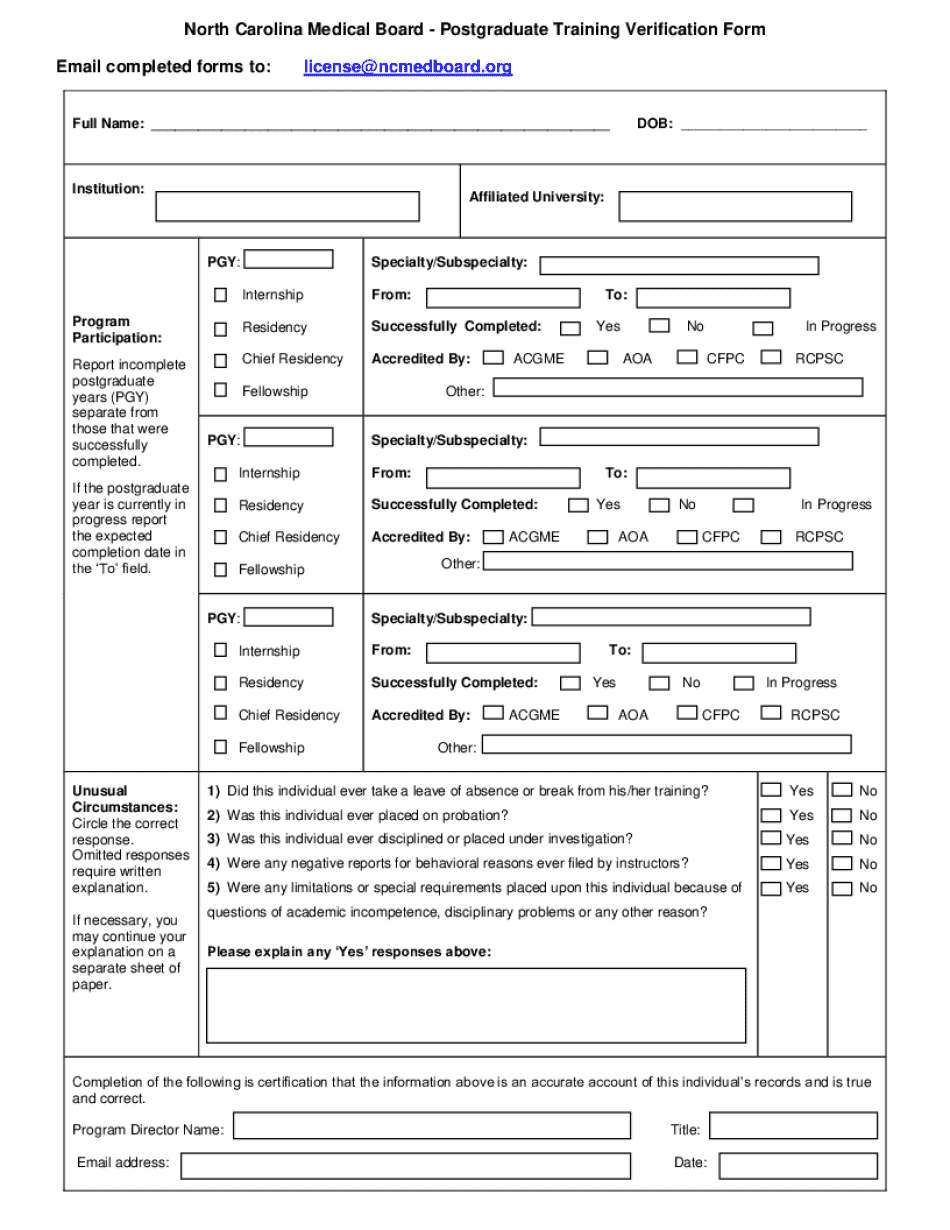
RTL Application Login North Carolina Medical Board Form


Understanding the RTL Application Login for the North Carolina Medical Board
The RTL Application Login for the North Carolina Medical Board is an online portal designed for healthcare professionals to manage their applications and credentials efficiently. This platform facilitates the submission of applications, renewals, and updates related to medical licenses and certifications. By utilizing this system, applicants can streamline their interactions with the North Carolina Medical Board, ensuring a more organized and timely process.
How to Access the RTL Application Login
To access the RTL Application Login, users must visit the official North Carolina Medical Board website. Once there, they will find a dedicated login section for the RTL Application. Users should enter their credentials, which typically include a username and password. If you are a first-time user, you may need to register for an account by providing personal information and verifying your identity.
Steps to Complete the RTL Application Login
Completing the RTL Application Login involves a few straightforward steps:
- Navigate to the North Carolina Medical Board website.
- Locate the RTL Application Login section.
- Enter your username and password.
- Click on the login button to access your account.
- If you forget your password, follow the prompts to reset it.
Once logged in, users can manage their applications, check the status of submissions, and update personal information as needed.
Required Documents for the RTL Application
When using the RTL Application, specific documents may be required to complete your application successfully. Commonly required documents include:
- Proof of identity (such as a government-issued ID).
- Educational credentials (transcripts or diplomas).
- Proof of clinical experience or residency.
- Background check authorization.
It is essential to gather these documents before starting your application to avoid delays in processing.
Eligibility Criteria for the RTL Application
To use the RTL Application Login, applicants must meet certain eligibility criteria set forth by the North Carolina Medical Board. Generally, these criteria include:
- Being a graduate from an accredited medical or healthcare program.
- Possessing the necessary clinical experience.
- Meeting any state-specific licensure requirements.
Applicants should review the specific requirements that apply to their profession to ensure compliance before submitting their applications.
Legal Use of the RTL Application Login
The RTL Application Login is intended for legal and professional use only. Users must adhere to the guidelines and regulations established by the North Carolina Medical Board. Misuse of the portal, such as submitting false information or unauthorized access, can lead to penalties, including revocation of licensure or legal action. It is crucial to maintain integrity and transparency throughout the application process.
Create this form in 5 minutes or less
Create this form in 5 minutes!
How to create an eSignature for the rtl application login north carolina medical board
How to create an electronic signature for a PDF online
How to create an electronic signature for a PDF in Google Chrome
How to create an e-signature for signing PDFs in Gmail
How to create an e-signature right from your smartphone
How to create an e-signature for a PDF on iOS
How to create an e-signature for a PDF on Android
People also ask
-
What is the RTL Application Login North Carolina Medical Board?
The RTL Application Login North Carolina Medical Board is a secure portal that allows medical professionals in North Carolina to access their application status and manage their licensing needs. This platform streamlines the process of submitting and tracking applications, ensuring that users can efficiently navigate the requirements set by the North Carolina Medical Board.
-
How do I access the RTL Application Login North Carolina Medical Board?
To access the RTL Application Login North Carolina Medical Board, simply visit the official website and click on the login link. You will need to enter your credentials, including your username and password, to gain access to your account and manage your applications.
-
Is there a cost associated with the RTL Application Login North Carolina Medical Board?
The RTL Application Login North Carolina Medical Board itself is free to access; however, there may be fees associated with specific applications or services. It's important to review the fee schedule provided by the North Carolina Medical Board to understand any potential costs involved.
-
What features does the RTL Application Login North Carolina Medical Board offer?
The RTL Application Login North Carolina Medical Board offers features such as application tracking, document submission, and real-time status updates. These features are designed to simplify the licensing process for medical professionals and ensure they stay informed about their application progress.
-
How can the RTL Application Login North Carolina Medical Board benefit me?
Using the RTL Application Login North Carolina Medical Board can signNowly reduce the time and effort required to manage your medical licensing applications. It provides a centralized platform for all your application needs, making it easier to stay organized and compliant with state regulations.
-
Can I integrate the RTL Application Login North Carolina Medical Board with other tools?
Yes, the RTL Application Login North Carolina Medical Board can be integrated with various document management and e-signature solutions, such as airSlate SignNow. This integration allows for a seamless workflow, enabling users to send and eSign documents directly within the application.
-
What support is available for users of the RTL Application Login North Carolina Medical Board?
Users of the RTL Application Login North Carolina Medical Board can access support through the North Carolina Medical Board's help center. They offer resources such as FAQs, guides, and direct assistance to help users navigate any issues they may encounter.
Get more for RTL Application Login North Carolina Medical Board
- New mexico rpd 41290 form
- Pli form pdf
- Madap semi annual verification form
- Friends neighbors privilege pricing application form
- Arizona snowbowl parentalguardian release of liability form
- Employee benefits division eligibility for a waiver of empire form
- Talent ampamp professional growth systems department form
- Michigan application for workers compensation insu form
Find out other RTL Application Login North Carolina Medical Board
- Electronic signature Texas Legal Lease Agreement Template Free
- Can I Electronic signature Texas Legal Lease Agreement Template
- How To Electronic signature Texas Legal Stock Certificate
- How Can I Electronic signature Texas Legal POA
- Electronic signature West Virginia Orthodontists Living Will Online
- Electronic signature Legal PDF Vermont Online
- How Can I Electronic signature Utah Legal Separation Agreement
- Electronic signature Arizona Plumbing Rental Lease Agreement Myself
- Electronic signature Alabama Real Estate Quitclaim Deed Free
- Electronic signature Alabama Real Estate Quitclaim Deed Safe
- Electronic signature Colorado Plumbing Business Plan Template Secure
- Electronic signature Alaska Real Estate Lease Agreement Template Now
- Electronic signature Colorado Plumbing LLC Operating Agreement Simple
- Electronic signature Arizona Real Estate Business Plan Template Free
- Electronic signature Washington Legal Contract Safe
- How To Electronic signature Arkansas Real Estate Contract
- Electronic signature Idaho Plumbing Claim Myself
- Electronic signature Kansas Plumbing Business Plan Template Secure
- Electronic signature Louisiana Plumbing Purchase Order Template Simple
- Can I Electronic signature Wyoming Legal Limited Power Of Attorney