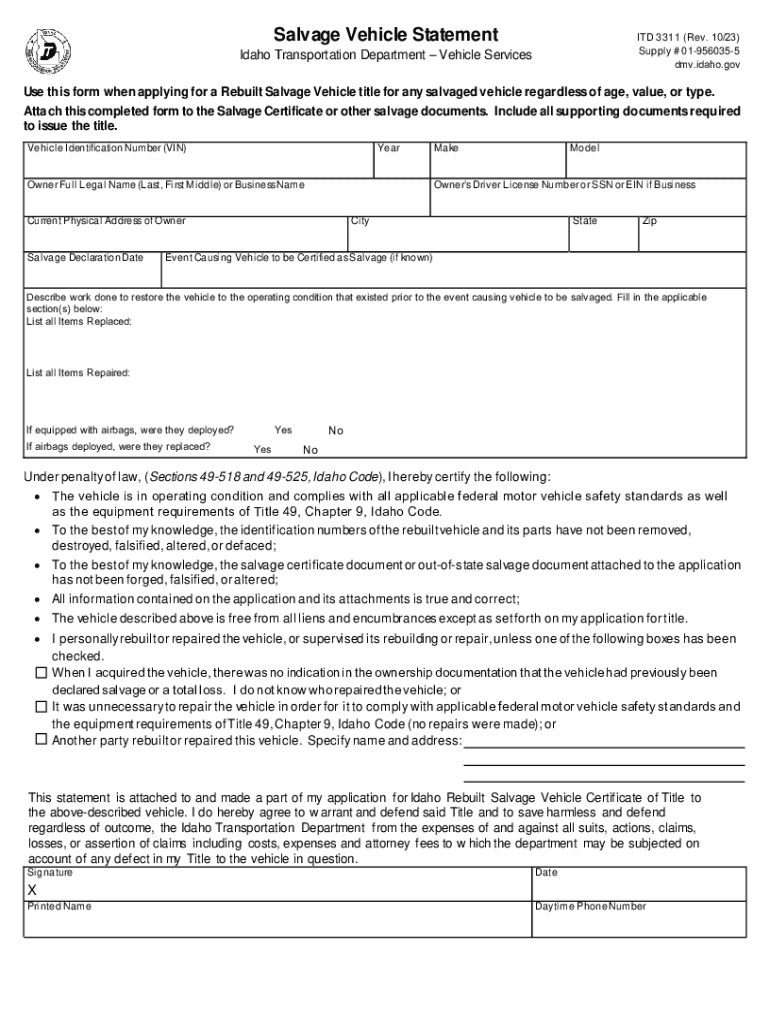
Salvage Vehicle Statement Form


What is the Salvage Vehicle Statement
The Salvage Vehicle Statement is an essential document used in the United States to declare the condition and history of a vehicle that has been deemed a total loss by an insurance company. This form provides crucial information regarding the vehicle's salvage status, which is important for potential buyers, insurers, and state authorities. It typically includes details such as the vehicle identification number (VIN), the reason for the salvage designation, and any repairs that have been made post-salvage.
How to use the Salvage Vehicle Statement
This statement serves multiple purposes in the vehicle ownership and transfer process. It can be used to register a salvage vehicle with the Department of Motor Vehicles (DMV), apply for a rebuilt title, or provide transparency during the sale of a previously salvaged vehicle. When using this document, it is important to ensure that all information is accurate and complete to avoid potential legal issues or complications during vehicle registration.
Steps to complete the Salvage Vehicle Statement
Completing the Salvage Vehicle Statement involves several straightforward steps:
- Gather necessary information about the vehicle, including the VIN, make, model, and year.
- Document the reason for the vehicle's salvage status, such as accident damage or theft recovery.
- Include details of any repairs made to the vehicle since it was salvaged.
- Sign and date the statement to certify that the information provided is true and accurate.
Legal use of the Salvage Vehicle Statement
The Salvage Vehicle Statement must be used in accordance with state laws and regulations. It is legally binding and can be required during vehicle registration or transfer. Misrepresentation of information on this statement can lead to penalties, including fines or legal action. Therefore, it is crucial to understand the legal implications and ensure compliance with local requirements when using this document.
Key elements of the Salvage Vehicle Statement
Key elements of the Salvage Vehicle Statement include:
- Vehicle Identification Number (VIN): A unique identifier for the vehicle.
- Owner Information: Name and contact details of the current owner.
- Salvage Reason: Explanation of why the vehicle was declared a salvage.
- Repair History: Details of any repairs or modifications made after the salvage designation.
State-specific rules for the Salvage Vehicle Statement
Each state in the U.S. may have different requirements regarding the Salvage Vehicle Statement. It is important to check local regulations to ensure compliance. Some states may require additional documentation, such as inspection reports or proof of repairs, before allowing a vehicle to be registered as rebuilt or roadworthy. Understanding these state-specific rules can help avoid delays in the registration process.
Create this form in 5 minutes or less
Create this form in 5 minutes!
How to create an eSignature for the salvage vehicle statement
How to create an electronic signature for a PDF online
How to create an electronic signature for a PDF in Google Chrome
How to create an e-signature for signing PDFs in Gmail
How to create an e-signature right from your smartphone
How to create an e-signature for a PDF on iOS
How to create an e-signature for a PDF on Android
People also ask
-
What is a Salvage Vehicle Statement?
A Salvage Vehicle Statement is a document that provides essential information about a vehicle that has been declared a total loss by an insurance company. This statement is crucial for buyers and sellers in the used car market, ensuring transparency regarding the vehicle's history. With airSlate SignNow, you can easily create and eSign your Salvage Vehicle Statement, streamlining the process.
-
How does airSlate SignNow help with Salvage Vehicle Statements?
airSlate SignNow simplifies the creation and signing of Salvage Vehicle Statements by providing an intuitive platform for document management. Users can quickly generate templates, fill in necessary details, and send them for eSignature. This efficiency saves time and reduces the hassle associated with traditional paperwork.
-
What are the pricing options for using airSlate SignNow for Salvage Vehicle Statements?
airSlate SignNow offers flexible pricing plans that cater to various business needs, including options for individuals and teams. Each plan includes features that facilitate the creation and management of documents like Salvage Vehicle Statements. You can choose a plan that best fits your budget and requirements.
-
Can I integrate airSlate SignNow with other software for managing Salvage Vehicle Statements?
Yes, airSlate SignNow supports integrations with various software applications, enhancing your workflow for managing Salvage Vehicle Statements. Whether you use CRM systems, cloud storage, or other document management tools, you can seamlessly connect them with airSlate SignNow for a more efficient process.
-
What are the benefits of using airSlate SignNow for Salvage Vehicle Statements?
Using airSlate SignNow for Salvage Vehicle Statements offers numerous benefits, including increased efficiency, reduced paperwork, and enhanced security. The platform allows for quick eSigning and document sharing, ensuring that all parties can access and sign the statement promptly. This leads to faster transactions and improved customer satisfaction.
-
Is it secure to use airSlate SignNow for my Salvage Vehicle Statements?
Absolutely! airSlate SignNow prioritizes security, employing advanced encryption and compliance measures to protect your documents, including Salvage Vehicle Statements. You can confidently send and store sensitive information, knowing that it is safeguarded against unauthorized access.
-
How can I track the status of my Salvage Vehicle Statement with airSlate SignNow?
airSlate SignNow provides tracking features that allow you to monitor the status of your Salvage Vehicle Statement in real-time. You will receive notifications when the document is viewed, signed, or completed, ensuring you stay informed throughout the process. This transparency helps you manage your documents effectively.
Get more for Salvage Vehicle Statement
- Washington employment security department student eligibility questionnaire 2012 form
- Application forwholesale fish dealer washington department of wdfw wa form
- 014 000 2010 form
- Application for exemption from permit 2 2doc cdhd wa form
- Online application for occupational driver license in texas form
- Td 420 040 2011 form
- You can use this form to apply to take the home inspector license exam dol wa
- Af form 24
Find out other Salvage Vehicle Statement
- How To Sign Arkansas Doctors Document
- How Do I Sign Florida Doctors Word
- Can I Sign Florida Doctors Word
- How Can I Sign Illinois Doctors PPT
- How To Sign Texas Doctors PDF
- Help Me With Sign Arizona Education PDF
- How To Sign Georgia Education Form
- How To Sign Iowa Education PDF
- Help Me With Sign Michigan Education Document
- How Can I Sign Michigan Education Document
- How Do I Sign South Carolina Education Form
- Can I Sign South Carolina Education Presentation
- How Do I Sign Texas Education Form
- How Do I Sign Utah Education Presentation
- How Can I Sign New York Finance & Tax Accounting Document
- How Can I Sign Ohio Finance & Tax Accounting Word
- Can I Sign Oklahoma Finance & Tax Accounting PPT
- How To Sign Ohio Government Form
- Help Me With Sign Washington Government Presentation
- How To Sign Maine Healthcare / Medical PPT