MEGA Sports Camp Registration Form for Ages 4 12 2011


What is the MEGA Sports Camp Registration Form for Ages 4 12
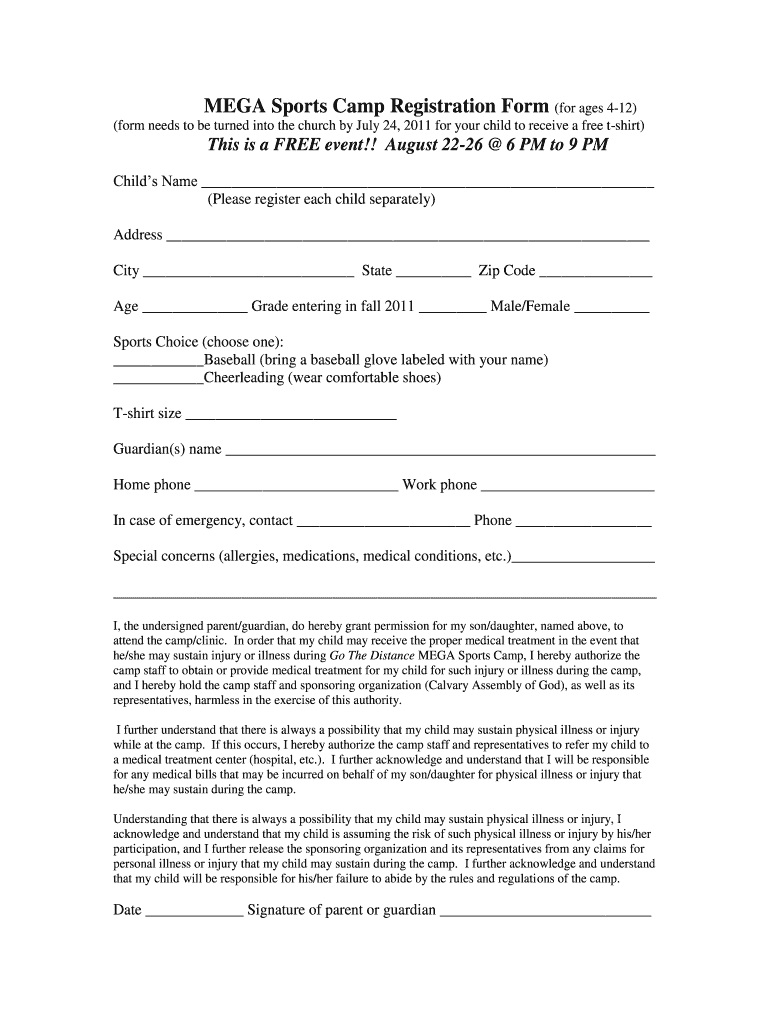
The MEGA Sports Camp Registration Form for Ages 4 12 is a specialized document designed for parents and guardians to enroll their children in a sports camp tailored for young participants. This form captures essential information about the child, including personal details, emergency contacts, and medical history. The registration process ensures that the camp can provide a safe and enjoyable environment for all attendees. By completing this form, parents affirm their commitment to the camp's policies and guidelines, facilitating a smooth registration experience.
Steps to complete the MEGA Sports Camp Registration Form for Ages 4 12
Completing the MEGA Sports Camp Registration Form for Ages 4 12 involves several straightforward steps. First, gather all necessary information, including your child's name, age, and any relevant medical information. Next, fill out the form with accurate details, ensuring that all sections are completed. Review the form for any errors or omissions before submission. Finally, sign the form electronically to confirm your consent and understanding of the camp's policies. This process can typically be done online, providing convenience and efficiency.
Legal use of the MEGA Sports Camp Registration Form for Ages 4 12
The legal use of the MEGA Sports Camp Registration Form for Ages 4 12 hinges on compliance with eSignature laws, such as the ESIGN Act and UETA. These regulations ensure that electronic signatures are recognized as valid and enforceable. When using an electronic platform to complete the form, it is important to utilize a service that provides a secure signing process, including features like identity verification and audit trails. This legal framework protects both the camp and the registrants, ensuring that all parties are held accountable.
Key elements of the MEGA Sports Camp Registration Form for Ages 4 12
Key elements of the MEGA Sports Camp Registration Form for Ages 4 12 include the child's personal information, parent or guardian contact details, and emergency contact information. Additionally, the form often requires medical history, including allergies and any special needs, to ensure the safety and well-being of all participants. Terms and conditions related to liability and consent for medical treatment are also typically included, making it essential for parents to read and understand these sections thoroughly before signing.
How to use the MEGA Sports Camp Registration Form for Ages 4 12
Using the MEGA Sports Camp Registration Form for Ages 4 12 is a simple process that can be completed online. Begin by accessing the form through the designated platform. Fill in the required fields with accurate information about your child and yourself. Ensure that you provide any necessary medical details and emergency contacts. Once completed, review the form for accuracy, and submit it electronically. This method not only saves time but also ensures that your registration is processed quickly and securely.
How to obtain the MEGA Sports Camp Registration Form for Ages 4 12
The MEGA Sports Camp Registration Form for Ages 4 12 can typically be obtained through the official camp website or by contacting the camp directly. Many organizations offer downloadable forms that can be filled out electronically. Alternatively, some camps may provide a digital version of the form that can be completed online. It is advisable to check for any specific deadlines for registration to ensure that you secure a spot for your child in the camp.
Quick guide on how to complete mega sports camp registration form for ages 4 12
Effortlessly prepare MEGA Sports Camp Registration Form for Ages 4 12 on any device
Digital document management has gained traction among enterprises and individuals. It serves as an ideal eco-friendly substitute for traditional printed and signed documents, allowing you to locate the appropriate form and securely keep it online. airSlate SignNow provides you with all the tools necessary to create, modify, and electronically sign your documents swiftly and without interruptions. Manage MEGA Sports Camp Registration Form for Ages 4 12 on any platform with airSlate SignNow's Android or iOS applications and simplify any document-related task today.
How to modify and electronically sign MEGA Sports Camp Registration Form for Ages 4 12 without difficulty
- Locate MEGA Sports Camp Registration Form for Ages 4 12 and click on Get Form to initiate.
- Utilize the tools we provide to complete your document.
- Emphasize key sections of your documents or obscure sensitive information using tools specifically provided by airSlate SignNow for that purpose.
- Create your signature with the Sign tool, which takes mere seconds and holds the same legal significance as a conventional wet ink signature.
- Review all information and click on the Done button to store your edits.
- Choose your preferred method of delivering your form, whether by email, SMS, invite link, or download it to your computer.
Eliminate concerns about lost or misfiled documents, time-consuming form searching, or errors that necessitate printing new copies of documents. airSlate SignNow addresses all your document management needs in just a few clicks from any device you prefer. Modify and electronically sign MEGA Sports Camp Registration Form for Ages 4 12 to ensure excellent communication throughout your form preparation process with airSlate SignNow.
Create this form in 5 minutes or less
Find and fill out the correct mega sports camp registration form for ages 4 12
Create this form in 5 minutes!
How to create an eSignature for the mega sports camp registration form for ages 4 12
How to generate an eSignature for your PDF online
How to generate an eSignature for your PDF in Google Chrome
How to generate an electronic signature for signing PDFs in Gmail
The best way to make an eSignature straight from your smartphone
The best way to create an electronic signature for a PDF on iOS
The best way to make an eSignature for a PDF document on Android
People also ask
-
What is the MEGA Sports Camp Registration Form for Ages 4 12?
The MEGA Sports Camp Registration Form for Ages 4 12 is a streamlined digital form designed to efficiently collect registration details for sports camps catering to children aged 4 to 12. This form simplifies the registration process for parents and guardians, ensuring that all necessary information is gathered quickly and securely.
-
How can I access the MEGA Sports Camp Registration Form for Ages 4 12?
You can easily access the MEGA Sports Camp Registration Form for Ages 4 12 through our airSlate SignNow platform. Simply create an account, and you can customize the form according to your camp's specific requirements, making the registration process seamless for your attendees.
-
What are the pricing options for the MEGA Sports Camp Registration Form for Ages 4 12?
The pricing for the MEGA Sports Camp Registration Form for Ages 4 12 varies based on the features and integrations you choose. Our platform offers flexible pricing plans that cater to different needs, ensuring that you can find a cost-effective solution that fits your budget while providing all necessary functionalities.
-
What features does the MEGA Sports Camp Registration Form for Ages 4 12 include?
The MEGA Sports Camp Registration Form for Ages 4 12 includes various features such as customizable fields, eSignature capabilities, and automatic notifications. These features enhance the registration experience by making it user-friendly and efficient for both organizers and parents.
-
How does the MEGA Sports Camp Registration Form for Ages 4 12 benefit my organization?
Utilizing the MEGA Sports Camp Registration Form for Ages 4 12 can signNowly benefit your organization by streamlining the registration process and reducing administrative workload. It allows for easy data collection, management, and tracking, ultimately improving the overall efficiency of your camp operations.
-
Can the MEGA Sports Camp Registration Form for Ages 4 12 be integrated with other software?
Yes, the MEGA Sports Camp Registration Form for Ages 4 12 can be easily integrated with various software applications, including payment processors and CRM systems. This flexibility allows you to manage registrations and payments seamlessly, enhancing your operational efficiency.
-
Is the MEGA Sports Camp Registration Form for Ages 4 12 mobile-friendly?
Absolutely! The MEGA Sports Camp Registration Form for Ages 4 12 is designed to be mobile-friendly, ensuring that parents can easily complete registrations from their smartphones or tablets. This feature increases accessibility and convenience for your users, making it easier for them to sign up their children.
Get more for MEGA Sports Camp Registration Form for Ages 4 12
Find out other MEGA Sports Camp Registration Form for Ages 4 12
- How Do I Electronic signature Iowa Construction Document
- How Can I Electronic signature South Carolina Charity PDF
- How Can I Electronic signature Oklahoma Doctors Document
- How Can I Electronic signature Alabama Finance & Tax Accounting Document
- How To Electronic signature Delaware Government Document
- Help Me With Electronic signature Indiana Education PDF
- How To Electronic signature Connecticut Government Document
- How To Electronic signature Georgia Government PDF
- Can I Electronic signature Iowa Education Form
- How To Electronic signature Idaho Government Presentation
- Help Me With Electronic signature Hawaii Finance & Tax Accounting Document
- How Can I Electronic signature Indiana Government PDF
- How Can I Electronic signature Illinois Finance & Tax Accounting PPT
- How To Electronic signature Maine Government Document
- How To Electronic signature Louisiana Education Presentation
- How Can I Electronic signature Massachusetts Government PDF
- How Do I Electronic signature Montana Government Document
- Help Me With Electronic signature Louisiana Finance & Tax Accounting Word
- How To Electronic signature Pennsylvania Government Document
- Can I Electronic signature Texas Government PPT