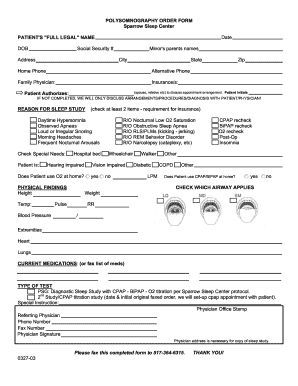
Sleep Center Order Form


What is the Sleep Center Order Form
The Sleep Center Order Form is a specialized document used to initiate a sleep polysomnography study. This form is essential for healthcare providers to gather necessary information about a patient’s sleep patterns and medical history. It typically includes sections for patient identification, insurance details, and specific symptoms or concerns related to sleep. The completion of this form allows sleep specialists to assess the need for further diagnostic testing and treatment options.
Steps to complete the Sleep Center Order Form
Completing the Sleep Center Order Form involves several key steps to ensure accuracy and compliance. First, gather all relevant patient information, including full name, date of birth, and contact details. Next, provide insurance information, if applicable, to facilitate billing. It is important to detail any sleep-related symptoms, such as insomnia, snoring, or excessive daytime sleepiness. Finally, review the form for completeness and accuracy before submission to ensure that all necessary information is included for the healthcare provider's review.
Legal use of the Sleep Center Order Form
The legal use of the Sleep Center Order Form is governed by various healthcare regulations. It is crucial that the form is completed accurately to comply with HIPAA regulations, which protect patient privacy. Additionally, the form must be signed by a qualified healthcare provider to validate the request for a sleep study. This ensures that the order is legitimate and that the patient receives appropriate care based on their specific needs.
Key elements of the Sleep Center Order Form
Key elements of the Sleep Center Order Form include patient demographics, medical history, and specific sleep-related symptoms. The form should also contain a section for the referring physician's information, including their signature and date. This information is vital for the sleep center to understand the patient's background and the context of the referral. Additionally, any previous sleep studies or treatments should be noted to provide a comprehensive view of the patient's sleep health.
How to use the Sleep Center Order Form
Using the Sleep Center Order Form effectively involves understanding its purpose and the information required. After filling out the form, it should be submitted to the appropriate sleep center, either electronically or via mail. It is advisable to keep a copy for personal records. If submitting electronically, ensure that the digital format is secure and complies with eSignature regulations to maintain the document's legal standing.
Examples of using the Sleep Center Order Form
Examples of using the Sleep Center Order Form can vary based on patient needs. For instance, a primary care physician may complete the form for a patient experiencing chronic insomnia, detailing their symptoms and medical history. Another example includes a referral from a pulmonologist for a patient with suspected sleep apnea. In both cases, the form serves as a crucial communication tool between healthcare providers and sleep specialists, facilitating timely and appropriate care.
Quick guide on how to complete sleep center order form
Effortlessly manage Sleep Center Order Form on any device
Digital document management has become increasingly favored by businesses and individuals alike. It offers an ideal eco-friendly alternative to traditional printed and signed documents, allowing you to locate the correct form and securely keep it online. airSlate SignNow provides all the necessary tools to create, modify, and electronically sign your documents swiftly without delays. Manage Sleep Center Order Form on any platform with airSlate SignNow's Android or iOS applications and enhance your document-centric processes today.
Steps to modify and electronically sign Sleep Center Order Form with ease
- Locate Sleep Center Order Form and click Get Form to begin.
- Use the features we offer to fill out your form.
- Emphasize pertinent sections of the documents or redact sensitive information with tools specifically designed for that purpose by airSlate SignNow.
- Create your electronic signature using the Sign tool, which is quick and carries the same legal validity as a traditional ink signature.
- Review all the details and click on the Done button to save your modifications.
- Choose how you want to send your form: via email, SMS, or invite link, or download it to your computer.
No more worrying about lost or misplaced documents, tedious searches for forms, or errors that necessitate printing new copies. airSlate SignNow fulfills all your document management needs in just a few clicks from any device of your choice. Modify and electronically sign Sleep Center Order Form to ensure outstanding communication at every stage of the form preparation process with airSlate SignNow.
Create this form in 5 minutes or less
Create this form in 5 minutes!
How to create an eSignature for the sleep center order form
The best way to make an electronic signature for a PDF document in the online mode
The best way to make an electronic signature for a PDF document in Chrome
The best way to generate an eSignature for putting it on PDFs in Gmail
How to create an electronic signature straight from your mobile device
How to generate an eSignature for a PDF document on iOS devices
How to create an electronic signature for a PDF document on Android devices
People also ask
-
What is sleep polysomnography and how does it work?
Sleep polysomnography is a comprehensive sleep study that records brain waves, oxygen levels, heart rate, and breathing, as well as eye and leg movements. This data helps diagnose sleep disorders such as sleep apnea or insomnia. Understanding these metrics is crucial for developing effective treatment plans.
-
What are the benefits of undergoing sleep polysomnography?
Undergoing sleep polysomnography can help identify sleep issues, leading to targeted treatment options that improve sleep quality. It can also provide insights into overall health and well-being. Accurate diagnosis through sleep polysomnography can signNowly enhance daily functioning and quality of life.
-
How much does a sleep polysomnography test cost?
The cost of a sleep polysomnography test can vary widely depending on the facility, location, and insurance coverage. Typically, prices range from $600 to over $2,000. It's advisable to check with your insurance provider for potential coverage to help manage expenses related to sleep polysomnography.
-
What do I need to prepare for a sleep polysomnography?
Preparation for sleep polysomnography usually includes avoiding caffeine and certain medications prior to the test. You'll also be advised on specific routines to ensure accurate results. Discussing any concerns with your healthcare provider before the test is essential for a smooth process.
-
Are there any risks associated with sleep polysomnography?
Sleep polysomnography is generally safe with minimal risks involved, as it is non-invasive. Some patients may experience discomfort from the electrodes attached to the skin. It’s important to express any concerns during the initial consultation to ensure reassurance and comfort during the procedure.
-
Can sleep polysomnography be done at home?
Yes, certain portable sleep monitoring devices allow for sleep polysomnography to be conducted at home. However, these at-home tests may not capture all the data a lab test would. Consulting with a healthcare provider can help determine if a home test is appropriate for your situation.
-
How can sleep polysomnography help with sleep disorders?
Sleep polysomnography provides a detailed analysis of sleep stages and disturbances, aiding in the diagnosis of conditions like sleep apnea and narcolepsy. This tailored information is crucial for creating effective treatment plans. By understanding the specifics of your sleep patterns, you can achieve better sleep health.
Get more for Sleep Center Order Form
Find out other Sleep Center Order Form
- Can I Electronic signature Delaware Stock Certificate
- Electronic signature Massachusetts Stock Certificate Simple
- eSignature West Virginia Sale of Shares Agreement Later
- Electronic signature Kentucky Affidavit of Service Mobile
- How To Electronic signature Connecticut Affidavit of Identity
- Can I Electronic signature Florida Affidavit of Title
- How Can I Electronic signature Ohio Affidavit of Service
- Can I Electronic signature New Jersey Affidavit of Identity
- How Can I Electronic signature Rhode Island Affidavit of Service
- Electronic signature Tennessee Affidavit of Service Myself
- Electronic signature Indiana Cease and Desist Letter Free
- Electronic signature Arkansas Hold Harmless (Indemnity) Agreement Fast
- Electronic signature Kentucky Hold Harmless (Indemnity) Agreement Online
- How To Electronic signature Arkansas End User License Agreement (EULA)
- Help Me With Electronic signature Connecticut End User License Agreement (EULA)
- Electronic signature Massachusetts Hold Harmless (Indemnity) Agreement Myself
- Electronic signature Oklahoma Hold Harmless (Indemnity) Agreement Free
- Electronic signature Rhode Island Hold Harmless (Indemnity) Agreement Myself
- Electronic signature California Toll Manufacturing Agreement Now
- How Do I Electronic signature Kansas Toll Manufacturing Agreement