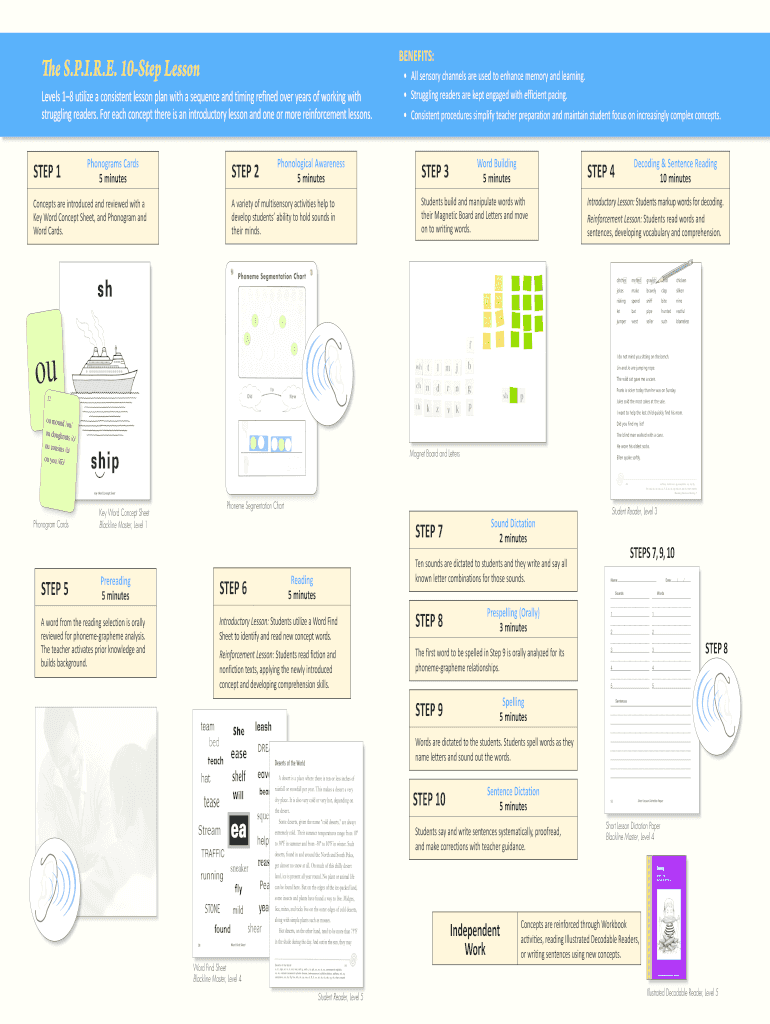
Spire Lesson Plan Template Form


What is the Spire Lesson Plan Template
The Spire Lesson Plan Template is a structured framework designed to assist educators in planning and delivering effective lessons. This template aligns with the Spire curriculum, which focuses on systematic and explicit instruction in literacy. It includes sections for objectives, materials, activities, assessments, and differentiation strategies, ensuring that all aspects of lesson delivery are considered. The template is particularly useful for teachers implementing the Spire approach, as it promotes consistency and clarity in lesson planning.
How to use the Spire Lesson Plan Template
Using the Spire Lesson Plan Template involves several straightforward steps. First, educators should identify the lesson objectives based on the curriculum standards. Next, fill in the materials needed for the lesson, which may include textbooks, digital resources, and manipulatives. Following this, outline the instructional activities, detailing the steps for teaching the lesson. Assessments should be included to evaluate student understanding, and finally, consider any necessary accommodations or modifications to support diverse learners.
Key elements of the Spire Lesson Plan Template
Key elements of the Spire Lesson Plan Template include:
- Objectives: Clear learning goals that align with curriculum standards.
- Materials: A comprehensive list of resources required for the lesson.
- Activities: Step-by-step instructions for teaching the lesson, including interactive components.
- Assessments: Methods to measure student understanding and progress.
- Differentiation: Strategies to accommodate various learning needs within the classroom.
Steps to complete the Spire Lesson Plan Template
Completing the Spire Lesson Plan Template involves a systematic approach:
- Define the lesson objectives based on student needs and curriculum goals.
- Gather and list all materials necessary for the lesson.
- Outline the instructional activities, ensuring they are engaging and interactive.
- Develop assessment tools to evaluate student learning outcomes.
- Incorporate differentiation strategies to meet the needs of all learners.
Legal use of the Spire Lesson Plan Template
The legal use of the Spire Lesson Plan Template ensures that educators adhere to copyright and educational standards. It is essential to use the template in a manner that respects intellectual property rights, particularly when incorporating third-party materials. Additionally, the template should be utilized in compliance with district guidelines and state education regulations, ensuring that all lesson plans are appropriate and effective for classroom use.
Examples of using the Spire Lesson Plan Template
Examples of using the Spire Lesson Plan Template can enhance understanding of its application. For instance, a lesson on phonics may include objectives focused on decoding skills, materials such as letter cards, and activities that involve interactive games. Similarly, a lesson on comprehension could incorporate reading passages, discussion questions, and assessments that evaluate students' ability to summarize texts. These examples illustrate the versatility of the template across various subjects and grade levels.
Quick guide on how to complete spire reading lesson plan template form
Complete Spire Lesson Plan Template effortlessly on any device
Online document management has gained traction among businesses and individuals alike. It offers an ideal eco-friendly substitute to traditional printed and signed documents, as you can easily locate the appropriate form and securely save it online. airSlate SignNow equips you with all the necessary tools to create, modify, and eSign your documents swiftly without delays. Manage Spire Lesson Plan Template on any device using the airSlate SignNow Android or iOS applications and enhance any document-related process today.
How to modify and eSign Spire Lesson Plan Template without difficulty
- Obtain Spire Lesson Plan Template and click on Get Form to begin.
- Utilize the tools we provide to complete your form.
- Emphasize important sections of the documents or conceal sensitive information with tools that airSlate SignNow specifically offers for that purpose.
- Create your eSignature with the Sign feature, which takes mere seconds and carries the same legal validity as a conventional wet ink signature.
- Review the details and click on the Done button to save your changes.
- Select your preferred method of sending your form, whether by email, text message (SMS), invite link, or download it to your computer.
Eliminate concerns about lost or misplaced documents, time-consuming form searches, or mistakes that necessitate new copies. airSlate SignNow meets your document management needs in just a few clicks from any device of your choice. Alter and eSign Spire Lesson Plan Template and ensure seamless communication at any stage of the form preparation process with airSlate SignNow.
Create this form in 5 minutes or less
FAQs
-
As a business owner, what online/offline templates would you benefit from having (e.g. a template to fill out and send invoices, business plan templates, etc.)?
One awesome highlight of ZipBooks’ invoice templates is that you can save default settings like your notes and payment terms for your invoices once you nail down the details of what exactly should be on your invoice. Using ZipBooks for your invoice means never sending off an invoice without your own company information on it (oops!). They actually score your invoice based on what information you include and so you'll be able to leverage the data we've collected from tens of thousands of invoices on what things are important to get you paid faster.Here are a couple tips on things that you will get you paid faster and should definitely be included on your invoice:Company logo: This is part of the invoice template that we provide for you. You'll save a company logo under company settings and you'll never have to think about whether your invoice template header looks good again.Notes: Thanking a customer for their business will always make you stand out in a crowd and leverages the psychological principle of reciprocity so that you get paid faster. Lots of studies show that including a thank you note gets you paid faster. I think that would especially be true when someone is getting a big bill for legal services.Invoice payment terms: Another great free feature of ZipBooks invoice templates for legal services (and anyone else who used our invoice templates for that matter) is that when you put terms into an invoice, we automatically detected it and set a due date for you. If you don't set terms, we assume that the invoice will be due in 14 days. This is the due date that we use to drive the late payment reminder and to display the number of days that a invoice has been outstanding in the AR aging report. If you don't want to set the invoice payment terms every time, you can set it up once under Account Preferences in the ZipBooks app. Pretty neat, right?Customer information: This one might seem pretty straightforward but it should always be on the list of "must haves" when thinking about what you should put on your invoice.Detailed description of bill: ZipBooks' invoice template lends itself to the ability to show a detailed account of everything that you have charged since you last sent an invoice. You can do that by manually entering the invoice details or you can use the time tracker to automatically pull in billable activity once you are ready to send the next invoice for your legal services.
-
I have a class lesson assessment form that I need to have filled out for 75 lessons. The form will be exactly the same except for the course number. How would you do this?
Another way would be to use the option of getting pre-filled answers with the course numbers entered. A custom URL is created and the form would collect the answers for all of the courses in the same spreadsheet. Not sure if that creates another problem for you, but you could sort OR filter the sheet once all the forms had been submitted. This is what the URL would look like for a Text Box https://docs.google.com/forms/d/1Ia6-paRijdUOn8U2L2H0bF1yujktcqgDsdBJQy2yO30/viewform?entry.14965048=COURSE+NUMBER+75 The nice thing about this is you can just change the part of the URL that Contains "COURSE+NUMBER+75" to a different number...SO for course number 1 it would be https://docs.google.com/forms/d/1Ia6-paRijdUOn8U2L2H0bF1yujktcqgDsdBJQy2yO30/viewform?entry.14965048=COURSE+NUMBER+1This is what the URL would look like for a Text Box radio button, same concept. https://docs.google.com/forms/d/1Ia6-paRijdUOn8U2L2H0bF1yujktcqgDsdBJQy2yO30/viewform?entry.14965048&entry.1934317001=Option+1 OR https://docs.google.com/forms/d/1Ia6-paRijdUOn8U2L2H0bF1yujktcqgDsdBJQy2yO30/viewform?entry.14965048&entry.1934317001=Option+6The Google Doc would look like this Quora pre-filled form I'm not sure if this helps at all or makes too complicated and prone to mistakes.
-
How can I fill out Google's intern host matching form to optimize my chances of receiving a match?
I was selected for a summer internship 2016.I tried to be very open while filling the preference form: I choose many products as my favorite products and I said I'm open about the team I want to join.I even was very open in the location and start date to get host matching interviews (I negotiated the start date in the interview until both me and my host were happy.) You could ask your recruiter to review your form (there are very cool and could help you a lot since they have a bigger experience).Do a search on the potential team.Before the interviews, try to find smart question that you are going to ask for the potential host (do a search on the team to find nice and deep questions to impress your host). Prepare well your resume.You are very likely not going to get algorithm/data structure questions like in the first round. It's going to be just some friendly chat if you are lucky. If your potential team is working on something like machine learning, expect that they are going to ask you questions about machine learning, courses related to machine learning you have and relevant experience (projects, internship). Of course you have to study that before the interview. Take as long time as you need if you feel rusty. It takes some time to get ready for the host matching (it's less than the technical interview) but it's worth it of course.
-
I started teaching piano lessons this year, how do I pay quarterly taxes in California? What form should I fill out?
Go to https://www.irs.gov/pub/irs-pdf/... You will file a form 1040ES each quarter. The website will tell you the due dates for each quarterly payment. Get a similar form from your state tax board website if you pay state taxes.Note: If this is your first year filing, ever, then you can get away without sending in estimated payments because you owe the LESSER of what you owe this year or last year. Having been self-employed most of my life, I always filed quarterly estimated taxes, using the amount I had owed the year before, because I had to to avoid fines, and because I didn't want to get to April of the next year and not have the money. As for the amount you should pay to the IRS and your state, you might be able to figure this out using worksheets available on the IRS and state websites. If you chose to deal in cash and not report it, that's your business. Your students are not going to send you a 1099 at the end of the year. But if you teach at an institution which pays you more than a few thousand dollars a year, they WILL file a 1099 stating how much they paid you in miscellaneous income, with the IRS and state.
-
How do I fill out the form of DU CIC? I couldn't find the link to fill out the form.
Just register on the admission portal and during registration you will get an option for the entrance based course. Just register there. There is no separate form for DU CIC.
-
How do you know if you need to fill out a 1099 form?
Assuming that you are talking about 1099-MISC. Note that there are other 1099s.check this post - Form 1099 MISC Rules & RegulationsQuick answer - A Form 1099 MISC must be filed for each person to whom payment is made of:$600 or more for services performed for a trade or business by people not treated as employees;Rent or prizes and awards that are not for service ($600 or more) and royalties ($10 or more);any fishing boat proceeds,gross proceeds of $600, or more paid to an attorney during the year, orWithheld any federal income tax under the backup withholding rules regardless of the amount of the payment, etc.
Create this form in 5 minutes!
How to create an eSignature for the spire reading lesson plan template form
How to create an electronic signature for the Spire Reading Lesson Plan Template Form online
How to make an eSignature for your Spire Reading Lesson Plan Template Form in Google Chrome
How to make an eSignature for putting it on the Spire Reading Lesson Plan Template Form in Gmail
How to create an eSignature for the Spire Reading Lesson Plan Template Form straight from your mobile device
How to create an eSignature for the Spire Reading Lesson Plan Template Form on iOS devices
How to generate an electronic signature for the Spire Reading Lesson Plan Template Form on Android
People also ask
-
What is the Spire Lesson Plan Template?
The Spire Lesson Plan Template is a customizable tool designed for educators to create structured lesson plans effortlessly. This template includes sections for objectives, materials, activities, and assessments, making it easier to organize your teaching strategy. With the Spire Lesson Plan Template, you can streamline your planning process and enhance your teaching effectiveness.
-
How can I access the Spire Lesson Plan Template?
You can access the Spire Lesson Plan Template through the airSlate SignNow platform by signing up for an account. Once logged in, simply navigate to the templates section where you can find and customize the Spire Lesson Plan Template to suit your specific needs. It's quick and easy to get started!
-
Is the Spire Lesson Plan Template free to use?
While the Spire Lesson Plan Template is included in the airSlate SignNow subscription, pricing may vary based on the plan you choose. We offer competitive pricing that provides access to a range of templates and features. Explore our pricing page to find the best option for your educational needs.
-
What features does the Spire Lesson Plan Template offer?
The Spire Lesson Plan Template includes features such as editable sections, collaboration tools, and easy sharing options. These features allow teachers to adapt the template to their curriculum and collaborate with colleagues seamlessly. With the Spire Lesson Plan Template, planning lessons becomes more efficient and organized.
-
Can I integrate the Spire Lesson Plan Template with other tools?
Yes, the Spire Lesson Plan Template can be integrated with various educational tools and platforms. This compatibility allows users to sync their lesson plans with calendars, learning management systems, and other applications. By integrating the Spire Lesson Plan Template, you can enhance your workflow and collaboration.
-
What are the benefits of using the Spire Lesson Plan Template?
Using the Spire Lesson Plan Template helps educators save time and maintain consistency in lesson planning. It promotes a structured approach to teaching that can improve student engagement and understanding. Additionally, the template's collaborative features foster teamwork among educators.
-
How do I customize the Spire Lesson Plan Template?
Customizing the Spire Lesson Plan Template is straightforward with airSlate SignNow’s user-friendly interface. Simply select the template, and you can edit text, add images, and modify sections according to your lesson requirements. This flexibility allows you to create a lesson plan that truly reflects your teaching style.
Get more for Spire Lesson Plan Template
- Jv 060 s juvenile court information for parents california courts courts ca
- Courts ca 6967826 form
- Ea 200 2012 form
- Sv 120 response to petition for private postsecondary school courts ca form
- Dv 800 2014 form
- Jv 250 s notice of hearing and temporary restraining orderjuvenile spanish judicial council forms courts ca
- Cr 110 2015 form
- Cr 126 fillable 2015 form
Find out other Spire Lesson Plan Template
- How Do I Sign Connecticut Real Estate Operating Agreement
- Sign Delaware Real Estate Quitclaim Deed Secure
- Sign Georgia Real Estate Business Plan Template Computer
- Sign Georgia Real Estate Last Will And Testament Computer
- How To Sign Georgia Real Estate LLC Operating Agreement
- Sign Georgia Real Estate Residential Lease Agreement Simple
- Sign Colorado Sports Lease Agreement Form Simple
- How To Sign Iowa Real Estate LLC Operating Agreement
- Sign Iowa Real Estate Quitclaim Deed Free
- How To Sign Iowa Real Estate Quitclaim Deed
- Sign Mississippi Orthodontists LLC Operating Agreement Safe
- Sign Delaware Sports Letter Of Intent Online
- How Can I Sign Kansas Real Estate Job Offer
- Sign Florida Sports Arbitration Agreement Secure
- How Can I Sign Kansas Real Estate Residential Lease Agreement
- Sign Hawaii Sports LLC Operating Agreement Free
- Sign Georgia Sports Lease Termination Letter Safe
- Sign Kentucky Real Estate Warranty Deed Myself
- Sign Louisiana Real Estate LLC Operating Agreement Myself
- Help Me With Sign Louisiana Real Estate Quitclaim Deed