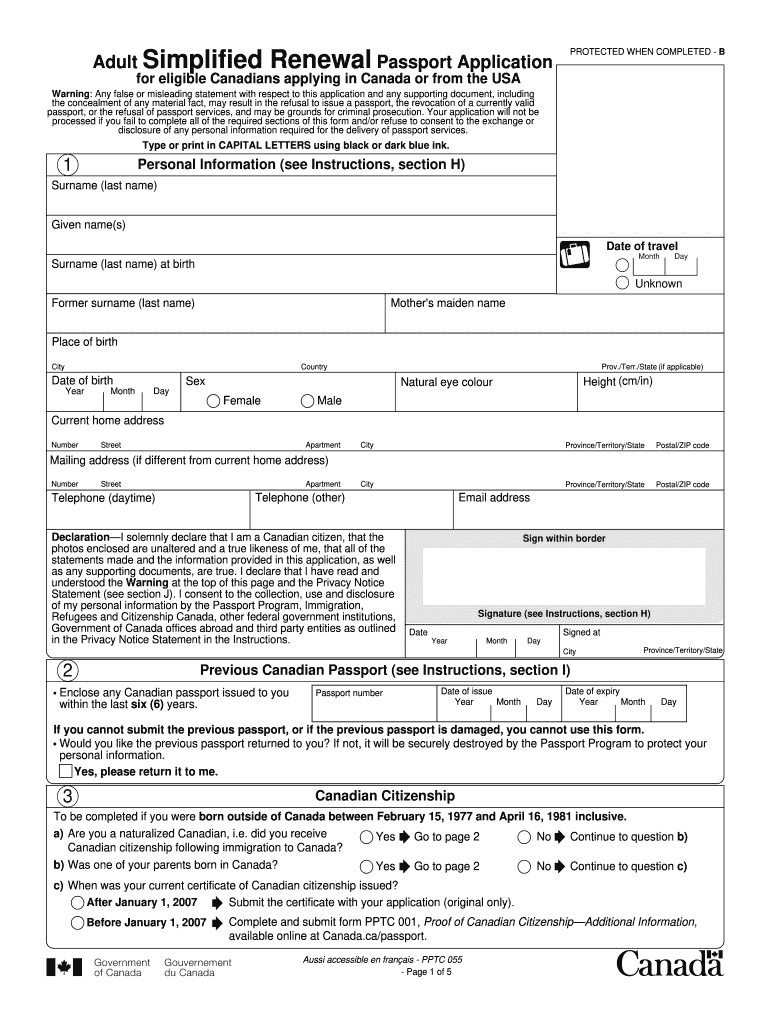
Passport Renewal Form Canada 2015


What is the Passport Renewal Form Canada
The Passport Renewal Form Canada is an official document used by Canadian citizens to apply for a new passport when their existing one is about to expire or has already expired. This form is specifically designed for individuals who are at least sixteen years old and meet certain eligibility criteria. It is important to note that the form can be completed electronically, allowing applicants in the United States to submit their applications without needing to visit a Canadian consulate or embassy in person.
Eligibility Criteria
To be eligible for passport renewal using the Passport Renewal Form Canada, applicants must meet several requirements:
- Be a Canadian citizen.
- Be at least sixteen years old at the time of application.
- Possess a previous passport that is not damaged, lost, or stolen.
- Have received the previous passport when they were sixteen or older.
- Ensure that the previous passport was issued within the last fifteen years and contains the same name, sex, date, and place of birth.
Steps to Complete the Passport Renewal Form Canada
Filling out the Passport Renewal Form Canada involves several key steps to ensure accuracy and compliance:
- Access the form through the official government website or a trusted source.
- Fill in personal information, including your current name, birth date, and contact details.
- Provide details from your previous passport, such as the passport number and its issue and expiration dates.
- Include any changes to your personal information, if applicable, and ensure that your application is signed and dated.
Required Documents
Along with the completed Passport Renewal Form Canada, applicants must submit several supporting documents:
- A recent passport-sized photograph that meets official specifications.
- The previous passport, unless it was lost or stolen (in which case, a police report may be required).
- Proof of identity, which may include a driver's license or another government-issued ID.
Form Submission Methods
Applicants can submit the completed Passport Renewal Form Canada through various methods, depending on their location:
- By Mail: Send the completed form and supporting documents to the appropriate address provided on the form.
- In Person: Visit a local Canadian consulate or embassy if you require immediate assistance or have specific questions.
How to Obtain the Passport Renewal Form Canada
The Passport Renewal Form Canada can be obtained through multiple channels:
- Download the form from the official Government of Canada website.
- Request a physical copy from a Canadian consulate or embassy.
- Access the form through trusted online platforms that provide government forms.
Quick guide on how to complete passport renewal form canada
A concise manual on how to create your Passport Renewal Form Canada
Locating the right template can be difficult when you need to provide official international documentation. Even if you possess the required form, it might be tedious to swiftly fill it out in accordance with all the specifications if you are using physical copies instead of handling everything digitally. airSlate SignNow is the web-based eSignature platform that enables you to navigate through these challenges. It permits you to obtain your Passport Renewal Form Canada and promptly complete and sign it on-site without the need to reprint documents whenever an error occurs.
Follow these steps to prepare your Passport Renewal Form Canada with airSlate SignNow:
- Click the Get Form button to upload your document to our editor without delay.
- Begin with the first blank field, enter your information, and proceed using the Next feature.
- Fill in the empty fields with the Cross and Check tools available in the upper toolbar.
- Choose the Highlight or Line options to emphasize the most important details.
- Click on Image and upload one if your Passport Renewal Form Canada necessitates it.
- Make use of the pane on the right side to add additional fields for you or others to complete if required.
- Review your inputs and confirm the template by selecting Date, Initials, and Sign.
- Draw, type, upload your eSignature, or capture it using a camera or QR code.
- Conclude your modifications to the form by hitting the Done button and selecting your file-sharing preferences.
Once your Passport Renewal Form Canada is ready, you can share it however you wish - send it via email, SMS, fax, or even print it directly from the editor. You can also securely keep all your completed documents in your account, organized into folders according to your preferences. Don’t spend time on outdated document completion methods; try airSlate SignNow!
Create this form in 5 minutes or less
Find and fill out the correct passport renewal form canada
FAQs
-
How do I fill out an Indian passport form online?
You need to be careful while filling up the Passport form online. If is better if you download the Passport form and fill it up offline. You can upload the form again after you completely fill it up. You can check the complete procedure to know : How to Apply for Indian Passport Online ?
-
How can a government employee apply to renew his passport? Which form to fill in for department permission?
Write an application to your Head of Department seeking permission to renew his or her passport no …….!This current passport expires on dd-mm-yyyy.Kindly grant permission to renew!This letter must be received by office with seal & sign of receivers!thanking you
-
How do I fill out the Annexure B form for a passport?
Specimen Annexure-B can be seen at the following link -http://passportindia.gov.in/AppO...It can be seen that following data has to be filled in the form -Date of Birth ………………………………..Place of Birth ………………………………..Educational Qualification ………………………………..Profession (Govt./Private Service/Others) ………………………………..Permanent Address .………………………………..Present Address …………………………………Thus filling the form is not a problem as the applicants must know the above mentioned particulars.The real issue lies in getting it signed by the authorities who are authorized to issue the same as listed in the format.
-
My passport is expiring next year in November? But can I fill the form for renewal this month?
Generally, renewal form can be submitted 12 months before expiry or 6 months after expiry
Create this form in 5 minutes!
How to create an eSignature for the passport renewal form canada
How to generate an electronic signature for the Passport Renewal Form Canada in the online mode
How to create an eSignature for your Passport Renewal Form Canada in Chrome
How to create an electronic signature for signing the Passport Renewal Form Canada in Gmail
How to create an electronic signature for the Passport Renewal Form Canada right from your smart phone
How to create an eSignature for the Passport Renewal Form Canada on iOS devices
How to create an electronic signature for the Passport Renewal Form Canada on Android devices
People also ask
-
What is the Passport Renewal Form Canada and why do I need it?
The Passport Renewal Form Canada is a document required for Canadian citizens to renew their passports. Completing this form is essential to ensure that your passport remains valid for international travel. With airSlate SignNow, you can easily fill out and eSign the Passport Renewal Form Canada, streamlining the process.
-
How can airSlate SignNow help with completing the Passport Renewal Form Canada?
airSlate SignNow provides an intuitive platform that allows users to fill out the Passport Renewal Form Canada digitally. Our easy-to-use interface and eSigning capabilities ensure that you can complete your form quickly and securely, reducing the hassle of paper forms.
-
Is there a cost associated with using airSlate SignNow for the Passport Renewal Form Canada?
Yes, airSlate SignNow offers a variety of pricing plans tailored to meet your needs. You can choose a plan that fits your budget and get access to features that simplify the process of completing the Passport Renewal Form Canada, making it a cost-effective solution.
-
What features does airSlate SignNow offer for the Passport Renewal Form Canada?
With airSlate SignNow, you benefit from features like online form filling, electronic signatures, and document templates specifically for the Passport Renewal Form Canada. These features enhance efficiency and ensure that your form is filled out correctly, saving you time and effort.
-
Can I save and edit my Passport Renewal Form Canada using airSlate SignNow?
Absolutely! airSlate SignNow allows you to save your progress while filling out the Passport Renewal Form Canada. You can return to your document at any time to make edits or updates before finalizing and signing it.
-
Are there integrations available for airSlate SignNow when working with the Passport Renewal Form Canada?
Yes, airSlate SignNow integrates seamlessly with various applications and services, making it easier to manage your Passport Renewal Form Canada alongside other documents. This integration enhances your workflow and allows for efficient document management.
-
Is the Passport Renewal Form Canada secure with airSlate SignNow?
Yes, airSlate SignNow prioritizes the security of your documents. The platform employs advanced encryption protocols, ensuring that your Passport Renewal Form Canada and personal information are protected throughout the submission process.
Get more for Passport Renewal Form Canada
Find out other Passport Renewal Form Canada
- How To Integrate Sign in Banking
- How To Use Sign in Banking
- Help Me With Use Sign in Banking
- Can I Use Sign in Banking
- How Do I Install Sign in Banking
- How To Add Sign in Banking
- How Do I Add Sign in Banking
- How Can I Add Sign in Banking
- Can I Add Sign in Banking
- Help Me With Set Up Sign in Government
- How To Integrate eSign in Banking
- How To Use eSign in Banking
- How To Install eSign in Banking
- How To Add eSign in Banking
- How To Set Up eSign in Banking
- How To Save eSign in Banking
- How To Implement eSign in Banking
- How To Set Up eSign in Construction
- How To Integrate eSign in Doctors
- How To Use eSign in Doctors