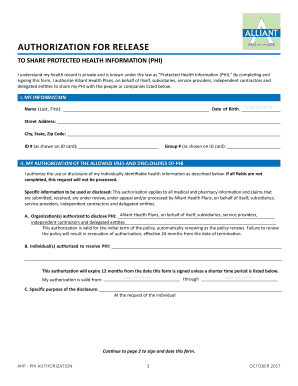
I Understand My Health Record is Private and is Known under the Law as Protected Health Information PHI 2017-2026


Understanding the Alliant Authorization Form
The Alliant Authorization Form is a crucial document that allows individuals to grant permission for specific actions regarding their accounts or services. This form is commonly used in financial institutions and healthcare settings, ensuring that sensitive information is handled appropriately. Understanding its purpose and the implications of signing this form is essential for anyone looking to manage their accounts effectively.
Steps to Complete the Alliant Authorization Form
Completing the Alliant Authorization Form involves several straightforward steps. First, gather all necessary personal information, including your account details and identification. Next, carefully read the instructions provided with the form to ensure compliance with all requirements. Fill out the form accurately, paying close attention to any sections that require signatures or additional documentation. Finally, review the completed form for accuracy before submitting it through the designated method, whether online, by mail, or in person.
Legal Use of the Alliant Authorization Form
The Alliant Authorization Form is legally binding once signed, meaning it grants the specified permissions outlined within. It is essential to understand that signing this form without fully comprehending its contents may lead to unintended consequences. The form must comply with relevant regulations, such as the Electronic Signatures in Global and National Commerce Act (ESIGN) and the Uniform Electronic Transactions Act (UETA), ensuring that electronic signatures are recognized in legal contexts.
Required Documents for the Alliant Authorization Form
When preparing to submit the Alliant Authorization Form, certain documents may be required to verify your identity and support your request. Commonly required documents include a government-issued photo ID, proof of address, and any relevant account statements. Ensure that all documents are current and legible to avoid delays in processing your request.
Form Submission Methods
The Alliant Authorization Form can typically be submitted through various methods, providing flexibility for users. Options may include online submission via a secure portal, mailing the completed form to the designated address, or delivering it in person at a local branch. Each method has its advantages, so choose the one that best fits your needs and timeline.
Eligibility Criteria for the Alliant Authorization Form
Eligibility to use the Alliant Authorization Form often depends on your relationship with the institution and the specific services you wish to access. Generally, account holders or authorized representatives can complete the form. It is advisable to check with the institution for any specific requirements or restrictions that may apply to your situation.
Quick guide on how to complete i understand my health record is private and is known under the law as protected health information phi
Complete I Understand My Health Record Is Private And Is Known Under The Law As Protected Health Information PHI effortlessly on any gadget
Web-based document management has become increasingly favored by businesses and individuals alike. It offers an ideal eco-friendly alternative to conventional printed and signed documentation, allowing you to locate the necessary form and securely preserve it online. airSlate SignNow equips you with all the resources you require to create, edit, and eSign your documents promptly without delays. Manage I Understand My Health Record Is Private And Is Known Under The Law As Protected Health Information PHI on any gadget using airSlate SignNow's Android or iOS applications and enhance any document-oriented process today.
How to edit and eSign I Understand My Health Record Is Private And Is Known Under The Law As Protected Health Information PHI with ease
- Find I Understand My Health Record Is Private And Is Known Under The Law As Protected Health Information PHI and then click Get Form to begin.
- Utilize the features we offer to complete your document.
- Emphasize signNow sections of your documents or conceal sensitive data with tools provided by airSlate SignNow specifically for that reason.
- Generate your signature using the Sign tool, which takes moments and has the same legal validity as a conventional wet ink signature.
- Verify the details and then click on the Done button to secure your modifications.
- Choose how you wish to send your form, whether by email, SMS, invitation link, or download it to your computer.
Eliminate worries about lost or disorganized documents, tiring form searches, or mistakes that necessitate printing new copies. airSlate SignNow meets your document management demands in just a few clicks from any device you select. Modify and eSign I Understand My Health Record Is Private And Is Known Under The Law As Protected Health Information PHI and ensure effective communication at every stage of the form preparation process with airSlate SignNow.
Create this form in 5 minutes or less
Create this form in 5 minutes!
How to create an eSignature for the i understand my health record is private and is known under the law as protected health information phi
The best way to generate an eSignature for your PDF document online
The best way to generate an eSignature for your PDF document in Google Chrome
How to make an electronic signature for signing PDFs in Gmail
How to create an electronic signature right from your smart phone
How to create an electronic signature for a PDF document on iOS
How to create an electronic signature for a PDF on Android OS
People also ask
-
What is airSlate SignNow and how does it protect my Health Record?
airSlate SignNow is an electronic signature platform that enables businesses to securely send and eSign documents, including sensitive health records. I understand my health record is private and is known under the law as Protected Health Information (PHI), and our platform complies with necessary regulations to ensure your data remains confidential and secure.
-
How does airSlate SignNow ensure compliance with PHI regulations?
airSlate SignNow adheres to strict compliance standards to protect your data, including HIPAA regulations. By stating, 'I understand my health record is private and is known under the law as Protected Health Information PHI,' users can be assured that our system is designed to keep your health information safe during electronic transactions.
-
What features does airSlate SignNow offer for handling PHI?
airSlate SignNow provides features specifically designed for handling Protected Health Information (PHI), such as secure document storage and encrypted communications. By using our platform, 'I understand my health record is private and is known under the law as Protected Health Information PHI,' which is crucial for maintaining confidentiality while facilitating necessary access.
-
Is airSlate SignNow affordable for small businesses managing PHI?
Yes, airSlate SignNow offers cost-effective pricing plans tailored for small businesses that need to manage Protected Health Information (PHI). We aim to provide a solution that allows businesses to state, 'I understand my health record is private and is known under the law as Protected Health Information PHI,' without breaking their budget.
-
Can I integrate airSlate SignNow with other software for managing health records?
Absolutely! airSlate SignNow integrates seamlessly with various business applications, making it easier to manage your health records while ensuring compliance. This means you can maintain the statement, 'I understand my health record is private and is known under the law as Protected Health Information PHI,' across all your tools.
-
What are the benefits of using airSlate SignNow for healthcare professionals?
Using airSlate SignNow allows healthcare professionals to streamline their document management processes while securing patient privacy. By affirming, 'I understand my health record is private and is known under the law as Protected Health Information PHI,' providers can confidently send and receive important documents electronically.
-
How does airSlate SignNow handle document security for PHI?
airSlate SignNow employs advanced security measures, including encryption and audit trails, to protect your documents containing Protected Health Information (PHI). Users can feel secure in stating, 'I understand my health record is private and is known under the law as Protected Health Information PHI,' when using our platform.
Get more for I Understand My Health Record Is Private And Is Known Under The Law As Protected Health Information PHI
- Amendment to prenuptial or premarital agreement connecticut form
- Financial statements only in connection with prenuptial premarital agreement connecticut form
- Revocation of premarital or prenuptial agreement connecticut form
- Ct uncontested form
- Notice of appearance 5th connecticut form
- Notice of appearance 6th connecticut form
- No fault agreed uncontested divorce package for dissolution of marriage for persons with no children with or without property 497300927 form
- Notice of appearance 7th connecticut form
Find out other I Understand My Health Record Is Private And Is Known Under The Law As Protected Health Information PHI
- How To Integrate Sign in Banking
- How To Use Sign in Banking
- Help Me With Use Sign in Banking
- Can I Use Sign in Banking
- How Do I Install Sign in Banking
- How To Add Sign in Banking
- How Do I Add Sign in Banking
- How Can I Add Sign in Banking
- Can I Add Sign in Banking
- Help Me With Set Up Sign in Government
- How To Integrate eSign in Banking
- How To Use eSign in Banking
- How To Install eSign in Banking
- How To Add eSign in Banking
- How To Set Up eSign in Banking
- How To Save eSign in Banking
- How To Implement eSign in Banking
- How To Set Up eSign in Construction
- How To Integrate eSign in Doctors
- How To Use eSign in Doctors