Additional Cardholder Form 2018-2026


What is the Additional Cardholder Form
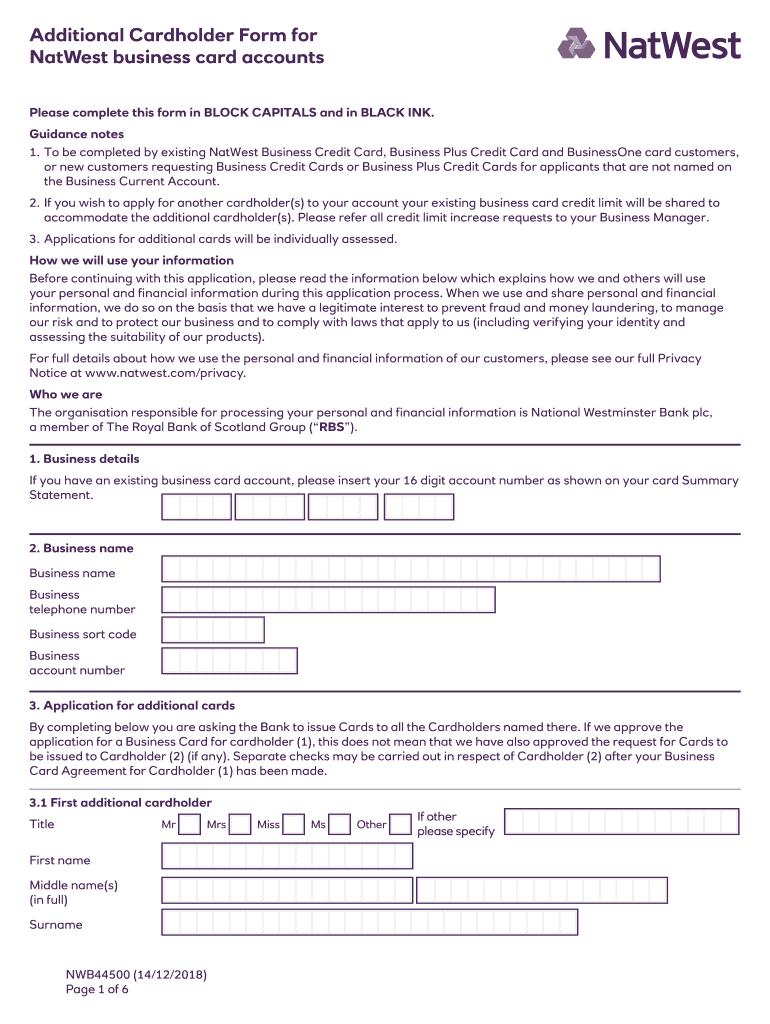
The Additional Cardholder Form is a document used by NatWest to add an authorized user to an existing credit or debit card account. This form allows the primary cardholder to designate another individual who can access the account, enabling them to make purchases and manage transactions. It is essential for maintaining financial control while providing access to trusted individuals, such as family members or business partners.
How to use the Additional Cardholder Form
Using the Additional Cardholder Form involves several straightforward steps. First, the primary cardholder must download the form from the NatWest website or obtain a physical copy. Next, they should fill out the required information, including the additional cardholder's name, contact details, and relationship to the primary cardholder. Once completed, the form must be signed and submitted to NatWest for processing. This can typically be done online, by mail, or in person at a local branch.
Steps to complete the Additional Cardholder Form
Completing the Additional Cardholder Form requires careful attention to detail. Here are the key steps:
- Download the NatWest Additional Cardholder Form from the official website.
- Fill in the primary cardholder's information, including account number and personal details.
- Provide the additional cardholder's full name, date of birth, and contact information.
- Specify the relationship between the primary cardholder and the additional cardholder.
- Review the form for accuracy and completeness.
- Sign and date the form to validate the request.
- Submit the form according to the preferred method: online, by mail, or in person.
Legal use of the Additional Cardholder Form
The Additional Cardholder Form is legally binding once it is completed and submitted to NatWest. It is crucial for both the primary and additional cardholders to understand their rights and responsibilities under this agreement. The primary cardholder remains liable for all transactions made by the additional cardholder. Therefore, it is advisable to choose individuals who can be trusted to manage the account responsibly.
Key elements of the Additional Cardholder Form
Several key elements must be included in the Additional Cardholder Form to ensure it is processed correctly. These elements typically include:
- Primary cardholder's account number and personal details.
- Additional cardholder's full name and contact information.
- Relationship between the primary and additional cardholder.
- Signatures of both parties to confirm consent.
- Date of submission.
Form Submission Methods
Submitting the Additional Cardholder Form can be done through various methods, providing flexibility for the primary cardholder. The common submission methods include:
- Online submission through the NatWest online banking portal.
- Mailing the completed form to the designated NatWest address.
- Visiting a local NatWest branch to submit the form in person.
Quick guide on how to complete additional cardholder form
Effortlessly Prepare Additional Cardholder Form on Any Device
Digital document management has become increasingly favored by businesses and individuals alike. It serves as an ideal eco-friendly alternative to traditional printed and signed documents, allowing you to access the necessary forms and securely store them online. airSlate SignNow equips you with all the resources you need to create, edit, and electronically sign your documents swiftly and without delays. Manage Additional Cardholder Form on any device with airSlate SignNow's Android or iOS applications and streamline your document-related processes today.
The Easiest Way to Edit and Electronically Sign Additional Cardholder Form
- Find Additional Cardholder Form and click Get Form to initiate the process.
- Utilize the available tools to fill out your document.
- Highlight important sections or redact sensitive information using features specifically designed for that purpose by airSlate SignNow.
- Create your electronic signature with the Sign tool, which takes just seconds and holds the same legal validity as a conventional ink signature.
- Review the details and click on the Done button to save your changes.
- Choose your preferred method for delivering the form, whether by email, text message (SMS), invitation link, or download it to your computer.
Eliminate concerns about lost or misplaced documents, tedious form navigation, or errors that necessitate reprinting copies. airSlate SignNow addresses all your document management needs in just a few clicks from any device you choose. Edit and electronically sign Additional Cardholder Form to ensure exceptional communication at every phase of the form preparation process with airSlate SignNow.
Create this form in 5 minutes or less
Find and fill out the correct additional cardholder form
Create this form in 5 minutes!
How to create an eSignature for the additional cardholder form
The best way to create an electronic signature for your PDF file in the online mode
The best way to create an electronic signature for your PDF file in Chrome
How to make an eSignature for putting it on PDFs in Gmail
The best way to generate an electronic signature right from your smartphone
The way to create an electronic signature for a PDF file on iOS devices
The best way to generate an electronic signature for a PDF on Android
People also ask
-
What is the Additional Cardholder Form in airSlate SignNow?
The Additional Cardholder Form in airSlate SignNow allows businesses to add authorized users to their accounts easily. This feature simplifies document management by enabling multiple team members to access and sign documents. It's an essential tool for businesses that require collaborative signing and document workflows.
-
How does the Additional Cardholder Form benefit my business?
By utilizing the Additional Cardholder Form, businesses can enhance team collaboration and streamline the signing process. It ensures that all relevant parties can access important documents without delays, improving overall efficiency. Additionally, this feature helps maintain security by allowing you to control who can sign and view documents.
-
Is there a cost associated with using the Additional Cardholder Form?
The Additional Cardholder Form is included in the airSlate SignNow subscription plans, making it a cost-effective solution for businesses. While there may be a limit on the number of additional cardholders depending on your plan, the feature provides great value by enhancing team productivity. Review our pricing page for detailed information on subscription tiers.
-
Can I revoke access to an Additional Cardholder Form at any time?
Yes, you can revoke access to any additional cardholder at any time using the management features in airSlate SignNow. This flexibility ensures that you maintain control over who has access to your documents and signing capabilities. Simply navigate to the user management section to update permissions.
-
How do I fill out the Additional Cardholder Form?
Filling out the Additional Cardholder Form is straightforward. You need to log into your airSlate SignNow account, navigate to the user management section, and follow the prompts to add a new cardholder. Make sure to provide the necessary details, such as the user's name and email address, to complete the process.
-
What integrations support the Additional Cardholder Form feature?
The Additional Cardholder Form feature in airSlate SignNow integrates seamlessly with various applications, such as CRM systems and document management tools. These integrations enhance your workflow by allowing you to manage documents and cardholders from one central platform. Check our integrations page for a complete list of compatible apps.
-
Can multiple users sign documents using the Additional Cardholder Form?
Absolutely! The Additional Cardholder Form allows multiple users to sign documents simultaneously, making it an ideal solution for collaborative projects. This feature simplifies the signing process, as all stakeholders can contribute without the need for back-and-forth emails or delays.
Get more for Additional Cardholder Form
- Massachusetts name change form
- Name change notification form massachusetts
- Massachusetts commercial lease form
- Massachusetts legal documents form
- Massachusetts guardian form
- Bankruptcy chapters 7 form
- Bill of sale with warranty by individual seller massachusetts form
- Bill of sale with warranty for corporate seller massachusetts form
Find out other Additional Cardholder Form
- How Can I Electronic signature Ohio Insurance Document
- Can I Electronic signature South Dakota Insurance PPT
- How Can I Electronic signature Maine Lawers PPT
- How To Electronic signature Maine Lawers PPT
- Help Me With Electronic signature Minnesota Lawers PDF
- How To Electronic signature Ohio High Tech Presentation
- How Can I Electronic signature Alabama Legal PDF
- How To Electronic signature Alaska Legal Document
- Help Me With Electronic signature Arkansas Legal PDF
- How Can I Electronic signature Arkansas Legal Document
- How Can I Electronic signature California Legal PDF
- Can I Electronic signature Utah High Tech PDF
- How Do I Electronic signature Connecticut Legal Document
- How To Electronic signature Delaware Legal Document
- How Can I Electronic signature Georgia Legal Word
- How Do I Electronic signature Alaska Life Sciences Word
- How Can I Electronic signature Alabama Life Sciences Document
- How Do I Electronic signature Idaho Legal Form
- Help Me With Electronic signature Arizona Life Sciences PDF
- Can I Electronic signature Colorado Non-Profit Form