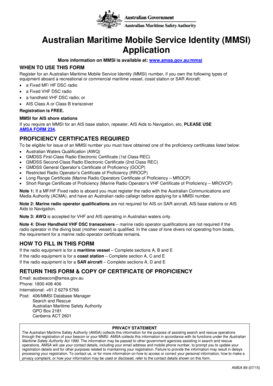
PDF 36Kb Australian Maritime Safety Authority Amsa Gov 2015-2026


Understanding the AMSA MMSI Registration Process
The Australian Maritime Safety Authority (AMSA) oversees the registration of Maritime Mobile Service Identities (MMSI). This process is crucial for vessels operating in Australian waters. To register, you need to provide specific details about your vessel, including its name, type, and ownership information. The registration ensures that your vessel is identifiable and can be located in case of emergencies. It is important to follow the guidelines set by AMSA to ensure compliance and avoid penalties.
Steps to Complete the AMSA MMSI Registration Form
Completing the AMSA MMSI registration form involves several key steps:
- Gather necessary documents, such as proof of ownership and vessel specifications.
- Access the AMSA MMSI registration form online or obtain a hard copy from AMSA offices.
- Fill out the form accurately, ensuring all required fields are completed.
- Submit the form electronically or via mail, along with any applicable fees.
- Receive confirmation from AMSA regarding your registration status.
Key Elements of the AMSA MMSI Registration Form
The AMSA MMSI registration form includes several essential elements that must be filled out correctly:
- Vessel Name: The official name of your vessel as registered.
- Vessel Type: The classification of your vessel (e.g., commercial, recreational).
- Owner Information: Details about the vessel's owner, including name and contact information.
- Dimensions: The physical measurements of the vessel, such as length and width.
- Radio Equipment: Information on the communication equipment installed on the vessel.
Legal Use of the AMSA MMSI Registration
Registering for an MMSI is not just a formality; it is a legal requirement for vessels operating in Australian waters. The registration provides a legal identity for your vessel, ensuring compliance with maritime laws. It also facilitates communication during emergencies, allowing rescue services to identify and locate your vessel quickly. Failure to register can lead to significant penalties and complications in legal situations.
Obtaining the AMSA MMSI Registration Form
The AMSA MMSI registration form can be obtained through multiple channels:
- Online: Visit the AMSA website to download the form directly.
- In-Person: Visit an AMSA office to request a hard copy of the form.
- By Mail: Request a form to be sent to your address by contacting AMSA customer service.
Examples of AMSA MMSI Registration Scenarios
Understanding common scenarios can help clarify the registration process:
- A recreational boater registering a personal yacht for the first time.
- A commercial fishing vessel needing to update its registration details after a change of ownership.
- A charter company registering multiple vessels under one MMSI for operational efficiency.
Quick guide on how to complete pdf 36kb australian maritime safety authority amsa gov
Finish PDF 36Kb Australian Maritime Safety Authority Amsa Gov effortlessly on any device
Web-based document management has become favored by companies and individuals alike. It offers an ideal environmentally friendly substitute for conventional printed and signed documents, allowing you to obtain the appropriate form and securely store it online. airSlate SignNow equips you with all the tools needed to create, modify, and eSign your documents quickly without delays. Handle PDF 36Kb Australian Maritime Safety Authority Amsa Gov on any device with the airSlate SignNow applications for Android or iOS and streamline any document-related process today.
How to modify and eSign PDF 36Kb Australian Maritime Safety Authority Amsa Gov with ease
- Locate PDF 36Kb Australian Maritime Safety Authority Amsa Gov and then click Get Form to begin.
- Utilize the tools provided to fill out your form.
- Emphasize important sections of your documents or obscure sensitive details with tools that airSlate SignNow offers specifically for this purpose.
- Create your signature using the Sign feature, which takes just seconds and holds the same legal validity as a conventional wet ink signature.
- Review the information and then click on the Done button to save your changes.
- Choose your preferred method of delivering your form—via email, SMS, invitation link, or download it to your computer.
Eliminate concerns about lost or misplaced files, tedious form searching, or errors that necessitate printing new document copies. airSlate SignNow fulfills your document management needs in just a few clicks from any device you choose. Adjust and eSign PDF 36Kb Australian Maritime Safety Authority Amsa Gov while ensuring outstanding communication at every stage of the form preparation process with airSlate SignNow.
Create this form in 5 minutes or less
Find and fill out the correct pdf 36kb australian maritime safety authority amsa gov
Create this form in 5 minutes!
How to create an eSignature for the pdf 36kb australian maritime safety authority amsa gov
The best way to create an eSignature for a PDF file online
The best way to create an eSignature for a PDF file in Google Chrome
The best way to create an electronic signature for signing PDFs in Gmail
The best way to generate an electronic signature from your mobile device
The way to generate an eSignature for a PDF file on iOS
The best way to generate an electronic signature for a PDF file on Android devices
People also ask
-
What is the PDF 36Kb Australian Maritime Safety Authority Amsa Gov. document format?
The PDF 36Kb Australian Maritime Safety Authority Amsa Gov. format refers to a specific document provided by AMSA that is essential for maritime operations in Australia. This document can be easily signed and managed using airSlate SignNow's eSigning features, ensuring compliance and efficiency in your maritime business processes.
-
How can airSlate SignNow help with the PDF 36Kb Australian Maritime Safety Authority Amsa Gov. documents?
airSlate SignNow simplifies the process of managing PDF 36Kb Australian Maritime Safety Authority Amsa Gov. documents by allowing users to eSign, send, and track these important files effortlessly. With our user-friendly interface, businesses can ensure timely and secure handling of critical maritime documentation.
-
Is there a cost associated with using airSlate SignNow for PDF 36Kb Australian Maritime Safety Authority Amsa Gov. documents?
Yes, airSlate SignNow offers various pricing plans to cater to different business needs, including those requiring handling of PDF 36Kb Australian Maritime Safety Authority Amsa Gov. documents. Our pricing is competitive and designed to provide a cost-effective solution for document management and eSigning.
-
What features does airSlate SignNow offer for PDF 36Kb Australian Maritime Safety Authority Amsa Gov. handling?
airSlate SignNow offers a variety of features for handling PDF 36Kb Australian Maritime Safety Authority Amsa Gov. documents, including customizable templates, bulk sending, and automated reminders. These features streamline the signing process and enhance productivity for maritime businesses.
-
Can I integrate airSlate SignNow with other applications for managing PDF 36Kb Australian Maritime Safety Authority Amsa Gov. documents?
Absolutely! airSlate SignNow supports integration with several third-party applications that can help manage PDF 36Kb Australian Maritime Safety Authority Amsa Gov. documents. This ensures a seamless workflow and allows you to utilize your existing tools in conjunction with our eSigning capabilities.
-
What are the benefits of using airSlate SignNow for PDF 36Kb Australian Maritime Safety Authority Amsa Gov. documents?
Using airSlate SignNow for PDF 36Kb Australian Maritime Safety Authority Amsa Gov. documents provides numerous benefits, including improved efficiency, reduced paperwork, and enhanced security. Our platform ensures that your documents are signed quickly, legally, and securely, making it an ideal choice for maritime businesses.
-
Is airSlate SignNow compliant with regulations for PDF 36Kb Australian Maritime Safety Authority Amsa Gov. documents?
Yes, airSlate SignNow is fully compliant with eSignature regulations and standards, making it suitable for handling PDF 36Kb Australian Maritime Safety Authority Amsa Gov. documents. This compliance ensures that all signed documents are legally valid and can be used for official maritime business.
Get more for PDF 36Kb Australian Maritime Safety Authority Amsa Gov
Find out other PDF 36Kb Australian Maritime Safety Authority Amsa Gov
- Sign Ohio Police Promissory Note Template Easy
- Sign Alabama Courts Affidavit Of Heirship Simple
- How To Sign Arizona Courts Residential Lease Agreement
- How Do I Sign Arizona Courts Residential Lease Agreement
- Help Me With Sign Arizona Courts Residential Lease Agreement
- How Can I Sign Arizona Courts Residential Lease Agreement
- Sign Colorado Courts LLC Operating Agreement Mobile
- Sign Connecticut Courts Living Will Computer
- How Do I Sign Connecticut Courts Quitclaim Deed
- eSign Colorado Banking Rental Application Online
- Can I eSign Colorado Banking Medical History
- eSign Connecticut Banking Quitclaim Deed Free
- eSign Connecticut Banking Business Associate Agreement Secure
- Sign Georgia Courts Moving Checklist Simple
- Sign Georgia Courts IOU Mobile
- How Can I Sign Georgia Courts Lease Termination Letter
- eSign Hawaii Banking Agreement Simple
- eSign Hawaii Banking Rental Application Computer
- eSign Hawaii Banking Agreement Easy
- eSign Hawaii Banking LLC Operating Agreement Fast