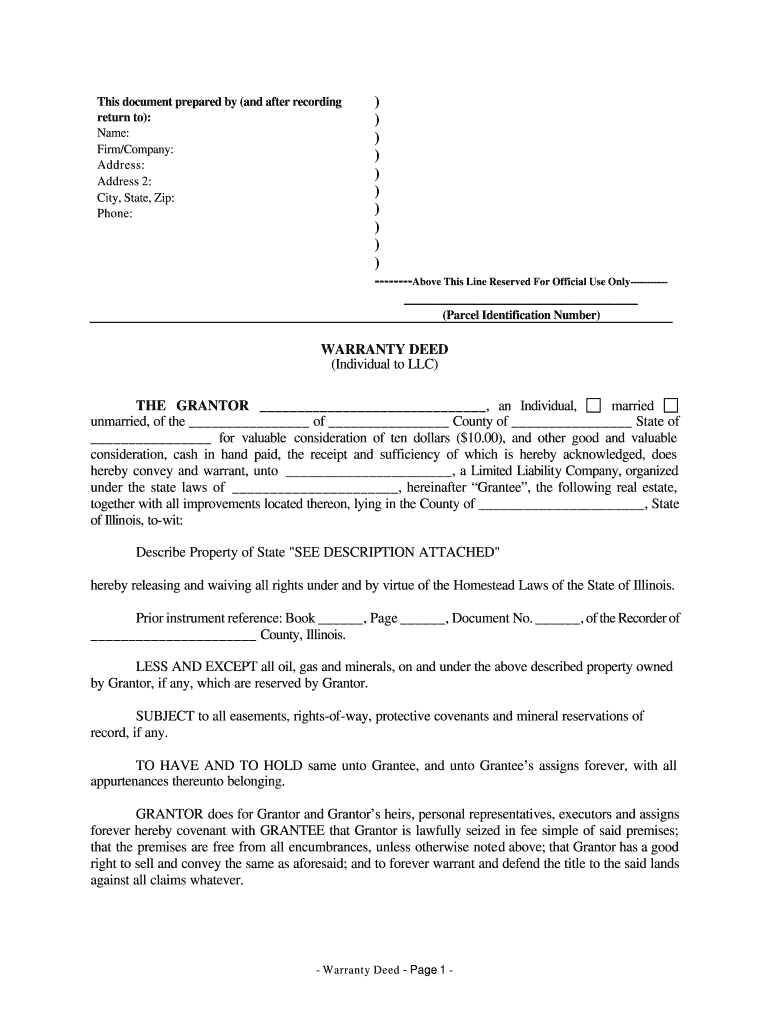
Warranty Deed from Llc to Individual Form


Key elements of the Warranty Deed From LLC To Individual
A Warranty Deed from an LLC to an individual is a legal document that guarantees the transfer of property ownership. This deed includes several key elements:
- Grantor and Grantee Information: The names and addresses of both the LLC (grantor) and the individual (grantee) must be clearly stated.
- Property Description: A detailed description of the property being transferred, including its legal description and physical address.
- Consideration: The amount paid for the property, which may be stated as a specific dollar amount or as “for love and affection.”
- Warranty Clause: A statement that the grantor guarantees clear title to the property, free from any encumbrances.
- Signatures: The deed must be signed by an authorized representative of the LLC and the individual receiving the property.
- Notarization: The document must be notarized to be legally valid.
Steps to complete the Warranty Deed From LLC To Individual
Completing a Warranty Deed from an LLC to an individual involves several essential steps:
- Gather Information: Collect all necessary details about the property, including the legal description and the names of the parties involved.
- Draft the Deed: Use a template or legal assistance to draft the Warranty Deed, ensuring all required elements are included.
- Review the Document: Carefully review the deed for accuracy, ensuring all information is correct and complete.
- Obtain Signatures: Have the authorized representative of the LLC and the individual sign the deed in the presence of a notary.
- Notarize the Deed: Ensure the document is notarized to validate the signatures.
- File the Deed: Submit the completed Warranty Deed to the appropriate county office for recording.
Legal use of the Warranty Deed From LLC To Individual
The legal use of a Warranty Deed from an LLC to an individual is crucial for ensuring property rights are transferred correctly. This deed serves as a public record of ownership and provides the grantee with a guarantee that the title is clear. It is legally binding and can be enforced in court if disputes arise regarding property ownership. The warranty clause protects the grantee by ensuring that the grantor will defend against any future claims to the property.
State-specific rules for the Warranty Deed From LLC To Individual
Each state has specific rules governing the use and execution of Warranty Deeds. In Illinois, for example, the deed must comply with state statutes, including:
- The deed must be in writing and signed by the grantor.
- It must include a legal description of the property.
- Recording the deed with the county recorder is required for it to be effective against third parties.
- Illinois may have specific tax implications or requirements that must be adhered to when transferring property.
How to obtain the Warranty Deed From LLC To Individual
Obtaining a Warranty Deed from an LLC to an individual involves a few straightforward steps:
- Contact the LLC: Reach out to the LLC to request the deed. Ensure you have the necessary information about the property and parties involved.
- Draft the Deed: If the LLC does not have a standard form, you may need to draft the deed with legal assistance.
- Review and Sign: Ensure all parties review the deed and sign it in the presence of a notary.
- File the Deed: Submit the completed deed to the local county recorder's office for official recording.
Examples of using the Warranty Deed From LLC To Individual
Examples of using a Warranty Deed from an LLC to an individual include:
- Transferring ownership of a rental property from an LLC to a member of the LLC.
- Conveying a commercial property held by an LLC to an individual investor.
- Transferring a family-owned property from an LLC to a family member for estate planning purposes.
Quick guide on how to complete illinois warranty deed from individual to llc
Complete Warranty Deed From Llc To Individual effortlessly on any gadget
Managing documents online has gained considerable traction among businesses and individuals alike. It offers an excellent eco-friendly substitute to conventional printed and signed papers, allowing you to obtain the necessary form and securely store it online. airSlate SignNow equips you with all the tools required to create, modify, and electronically sign your documents swiftly and without holdups. Handle Warranty Deed From Llc To Individual on any gadget using airSlate SignNow's Android or iOS applications and enhance any document-related task today.
The simplest method to modify and eSign Warranty Deed From Llc To Individual with ease
- Obtain Warranty Deed From Llc To Individual and click on Get Form to begin.
- Make use of the tools we provide to complete your document.
- Emphasize pertinent sections of the documents or redact sensitive information using tools specifically designed by airSlate SignNow for that purpose.
- Generate your signature with the Sign feature, which takes just seconds and carries the same legal authority as a traditional handwritten signature.
- Review all the details and click on the Done button to save your modifications.
- Choose how you wish to send your form, whether by email, text message (SMS), invitation link, or download it to your computer.
Say goodbye to lost or mislaid documents, tedious form searches, or errors that require printing new copies. airSlate SignNow meets your document management needs in just a few clicks from any gadget of your preference. Modify and eSign Warranty Deed From Llc To Individual and ensure exceptional communication at every stage of the form preparation process with airSlate SignNow.
Create this form in 5 minutes or less
FAQs
-
What tax form do I need to fill out to convert from single member LLC to multi-member LLC?
When you add a member to your previously single member LLC (which you can do structurally by amending your operating agreement and filing an amended report, if required, with your secretary of state), you cease to be a 'disregarded entity' under the applicable Treasury Regulations.Going forward, you will either be a (a) partnership, by default, and will have to file a partnership income tax return on Form 1065, or (b) a corporation, if you so elect, and will have to file a Form 1120 if you are a C corporation or Form 1120S if you elect to be taxed as an S corporation.There can be other tax issues as well, and these need to be addressed with a business CPA.
-
I need to pay an $800 annual LLC tax for my LLC that formed a month ago, so I am looking to apply for an extension. It's a solely owned LLC, so I need to fill out a Form 7004. How do I fill this form out?
ExpressExtension is an IRS-authorized e-file provider for all types of business entities, including C-Corps (Form 1120), S-Corps (Form 1120S), Multi-Member LLC, Partnerships (Form 1065). Trusts, and Estates.File Tax Extension Form 7004 InstructionsStep 1- Begin by creating your free account with ExpressExtensionStep 2- Enter the basic business details including: Business name, EIN, Address, and Primary Contact.Step 3- Select the business entity type and choose the form you would like to file an extension for.Step 4- Select the tax year and select the option if your organization is a Holding CompanyStep 5- Enter and make a payment on the total estimated tax owed to the IRSStep 6- Carefully review your form for errorsStep 7- Pay and transmit your form to the IRSClick here to e-file before the deadline
-
What forms do I need to fill out as a first-year LLC owner? It's a partnership LLC.
A Limited Liability Company (LLC) is business structure that provides the limited liability protection features of a corporation and the tax efficiencies and operational flexibility of a partnership.Unlike shareholders in a corporation, LLCs are not taxed as a separate business entity. Instead, all profits and losses are "passed through" the business to each member of the LLC. LLC members report profits and losses on their personal federal tax returns, just like the owners of a partnership would.The owners of an LLC have no personal liability for the obligations of the LLC. An LLC is the entity of choice for a businesses seeking to flow through losses to its investors because an LLC offers complete liability protection to all its members. The basic requirement for forming an Limited Liability Company are:Search your business name - before you form an LLC, you should check that your proposed business name is not too similar to another LLC registered with your state's Secretary of StateFile Articles of Organization - the first formal paper you will need file with your state's Secretary of State to form an LLC. This is a necessary document for setting up an LLC in many states. Create an Operating Agreement - an agreement among LLC members governing the LLC's business, and member's financial and managerial rights and duties. Think of this as a contract that governs the rules for the people who own the LLC. Get an Employer Identification Number (EIN) - a number assigned by the IRS and used to identify taxpayers that are required to file various business tax returns. You can easily file for an EIN online if you have a social security number. If you do not have a social security number or if you live outsides of United States, ask a business lawyer to help you get one.File Statement of Information - includes fairly basic information about the LLC that you need to file with your state’s Secretary of State every 2 years. Think of it as a company census you must complete every 2 years.Search and Apply for Business Licenses and Permits - once your business is registered, you should look and apply for necessary licenses and permits you will need from the county and city where you will do business. Every business has their own business licenses and permits so either do a Google search of your business along with the words "permits and licenses" or talk to a business lawyer to guide you with this.If you have any other questions, talk to a business lawyer who will clarify and help you with all 6 above steps or answer any other question you may have about starting your business.I am answering from the perspective of a business lawyer who represents businesspersons and entrepreneurs with their new and existing businesses. Feel free to contact me sam@mollaeilaw.com if you need to form your LLC.In my course, How To Incorporate Your Business on Your Own: Quick & Easy, you will learn how to form your own Limited Liability Company (LLC) or Corporation without a lawyer, choose a business name, file a fictitious business name, file Articles of Organization or Articles of Incorporation, create Operating Agreement or Bylaws, apply for an EIN, file Statement of Information, and how to get business licenses and permits.
-
When dissolving an LLC do you need to fill out IRS Form 966?
The answer will be yes or no depending on how your entity is recognized for tax purposes. An LLC is not a recognized entity by the IRS. By default, a single-member LLC is organized for tax purposes as a sole proprietorship and a partnership for tax purposes if there is more than one member. However, you can make an election to be taxed as a C Corporation (i.e., an LLC for legal purposes that is taxed as a C Corporation for tax purposes).You must complete and file form 966 to dissolve your LLC if you have elected to be a C Corporation or a Cooperative (Coop) for tax purposes. S Corporations and tax-exempt non-profits are exempt from filing this form (see here).If you are organized for tax purposes as an S Corporation you would file your taxes via form 1120S for the last time and check the box indicating that your return is a “Final Return.” Same is true for a Partnership, but with form 1065.On a state and local level, best practice is to check with your state and local agencies for requirements.For digestible information and tools for understanding how the tax landscape affects your business, visit Financial Telepathy
-
Do I need to fill out Form W-9 (US non-resident alien with an LLC in the US)?
A single-member LLC is by default a disregarded entity. Assuming you have not made a “check-the-box” election to have it treated as a corporation, this means for tax purposes, you are a sole proprietor.As a non-resident alien, you would not complete form W-9. You would likely provide form W-8ECI; possibly W-8BEN.
-
What do you need from your partners in order to fill out a k1-form? We all used LLC's to split our partnership up, so do I just need thier EINs or do I need their personal SSN as well?
Assuming each LLC is a single member disregarded entity, then you need the individual's SSN not the EIN of the LLC. You also put the individual's name on the K1 not the name of the LLC. If the LLC's are any other type of entity, then use the EIN and name of the LLC.You also need each partner's address and capital, loss and profit percentage.
Create this form in 5 minutes!
How to create an eSignature for the illinois warranty deed from individual to llc
How to make an eSignature for the Illinois Warranty Deed From Individual To Llc online
How to create an electronic signature for the Illinois Warranty Deed From Individual To Llc in Chrome
How to create an eSignature for signing the Illinois Warranty Deed From Individual To Llc in Gmail
How to make an eSignature for the Illinois Warranty Deed From Individual To Llc straight from your smartphone
How to generate an eSignature for the Illinois Warranty Deed From Individual To Llc on iOS
How to create an eSignature for the Illinois Warranty Deed From Individual To Llc on Android devices
People also ask
-
What is a Warranty Deed From LLC To Individual?
A Warranty Deed From LLC To Individual is a legal document that transfers property ownership from a limited liability company (LLC) to an individual. This deed guarantees that the LLC holds clear title to the property and has the right to transfer it without encumbrances. Understanding this deed is essential for ensuring the legitimacy of the property transfer.
-
How can airSlate SignNow help with creating a Warranty Deed From LLC To Individual?
airSlate SignNow offers an easy-to-use platform that allows you to create and eSign a Warranty Deed From LLC To Individual quickly. With customizable templates and user-friendly features, you can draft a legally binding deed in minutes, ensuring a smooth transfer of property ownership.
-
What are the benefits of using airSlate SignNow for my Warranty Deed From LLC To Individual?
Using airSlate SignNow for your Warranty Deed From LLC To Individual simplifies the document signing process. It provides secure storage for your documents, facilitates easy sharing, and enhances the overall efficiency of your transactions, all while ensuring compliance with legal standards.
-
Is there a cost associated with using airSlate SignNow for a Warranty Deed From LLC To Individual?
Yes, airSlate SignNow offers several pricing plans tailored to fit various business needs. The cost for using the service to create a Warranty Deed From LLC To Individual is competitive, and the investment often pays off by streamlining your document management and signing processes.
-
Can I customize my Warranty Deed From LLC To Individual template on airSlate SignNow?
Absolutely! airSlate SignNow allows you to customize your Warranty Deed From LLC To Individual template according to your specific requirements. You can easily add personalized terms, clauses, and signatures to ensure that the document meets all legal and personal needs.
-
Does airSlate SignNow integrate with other applications for managing Warranty Deeds?
Yes, airSlate SignNow integrates seamlessly with various applications, such as Google Drive and Dropbox, which can help manage your Warranty Deed From LLC To Individual. This integration allows you to store, access, and share your documents effortlessly across platforms.
-
How secure is my Warranty Deed From LLC To Individual when using airSlate SignNow?
Security is a top priority at airSlate SignNow. Your Warranty Deed From LLC To Individual is protected with advanced encryption and secure cloud storage, ensuring that your documents are safe from unauthorized access and potential data bsignNowes.
Get more for Warranty Deed From Llc To Individual
- Customs clearance services csaci form
- Prenatal trio form
- Doh intake form
- Providence prior authorization form for medical services
- Please answer the following questions about your history form
- Employee health post form
- Physician practices authorization to disclose protected form
- Request for applications national association of chronic form
Find out other Warranty Deed From Llc To Individual
- How To Integrate Sign in Banking
- How To Use Sign in Banking
- Help Me With Use Sign in Banking
- Can I Use Sign in Banking
- How Do I Install Sign in Banking
- How To Add Sign in Banking
- How Do I Add Sign in Banking
- How Can I Add Sign in Banking
- Can I Add Sign in Banking
- Help Me With Set Up Sign in Government
- How To Integrate eSign in Banking
- How To Use eSign in Banking
- How To Install eSign in Banking
- How To Add eSign in Banking
- How To Set Up eSign in Banking
- How To Save eSign in Banking
- How To Implement eSign in Banking
- How To Set Up eSign in Construction
- How To Integrate eSign in Doctors
- How To Use eSign in Doctors