
How tech companies leverage eSignatures for smarter workflows in 2026

Technology companies are increasingly adopting eSignature solutions to streamline their operations and improve efficiency. By eliminating the need for paper-based processes, eSignatures enable faster approvals, enhanced security, and seamless integration with existing digital workflows.
- Speed up deals: Reduce turnaround times for sales contracts and vendor agreements from days to minutes by automating document routing.
- Scale effortlessly: Use bulk sending and templates to manage high-volume paperwork like HR offer letters and policy updates.
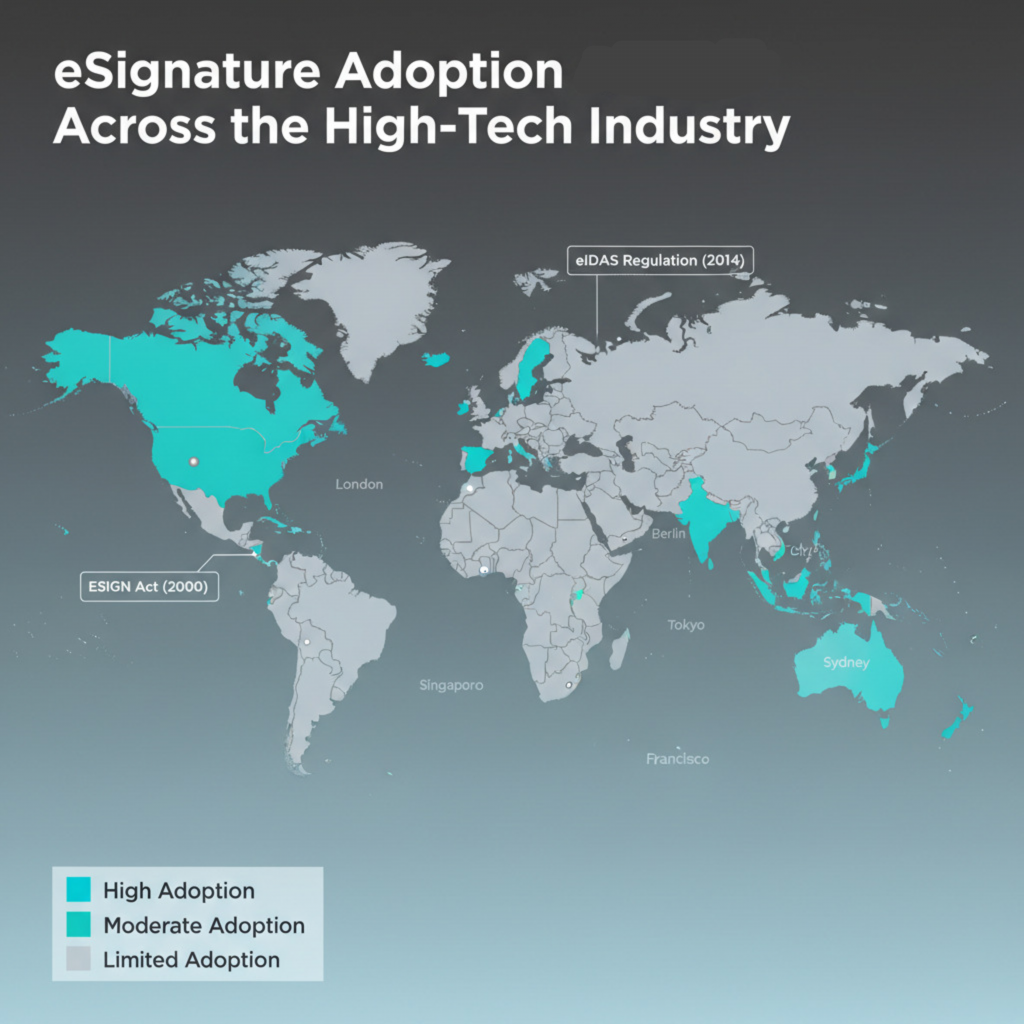
- Enhance security: Protect sensitive intellectual property and customer data with audit trails, identity verification, and compliance with standards like the ESIGN Act and eIDAS.
- Integrate seamlessly: Connect eSignature software directly into your existing tech stack (CRM, HRIS) to keep teams focused and productive.
- Reduce costs: Eliminate printing, shipping, and storage costs while minimizing manual errors that lead to rework.
The high-tech industry moves at a blistering pace. In an environment where shipping code, closing enterprise deals, and onboarding top talent happens around the clock, traditional paperwork is a major bottleneck. Physical signatures and manual document routing simply cannot keep up with the demands of modern tech businesses.
This guide explores how high-tech companies use eSignature solutions to work smarter, not harder. We will cover specific use cases, implementation strategies, and how tools like airSlate SignNow help you scale without compromising security or compliance.
Why high tech needs smarter signing workflows
Technology companies face unique challenges when it comes to document management. You often deal with intellectual property, complex global supply chains, and a workforce that spans multiple time zones. Relying on paper or disconnected digital tools creates risks that slow down innovation.
Speed and efficiency in a fast-paced environment
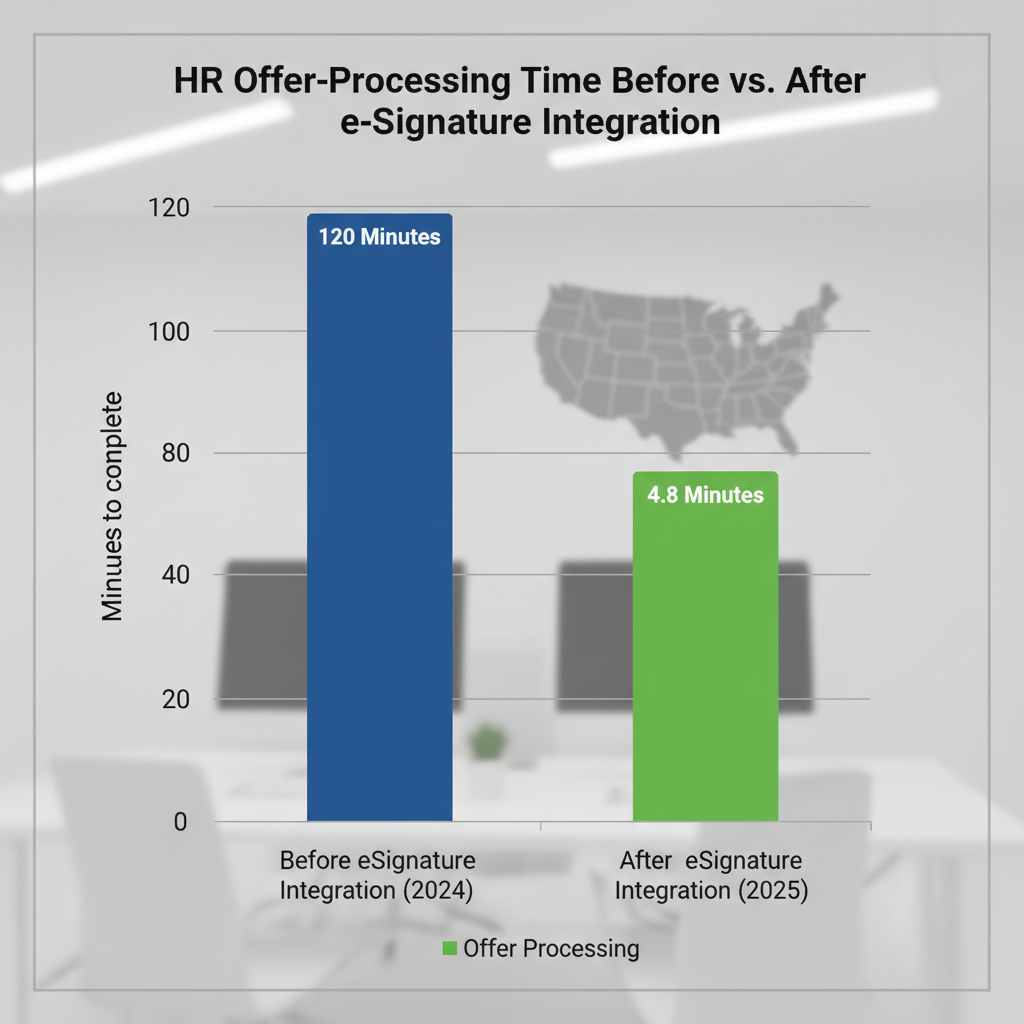
In the tech industry, speed is a competitive advantage. Sales teams need to get contracts signed before the quarter ends. HR departments must send offer letters quickly to secure top engineering talent. When you rely on manual paperwork, you introduce delays.
eSignatures remove these barriers. Instead of waiting for a client to print, sign, and scan a document, they can electronically sign it in seconds from any device. This accelerates cycle times and ensures that revenue-generating activities are not held up by administrative tasks.
Security and compliance standards
Tech firms often handle confidential information and customer data. Ensuring data protection is not optional; it is a requirement. Using standard email attachments or physical papers increases the risk of data breaches and unauthorized access.
eSignature software provides a secure environment for signing electronic documents. Solutions like SignNow offer audit trails, multi-factor authentication, and encryption to ensure that signed agreements are legally binding and tamper-evident. This helps you meet rigorous compliance standards such as SOC 2, HIPAA, and GDPR.
Remote work and global collaboration
The shift to remote work has made physical presence for signing documents obsolete. Teams need seamless collaboration tools that work wherever they are. Whether a developer is in San Francisco or a sales rep is in London, they need access to the same secure signing process.
Electronic signatures enable organizations to maintain business continuity regardless of location. You can sign documents on mobile devices, track status in real-time, and store completed files in the cloud for easy retrieval.
What are the key workflows optimized by eSignatures?
High-tech companies leverage eSignatures across various departments to drive efficiency. Here is how different teams utilize digital signatures to improve their daily operations.
Accelerating sales cycles
Sales teams live and die by their ability to close deals faster. Friction during the contract stage can cause opportunities to stall or fall through. By automating document routing and integrating eSignatures into Customer Relationship Management (CRM) systems like Salesforce, sales reps can generate and send sales contracts without leaving their primary workspace.
- Auto-filled contracts: Pull customer data directly from the CRM to populate contracts, reducing errors.
- Real-time tracking: Know exactly when a prospect opens, views, and signs a proposal.
- Mobile signing: Allow clients to sign contracts on their phone, speeding up the final approval.
Streamlining HR and onboarding
People operations in high-tech companies often manage rapid scaling. Onboarding dozens of new hires requires processing a mountain of paperwork, from offer letters to non-disclosure agreements (NDAs) and employee handbooks. Using eSignature solutions allows HR teams to create templates for common documents. With features like bulk sending, you can send policy updates to the entire company with a single click. This ensures widespread adoption of new policies and provides a clear audit trail of who has acknowledged them.
Optimizing procurement and vendor management
Tech companies rely on a vast network of vendors and partners. Managing Master Service Agreements (MSAs), Statements of Work (SOWs), and vendor contracts can become chaotic without a centralized system.
eSignatures help procurement teams organize and store documents efficiently. You can set up automated reminders to ensure vendors sign documents on time, and use digital storage to keep track of renewal dates and terms. This reduces the administrative burden and strengthens vendor relationships.
Enhancing product and legal workflows
Legal teams in tech spend significant time reviewing and approving terms. They need to ensure that every signature request is valid and that the organization is protected.
Electronic signature laws like the ESIGN Act in the U.S. and eIDAS in Europe provide the framework for legally binding electronic records. By using a compliant eSignature provider, legal teams can enforce internal controls, manage version history, and ensure that sensitive documents are handled with the highest level of security.
How to implement eSignatures in your tech stack
Adopting eSignatures is more than just buying software; it is about integrating a new capability into your existing workflows. Here is a step-by-step approach to successful implementation.
1. Identify high-volume use cases
Start by auditing your current processes. Where are the bottlenecks? Look for workflows that involve repetitive manual paperwork, such as sales contracts, NDAs, or permission slips. These areas offer the highest ROI for automation.
2. Choose the right eSignature software
Not all eSignature solutions are created equal. High-tech companies need a platform that offers robust API capabilities, enterprise-grade security, and ease of use.
SignNow stands out by offering a user-friendly interface combined with powerful features like conditional routing and team collaboration tools. It allows you to create complex workflows without needing a degree in computer science.
3. Integrate with your core systems
To truly streamline processes, your eSignature tool should talk to your other apps. Integrations with Microsoft Word, Google Workspace, and various CRMs mean you can send documents for signature directly from the applications you use every day.
For example, you can draft a contract in Microsoft Word, convert it to a PDF document within the app, and send it for signature using the SignNow add-on. This seamless collaboration eliminates the need to switch context or manually upload files.
4. Configure security and compliance settings
Before rolling out the solution, configure your security settings to match your company’s risk profile. Enable multi-factor authentication for sensitive documents and define access roles for different team members.
Ensure that your configuration aligns with data protection regulations. If you operate in Europe, verify that your processes meet eIDAS standards for advanced or qualified electronic signatures where necessary.
5. Train your team and drive adoption
Even the best software fails without user adoption. Provide training sessions for key departments. Show sales teams how to send contracts from their CRM. Teach HR how to use templates for offer letters.
Highlight the benefits: less time chasing signatures, no more scanning, and faster results. When employees see how it makes their life easier, widespread adoption follows quickly.
Comparing secure signing methods
Understanding the different levels of signature security is crucial for high-tech industry compliance.
| Feature | Simple Electronic Signature (SES) | Advanced Electronic Signature (AES) | Qualified Electronic Signature (QES) |
| Verification | Basic email verification or link access. | Linked to signer ID; detects changes to document. | Face-to-face or equivalent remote ID verification. |
| Security Level | Standard. Good for low-risk internal docs. | High. Uses digital certificates and encryption. | Highest. Legal equivalent to a handwritten signature. |
| Use Case | Internal approvals, casual acknowledgments. | Sales contracts, NDAs, HR forms. | High-value transactions, government filings. |
| Audit Trail | Basic logs (IP, time). | Detailed logs + identity proofing. | Full cryptographic proof + TSP validation. |
Maximizing ROI with SignNow
For organizations seeking to maximize value, SignNow offers a compelling balance of functionality and cost. Unlike some legacy providers that charge per envelope, SignNow offers transparent pricing that scales with your business.
Reducing operational costs
Physical signatures are expensive. You pay for paper, toner, shipping, and physical storage. By switching to electronic documents, companies can save significantly on these hard costs. Additionally, the reduction in manual errors saves valuable employee time.
Improving customer experience
Your customers expect a digital-first experience. Sending them a PDF file to print and sign feels outdated. Offering a smooth, mobile-friendly signing process reflects positively on your brand reputation. It shows that you are a modern, efficient partner.
Custom branding and professional appearance
SignNow allows you to add custom branding to your email invitations and signing links. This ensures that every interaction reinforces your brand identity. A professionally branded signing experience builds trust and keeps your company top-of-mind.
Advanced features for power users
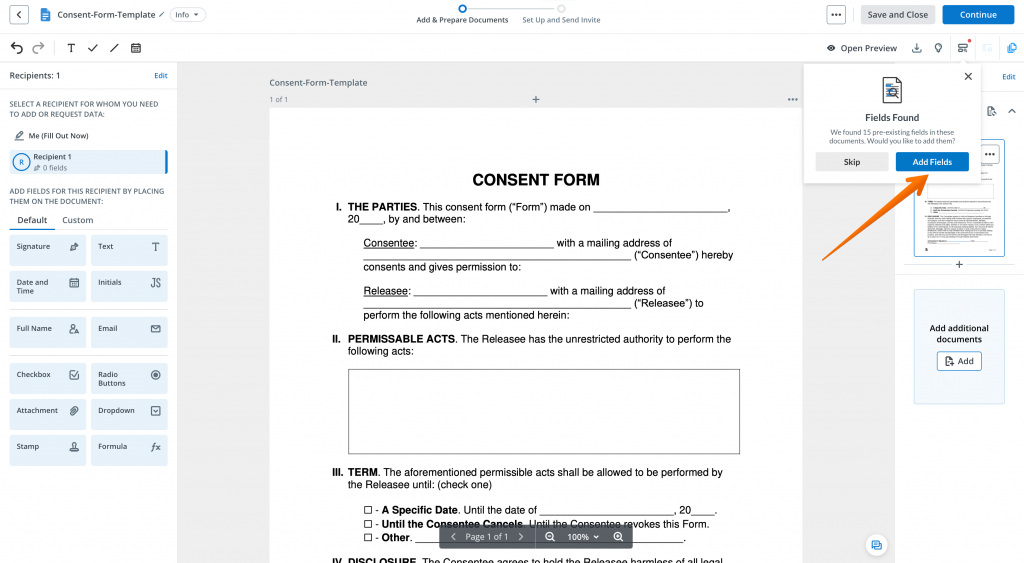
For complex workflows, features like conditional fields and calculated values allow you to create smart forms. You can set up a document so that specific clauses only appear if a user selects a certain option. This reduces clutter and ensures accuracy in data collection.
A common concern for businesses is whether electronic signatures are legally binding.
U.S. Regulations: ESIGN and UETA
In the United States, the Electronic Signatures in Global and National Commerce (ESIGN) Act and the Uniform Electronic Transactions Act (UETA) grant electronic signatures the same legal status as physical signatures. As long as you can prove consent and retain the record, the signature is valid.
EU Regulations: eIDAS
In the European Union, the eIDAS regulation establishes a standardized framework for electronic identification and trust services. It defines three levels of signatures (SES, AES, QES). SignNow helps companies navigate these requirements by providing tools to meet the necessary assurance levels for their specific transactions.
Industry-specific compliance
For high-tech companies working in regulated sectors like healthcare (HealthTech) or finance (FinTech), additional standards apply. SignNow supports HIPAA compliance and provides detailed audit trails that are essential during audits or legal disputes.
Challenges and how to overcome them
While the benefits are clear, some challenges remain during adoption.
- Resistance to change
Some stakeholders may prefer the familiarity of “wet ink” signatures. Overcome this by demonstrating the security features and legal validity of digital signatures. Show them the audit trails that prove exactly who signed and when.
- Integration complexity
Integrating new software can be daunting. Choose a solution with robust API documentation and pre-built connectors. SignNow’s API is designed for developers, making it easy to embed signing capabilities into your own applications or website.
- Managing identity risks
In a remote world, verifying that the signer is who they say they are is critical. Use tools with identity verification features. SignNow allows you to request additional authentication steps, such as SMS passwords or phone call verification, before a user can access the document.
Future trends in eSignature for high tech
The technology behind eSignatures continues to evolve.
- AI and automation: Expect to see more AI-driven contract analysis and automated risk scoring within signing workflows.
- Blockchain integration: Some sectors are exploring blockchain for immutable record-keeping of signed agreements.
- Unified agreement platforms: The line between eSignature, contract lifecycle management (CLM), and document generation will continue to blur, offering a single platform for the entire document journey.
Final thoughts
The high-tech industry demands tools that are fast, secure, and scalable. eSignatures are no longer just a convenience; they are a critical component of modern infrastructure. By digitizing the signing process, technology companies can eliminate bottlenecks, enhance security, and deliver a superior experience to customers and employees.
SignNow provides the robust features and flexibility that high-tech teams need to succeed. From seamless integrations to enterprise-grade compliance, it empowers you to manage your documents with confidence.
Ready to transform your workflows? Stop letting paperwork slow you down. Start your free trial of SignNow today and experience the power of smarter eSignatures.
Disclaimer: This article provides general information and does not constitute legal advice. Compliance requirements can vary by jurisdiction and industry. Consult with your legal team to ensure your eSignature processes meet your specific regulatory obligations.
Glossary
- Audit Trail: A digital record that logs every step of the document signing process, including who signed, when they signed, and their IP address. It serves as critical evidence to prove the validity of the signature in legal disputes or compliance audits.
- Certificate of Authority (CA): A trusted entity that issues digital certificates to verify the identity of the signer. CAs play a vital role in ensuring the security and authenticity of advanced and qualified electronic signatures.
- API (Application Programming Interface): A set of rules that allows different software applications to communicate with each other. In eSignatures, APIs allow companies to embed signing functionality directly into their own websites, apps, or internal systems.
- Identity Assurance Level (IAL): A standard (often referenced in NIST guidelines) that categorizes the degree of confidence in a signer’s claimed identity. Higher levels require more rigorous proofing, such as biometric scans or government ID verification.
FAQ
1. Are eSignatures secure enough for sensitive tech contracts?
Yes, eSignatures are highly secure and often safer than paper documents. Reputable providers like SignNow use high-level encryption to protect data both in transit and at rest. Additionally, features like multi-factor authentication and detailed audit trails ensure that only authorized individuals can access and sign sensitive documents.
2. How does SignNow integrate with tools like Salesforce?
SignNow offers a pre-built integration for Salesforce that allows you to manage the entire signing process without leaving the CRM. You can generate contracts using Salesforce data, send them for signature, and track their status directly from the opportunity record. Once signed, the final document is automatically saved back to the client’s file in Salesforce.
3. Can I use eSignatures for employees in different countries?
Absolutely. eSignatures are legally recognized in most developed nations, including the US, Canada, the UK, the European Union, and Australia. SignNow complies with major international regulations like eIDAS and GDPR, making it a suitable solution for global teams and cross-border agreements.
4. What happens if a signer denies signing a document?
If a signature is challenged, the comprehensive audit trail provided by the eSignature software serves as legal evidence. This log records the signer’s email, IP address, time stamp, and authentication method. In a court of law, this digital footprint is often easier to authenticate and defend than a traditional physical signature.
5. Do my clients need a SignNow account to sign documents?
No, your clients or vendors do not need to create an account or pay for a subscription to sign a document you send them. They simply receive an email with a secure link, which opens the document in their web browser or mobile device for signing. This removes friction and ensures a smooth experience for external parties.
- Why high tech needs smarter signing workflows
- What are the key workflows optimized by eSignatures?
- How to implement eSignatures in your tech stack
- Comparing secure signing methods
- Maximizing ROI with SignNow
- Navigating the legal landscape
- Challenges and how to overcome them
- Future trends in eSignature for high tech
- Final thoughts
- Glossary
- FAQ
