
A professional estimate template gives a client a clear, itemized picture of project costs before work starts, and gives the business a record of exactly what was proposed. Most free estimate templates stop there: a static PDF or Excel spreadsheet a client can save or ignore. This guide covers what an estimate template needs to contain, how to turn one into a fillable, signable document, and how to move an accepted estimate into a final invoice without retyping the same line items. Think of an estimate as a draft agreement that can still change, while an invoice is the bill for what was actually delivered. SignNow makes the process of implementing an estimate template easy and intuitive.
TL;DR
Key takeaways before you build one:
- A complete estimate template needs client and business details, an itemized scope with unit prices, tax, a total, an estimate number, and an expiration date, the baseline for accurate estimates.
- An estimate is a projection, a quote is usually a fixed price, and an invoice is the payment request issued after work is done.
- A fillable template lets a business build the layout once and reuse it for every client.
- Sending an estimate as a secure link with an e-signature step creates a record that the client actually accepted the terms.
- Construction, contracting, and freelance estimates share the same core fields but differ in scope, detail, and milestone structure.
- Converting a signed estimate into an invoice avoids re-entering the same line items and reduces billing disputes.
What a professional estimate template should include
A usable estimate template, or estimate form, answers three questions at a glance: what is being proposed, what it costs, and how long the offer stands.
Why it matters: a missing expiration date or tax line is a common source of billing disputes once a project starts, and consistent fields make project planning easier across jobs.
Core items to include:
- Business name, logo, and contact information
- Client information and contact details
- A unique estimate number, for tracking and reference
- An issue date and an expiration date, after which the pricing is no longer guaranteed
- A description of the project scope, broken into line items
- Unit prices and quantities for each line item, plus a subtotal
- Sales tax and any other applicable taxes, plus additional fees
- The total cost due if the estimate is accepted
- Payment terms and any notes on what happens if the scope changes
- A signature line for formal acceptance
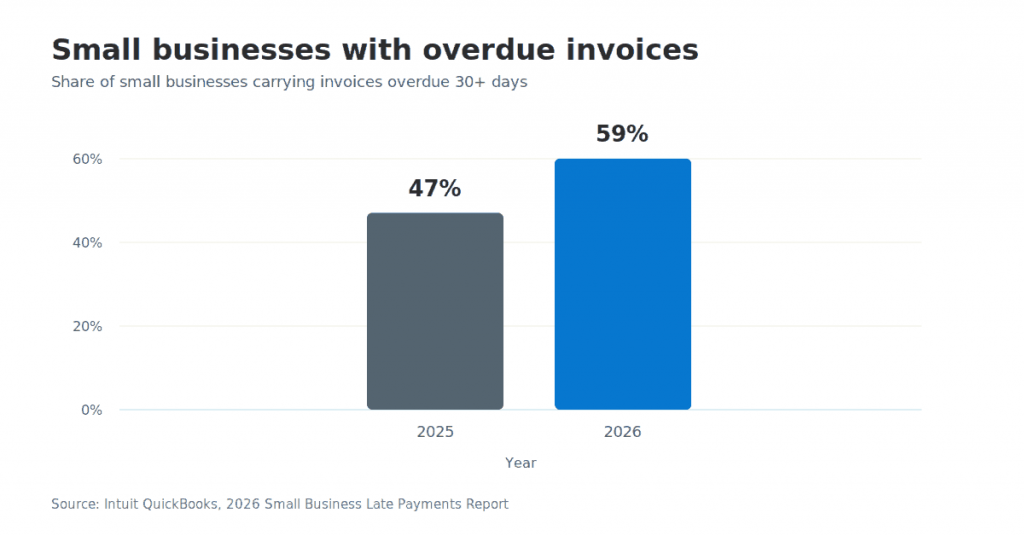
Getting these essential details right, especially accurate customer information, matters more than it might seem: 59% of small businesses now carry invoices overdue by 30 or more days, up from 47% a year earlier, and unclear scope or missing terms at the estimate stage is one of the reasons payment disputes start. Setting a document expiration date on the template itself is one of the simplest ways to keep old pricing from resurfacing later.
Estimate vs. quote vs. invoice: what’s different
An estimate, a quote, and an invoice cover three different points in the same transaction, and mixing them up is one of the most common misconceptions around project pricing. Why it matters: treating an estimate as a binding price, or an invoice as optional until a client feels ready, causes avoidable disagreements.
- Estimate: a projected cost, issued before work begins, that can shift if the scope changes.
- Quote: usually a fixed price for defined work, issued when the scope is already locked.
- Invoice: a formal request for payment, issued after the work is delivered.
A contractor issues the estimate at the first client conversation, a service provider issues a quote once the job is scoped in detail, and either issues the invoice once the work is complete. For a closer look at how the two are used in practice, see SignNow’s invoice vs. estimate comparison.
How to build and send a fillable estimate template
A fillable template is built once, then reused for every client instead of retyped from scratch, fitting into any project management workflow. Why it matters: a static PDF has to be manually edited for each job; a fillable template only needs new values entered into existing fields.
Step 1: Start from a template
- Visit SignNow’s estimate templates page and choose a necessary template from the list:
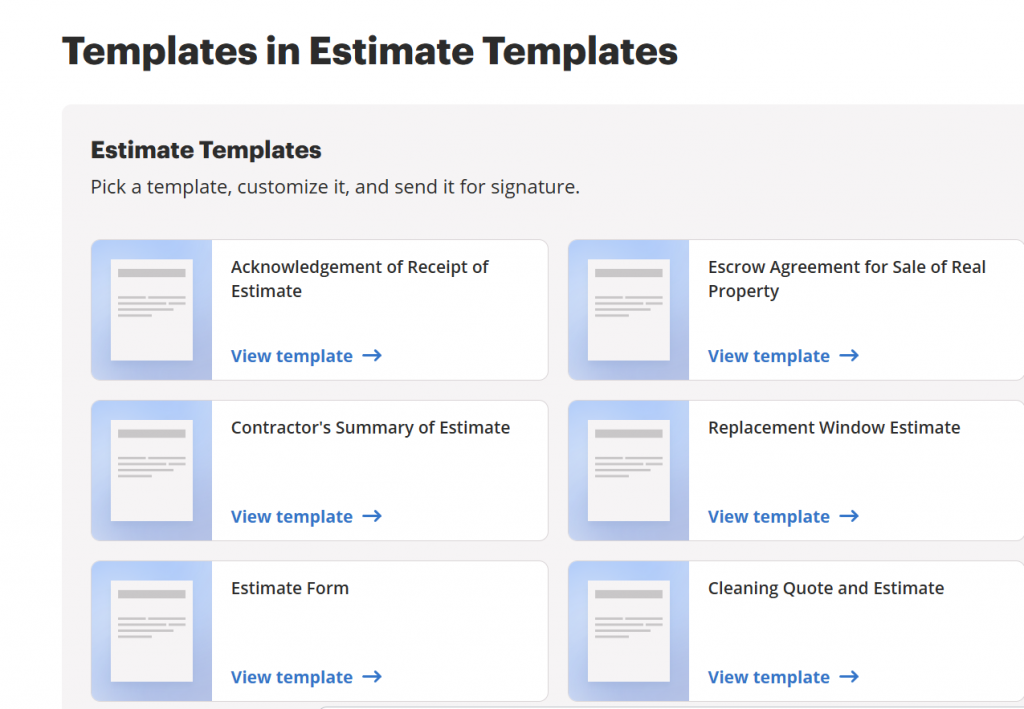
- Click on the View template to view the document template.
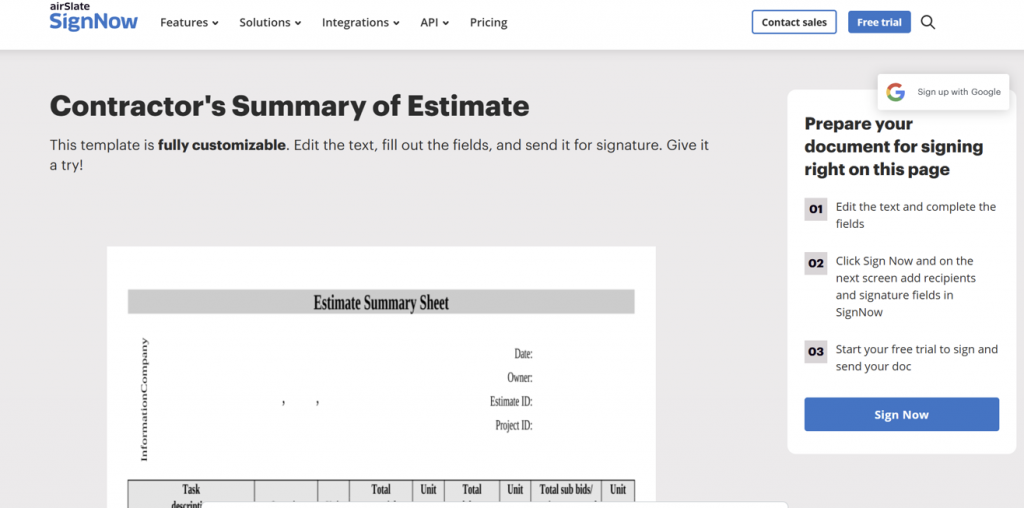
Step 2: Use the chosen estimate template
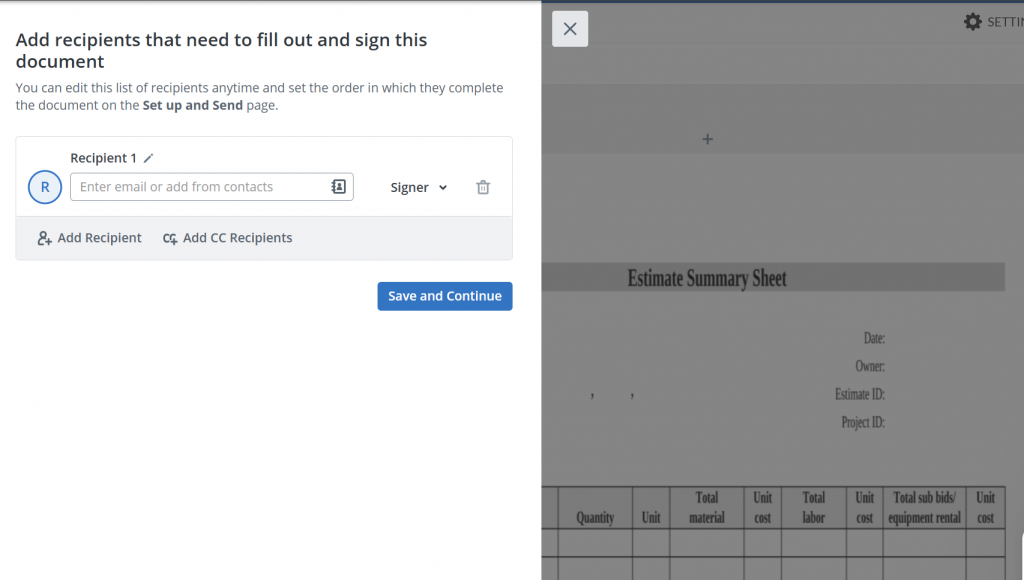
- Click Sign Now and log in using your email credentials to locate the document on your dashboard and open it in SignNow editor using the Prepare and Send option
- From the left-side field panel, add Text fields for the project description, Currency fields for line items and totals, and a Date field for the expiration date.
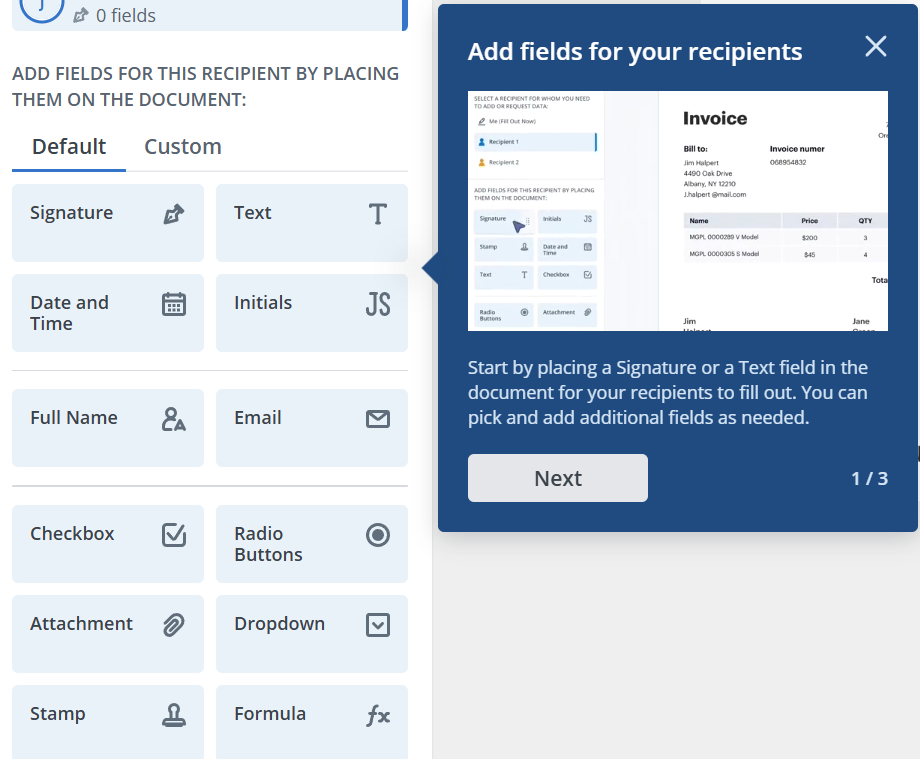
- Drag each field onto the document, then click it to set validation, required status, or a pre-filled value.
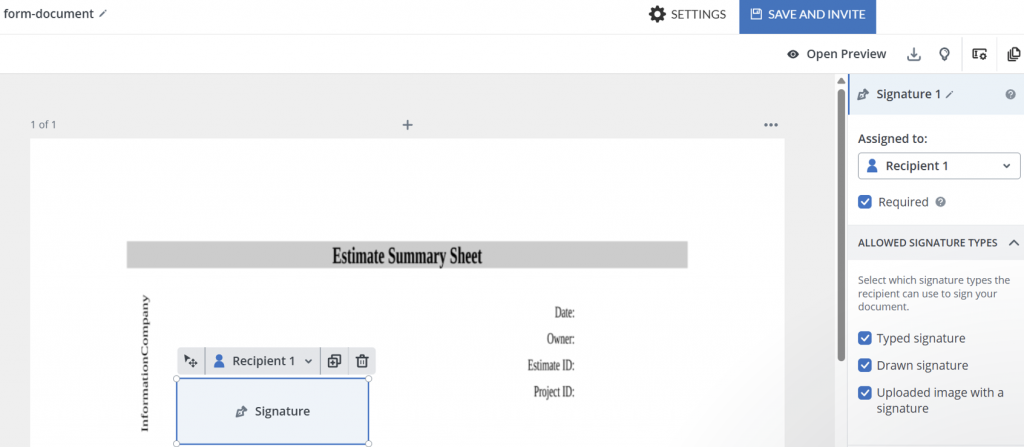
- Add a Signature field where the client accepts the estimate.
Step 3: Send it as a secure link or invite
- After all the needed fields are added and assigned, select Save and invite
- Use your email credentials to log in to SignNow
- Open and review the document using the Prepare and Send button.
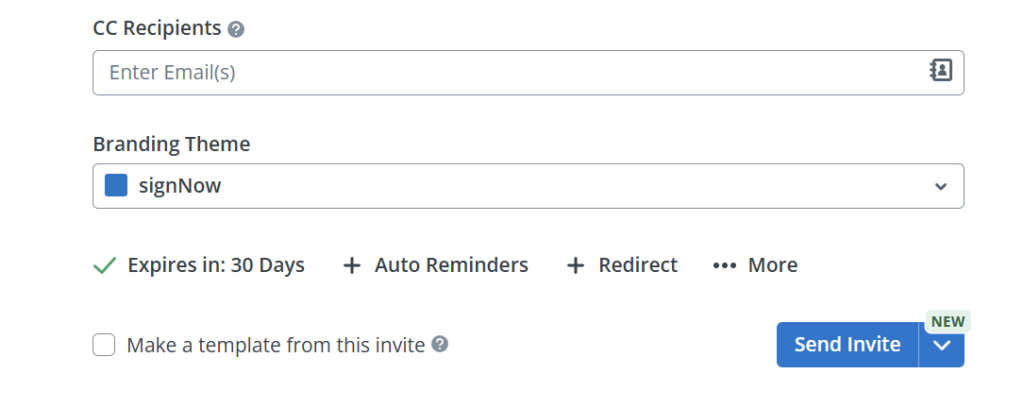
- Send the invite using the Send Invtie option, or schedule it using the dropdown.
- If you want to reuse the sent document in the future, create a template from it as you’ll be prompted to do.
Every accepted estimate is logged in a signature history and audit trail, recording who signed, when, and from what IP address, a detail plain PDF templates don’t capture.
Estimate template examples for different project types
The core fields on an estimate template stay the same across industries, but the scope detail and milestone structure change with project size.
Why it matters
A one-page freelance estimate and a multi-phase construction estimate both need a total and an expiration date, but they need very different levels of scope breakdown.
General contractors and other construction companies estimating a kitchen remodel typically itemize labor and materials separately, add a line for permits, and tie payment to key milestones such as demolition, rough-in, and final inspection rather than a single lump sum. Large projects carry real estimating risk: a 2017 McKinsey Global Institute analysis points to persistent cost and schedule overruns on construction projects, which is one reason milestone-based estimates matter more as project size grows. An estimate based on early-stage scope alone often needs revising once site conditions are confirmed. Jim Puerner, Vice President, IT / CIO at Tutor Perini Corporation, described the effect of moving estimating and approval documents into SignNow this way: “By choosing SignNow, we were able maintain the high levels of access to data and internal controls that Egnyte provides with our newly automated processes.“
A freelance designer or consultant can usually keep an estimate to a single scope line, a flat rate or hourly range, and a shorter validity window, since the project work has fewer moving parts and fewer outside suppliers to coordinate.
Converting an accepted estimate into an invoice
Once a client accepts an estimate, the fastest way to bill for the work is to carry the same line items into an invoice rather than rebuilding the document. Why it matters: re-entering totals by hand is where copy errors and mismatches between what was quoted and the actual costs tend to creep in.
How estimates drive the invoice creation process
Because the estimate was built as a structured, fillable document rather than flat text on a PDF, its client details, line items, and totals can become the starting point for the invoice, adjusted only for approved scope changes. This depends on the accepted estimate being a real record rather than an email reply: an e-signature captured this way satisfies the ESIGN Act and, in most states, UETA, so the signed acceptance holds up the same way a signed paper agreement would. Teams that need approvals before the invoice goes out can route it through SignNow’s contract management tools.
Conclusion
A clear, fillable estimate template turns a one-off pitch into a repeatable process: the same fields every time, a signed record of what was agreed, and a straight line into the invoice once work begins.
Try SignNow today to get a free estimate template and send your next one as a secure, signable link.
Key terms
- Change order: A documented adjustment to an estimate or contract’s scope, cost, or project timeline after work has started.
- Estimate: A projected cost for a project, issued before work begins, subject to change if the scope shifts.
- Line item: A single priced entry on an estimate or invoice, typically a unit of labor, material, or service.
- Quote: A fixed-price offer for clearly defined work, issued once the scope is locked in.
- Sales tax: a percentage-based charge applied to the taxable portion of an estimate or invoice, based on jurisdiction.
Frequently asked questions
What should an estimate template include?
Business and client details, an itemized scope with unit prices, tax, a total, a unique estimate number, and an expiration date. A signature line for acceptance is standard practice, even where not strictly required.
What is the difference between an estimate, a quote, and an invoice?
An estimate is a projected cost issued before work starts and can change with scope. A quote is typically a fixed price for defined work. An invoice is the payment request issued after the work is complete.
Do estimates need to be signed?
Not always, but a signed acceptance creates a clear record of what the client agreed to, which reduces disputes if the final figure differs from the original estimate.
How long should an estimate stay valid?
That depends on the industry and how quickly material or labor costs change, but every estimate should state an explicit expiration date rather than leaving the pricing open-ended.
Can a business charge for giving a project estimate?
Most businesses provide estimates free as part of the sales process, though some charge a fee for detailed or highly technical estimates on complex projects.
How do you convert estimates into an invoice?
Carry the accepted estimate’s client details, line items, and totals into an invoice, adjusting only for changes the client approved, instead of re-entering the data from scratch.
Sources
- QuickBooks 2026 Small Business Late Payments Report (Intuit QuickBooks, 2026)
- Reinventing Construction: A Route to Higher Productivity (McKinsey Global Institute, 2017)
- Electronic Signatures in Global and National Commerce Act, ESIGN Act (U.S. federal law)
- Uniform Electronic Transactions Act, UETA (state-level e-signature law)
- TL;DR
- What a professional estimate template should include
- Estimate vs. quote vs. invoice: what’s different
- How to build and send a fillable estimate template
- Estimate template examples for different project types
- Converting an accepted estimate into an invoice
- Conclusion
- Key terms
- Frequently asked questions
- Sources
