
How to electronically sign in Google Docs (with or without Workspace access)

Summary
- Google offers a built-in eSignature tool in Docs and Drive for eligible Google Workspace editions and Workspace Individual accounts.
- If you don’t have access to Google’s native eSignature, you can send and eSign Google Docs via SignNow using the Google Docs or Google Drive extension.
- In the U.S., eSignatures are legally valid under the federal ESIGN Act; most states also recognize electronic signatures via UETA.
- This guide walks you through step-by-step instructions for both paths (with and without Workspace access), plus compliance and troubleshooting tips.
This how-to guide shows you two reliable ways to add an electronic signature in Google Docs: (1) using Google’s native eSignature if your account is eligible, and (2) using SignNow’s integrations for Google Docs and Google Drive if you’re not eligible or you need advanced workflows. We also summarize U.S. eSignature legality so you can sign with confidence.
Path A — Use Google’s built-in eSignature
Check eligibility
Google’s eSignature is available for Workspace Individual and the following Google Workspace editions: Business Standard, Business Plus, Enterprise Standard, Enterprise Plus, Education Plus, Enterprise Essentials, and Enterprise Essentials Plus. Admins can enable or disable it at the organization or unit level.
Turn it on (admins)
If you’re a Google Workspace admin, open Admin console → Apps → Google Workspace → Drive and Docs → eSignature and ensure it’s enabled for relevant users (it’s on by default for supported editions).
Add signature fields in a Google Doc
In a Google Doc you own, insert fillable fields, then send for signature:
- Open your document in Google Docs.
- Insert eSignature elements (signature, name, date) and place them where needed.
- Add recipients, set the signing order, and send the request.
- Track status and audit trail in Docs/Drive.
Note: Menu wording may appear as Insert → eSignature field(s) in some interfaces.
Track and complete
Signers receive a secure request, complete required fields, and submit. You can monitor status and access an audit trail after completion.

Path B — Use SignNow with Google Docs or Google Drive (no Workspace access needed)
Option 1: SignNow extension for Google Docs
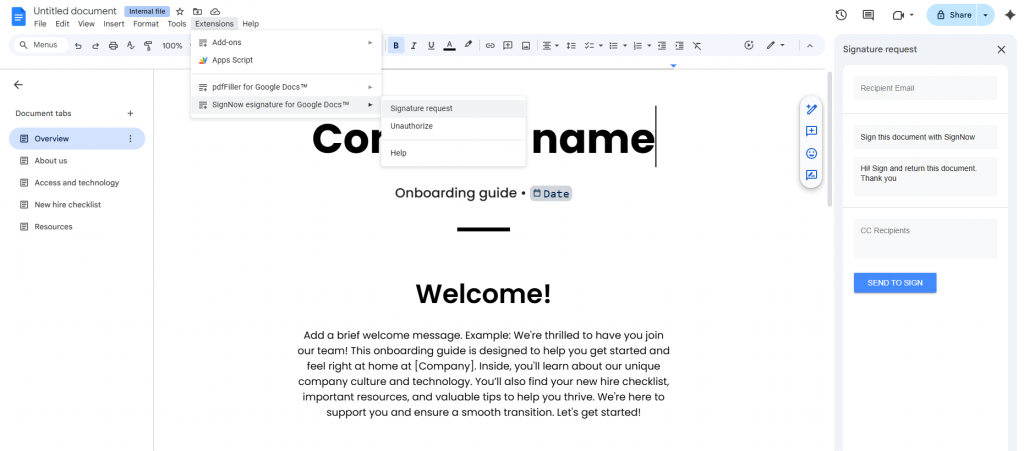
Use the SignNow extension for Google Doc to send documents for signature directly from the editor.
- In Google Docs, open Extensions → Add-ons → Get add-ons, search “SignNow for Google Docs”, and install.
- Reopen the Doc and launch the SignNow add-on.
- Log in with your SignNow credentials and give permissions to connect accounts.
- Once connected, select Signature request.
- Enter the recipient’s email address, customize your message, add CC’d recipients, and send.
- Track status and receive the completed copy with an audit trail in your SignNow account.
Option 2: SignNow integration with Google Drive
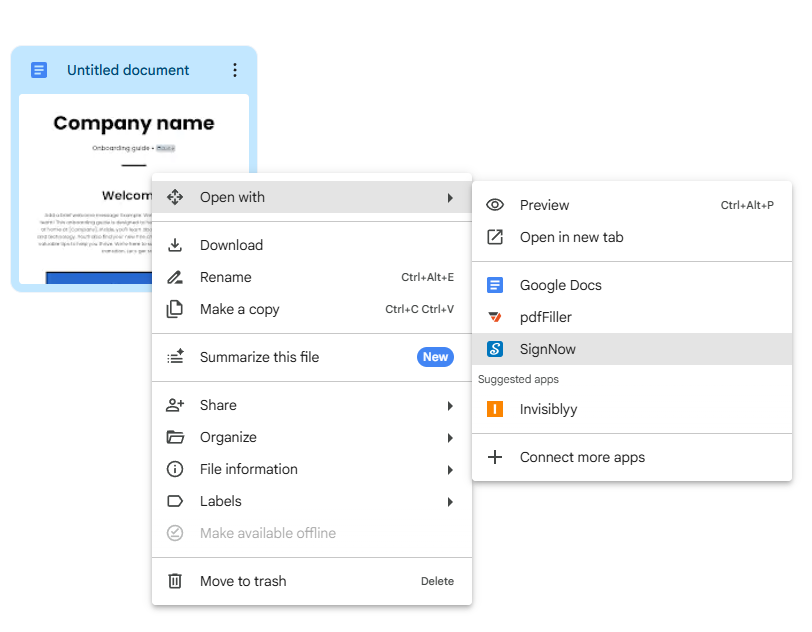
Send any file stored in Drive (including Google Docs exported as PDFs) via SignNow.
- Install the SignNow extension for Drive.
- In Google Drive, right-click the file → Open with → SignNow.
- Insert fields (signature, initials, text).
- Add recipients and send.
- Track progress and manage completed agreements in your SignNow account.
Compliance and legality in the USA
- Federal law (ESIGN Act, 15 U.S.C. Chapter 96): A contract, record, or signature may not be denied legal effect solely because it’s electronic, subject to certain exceptions (e.g., wills, certain notices).
- State law (UETA): Most U.S. jurisdictions have adopted the Uniform Electronic Transactions Act, providing legal recognition to electronic records and signatures where parties agree to transact electronically.
- Practical takeaway: For typical business agreements, eSignatures are enforceable when you (a) obtain signer consent, (b) preserve an audit trail, and (c) retain the executed record. Federal banking/consumer guidance echoes the validity principle and emphasizes proper disclosures/consent in consumer contexts.
Troubleshooting and tips
- I don’t see eSignature in my Google Docs.
Your account/edition may not be supported, or admins may have disabled it. Check supported editions and admin settings. - Signers can’t access the request.
Resend from your eSignature dashboard; confirm email accuracy and check spam filters (audit trail confirms delivery and completion.) - I need more advanced workflows.
Use SignNow for Google Docs or Drive to route documents to multiple signers, set reminders, manage reusable templates, and track documents. - Are these signatures enforceable?
Yes—provided basic consent/recordkeeping are met under ESIGN/UETA. Certain document types are excluded by law; consult counsel for those edge cases.
Case studies
1) Freelance contractor onboarding
A sole proprietor without Workspace access installs the SignNow for Google Docs add-on, sends their standard services agreement from within Docs, and retains the completed PDF with an audit trail in Drive for annual tax records.
2) Education nonprofit with Workspace
A small nonprofit on Google Workspace Business Standard enables eSignature for its staff. HR sends offer letters directly from Docs; signed copies and audit trails are stored centrally in Drive.
FAQs
- Is Google’s eSignature free with my Google account?
It’s bundled with specific Workspace editions and Workspace Individual; it isn’t available on all plans. - Can recipients sign without a SignNow account?
Yes, recipients don’t need to sign up or install any apps to sign documents from you. - How do I keep an audit trail?
Google’s eSignature and SignNow automatically generate audit trails of signer activity and completion. - Is an image of my signature enough?
Under ESIGN/UETA, what matters is the intent to sign plus attribution and record retention. Use platforms that preserve metadata and the audit trail.
Glossary
- eSignature (Electronic Signature)
An electronic method of signing a document. In the United States, electronic signatures are legally valid under federal (ESIGN Act) and state (UETA) laws. - Audit trail A record generated by an eSignature system that documents signer activity and completion. Preserving an audit trail is a key practice for ensuring an eSignature is enforceable. Both Google’s native tool and SignNow provide audit trails.
- Signature request
The formal process initiated from within Google Docs (on eligible Workspace plans) or SignNow to send a document to one or more recipients for their electronic signature. This action opens a dedicated panel to manage recipients and track the document’s status.
