
A timesheet template is a reusable form for recording the hours an employee worked in a given period, used to calculate pay and to prove the calculation later. Federal law does not tell you what that form should look like, which is why hundreds of free templates all qualify. It does tell you what has to be on it, and how long the completed sheet has to survive after payroll runs. Those two things decide whether a template is useful or decorative.
TL;DR
- No federal rule prescribes a timesheet format. Any timekeeping plan is acceptable if it is complete and accurate.
- The sheet has to carry the workweek start, hours worked each workday, total hours each workweek, the regular hourly rate where overtime applies, and the pay period covered.
- Overtime runs on the workweek, not the pay period, so a biweekly template still has to separate the two weeks.
- Completed timesheets are wage-computation records: keep them at least two years. Payroll records run three.
- Missing or incorrect overtime is the single largest category of payroll error reported by employees.
- A signature from the employee and the approver is what turns a column of numbers into an agreed record.
What a timesheet template is, and what the law expects from it
The Fair Labor Standards Act regulates the content of time records, not their design. DOL Fact Sheet 21 states that the Act “requires no particular form for the records” and that employers “may use any timekeeping method they choose”, whether that is a time clock, a timekeeper, or workers writing their own times on the record. Any timekeeping plan is acceptable as long as it is complete and accurate.
Why it matters: those records must be open for inspection by Wage and Hour Division representatives, who can ask for computations or transcriptions from them. A template that collects hours but omits the pay rate leaves a gap someone else fills in during an investigation.
The content requirement sits in 29 CFR 516.2, which lists what has to be preserved for every non-exempt employee. Most of it is payroll data. The subset belonging on the timesheet itself is short, specific, and routinely incomplete on the free templates circulating online.
The fields a timesheet template has to carry
Eleven entries carry the weight. Everything else on a typical template is convenience.
- Employee name and occupation, the name as used for Social Security recordkeeping.
- Time of day and day of week the workweek begins. The entry most templates omit entirely.
- Hours worked each workday, day by day rather than a weekly total recalled later.
- Total hours worked each workweek.
- Regular hourly rate of pay for any workweek in which overtime is due.
- Basis on which wages are paid, such as hourly, salaried, or piece rate.
- Total daily or weekly straight-time earnings.
- Total premium pay for overtime hours.
- Additions to or deductions from wages for the pay period.
- Total wages paid each pay period.
- Date of payment and the pay period it covers.
Overtime is where a template either does its job or creates work. Under the FLSA overtime rule, covered employees must be paid at not less than time and one-half their regular rate for hours over 40 in a workweek, and the workweek is a fixed, recurring period of 168 hours that need not match the calendar week. A template with one “total hours” box and no workweek boundary cannot show that calculation.
That gap shows up in the payroll data. In HiBob’s 2025 survey of 2,000 US employees, 44% had encountered a payroll error, and among the error types reported, missing or incorrect overtime compensation led at 42%, ahead of inaccurate hours or days worked at 28%.
Where payroll errors show up
| Error type | Share of reported errors |
| Missing or incorrect overtime | 42% |
| Inaccurate hours or days worked | 28% |
| Incorrect salary or hourly rate | 26% |
| Unpaid or miscalculated bonuses | 24% |
| Incorrect tax deductions | 21% |
Source: HiBob, 2025 survey of 2,000 US employees
Project codes, client names, and cost codes are worth adding when the hours are billed onward, but they answer a billing question rather than a compliance one. Keep them in separate columns so the required fields stay legible.
Choosing the pay period the template covers
Match the template to the payroll cycle, then keep the workweek visible inside it. A daily sheet suits shift work and job-site crews moving between cost codes. A weekly sheet is the cleanest fit for hourly staff, because the sheet boundary and the overtime boundary are the same line. Biweekly and semi-monthly sheets cut paperwork but introduce a trap: overtime still runs on each workweek separately, so a biweekly template needs two subtotal rows rather than one 80-hour total.
A construction crew on a biweekly cycle shows the problem. The foreman signs off on ten working days at once, and if the sheet totals the whole period, a week of 46 hours and a week of 34 look like a compliant 80. An employee time sheet form avoids this by keeping each week’s total on its own line above the period total.
How long to keep completed timesheets
Two years at minimum, and three for the payroll records the sheet feeds. The regulation splits retention by record type: payroll records, collective bargaining agreements, and sales and purchase records are preserved for at least three years, while wage-computation records are preserved for at least two. Time cards, work and time schedules, and wage rate tables are named explicitly in that second group, which is the category a completed timesheet falls into.
Minimum federal retention for time and pay records
| Record type | Minimum retention |
| Payroll records (29 CFR 516.5) | 3 years |
| Wage-computation records, including time cards (29 CFR 516.6) | 2 years |
Source: 29 CFR 516.5 and 516.6; US Department of Labor Fact Sheet 21
A timesheet is therefore not disposable once payroll runs. It reconstructs the payment if anyone disputes it, and its retention period runs from the last date of entry.
The cost of not having it is published every year. The Wage and Hour Division recovered more than $259 million in back wages for 176,957 employees in fiscal year 2025, an average of $1,465 per worker, and the highest recovery since 2019. Recoveries under the FLSA rose to more than $184 million from just under $150 million the year before, while concluded compliance actions fell to just under 17,000 from 17,300. Exposure per case is rising. Several states set longer retention periods than the federal floor, so check the state where the work is performed before setting a deletion schedule.
How to build and send a signed timesheet template in SignNow
If you would rather not start from a blank sheet, SignNow’s timesheet templates include daily, employee, and reporting variants you can open and adapt before running the steps below.
Build the sheet once as a template and reuse it each period. On the Business plan at $8 per user per month billed annually:
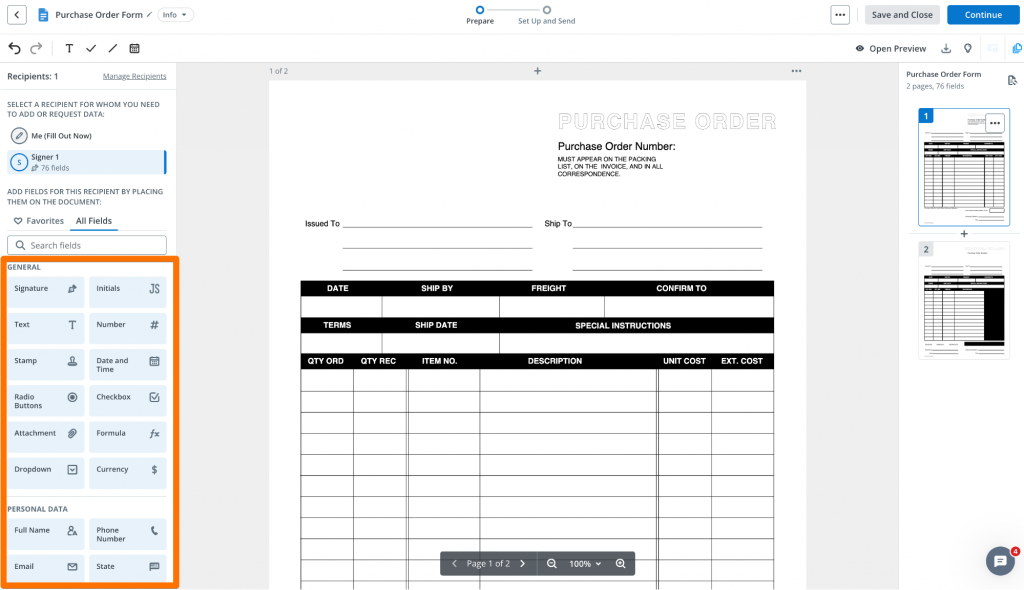
- Click +Create at the top left and upload the blank sheet as a Template. PDF, DOC, DOCX, XLS, and XLSX are all accepted, up to 50 MB per document.
- Open the document in the editor, click Manage Recipients in the left panel, and add two roles: the employee who enters the hours and the manager who approves them. Add payroll as a CC recipient to receive the completed sheet without signing.
- If the file already carries native fillable fields, accept Add Fields; otherwise, choose Skip and place them yourself.
- Select the employee role, then drag Text, Number, Date and Time, and Checkbox fields onto the daily rows. Switch to the approver role before placing the approval block, so neither party can edit the other’s entries.
- Add a calculated field (Formula) for each weekly subtotal. Values compute automatically from the fields the recipient fills in, removing the arithmetic step where errors enter.
- Click Open Preview to check the sheet as the signer sees it, then Back to Editing.
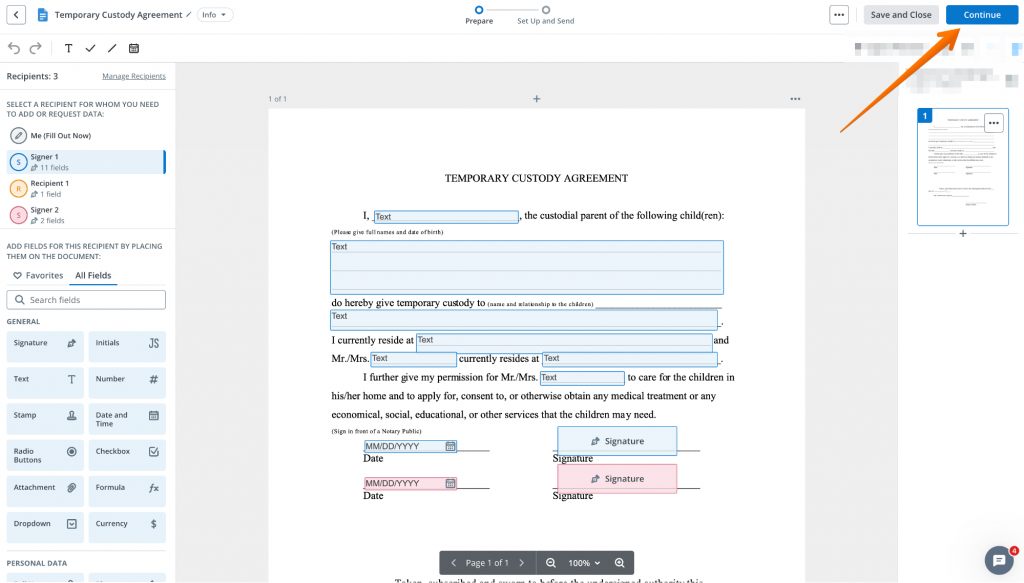
- Click Continue to reach the invite page. Set the Signing Order so the employee signs before the approver, use Customize Message for the subject and body, and open Manage Additional Settings to schedule reminders before the payroll cutoff.
Saving the file with Make Template puts it in the Templates folder for the next period, and reusable templates are available on all paid plans. Teams sending the same sheet to a whole crew at once can use bulk send, which the SignNow pricing plans list on Business Premium at $15 per user per month.
“SignNow has changed our workflows to be more streamlined and efficient. We saved more than 1500 pieces of paper converting to an electronic format,” says Nicholas Tovar, SHRM-CP.
Why the signature line is the part that matters
A signature converts a column of numbers into a record both sides agreed on. Without it, a disputed week is one person’s spreadsheet against another person’s memory. With a signing order set, the employee attests to the hours, and the manager approves them in sequence, and the timestamps show which came first.
Role separation does the rest. Because the hours fields belong to the employee’s role and the approval block to the manager’s, neither can overwrite the other afterwards. The audit trail records every action on the document with full names, email and IP addresses, and time stamps, inside a platform audited against SOC 2 Type II and 21 CFR Part 11 and compliant with ESIGN and UETA.
This is the completion, approval, and retention layer, not a time clock and not a payroll engine. The hours still come from wherever your people record them. What changes is that the finished sheet is signed, dated, searchable, and still there in two years. The stakes are not only regulatory: among the HiBob respondents, 53% would consider leaving an employer over repeated payroll mistakes.
Final thoughts
A timesheet template earns its place when it records what the FLSA recordkeeping rule expects, keeps the approval attached to the hours, and survives the retention window. Build it once with number and formula fields, set the employee and the approver in signing order, and the weekly cycle stops being a chase. Start from one of the ready-made timesheet templates if you do not want to build the layout yourself. SignNow starts at $8 per user per month on the Business plan with a 7-day free trial. The current plans are listed on the SignNow pricing page.
Sign up for a free trial of SignNow and discover how it can streamline your document workflows today.
Key terms
- Audit trail: The document history that records who acted on a record, when, and from which address.
- Non-exempt employee: A worker covered by the FLSA minimum wage and overtime provisions, and therefore by its recordkeeping rules.
- Overtime premium: Pay above straight time owed for hours over 40 in a workweek.
- Regular rate. The hourly rate on which the overtime calculation is based.
- Wage-computation record: A document used to calculate pay, such as a completed timesheet, subject to the two-year retention floor.
- Workweek: A fixed, recurring period of 168 hours that sets the boundary for the overtime calculation.
FAQ
What must be included in a timesheet?
The employee’s name, the time of day and day of week the workweek begins, hours worked each workday, total hours each workweek, the regular hourly rate where overtime is due, and the pay period covered. The full list of records an employer must keep is in 29 CFR 516.2.
How long do employers have to keep timesheets?
At least two years, because a completed timesheet is a record on which wage computations are based. Payroll records themselves run three years. Both periods count from the last date of entry, and some states require longer.
Are timesheets a legal requirement?
Time records are. The FLSA requires employers to record hours worked for non-exempt employees, but not a timesheet specifically or any particular form of record.
Does an employee have to sign their timesheet?
The FLSA recordkeeping rule lists the records an employer has to keep, and a signed employee acknowledgment is not among them. A signature remains the cheapest evidence that the employee agreed to the hours before being paid, which is why most approval workflows include one.
Can I use a spreadsheet as a timesheet?
Yes. The DOL accepts any timekeeping plan that is complete and accurate, including workers writing their own times. The risk is version control and the absence of an approval record, not the file format.
Can timesheets be signed electronically?
Yes. Electronic signatures on employment records are valid under ESIGN and state enactments of UETA, and the workflow produces a timestamped history that a paper sheet does not.
Sources
- Fact Sheet 21: Recordkeeping Under the Fair Labor Standards Act — US Department of Labor
- 29 CFR 516.2, Records to be kept — Cornell Law School LII
- 29 CFR 516.6, Records to be preserved 2 years — Cornell Law School LII
- Overtime Pay — US Department of Labor, Wage and Hour Division
- Wage and Hour Division fiscal year 2025 recoveries — US Department of Labor, 2026
- DOL back-wage recovery hit 5-year high in 2025 — HR Dive, 2026
- Beyond the paystub: why payroll accuracy is a cornerstone of employee experience — HiBob, 2025
- Security and compliance — SignNow
- TL;DR
- What a timesheet template is, and what the law expects from it
- The fields a timesheet template has to carry
- Choosing the pay period the template covers
- How long to keep completed timesheets
- How to build and send a signed timesheet template in SignNow
- Why the signature line is the part that matters
- Final thoughts
- Key terms
- FAQ
- Sources
