4 805 2009-2026


What is the 4 805?
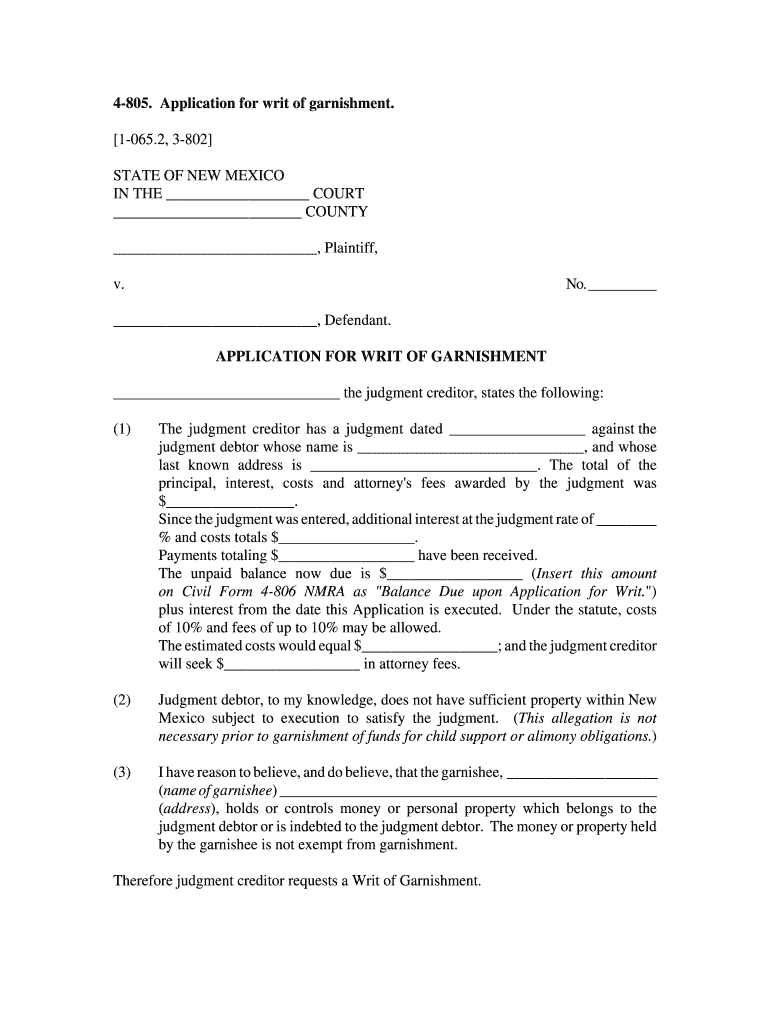
The 4 805 is a legal form used in New Mexico for initiating a writ of garnishment. This form allows a creditor to request the court to take funds directly from a debtor's bank account or wages to satisfy a debt. Understanding the purpose and function of the 4 805 is crucial for both creditors and debtors involved in the garnishment process.
Steps to complete the 4 805
Completing the 4 805 form involves several key steps to ensure it is filled out correctly. Begin by gathering all necessary information, including the debtor's details and the amount owed. Next, accurately fill in the required fields on the form, ensuring all information is current and correct. After completing the form, review it for any errors before signing and dating it. Finally, submit the form to the appropriate court for processing.
Legal use of the 4 805
The 4 805 must be used in accordance with New Mexico state laws regarding garnishment. This includes understanding the limits on how much can be garnished from wages or bank accounts. Creditors must also ensure that they follow proper procedures to avoid legal repercussions, such as wrongful garnishment claims. Familiarity with these legal stipulations is essential for effective use of the form.
Key elements of the 4 805
Several key elements must be included in the 4 805 form to make it valid. These include the creditor's name and contact information, the debtor's details, the specific amount owed, and the signature of the creditor or their representative. Additionally, the form should clearly state the basis for the garnishment request, which helps the court understand the context of the claim.
How to obtain the 4 805
The 4 805 form can be obtained from the New Mexico court system's official website or directly from the courthouse. It is important to ensure that you are using the most current version of the form, as outdated forms may not be accepted by the court. Additionally, legal aid organizations may provide assistance in obtaining and completing the form.
Filing Deadlines / Important Dates
When filing the 4 805, it is crucial to be aware of any deadlines associated with the garnishment process. Typically, forms must be filed within a specific timeframe after a judgment has been made. Missing these deadlines can result in delays or the dismissal of the garnishment request. Always check with the court for the most accurate and relevant dates.
Quick guide on how to complete 4 805 form
Complete and submit your 4 805 swiftly
Reliable tools for digital document exchange and approval are essential for optimizing processes and the continuous advancement of your forms. When managing legal documents and signing a 4 805, the appropriate signature solution can conserve a signNow amount of time and resources with every submission.
Search, fill in, modify, sign, and distribute your legal paperwork with airSlate SignNow. This platform provides everything necessary to create streamlined paper submission workflows. Its comprehensive library of legal forms and intuitive interface will assist you in locating your 4 805 promptly, while the editor featuring our signature capability will enable you to complete and authorize it instantly.
Sign your 4 805 in a few easy steps
- Locate the 4 805 you need in our library by utilizing the search or catalog pages.
- Examine the form details and preview it to confirm it meets your requirements and complies with state regulations.
- Click Obtain form to begin editing.
- Complete the form using the extensive toolbar.
- Verify the information you entered and click the Sign option to validate your document.
- Select one of three ways to affix your signature.
- Complete the modifications and save the file, then download it to your device or share it right away.
Optimize every phase of your document preparation and approval with airSlate SignNow. Experience a more effective online solution that thoroughly addresses all aspects of managing your paperwork.
Create this form in 5 minutes or less
FAQs
-
How do I fill out a W-4 form?
The main thing you need to put on your W-4 besides your name, address and social security number is whether you are married or single and the number of exemptions you wish to take to lower the amount of money with held for taxes from your paycheck. The number of exemptions refers to how many people you support, i. e. children. Say you are single and have 3 children, you can put down 4 exemptions, 1 for your self and 1 for each child. This means you will have more pay to take home because you aren’t having it with held from your paycheck. If you are single and have no children, you can either take 1 or 0 exemptions. If you make decent money, take 0 deductions, if you are barely making it you could probably take 1 exemption. Just realize that if you take exemptions, and not enough money is taken out of your check to pay your taxes, you will be liable for it come April 15th.If you are married and have no children and you make decent money, take 0 deductions. If you have children, only one spouse should take them as exemptions and it should be the one who makes the most money. For example, say your spouse is the major bread winner and you have 2 children, your spouse could take 4 exemptions (one for each member of the family) and then you would take 0 exemptions.Usually, it’s best to err on the side of caution and take the smaller amount of deductions so that you won’t owe a lot of money come tax time. If you’ve had too much with held it will come back to you as a refund.
-
How do I fill up the ITR 4 form?
Guidance to File ITR 4Below are mentioned few common guidelines to consider while filing your ITR 4 form:If any schedule is not relevant/applicable to you, just strike it out and write —NA— across itIf any item/particular is not applicable/relevant to you, just write NA against itIndicate nil figures by writing “Nil” across it.Kindly, put a “-” sign prior to any negative figure.All figures shall be rounded off to the nearest one rupee except figures for total income/loss and tax payable. Those shall be rounded off to the nearest multiple of ten.If you are an Employer individual, then you must mark Government if you are a Central/State Government employee. You should tick PSU if you are working in a public sector company of the Central/State Government.Sequence to fill ITR 4 formThe easiest way to fill out your ITR-4 Form is to follow this order:Part AAll the schedulesPart BVerificationModes to file ITR 4 FormYou can submit your ITR-4 Form either online or offline. It is compulsory to file ITR in India electronically (either through Mode 3 or Mode 4) for the following assesses:Those whose earning exceeds Rs. 5 lakhs per yearThose possessing any assets outside the boundary of India (including financial interest in any entity) or signing authority in any account outside India.Those claiming relief under Section 90/90A/91 to whom Schedule FSI and Schedule TR applyOffline:By furnishing a return in a tangible l paper formBy furnishing a bar-coded returnThe Income Tax Department will issue you an acknowledgment as a form of response/reply at the time of submission of your tangible paper return.Online/Electronically:By furnishing the return electronically using digital signature certificate.By sending the data electronically and then submitting the confirmation of the return in Return Form ITR-VIf you submit your ITR-4 Form by electronic means under digital signature, the acknowledgment/response will be sent to your registered email id. You can even download it manually from the official income tax website. For this, you are first required to sign it and send it to the Income Tax Department’s CPC office in Bangalore within 120 days of e-filing.Keep in mind that ITR-4 is an annexure-less form. It means you don’t have to attach any documents when you send it.TaxRaahi is your income tax return filing online companion. Get complete assistance and tax saving tips from experts.
-
How do I fill out the SS-4 form for a new Delaware C-Corp to get an EIN?
You indicate this is a Delaware C Corp so check corporation and you will file Form 1120.Check that you are starting a new corporation.Date business started is the date you actually started the business. Typically you would look on the paperwork from Delaware and put the date of incorporation.December is the standard closing month for most corporations. Unless you have a signNow business reason to pick a different month use Dec.If you plan to pay yourself wages put one. If you don't know put zero.Unless you are fairly sure you will owe payroll taxes the first year check that you will not have payroll or check that your liability will be less than $1,000. Anything else and the IRS will expect you to file quarterly payroll tax returns.Indicate the type of SaaS services you will offer.
-
Why did my employer give me a W-9 Form to fill out instead of a W-4 Form?
I wrote about the independent-contractor-vs-employee issue last year, see http://nctaxpro.wordpress.com/20...Broadly speaking, you are an employee when someone else - AKA the employer - has control over when and where you work and the processes by which you perform the work that you do for that individual. A DJ or bartender under some circumstances, I suppose, might qualify as an independent contractor at a restaurant, but the waitstaff, bus help, hosts, kitchen aides, etc. almost certainly would not.There's always risk in confronting an employer when faced with a situation like yours - my experience is that most employers know full well that they are violating the law when they treat employees as independent contractors, and for that reason they don't tolerate questions about that policy very well - so you definitely should tread cautiously if you want to keep this position. Nonetheless, I think you owe it to yourself to ask whether or not the restaurant intends to withhold federal taxes from your checks - if for no other reason than you don't want to get caught short when it comes to filing your own return, even if you don't intend to challenge the policy.
-
How should I fill out my w-2 or w-4 form?
To calculate how much you should withhold you need to calculate two things. Step 1 - Estimate your TaxFirst go to Intuit's TaxCaster (Link -> TurboTax® TaxCaster, Free Tax Calculator, Free Tax Refund Estimator) and put in your family's information and income (estimate what you'll make in 2016 before taxes and put zero for federal and state taxes withheld, don't worry that the TaxCaster is for 2015, you're just trying to get a general number). Once you enter in your correct information it will tell you what you would owe to the federal government.Step 2 - Estimate your Tax Withholding Based on Allowances ClaimedSecond go to Paycheck City (Link -> Salary Paycheck Calculator | Payroll Calculator | Paycheck City) select the correct state, enter in your pay information. Select married filing jointly then try putting in 3 or 4 for withholdings. Once you calculate it will tell you how much taxes are being withheld. Set the pay frequency to annual instead of bi-monthly or bi-weekly since you need a total number for the year. Try changing the Federal withholding allowance until you have enough Federal taxes withheld to cover the amount calculated in the TaxCaster. The Federal withholding allowance number that covers all taxes owed should be the number claimed on your W-4.Don't worry too much about your state. If you claim the same as Federal what will usually happen is you might get a small refund for Federal and owe a small amount for State. I usually end up getting a Federal refund for ~$100 and owing state for just over $100. In the end I net owing state $20-40.Remember, the more details you can put into the TaxCaster and Paycheck City the more accurate your tax estimate will be.
-
How much do accountants charge for helping you fill out a W-4 form?
A W-4 is a very simple form to instruct your employer to withhold the proper tax. It's written in very plain English and is fairly easy to follow. I honestly do not know of a CPA that will do one of these. If you're having trouble and cannot find a tutorial you like on line see if you can schedule a probing meeting. It should take an accounting student about 10 minutes to walk you through. There is even a worksheet on the back.If you have mitigating factors such as complex investments, partnership income, lies or garnishments, talk to your CPA about those, and then ask their advice regarding the W4 in the context of those issues.
-
How do I fill out tax form 4972?
Here are the line by line instructions Page on irs.gov, if you still are having problems, I suggest you contact a US tax professional to complete the form for you.
Create this form in 5 minutes!
How to create an eSignature for the 4 805 form
How to make an eSignature for the 4 805 Form in the online mode
How to make an electronic signature for the 4 805 Form in Google Chrome
How to generate an eSignature for putting it on the 4 805 Form in Gmail
How to make an electronic signature for the 4 805 Form right from your mobile device
How to generate an eSignature for the 4 805 Form on iOS devices
How to generate an electronic signature for the 4 805 Form on Android devices
People also ask
-
What is the significance of the '4 805' feature in airSlate SignNow?
The '4 805' feature in airSlate SignNow refers to a specific set of functionalities that enhance document management efficiency. This feature allows users to streamline their eSigning processes, ensuring that all documents are signed quickly and securely. By leveraging '4 805,' businesses can reduce turnaround times and improve overall productivity.
-
How does airSlate SignNow pricing compare for the '4 805' plan?
The pricing for the '4 805' plan in airSlate SignNow is designed to be cost-effective while offering robust features. This plan provides excellent value for businesses looking to enhance their document workflows without breaking the bank. Users can benefit from competitive rates and various subscription options tailored to their needs.
-
What benefits can I expect from using the '4 805' feature in airSlate SignNow?
Using the '4 805' feature in airSlate SignNow brings numerous benefits, including improved efficiency and reduced document processing times. It allows teams to collaborate seamlessly and ensures compliance with legal standards for eSigning. Overall, '4 805' empowers businesses to focus on their core activities while automating administrative tasks.
-
Can airSlate SignNow integrate with other tools under the '4 805' plan?
Yes, the '4 805' plan in airSlate SignNow supports integration with various third-party applications and services. This flexibility allows users to connect their existing tools, such as CRMs and project management software, enhancing the overall workflow. Integrating with other tools ensures that businesses can streamline their processes without unnecessary disruptions.
-
Is the '4 805' feature user-friendly for new users of airSlate SignNow?
Absolutely! The '4 805' feature in airSlate SignNow is designed with user-friendliness in mind, making it accessible for both new and experienced users. The intuitive interface guides users through the eSigning process, minimizing the learning curve. This ensures that businesses can quickly adopt the solution and start benefiting from its functionalities.
-
What types of documents can I manage with the '4 805' feature?
With the '4 805' feature in airSlate SignNow, users can manage a wide variety of documents, including contracts, agreements, and forms. This versatility allows businesses to handle all their eSigning needs in one platform, simplifying document management. Whether you're sending or receiving documents, '4 805' can adapt to your requirements.
-
How secure is the '4 805' feature in airSlate SignNow?
Security is a top priority for airSlate SignNow, and the '4 805' feature is equipped with advanced encryption and compliance measures. This ensures that all documents are protected during transmission and storage. Users can confidently sign and manage sensitive information knowing that '4 805' adheres to industry security standards.
Get more for 4 805
Find out other 4 805
- How To Integrate Sign in Banking
- How To Use Sign in Banking
- Help Me With Use Sign in Banking
- Can I Use Sign in Banking
- How Do I Install Sign in Banking
- How To Add Sign in Banking
- How Do I Add Sign in Banking
- How Can I Add Sign in Banking
- Can I Add Sign in Banking
- Help Me With Set Up Sign in Government
- How To Integrate eSign in Banking
- How To Use eSign in Banking
- How To Install eSign in Banking
- How To Add eSign in Banking
- How To Set Up eSign in Banking
- How To Save eSign in Banking
- How To Implement eSign in Banking
- How To Set Up eSign in Construction
- How To Integrate eSign in Doctors
- How To Use eSign in Doctors