4355 Construction Floridas Form


What is the 4355 Construction Floridas Form
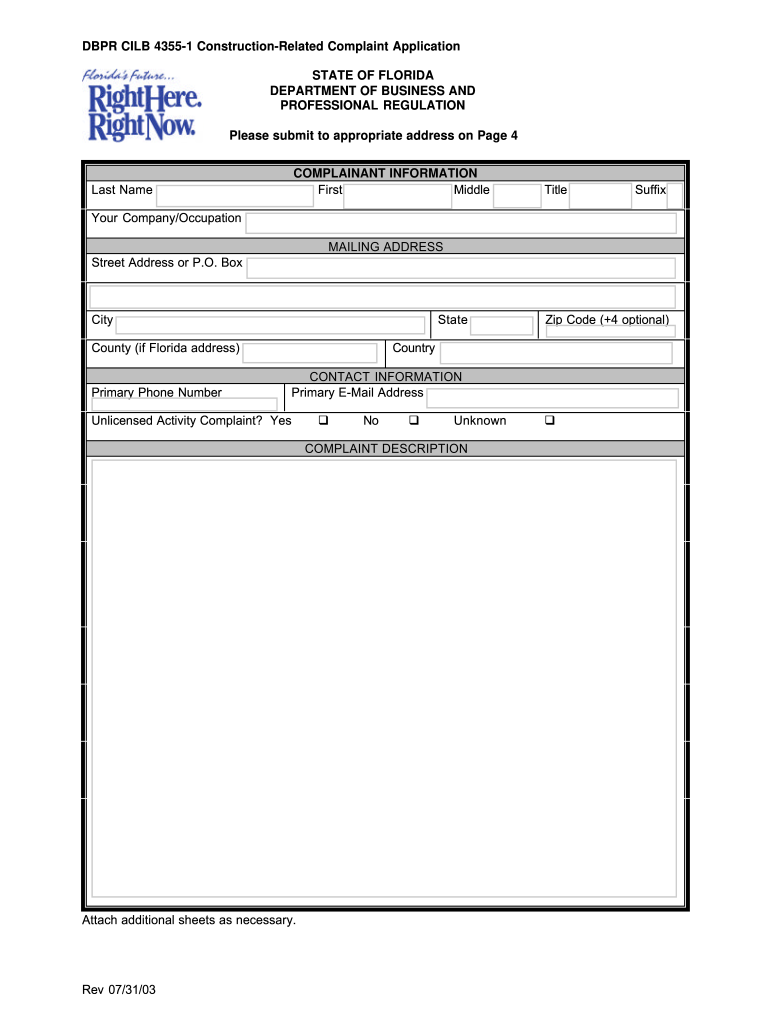
The 4355 Construction Floridas Form is a specific document used in the construction industry in Florida for filing complaints related to construction practices. This form is essential for individuals or entities who wish to report issues concerning construction projects, including but not limited to, violations of building codes, safety standards, or contractual obligations. It serves as a formal mechanism to address grievances and seek resolution through the appropriate regulatory bodies.
How to use the 4355 Construction Floridas Form
Utilizing the 4355 Construction Floridas Form involves several straightforward steps. First, gather all relevant information related to your complaint, including details about the construction project, the parties involved, and specific issues encountered. Next, accurately fill out the form, ensuring that all required fields are completed. Once the form is filled, review it for accuracy before submission. This form can be submitted online or via traditional mail, depending on your preference and the specific guidelines provided by the Florida Department of Business and Professional Regulation (DBPR).
Steps to complete the 4355 Construction Floridas Form
Completing the 4355 Construction Floridas Form requires careful attention to detail. Follow these steps for a successful submission:
- Begin by downloading the form from the official DBPR website or accessing it through a digital platform.
- Fill in your personal information, including your name, address, and contact details.
- Provide specific details about the construction project, including the contractor's name and license number.
- Clearly describe the nature of your complaint, including dates, incidents, and any supporting evidence you may have.
- Review the completed form for any errors or omissions.
- Submit the form according to the provided instructions, either online or by mailing it to the appropriate DBPR office.
Legal use of the 4355 Construction Floridas Form
The 4355 Construction Floridas Form is legally recognized as a formal complaint document within the state of Florida. When completed and submitted correctly, it initiates a review process by the DBPR. This form must be used in accordance with state laws and regulations governing construction practices. It is important to ensure that your complaint is valid and supported by adequate evidence to facilitate a thorough investigation by the relevant authorities.
Key elements of the 4355 Construction Floridas Form
Several key elements are essential to the 4355 Construction Floridas Form. These include:
- Personal Information: Your name, address, and contact information.
- Project Details: Information about the construction project, including location and contractor details.
- Complaint Description: A clear and detailed account of the issues you are experiencing.
- Supporting Documentation: Any evidence that supports your complaint, such as photographs, contracts, or correspondence.
Form Submission Methods (Online / Mail / In-Person)
The 4355 Construction Floridas Form can be submitted through various methods to accommodate different preferences. You may choose to submit the form online via the DBPR's official website, which often provides a streamlined process. Alternatively, you can mail the completed form to the designated DBPR office, ensuring it is sent to the correct address. In some cases, in-person submissions may also be accepted, allowing for direct interaction with DBPR representatives.
Quick guide on how to complete 4355 construction floridas form
Effortlessly Prepare 4355 Construction Floridas Form on Any Device
Digital document management has gained traction among enterprises and individuals. It offers a flawless eco-friendly alternative to conventional printed and signed documents, allowing you to locate the appropriate form and securely store it online. airSlate SignNow equips you with all the necessary tools to create, modify, and eSign your documents swiftly without delays. Manage 4355 Construction Floridas Form on any device using airSlate SignNow's Android or iOS applications and enhance any document-related task today.
How to Alter and eSign 4355 Construction Floridas Form with Ease
- Find 4355 Construction Floridas Form and then click Get Form to begin.
- Utilize the tools we offer to complete your form.
- Emphasize important sections of the documents or obscure sensitive information with the tools provided by airSlate SignNow for that specific purpose.
- Generate your signature using the Sign tool, which takes just seconds and carries the same legal validity as a traditional wet ink signature.
- Review the details and then click on the Done button to save your modifications.
- Choose how you want to send your form, whether by email, text message (SMS), invitation link, or download it to your computer.
Eliminate the stress of lost or misfiled documents, tedious form searches, or errors that necessitate printing new copies. airSlate SignNow addresses your document management needs in just a few clicks from your preferred device. Modify and eSign 4355 Construction Floridas Form and guarantee seamless communication at any stage of the form preparation process with airSlate SignNow.
Create this form in 5 minutes or less
Create this form in 5 minutes!
People also ask
-
What is a DBPR construction related complaint form?
The DBPR construction related complaint form is a document used to file complaints regarding construction-related issues in Florida. It allows individuals to report issues such as defective workmanship, code violations, or unlicensed contracting. Submitting this form helps facilitate the investigation of complaints and ensures consumer protection.
-
How do I access the DBPR construction related complaint form?
You can easily access the DBPR construction related complaint form through the official Florida Department of Business and Professional Regulation (DBPR) website. Once there, you'll find options to download or complete the form online. Having access to this form is vital for anyone looking to address construction disputes.
-
Can I submit the DBPR construction related complaint form electronically?
Yes, the DBPR construction related complaint form can often be submitted electronically through the DBPR website. This method is fast and efficient, allowing you to ensure your complaint is filed without unnecessary delays. Utilizing tools like airSlate SignNow can streamline the e-signing and submission process.
-
What are the fees associated with filing a DBPR construction related complaint form?
Filing a DBPR construction related complaint form typically involves no fees. However, it's essential to verify any associated costs on the DBPR website or consult directly with their offices. Understanding any requirements upfront can help you avoid surprises during the filing process.
-
What features does airSlate SignNow offer for managing the DBPR construction related complaint form?
airSlate SignNow provides robust features for managing the DBPR construction related complaint form, including e-signature capabilities, cloud storage, and real-time collaboration. These features ensure your documents are secure, easily accessible, and efficiently shared with relevant stakeholders. This streamlines the management of complaint forms and enhances your workflow.
-
How can airSlate SignNow benefit my business when dealing with the DBPR construction related complaint form?
By using airSlate SignNow, businesses can save time and reduce paperwork when handling the DBPR construction related complaint form. The platform offers an easy-to-use interface that simplifies the documentation process, increases accuracy, and helps keep track of submissions. This ultimately promotes better customer satisfaction and operational efficiency.
-
Is customer support available for issues related to the DBPR construction related complaint form?
Yes, customer support is available through the DBPR for any issues related to the construction related complaint form. Additionally, airSlate SignNow also offers extensive support to help you navigate their platform and utilize its features effectively. Ensuring your questions are answered can help you expedite the complaint process.
Get more for 4355 Construction Floridas Form
- Ohio husband wife 497322129 form
- Quitclaim deed from husband and wife to husband and wife ohio form
- General warranty deed from husband and wife to husband and wife ohio form
- Ohio limited warranty form
- Quitclaim deed from husband and wife to an individual ohio form
- General warranty deed from husband and wife to an individual ohio form
- Ohio limited warranty deed form
- Transfer on death designation affidavit tod from individual to individual with contingent beneficiary ohio form
Find out other 4355 Construction Floridas Form
- How To Integrate Sign in Banking
- How To Use Sign in Banking
- Help Me With Use Sign in Banking
- Can I Use Sign in Banking
- How Do I Install Sign in Banking
- How To Add Sign in Banking
- How Do I Add Sign in Banking
- How Can I Add Sign in Banking
- Can I Add Sign in Banking
- Help Me With Set Up Sign in Government
- How To Integrate eSign in Banking
- How To Use eSign in Banking
- How To Install eSign in Banking
- How To Add eSign in Banking
- How To Set Up eSign in Banking
- How To Save eSign in Banking
- How To Implement eSign in Banking
- How To Set Up eSign in Construction
- How To Integrate eSign in Doctors
- How To Use eSign in Doctors