Response to Request for Information by SubcontractorIndividual


What is the Response To Request For Information By SubcontractorIndividual
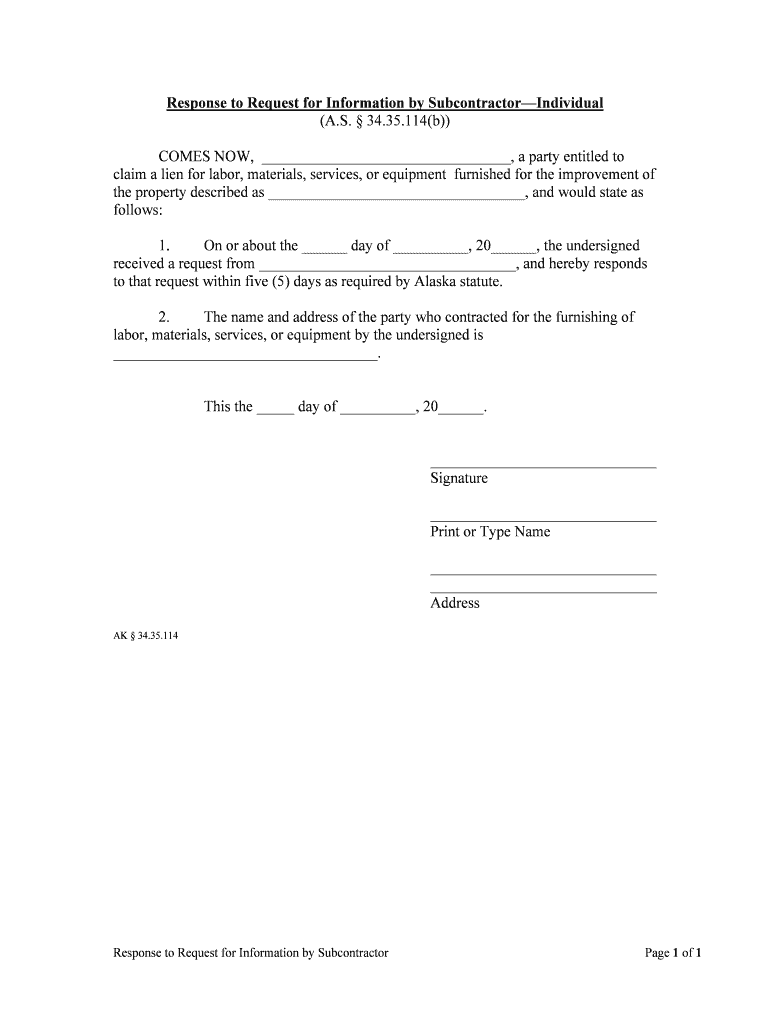
The Response To Request For Information By SubcontractorIndividual is a formal document used in the construction and contracting industries. It serves as a reply from a subcontractor to a general contractor or project owner when additional information is requested regarding a specific project. This document helps clarify project details, specifications, and any other relevant information that may impact the subcontractor's work. It is essential for maintaining clear communication and ensuring that all parties are aligned on project expectations.
How to use the Response To Request For Information By SubcontractorIndividual
To effectively use the Response To Request For Information By SubcontractorIndividual, a subcontractor should first carefully review the request for information (RFI) they received. This involves understanding the questions or clarifications needed. The subcontractor should then gather the necessary information and respond clearly and concisely. It is important to address each point raised in the RFI to avoid misunderstandings. Once completed, the response should be submitted in accordance with the project’s communication protocols, ensuring that it is sent to the appropriate parties.
Steps to complete the Response To Request For Information By SubcontractorIndividual
Completing the Response To Request For Information By SubcontractorIndividual involves several key steps:
- Review the original request thoroughly to understand the information needed.
- Gather all relevant data, including project specifications, drawings, and any other necessary documents.
- Draft a clear and concise response, addressing each question or point raised in the request.
- Ensure that the response is formatted correctly and includes any required signatures or certifications.
- Submit the completed response to the designated recipient, keeping a copy for your records.
Legal use of the Response To Request For Information By SubcontractorIndividual
The legal use of the Response To Request For Information By SubcontractorIndividual hinges on its adherence to relevant laws and regulations. For the document to be considered legally binding, it must include proper identification of all parties involved, a clear statement of the information being provided, and the date of submission. Additionally, using a reliable electronic signature solution, such as signNow, can enhance the document's legal standing by ensuring compliance with eSignature laws like ESIGN and UETA.
Key elements of the Response To Request For Information By SubcontractorIndividual
Key elements that should be included in the Response To Request For Information By SubcontractorIndividual are:
- The date of the response.
- The name and contact information of the subcontractor.
- The name and contact information of the general contractor or project owner.
- A reference to the original RFI number or title.
- A detailed response addressing each question or request for clarification.
- Any supporting documentation or attachments that may assist in understanding the response.
- The signature of the subcontractor or authorized representative.
Examples of using the Response To Request For Information By SubcontractorIndividual
Examples of situations where the Response To Request For Information By SubcontractorIndividual may be utilized include:
- A subcontractor needing clarification on project specifications before proceeding with work.
- A request for additional details on materials to be used in a construction project.
- Seeking confirmation on deadlines or project milestones that may affect subcontractor timelines.
Quick guide on how to complete response to request for information by subcontractorindividual
Prepare Response To Request For Information By SubcontractorIndividual effortlessly on any gadget
Digital document management has become increasingly popular among businesses and individuals. It offers a perfect environmentally friendly alternative to traditional printed and signed documents, as you can access the required form and securely keep it online. airSlate SignNow provides you with all the necessary tools to create, modify, and eSign your documents promptly without delays. Manage Response To Request For Information By SubcontractorIndividual on any gadget using airSlate SignNow Android or iOS applications and simplify any document-related task today.
How to modify and eSign Response To Request For Information By SubcontractorIndividual with ease
- Obtain Response To Request For Information By SubcontractorIndividual and click on Get Form to begin.
- Utilize the tools we provide to finish your document.
- Emphasize signNow sections of your documents or redact sensitive information with tools that airSlate SignNow offers specifically for that purpose.
- Generate your eSignature using the Sign feature, which takes seconds and holds the same legal validity as a conventional wet ink signature.
- Review all the details and click on the Done button to save your modifications.
- Choose your preferred method to send your form, whether by email, SMS, or invitation link, or download it to your computer.
No more lost or misplaced documents, tedious form searches, or errors that require reprinting new document copies. airSlate SignNow meets all your document management needs in just a few clicks from any device you prefer. Modify and eSign Response To Request For Information By SubcontractorIndividual and guarantee excellent communication at every stage of the form preparation process with airSlate SignNow.
Create this form in 5 minutes or less
Create this form in 5 minutes!
People also ask
-
What is the 'Response To Request For Information By SubcontractorIndividual' feature?
The 'Response To Request For Information By SubcontractorIndividual' feature is designed to streamline communication between businesses and subcontractors. By allowing users to efficiently respond to inquiries, it fosters transparency and maintains workflow efficiency in document management.
-
How can airSlate SignNow help with the 'Response To Request For Information By SubcontractorIndividual' process?
airSlate SignNow simplifies the 'Response To Request For Information By SubcontractorIndividual' process by providing a user-friendly interface for document signing and sharing. This allows businesses to quickly address requests and maintain a clear record of communications with subcontractors.
-
What are the pricing options for using airSlate SignNow for 'Response To Request For Information By SubcontractorIndividual'?
airSlate SignNow offers flexible pricing plans suitable for businesses of all sizes, including options tailored for teams handling 'Response To Request For Information By SubcontractorIndividual'. These plans are designed to deliver cost-effective solutions without compromising on features or support.
-
What key features support 'Response To Request For Information By SubcontractorIndividual' in airSlate SignNow?
Key features supporting the 'Response To Request For Information By SubcontractorIndividual' process in airSlate SignNow include eSignature capabilities, customizable templates, and document tracking. These functionalities help streamline the workflow and ensure prompt communication with subcontractors.
-
What benefits can businesses expect from using airSlate SignNow for 'Response To Request For Information By SubcontractorIndividual'?
By using airSlate SignNow for 'Response To Request For Information By SubcontractorIndividual', businesses can expect enhanced productivity, reduced turnaround times, and better compliance. The streamlined processes contribute to overall operational efficiency and improved contractor relationships.
-
Does airSlate SignNow integrate with other tools for 'Response To Request For Information By SubcontractorIndividual'?
Yes, airSlate SignNow seamlessly integrates with various applications and tools commonly used for 'Response To Request For Information By SubcontractorIndividual'. This integration capability ensures that users can connect their existing systems for a more cohesive workflow.
-
Is there customer support available for questions about 'Response To Request For Information By SubcontractorIndividual'?
Absolutely! airSlate SignNow provides dedicated customer support to assist users with any inquiries related to 'Response To Request For Information By SubcontractorIndividual'. Our knowledgeable team is ready to help ensure that you maximize your use of the platform.
Get more for Response To Request For Information By SubcontractorIndividual
- Quiz for teenagers form
- Dog owner surrender form
- Cerfa 85 0233 form
- Passion planner pdf form
- Architectcontract administratoramp39s instruction pdf riba contracts form
- Aesop change form the san mateo county office of education
- Tree disclosure statement palo alto california cityofpaloalto form
- Office of the assessorcounty of los angeles500 w form
Find out other Response To Request For Information By SubcontractorIndividual
- Sign Arkansas IT Consulting Agreement Computer
- Can I Sign Arkansas IT Consulting Agreement
- Sign Iowa Agile Software Development Contract Template Free
- How To Sign Oregon IT Consulting Agreement
- Sign Arizona Web Hosting Agreement Easy
- How Can I Sign Arizona Web Hosting Agreement
- Help Me With Sign Alaska Web Hosting Agreement
- Sign Alaska Web Hosting Agreement Easy
- Sign Arkansas Web Hosting Agreement Simple
- Sign Indiana Web Hosting Agreement Online
- Sign Indiana Web Hosting Agreement Easy
- How To Sign Louisiana Web Hosting Agreement
- Sign Maryland Web Hosting Agreement Now
- Sign Maryland Web Hosting Agreement Free
- Sign Maryland Web Hosting Agreement Fast
- Help Me With Sign New York Web Hosting Agreement
- Sign Connecticut Joint Venture Agreement Template Free
- Sign South Dakota Web Hosting Agreement Free
- Sign Wisconsin Web Hosting Agreement Later
- Sign Wisconsin Web Hosting Agreement Easy