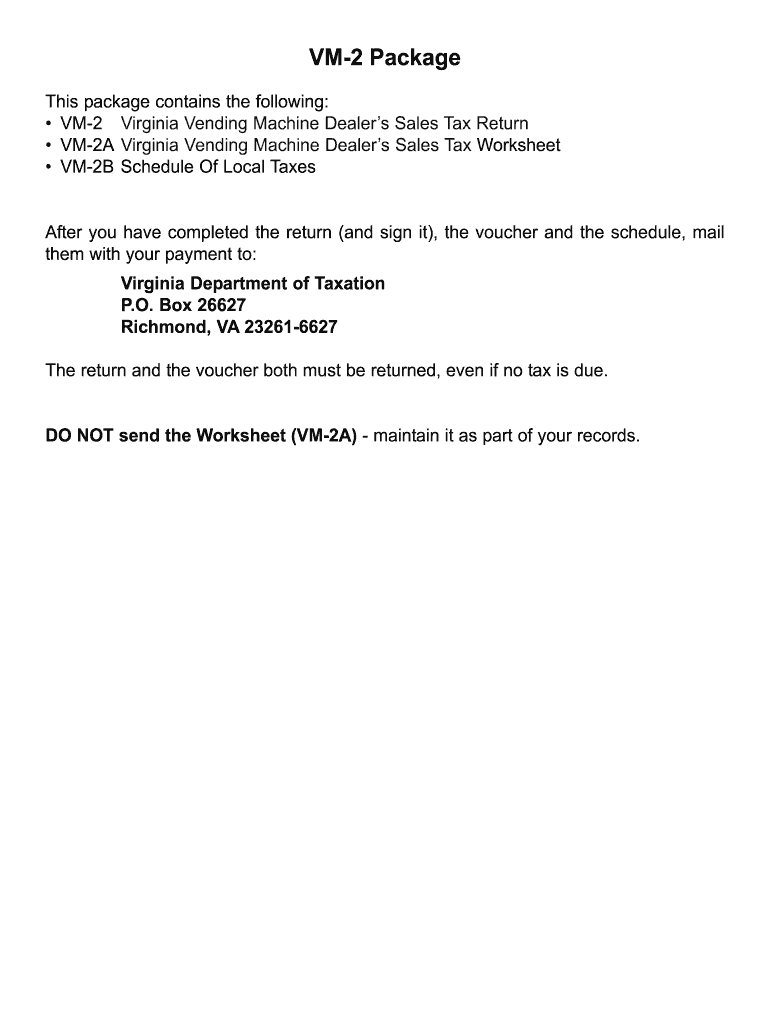
Form Vm 2 Virginia Vending Machine Dealers Sales Tax Return 2005


Understanding the Form Vm 2 Virginia Vending Machine Dealers Sales Tax Return
The Form Vm 2 is a crucial document for vending machine dealers in Virginia, specifically designed for reporting sales tax. This form enables businesses to declare their vending machine sales and calculate the appropriate sales tax owed to the state. It is essential for maintaining compliance with Virginia tax regulations, ensuring that all vending operations are properly reported and taxed.
Steps to Complete the Form Vm 2 Virginia Vending Machine Dealers Sales Tax Return
Completing the Form Vm 2 involves several key steps:
- Gather sales data for all vending machines operated during the reporting period.
- Calculate the total sales amount from each machine, ensuring accuracy in reporting.
- Determine the applicable sales tax rate for your location within Virginia.
- Fill out the form with the total sales and calculated sales tax.
- Review the completed form for any errors or omissions.
- Submit the form by the designated deadline, either online or via mail.
Legal Use of the Form Vm 2 Virginia Vending Machine Dealers Sales Tax Return
The legal use of the Form Vm 2 is governed by Virginia tax laws. It serves as an official record for vending machine sales and the associated sales tax. Proper completion and submission of this form are vital for compliance, as failure to file or inaccuracies can lead to penalties. The form must be filled out truthfully and submitted within the specified deadlines to ensure that the vending machine business operates within legal parameters.
Filing Deadlines / Important Dates
Vending machine dealers must adhere to specific filing deadlines for the Form Vm 2. Typically, the form is due on a quarterly basis, aligning with Virginia's sales tax reporting schedule. It is essential to be aware of these dates to avoid late fees or penalties. Keeping a calendar of important tax dates can help ensure timely submissions.
Form Submission Methods (Online / Mail / In-Person)
The Form Vm 2 can be submitted through various methods, offering flexibility for vending machine dealers. Options include:
- Online submission via the Virginia Department of Taxation website, which is often the fastest method.
- Mailing a paper copy of the form to the designated tax office address.
- In-person submission at local tax offices, if preferred.
Key Elements of the Form Vm 2 Virginia Vending Machine Dealers Sales Tax Return
Understanding the key elements of the Form Vm 2 is essential for accurate reporting. The form typically includes:
- Business identification information, including name and address.
- Total sales figures from all vending machines.
- Calculated sales tax based on the total sales.
- Signature and date to certify the accuracy of the information provided.
Examples of Using the Form Vm 2 Virginia Vending Machine Dealers Sales Tax Return
Practical examples of using the Form Vm 2 can illustrate its importance. For instance, a vending machine operator with multiple locations must accurately report sales from each machine to ensure compliance. If a dealer sells $10,000 in snacks and beverages over a quarter, they would need to calculate the sales tax based on the total sales and report it using the Form Vm 2. This ensures that the business meets its tax obligations while avoiding potential legal issues.
Quick guide on how to complete form vm 2 virginia vending machine dealers sales tax return
Effortlessly Create Form Vm 2 Virginia Vending Machine Dealers Sales Tax Return on Any Device
Digital document management has gained traction among businesses and individuals alike. It serves as an ideal eco-friendly substitute for traditional printed and signed documents, allowing you to access the correct forms and securely archive them online. airSlate SignNow equips you with all the tools necessary to draft, amend, and eSign your documents quickly without any holdups. Manage Form Vm 2 Virginia Vending Machine Dealers Sales Tax Return on any platform using the airSlate SignNow Android or iOS applications and streamline your document-related tasks today.
The Simplest Method to Edit and eSign Form Vm 2 Virginia Vending Machine Dealers Sales Tax Return Seamlessly
- Locate Form Vm 2 Virginia Vending Machine Dealers Sales Tax Return and then click Get Form to initiate the process.
- Utilize the tools we provide to complete your document.
- Highlight important sections of the documents or obscure sensitive information with tools that airSlate SignNow provides specifically for that purpose.
- Create your signature using the Sign tool, which takes mere seconds and carries the same legal standing as a conventional wet ink signature.
- Review all the details and then click on the Done button to store your changes.
- Choose how you wish to share your form, whether by email, text message (SMS), or invitation link, or download it to your computer.
Eliminate concerns about lost or misplaced documents, tedious form searching, or errors that require reprinting new copies. airSlate SignNow meets your document management requirements in just a few clicks from any device you prefer. Edit and eSign Form Vm 2 Virginia Vending Machine Dealers Sales Tax Return while ensuring excellent communication throughout the form preparation process with airSlate SignNow.
Create this form in 5 minutes or less
Find and fill out the correct form vm 2 virginia vending machine dealers sales tax return
FAQs
-
How does a Virginia LLC transfer a machine which is out of the normal line of business to another Virginia LLC without incurring sales tax?
Bill of Sale and record it appropriately on the Books.
-
How much will a doctor with a physical disability and annual net income of around Rs. 2.8 lakhs pay in income tax? Which ITR form is to be filled out?
For disability a deduction of ₹75,000/- is available u/s 80U.Rebate u/s87AFor AY 17–18, rebate was ₹5,000/- or income tax which ever is lower for person with income less than ₹5,00,000/-For AY 18–19, rebate is ₹2,500/- or income tax whichever is lower for person with income less than 3,50,000/-So, for an income of 2.8 lakhs, taxable income after deduction u/s 80U will remain ₹2,05,000/- which is below the slab rate and hence will not be taxable for any of the above said AY.For ITR,If doctor is practicing himself i.e. He has a professional income than ITR 4 should be filedIf doctor is getting any salary than ITR 1 should be filed.:)
Create this form in 5 minutes!
How to create an eSignature for the form vm 2 virginia vending machine dealers sales tax return
How to create an eSignature for the Form Vm 2 Virginia Vending Machine Dealers Sales Tax Return in the online mode
How to generate an eSignature for the Form Vm 2 Virginia Vending Machine Dealers Sales Tax Return in Chrome
How to make an electronic signature for putting it on the Form Vm 2 Virginia Vending Machine Dealers Sales Tax Return in Gmail
How to create an eSignature for the Form Vm 2 Virginia Vending Machine Dealers Sales Tax Return straight from your smartphone
How to create an electronic signature for the Form Vm 2 Virginia Vending Machine Dealers Sales Tax Return on iOS devices
How to create an eSignature for the Form Vm 2 Virginia Vending Machine Dealers Sales Tax Return on Android OS
People also ask
-
What is Form Vm 2 Virginia Vending Machine Dealers Sales Tax Return?
Form Vm 2 Virginia Vending Machine Dealers Sales Tax Return is a specific tax form that vending machine operators in Virginia must file to report their sales tax obligations. This form helps ensure compliance with state tax regulations, allowing dealers to accurately report their earnings from vending machine sales.
-
How can airSlate SignNow help me with Form Vm 2 Virginia Vending Machine Dealers Sales Tax Return?
airSlate SignNow simplifies the process of preparing and submitting Form Vm 2 Virginia Vending Machine Dealers Sales Tax Return by allowing users to easily fill, sign, and send the document electronically. Our platform ensures that you can manage your sales tax returns quickly and efficiently, minimizing the risk of errors.
-
Is there a cost associated with using airSlate SignNow for Form Vm 2 Virginia Vending Machine Dealers Sales Tax Return?
Yes, airSlate SignNow offers various pricing plans that cater to different business needs. While there is a nominal fee associated with using our platform to manage Form Vm 2 Virginia Vending Machine Dealers Sales Tax Return, the cost is designed to be cost-effective, especially considering the time saved and the efficiency gained.
-
What features does airSlate SignNow offer for managing tax forms like Form Vm 2 Virginia Vending Machine Dealers Sales Tax Return?
airSlate SignNow provides features such as customizable templates, electronic signatures, and secure document storage, specifically designed to facilitate the management of tax forms like Form Vm 2 Virginia Vending Machine Dealers Sales Tax Return. These features enhance the overall experience and ensure that your documents are handled securely and efficiently.
-
Can I integrate airSlate SignNow with other software for Form Vm 2 Virginia Vending Machine Dealers Sales Tax Return?
Absolutely! airSlate SignNow offers seamless integrations with various accounting and tax software, making it easier for you to manage Form Vm 2 Virginia Vending Machine Dealers Sales Tax Return alongside your other financial documents. This integration streamlines your workflow and ensures that all your data is synced and up-to-date.
-
How secure is airSlate SignNow for handling Form Vm 2 Virginia Vending Machine Dealers Sales Tax Return?
Security is a top priority for airSlate SignNow. Our platform employs advanced encryption protocols to protect your data, ensuring that your Form Vm 2 Virginia Vending Machine Dealers Sales Tax Return and other sensitive documents are kept safe from unauthorized access.
-
Can I track the status of my Form Vm 2 Virginia Vending Machine Dealers Sales Tax Return using airSlate SignNow?
Yes, airSlate SignNow allows you to track the status of your Form Vm 2 Virginia Vending Machine Dealers Sales Tax Return in real time. You will receive notifications when your document is viewed, signed, or completed, giving you peace of mind and keeping you informed throughout the process.
Get more for Form Vm 2 Virginia Vending Machine Dealers Sales Tax Return
- Et2325pdf wisconsin department of employee trust funds form
- Insurancemarylandgovconsumerdocumentsmedicalliability rate guide maryland insurance administration form
- Nc dhhs food and nutrition services food stamps form
- Get the free physician assistant shadowing patient contact form
- The praxis tests information bulletin 202122
- Fillable online vegasdermatology aesthetic services our form
- Wwwpdffillercom471991221 il ccdr 0556 a 2019 2021 form il ccdr 0556 a fill online printable
- Small claims court procedures judiciary of virginiageneral information small claims cases guides at texas small claims
Find out other Form Vm 2 Virginia Vending Machine Dealers Sales Tax Return
- Electronic signature Indiana Insurance LLC Operating Agreement Computer
- Electronic signature Iowa Insurance LLC Operating Agreement Secure
- Help Me With Electronic signature Kansas Insurance Living Will
- Electronic signature Insurance Document Kentucky Myself
- Electronic signature Delaware High Tech Quitclaim Deed Online
- Electronic signature Maine Insurance Quitclaim Deed Later
- Electronic signature Louisiana Insurance LLC Operating Agreement Easy
- Electronic signature West Virginia Education Contract Safe
- Help Me With Electronic signature West Virginia Education Business Letter Template
- Electronic signature West Virginia Education Cease And Desist Letter Easy
- Electronic signature Missouri Insurance Stock Certificate Free
- Electronic signature Idaho High Tech Profit And Loss Statement Computer
- How Do I Electronic signature Nevada Insurance Executive Summary Template
- Electronic signature Wisconsin Education POA Free
- Electronic signature Wyoming Education Moving Checklist Secure
- Electronic signature North Carolina Insurance Profit And Loss Statement Secure
- Help Me With Electronic signature Oklahoma Insurance Contract
- Electronic signature Pennsylvania Insurance Letter Of Intent Later
- Electronic signature Pennsylvania Insurance Quitclaim Deed Now
- Electronic signature Maine High Tech Living Will Later