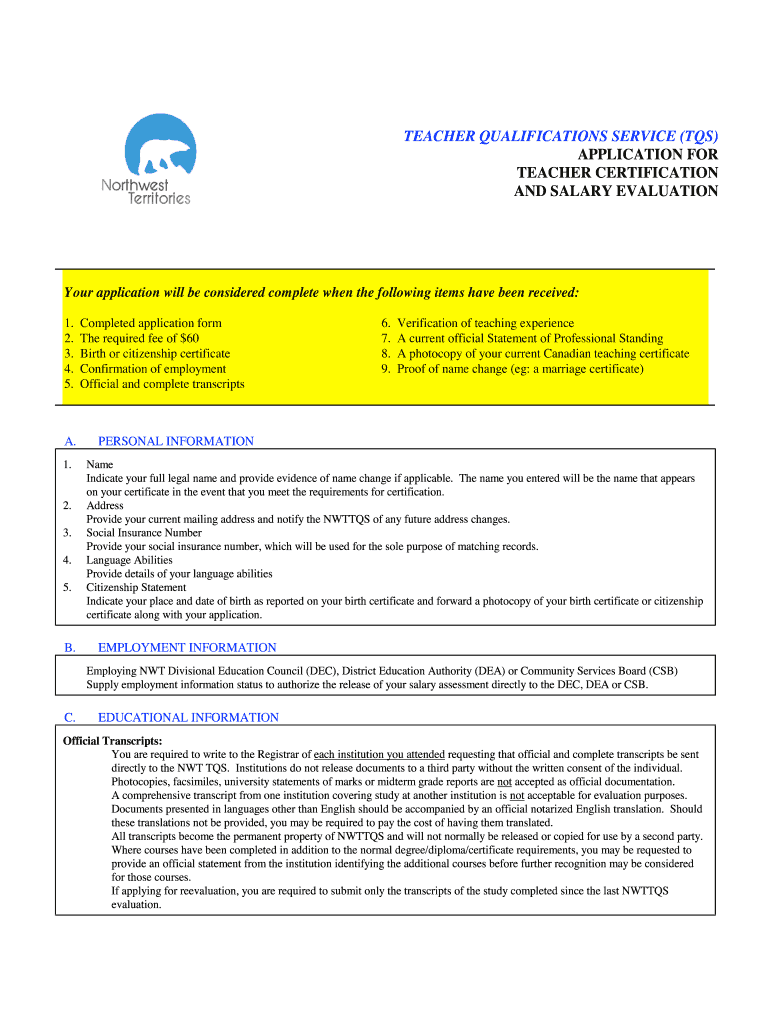
Nwt Teacher Salary Evaluation Form


What is the NWT Teacher Salary Evaluation Form
The NWT Teacher Salary Evaluation Form is a critical document used to assess the qualifications and experience of teachers in the Northwest Territories. This form plays a vital role in determining salary levels based on various factors such as education, certifications, and years of service. It ensures that teachers are compensated fairly according to their professional credentials and contributions to the educational system.
How to use the NWT Teacher Salary Evaluation Form
To effectively use the NWT Teacher Salary Evaluation Form, start by gathering all necessary documentation that supports your qualifications. This may include transcripts, certificates, and proof of teaching experience. Once you have all relevant materials, fill out the form accurately, ensuring that all sections are completed. After completing the form, submit it to the appropriate educational authority for review and processing. This form is essential for establishing your salary and ensuring you receive the correct compensation for your work.
Steps to complete the NWT Teacher Salary Evaluation Form
Completing the NWT Teacher Salary Evaluation Form involves several key steps:
- Gather Documentation: Collect all necessary documents, including educational qualifications and teaching experience.
- Fill Out the Form: Carefully complete each section of the form, ensuring accuracy and completeness.
- Review: Double-check the information provided for any errors or omissions.
- Submit: Send the completed form along with supporting documents to the designated authority for evaluation.
Key elements of the NWT Teacher Salary Evaluation Form
Several key elements are essential for the NWT Teacher Salary Evaluation Form. These include:
- Personal Information: Basic details such as name, contact information, and teaching license number.
- Educational Background: Information about degrees earned, institutions attended, and graduation dates.
- Professional Experience: A detailed account of previous teaching positions, including dates and responsibilities.
- Certifications: Any additional certifications or endorsements that may impact salary evaluation.
Legal use of the NWT Teacher Salary Evaluation Form
The NWT Teacher Salary Evaluation Form must be used in accordance with applicable laws and regulations governing teacher compensation in the Northwest Territories. This includes ensuring that all information provided is truthful and accurate, as any discrepancies could lead to penalties or delays in salary processing. It is important to understand the legal framework surrounding the evaluation process to ensure compliance and protect your rights as an educator.
Form Submission Methods (Online / Mail / In-Person)
The NWT Teacher Salary Evaluation Form can typically be submitted through various methods, depending on the guidelines set by the local education authority. Common submission methods include:
- Online: Many authorities offer online submission options, allowing for quick and efficient processing.
- Mail: You can send the completed form and supporting documents via postal mail to the designated office.
- In-Person: Some educators may prefer to submit their forms in person, providing an opportunity to ask questions and ensure all materials are received.
Quick guide on how to complete nwt teacher salary evaluation form
A concise guide on how to prepare your Nwt Teacher Salary Evaluation Form
Finding the correct template can turn into a difficulty when you have to present official international documentation. Even if you possess the necessary form, it might be cumbersome to swiftly complete it according to all the specifications if you rely on paper versions instead of handling everything digitally. airSlate SignNow is the online e-signature platform that aids you in overcoming this hurdle. It enables you to select your Nwt Teacher Salary Evaluation Form and promptly fill it out and sign it on-site without needing to reprint documents every time you make a mistake.
Here are the procedures you should follow to prepare your Nwt Teacher Salary Evaluation Form with airSlate SignNow:
- Tap the Get Form button to upload your document to our editor right away.
- Begin with the first vacant field, input your details, and move forward using the Next tool.
- Complete the empty sections with the Cross and Check tools from the panel above.
- Choose the Highlight or Line options to emphasize the most crucial information.
- Click on Image and upload one if your Nwt Teacher Salary Evaluation Form requires it.
- Utilize the right-side panel to add more fields for you or others to complete if needed.
- Review your responses and confirm the template by clicking Date, Initials, and Sign.
- Create, type, upload your eSignature, or capture it with a camera or QR code.
- Complete editing by clicking the Done button and choosing your file-sharing preferences.
Once your Nwt Teacher Salary Evaluation Form is prepared, you can share it as you wish - send it to your recipients via email, SMS, fax, or even print it directly from the editor. You can also securely store all your completed documents in your account, organized in folders based on your preferences. Don’t waste time on manual document completion; try airSlate SignNow!
Create this form in 5 minutes or less
FAQs
-
Is it going too far to ask a potential girlfriend to fill out a potential partner evaluation form?
You have, of course, offered her your version of the same form (or equivalent), filled out with all your answers, right?I just applied for a job I may decide I don’t want because their application process is so 1999. Allow that your prospective partners will be evaluating your date selection process while they fill out the form. It is possible that some women will relish a more straightforward, apparently data-driven approach and find it more comfortable to write answers than to talk.This might actually be the best way to weed out incompatible partners, for you.You will have to accept that this WILL weed out incompatible partners, of course. As long as you can live with that fall out, I’m all for reducing the field of candidates to manageable numbers as fast as possible.You might want to have the form reviewed by someone you trust who can help you evaluate how you have worded the various questions and make sure that the data you are seeking is actually relevant to your criteria.(And you do have criteria, of course.)
-
How can I write a teacher evaluation form? How should I start to sentence?
TDeron is right: this question needs context, especially if you would like specific answers. That being said, let me make a few observations that have applicaton in most possible contexts. The most important part of both creating an evaluation form and for filling one out is to understand the philosophy behind it. If you are creating the form, then you will need to know what you--or the organization you are writing this form for--value as most important for a teacher to do well. You will need to decide whether you value certain activities/actions or achieving certain outcomes--leaving the methodology to the teacher. Once you decide these things, the next step is to select or invent metrics that give you some way to measure and report how well the teacher did the actions or achieved the outcome that you value. Once your metrics are determined, then data collection methods must be developed to acurately report what the teacher did/achieved. Once the values, metrics, and data collection methods are determined, the form will pretty much begin to write itself. If you are writing the form for an organization, then you will need to understand the values, metrics, and data collection methods of the organization and write the form to reflect what the organization values and measured in the language of the methods it used to collect the data. On any evaluation form space should be provided for the evaluator to explain, elaborate, or expand on any rating that he or she feels is extremely important. Space should be provided for evaluators to give specific examples of behaviors that are to be encouraged and those that might become part of an improvement plan.An evaluation form is an important part of an evaluation process. It is derived from the process and must represent the results of the process accurately. Having a clear understanding of the evaluation process is essential to creating or filling out an evaluation form.
-
Do military members have to pay any fee for leave or fiancee forms?
NOOOOOOO. You are talking to a military romance scammer. I received an email from the US Army that directly answers your question that is pasted below please keep reading.I believe you are the victim of a military Romance Scam whereas the person you are talking to is a foreign national posing as an American Soldier claiming to be stationed overseas on a peacekeeping mission. That's the key to the scam they always claim to be on a peacekeeping mission.Part of their scam is saying that they have no access to their money that their mission is highly dangerous.If your boyfriend girlfriend/future husband/wife is asking you to do the following or has exhibited this behavior, it is a most likely a scam:Moves to private messaging site immediately after meeting you on Facebook or SnapChat or Instagram or some dating or social media site. Often times they delete the site you met them on right after they asked you to move to a more private messaging siteProfesses love to you very quickly & seems to quote poems and song lyrics along with using their own sort of broken language, as they profess their love and devotion quickly. They also showed concern for your health and love for your family.Promises marriage as soon as he/she gets to state for leave that they asked you to pay for.They Requests money (wire transfers) and Amazon, iTune ,Verizon, etc gift cards, for medicine, religious practices, and leaves to come home, internet access, complete job assignments, help sick friend, get him out of trouble, or anything that sounds fishy.The military does provide all the soldier needs including food medical Care and transportation for leave. Trust me, I lived it, you are probably being scammed. I am just trying to show you examples that you are most likely being connned.Below is an email response I received after I sent an inquiry to the US government when I discovered I was scammed. I received this wonderful response back with lots of useful links on how to find and report your scammer. And how to learn more about Romance Scams.Right now you can also copy the picture he gave you and do a google image search and you will hopefully see the pictures of the real person he is impersonating. this doesn't always work and take some digging. if you find the real person you can direct message them and alert them that their image is being used for scamming.Good Luck to you and I'm sorry this may be happening to you. please continue reading the government response I received below it's very informative. You have contacted an email that is monitored by the U.S. Army Criminal Investigation Command. Unfortunately, this is a common concern. We assure you there is never any reason to send money to anyone claiming to be a Soldier online. If you have only spoken with this person online, it is likely they are not a U.S. Soldier at all. If this is a suspected imposter social media profile, we urge you to report it to that platform as soon as possible. Please continue reading for more resources and answers to other frequently asked questions: How to report an imposter Facebook profile: Caution-https://www.facebook.com/help/16... < Caution-https://www.facebook.com/help/16... > Answers to frequently asked questions: - Soldiers and their loved ones are not charged money so that the Soldier can go on leave. - Soldiers are not charged money for secure communications or leave. - Soldiers do not need permission to get married. - Soldiers emails are in this format: john.doe.mil@mail.mil < Caution-mailto: john.doe.mil@mail.mil > anything ending in .us or .com is not an official email account. - Soldiers have medical insurance, which pays for their medical costs when treated at civilian health care facilities worldwide – family and friends do not need to pay their medical expenses. - Military aircraft are not used to transport Privately Owned Vehicles. - Army financial offices are not used to help Soldiers buy or sell items of any kind. - Soldiers deployed to Combat Zones do not need to solicit money from the public to feed or house themselves or their troops. - Deployed Soldiers do not find large unclaimed sums of money and need your help to get that money out of the country. Anyone who tells you one of the above-listed conditions/circumstances is true is likely posing as a Soldier and trying to steal money from you. We would urge you to immediately cease all contact with this individual. For more information on avoiding online scams and to report this crime, please see the following sites and articles: This article may help clarify some of the tricks social media scammers try to use to take advantage of people: Caution-https://www.army.mil/article/61432/< Caution-https://www.army.mil/article/61432/> CID advises vigilance against 'romance scams,' scammers impersonating Soldiers Caution-https://www.army.mil/article/180749 < Caution-https://www.army.mil/article/180749 > FBI Internet Crime Complaint Center: Caution-http://www.ic3.gov/default.aspx< Caution-http://www.ic3.gov/default.aspx> U.S. Army investigators warn public against romance scams: Caution-https://www.army.mil/article/130...< Caution-https://www.army.mil/article/130...> DOD warns troops, families to be cybercrime smart -Caution-http://www.army.mil/article/1450...< Caution-http://www.army.mil/article/1450...> Use caution with social networking Caution-https://www.army.mil/article/146...< Caution-https://www.army.mil/article/146...> Please see our frequently asked questions section under scams and legal issues. Caution-http://www.army.mil/faq/ < Caution-http://www.army.mil/faq/ > or visit Caution-http://www.cid.army.mil/ < Caution-http://www.cid.army.mil/ >. The challenge with most scams is determining if an individual is a legitimate member of the US Army. Based on the Privacy Act of 1974, we cannot provide this information. If concerned about a scam you may contact the Better Business Bureau (if it involves a solicitation for money), or local law enforcement. If you're involved in a Facebook or dating site scam, you are free to contact us direct; (571) 305-4056. If you have a social security number, you can find information about Soldiers online at Caution-https://www.dmdc.osd.mil/appj/sc... < Caution-https://www.dmdc.osd.mil/appj/sc... > . While this is a free search, it does not help you locate a retiree, but it can tell you if the Soldier is active duty or not. If more information is needed such as current duty station or location, you can contact the Commander Soldier's Records Data Center (SRDC) by phone or mail and they will help you locate individuals on active duty only, not retirees. There is a fee of $3.50 for businesses to use this service. The check or money order must be made out to the U.S. Treasury. It is not refundable. The address is: Commander Soldier's Records Data Center (SRDC) 8899 East 56th Street Indianapolis, IN 46249-5301 Phone: 1-866-771-6357 In addition, it is not possible to remove social networking site profiles without legitimate proof of identity theft or a scam. If you suspect fraud on this site, take a screenshot of any advances for money or impersonations and report the account on the social networking platform immediately. Please submit all information you have on this incident to Caution-www.ic3.gov < Caution-http://www.ic3.gov > (FBI website, Internet Criminal Complaint Center), immediately stop contact with the scammer (you are potentially providing them more information which can be used to scam you), and learn how to protect yourself against these scams at Caution-http://www.ftc.gov < Caution-http://www.ftc.gov > (Federal Trade Commission's website)
-
Can my 7th grade teacher fill out a recommendation form for high school?
I would ask the high school you are applying to for guidelines. They should be able to specify who is qualified to write the letter.If you are indeed allowed to ask your 7th grade teacher, ask them if they can write you a strong, positive letter recommending your admission into the school. This should allow them to be honest on whether they can write you a letter that will be helpful, rather than detrimental.Good luck!
Create this form in 5 minutes!
How to create an eSignature for the nwt teacher salary evaluation form
How to create an electronic signature for the Nwt Teacher Salary Evaluation Form online
How to create an electronic signature for the Nwt Teacher Salary Evaluation Form in Google Chrome
How to make an electronic signature for putting it on the Nwt Teacher Salary Evaluation Form in Gmail
How to generate an eSignature for the Nwt Teacher Salary Evaluation Form straight from your smart phone
How to generate an eSignature for the Nwt Teacher Salary Evaluation Form on iOS devices
How to make an eSignature for the Nwt Teacher Salary Evaluation Form on Android OS
People also ask
-
What is the Nwt Teacher Salary Evaluation Form?
The Nwt Teacher Salary Evaluation Form is a specialized document designed to assess and evaluate teacher salaries in the Northwest Territories. This form streamlines the process of salary evaluation, ensuring accuracy and compliance with local regulations. By utilizing the Nwt Teacher Salary Evaluation Form, educators and administrators can efficiently manage salary assessments.
-
How can airSlate SignNow help with the Nwt Teacher Salary Evaluation Form?
airSlate SignNow provides an intuitive platform to create, send, and eSign the Nwt Teacher Salary Evaluation Form securely. With our easy-to-use tools, you can customize the form as per your requirements and ensure that all stakeholders can sign it electronically, reducing paperwork and administrative burden.
-
Is the Nwt Teacher Salary Evaluation Form customizable?
Yes, the Nwt Teacher Salary Evaluation Form can be fully customized using airSlate SignNow's platform. You can add specific fields, adjust formatting, and include organizational branding to tailor the form to your unique needs, making the evaluation process more relevant and effective.
-
What features does airSlate SignNow offer for the Nwt Teacher Salary Evaluation Form?
airSlate SignNow offers various features for the Nwt Teacher Salary Evaluation Form, including eSigning, document templates, and real-time tracking. You can also integrate automated workflows to streamline the evaluation process and ensure timely reviews and approvals.
-
Are there any pricing options for using airSlate SignNow with the Nwt Teacher Salary Evaluation Form?
Yes, airSlate SignNow offers flexible pricing plans that cater to different organizational needs. You can choose a plan that suits your budget while accessing all necessary features to effectively manage the Nwt Teacher Salary Evaluation Form and other documents.
-
Can I track the status of the Nwt Teacher Salary Evaluation Form once sent?
Absolutely! With airSlate SignNow, you can easily track the status of your Nwt Teacher Salary Evaluation Form. The platform provides real-time notifications and updates, allowing you to know when the form has been viewed, signed, or requires any further action.
-
What integrations does airSlate SignNow support for the Nwt Teacher Salary Evaluation Form?
airSlate SignNow supports numerous integrations with popular applications, enhancing the functionality of the Nwt Teacher Salary Evaluation Form. You can connect with tools like Google Drive, Dropbox, and CRM systems to streamline document management and improve efficiency.
Get more for Nwt Teacher Salary Evaluation Form
- Data collection form totalsir
- Employability profile form
- Motion for order setting final hearing marion county clerk of courts marioncountyclerk form
- Affidavit terminating life form
- Pharmacy prescription transfer template form
- Uber profit and loss statement template form
- Solicitud del programa de asistencia para consumidores form
- Sb 13546 form
Find out other Nwt Teacher Salary Evaluation Form
- How To eSign New York Profit and Loss Statement
- How To eSign Ohio Profit and Loss Statement
- How Do I eSign Ohio Non-Compete Agreement
- eSign Utah Non-Compete Agreement Online
- eSign Tennessee General Partnership Agreement Mobile
- eSign Alaska LLC Operating Agreement Fast
- How Can I eSign Hawaii LLC Operating Agreement
- eSign Indiana LLC Operating Agreement Fast
- eSign Michigan LLC Operating Agreement Fast
- eSign North Dakota LLC Operating Agreement Computer
- How To eSignature Louisiana Quitclaim Deed
- eSignature Maine Quitclaim Deed Now
- eSignature Maine Quitclaim Deed Myself
- eSignature Maine Quitclaim Deed Free
- eSignature Maine Quitclaim Deed Easy
- How Do I eSign South Carolina LLC Operating Agreement
- Can I eSign South Carolina LLC Operating Agreement
- How To eSignature Massachusetts Quitclaim Deed
- How To eSign Wyoming LLC Operating Agreement
- eSignature North Dakota Quitclaim Deed Fast