I'm a Construction Subcontractor Who Did Not Get Paid by Form


What is the I'm A Construction Subcontractor Who Did Not Get Paid By
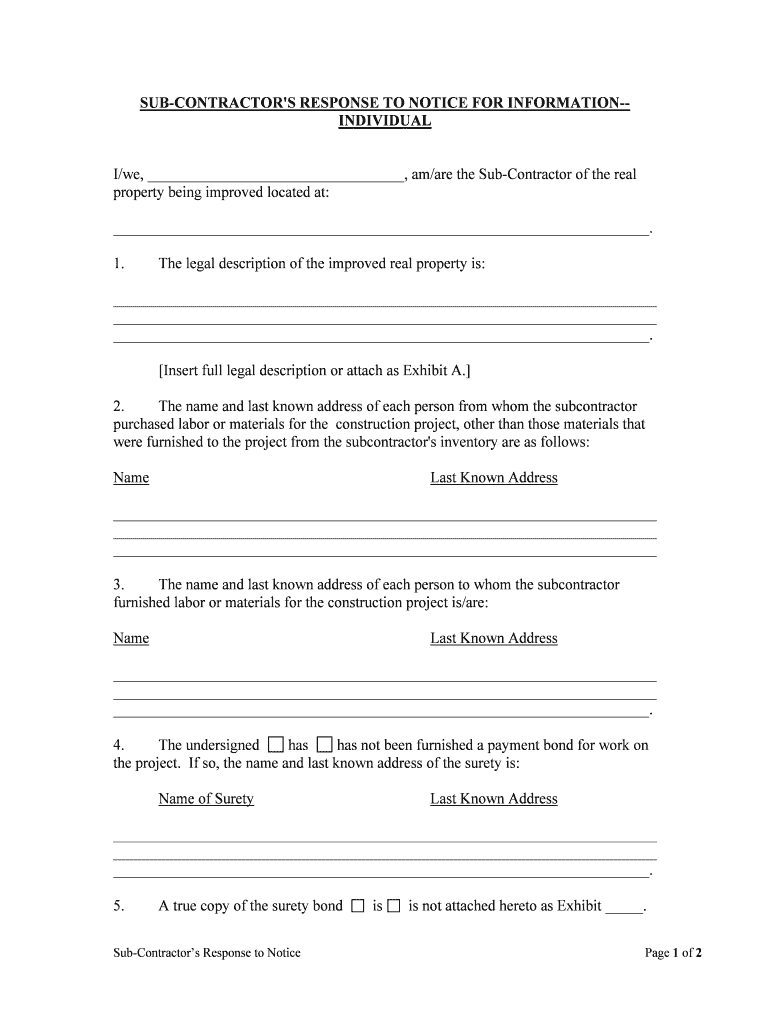
The form "I'm A Construction Subcontractor Who Did Not Get Paid By" serves as a formal declaration for subcontractors who have not received payment for their services. This document outlines the details of the unpaid work, including the scope of services rendered, the agreed payment terms, and any relevant contractual obligations. It is essential for subcontractors to document their claims accurately to protect their rights and facilitate potential legal recourse.
Steps to complete the I'm A Construction Subcontractor Who Did Not Get Paid By
Completing the form requires careful attention to detail. Start by gathering all relevant information, including the contract details, dates of service, and amounts owed. Follow these steps:
- Clearly state your name and contact information at the top of the form.
- Provide the name and contact information of the general contractor or entity that owes you payment.
- Detail the services you provided, including dates and any pertinent project information.
- Specify the total amount due and any previous payments made, if applicable.
- Include any supporting documentation, such as invoices or contracts, to substantiate your claim.
Legal use of the I'm A Construction Subcontractor Who Did Not Get Paid By
This form is legally significant as it can serve as evidence in disputes over unpaid work. To ensure its legal standing, it should be filled out accurately and submitted promptly. The form may need to be notarized or submitted in conjunction with other legal documents, depending on state laws. It is advisable to consult with a legal professional to understand the specific requirements in your jurisdiction.
Key elements of the I'm A Construction Subcontractor Who Did Not Get Paid By
Several key elements must be included in the form to ensure its effectiveness:
- Identification: Clearly identify yourself and the party responsible for payment.
- Service Description: Provide a detailed account of the services rendered.
- Payment Terms: Include the agreed-upon payment schedule and any overdue amounts.
- Supporting Documents: Attach copies of contracts, invoices, and correspondence related to the payment.
Examples of using the I'm A Construction Subcontractor Who Did Not Get Paid By
Subcontractors may use this form in various scenarios, such as:
- When a general contractor fails to pay for completed work on time.
- In cases where a dispute arises over the scope of work or payment terms.
- As part of a larger claim process for unpaid wages or services rendered.
State-specific rules for the I'm A Construction Subcontractor Who Did Not Get Paid By
Each state may have specific rules governing the use of this form. It is crucial to be aware of local laws regarding subcontractor rights and payment disputes. Some states may require additional documentation or have specific timelines for filing claims. Researching state-specific regulations can help ensure compliance and strengthen your position in any disputes.
Quick guide on how to complete im a construction subcontractor who did not get paid by
Complete I'm A Construction Subcontractor Who Did Not Get Paid By seamlessly on any gadget
Online document management has gained traction among businesses and individuals alike. It offers a superb eco-friendly substitute to traditional printed and signed documents since you can access the necessary form and securely store it online. airSlate SignNow equips you with all the tools required to create, edit, and eSign your files quickly and without holdups. Manage I'm A Construction Subcontractor Who Did Not Get Paid By on any gadget with airSlate SignNow Android or iOS applications and simplify any document-related process today.
The easiest method to modify and eSign I'm A Construction Subcontractor Who Did Not Get Paid By effortlessly
- Find I'm A Construction Subcontractor Who Did Not Get Paid By and click Get Form to initiate.
- Utilize the tools we offer to complete your form.
- Emphasize crucial parts of your documents or redact sensitive details with tools that airSlate SignNow provides specifically for that purpose.
- Create your eSignature with the Sign feature, which takes mere seconds and carries the same legal significance as a traditional handwritten signature.
- Review all the details and click on the Done button to save your changes.
- Choose your preferred method to submit your form, via email, SMS, or invitation link, or download it to your computer.
Say goodbye to lost or misplaced files, tedious form searching, or errors that necessitate printing new document copies. airSlate SignNow fulfills all your requirements in document management within a few clicks from any device you prefer. Modify and eSign I'm A Construction Subcontractor Who Did Not Get Paid By and ensure excellent communication at any stage of the form preparation process with airSlate SignNow.
Create this form in 5 minutes or less
Create this form in 5 minutes!
People also ask
-
What should I do if I'm a construction subcontractor who did not get paid by my client?
If you're a construction subcontractor who did not get paid by your client, it’s essential to review your contract and document all communication. You can use airSlate SignNow to create and send notices of non-payment, providing a clear record that can help in negotiations or legal proceedings.
-
How can airSlate SignNow help me document unpaid work as a subcontractor?
airSlate SignNow allows you to easily create and sign documents that can serve as official records of your completed work and payments due. This documentation is critical when you're a construction subcontractor who did not get paid by a client and may need to take further action.
-
What features does airSlate SignNow offer for subcontractors dealing with payment issues?
airSlate SignNow provides features such as electronic signatures, customizable templates, and secure document storage, all of which are invaluable for subcontractors. These tools help streamline the documentation process when you're a construction subcontractor who did not get paid by their client.
-
Is there a cost associated with using airSlate SignNow for unpaid contract disputes?
While there may be costs associated with using airSlate SignNow, its pricing plans are designed to be cost-effective. Subcontractors can benefit from a budget-friendly solution for managing disputes, especially if you're a construction subcontractor who did not get paid by a client.
-
Can I integrate airSlate SignNow with other business tools?
Yes, airSlate SignNow offers integrations with various business applications, enhancing its utility for subcontractors. When you're a construction subcontractor who did not get paid by a client, integrating your document workflow can improve efficiency and ensure all your documentation is synced.
-
What benefits does airSlate SignNow provide for contractors focusing on payment security?
The software provides secure eSigning and document storage, ensuring that your agreements are safe and legally binding. By using airSlate SignNow, subcontractors can protect their interests, especially if you're a construction subcontractor who did not get paid by a client.
-
How does airSlate SignNow simplify the process of creating payment reminders?
With airSlate SignNow, creating payment reminders is straightforward thanks to customizable templates. If you’re a construction subcontractor who did not get paid by a client, being able to send reminders quickly can help prompt those overdue payments.
Get more for I'm A Construction Subcontractor Who Did Not Get Paid By
Find out other I'm A Construction Subcontractor Who Did Not Get Paid By
- Can I eSign Alabama Non disclosure agreement sample
- eSign California Non disclosure agreement sample Now
- eSign Pennsylvania Mutual non-disclosure agreement Now
- Help Me With eSign Utah Non disclosure agreement sample
- How Can I eSign Minnesota Partnership agreements
- eSign Pennsylvania Property management lease agreement Secure
- eSign Hawaii Rental agreement for house Fast
- Help Me With eSign Virginia Rental agreement contract
- eSign Alaska Rental lease agreement Now
- How To eSign Colorado Rental lease agreement
- How Can I eSign Colorado Rental lease agreement
- Can I eSign Connecticut Rental lease agreement
- eSign New Hampshire Rental lease agreement Later
- Can I eSign North Carolina Rental lease agreement
- How Do I eSign Pennsylvania Rental lease agreement
- How To eSign South Carolina Rental lease agreement
- eSign Texas Rental lease agreement Mobile
- eSign Utah Rental agreement lease Easy
- How Can I eSign North Dakota Rental lease agreement forms
- eSign Rhode Island Rental lease agreement forms Now