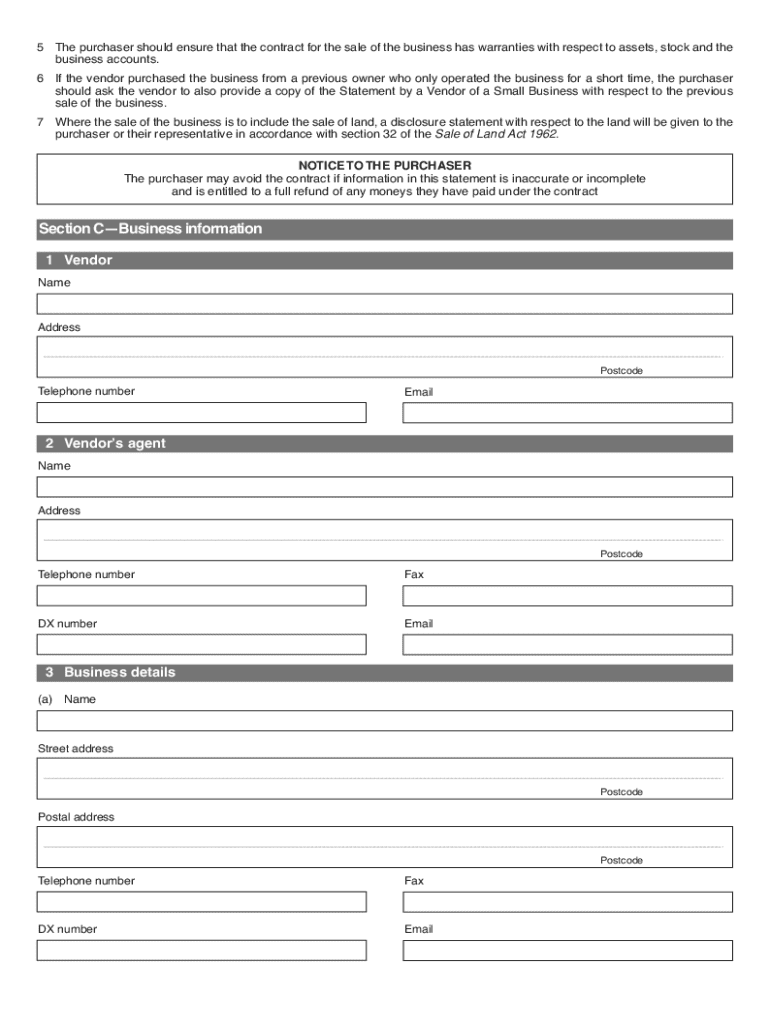
Statement by a Vendor of Small Business Form


What is the Statement By A Vendor Of Small Business Form
The Statement By A Vendor Of Small Business Form is a legal document that provides essential information about a business being sold. This form is often used in real estate transactions and business sales to disclose relevant details that potential buyers need to know. It typically includes information about the business's financial status, assets, liabilities, and any ongoing legal matters. Understanding this form is crucial for both buyers and sellers to ensure transparency and compliance with the estate agents act.
How to use the Statement By A Vendor Of Small Business Form
Using the Statement By A Vendor Of Small Business Form involves several steps to ensure that all necessary information is accurately reported. First, gather all relevant financial documents and records related to the business. This may include tax returns, profit and loss statements, and any legal documents. Next, fill out the form with precise and honest information, ensuring that all sections are completed. Once filled out, the form should be reviewed for accuracy before being submitted to the relevant parties involved in the transaction.
Steps to complete the Statement By A Vendor Of Small Business Form
Completing the Statement By A Vendor Of Small Business Form requires careful attention to detail. Follow these steps:
- Collect all necessary documentation, including financial records and legal papers.
- Begin filling out the form by entering the business's name and address.
- Provide detailed information about the business's financial health, including assets and liabilities.
- Disclose any legal issues or disputes that may affect the sale.
- Review the form thoroughly to ensure all information is accurate and complete.
- Sign and date the form before submitting it to the appropriate parties.
Key elements of the Statement By A Vendor Of Small Business Form
The Statement By A Vendor Of Small Business Form includes several key elements that are vital for a comprehensive understanding of the business being sold. These elements typically encompass:
- Business Identification: Name, address, and contact information of the business.
- Financial Information: Details about assets, liabilities, and overall financial health.
- Legal Disclosures: Any ongoing legal matters or disputes that may impact the sale.
- Seller's Affidavit: A statement confirming the accuracy of the information provided.
Legal use of the Statement By A Vendor Of Small Business Form
The legal use of the Statement By A Vendor Of Small Business Form is essential in ensuring that all parties involved in a business transaction are protected. This form serves as a legally binding document that can be used in court if disputes arise regarding the sale. Properly filling out and submitting this form helps to ensure compliance with the estate agents act and protects the rights of both the seller and the buyer. It is advisable to consult with a legal professional when preparing this form to ensure all legal requirements are met.
Quick guide on how to complete section 55 estate agents act form
Learn how to effortlessly complete the Statement By A Vendor Of Small Business Form with this simple guide
eFiling and signNowing documents online is gaining signNow popularity and has become a preferred option for numerous users. It offers various advantages over conventional printed forms, including convenience, time-saving, enhanced precision, and security.
With solutions like airSlate SignNow, you can find, modify, sign, optimize, and send your Statement By A Vendor Of Small Business Form without the hassle of repeated printing and scanning. Follow this brief tutorial to begin and complete your form.
Employ these instructions to obtain and complete Statement By A Vendor Of Small Business Form
- Begin by clicking the Get Form button to access your document in our editor.
- Follow the green indicator on the left that highlights required fields to ensure you don’t miss any.
- Make use of our advanced features to annotate, modify, sign, protect, and enhance your document.
- Secure your document or convert it into a fillable form using the appropriate tab options.
- Review the document and look for errors or inconsistencies.
- Click DONE to complete the editing process.
- Rename your document or keep it as it is.
- Select your preferred storage option to save your document, send it via USPS, or click the Download Now button to obtain your document.
If Statement By A Vendor Of Small Business Form isn’t what you were looking for, you can explore our extensive library of pre-added forms that require minimal input to complete. Visit our platform today!
Create this form in 5 minutes or less
FAQs
-
What will be the appropriate section to choose while filling out the ITR 1 form online?
Please find details of return filed under sectionSection 139(1) – Original return filed before the last due date for filing returnOriginal returnfiling for the first time in an assessment yearSection 139(4) – Belated returnOriginal returnFiling for the first time after the due date of filing the return for the assessment yearSection 139(5) – Revised returnRevised return filed subsequent to original returnThis will be revised returnVoluntarily filing the revised returnInfo needed is:Acknowledgement numberdate of filing originalSection 139(9) – Defective returnWhen due to an error, the return is considered as defective (as if no return has been filed)The department may issue notice to correct the errors and file the returnSo the return filed subsequent to the intimation u/s 139(9) will be original returnYou have to provide following info while filing the return in response to noticeReceipt No: i.e Acknowledgement number of Original (Defective in this case) returnDate of filing the original (Defective in this case) returnNotice no. (Eg. CPC/1415/G5/1421417689)Date of NoticeSection 142(1) – Notice to assessee for filing the returnWhen a person has not filed the return, he may receive notice u/s 142(1) asking him to file the returnThis will be the original returnYou need to mention the notice date only while filing the return subsequent to the notice u/s 142(1)Section 148 – Issue of notice for reassessment (Income escaping assessment)Department can issue a notice to a person for filing the income tax return u/s 148This will be the original returnYou need to mention the notice date only while filing the return subsequent to the notice u/s 148Section 153A – Fresh assessment pursuance of an orderDepartment can issue a notice u/s 153A to a person for filing the income tax returnThis will be the original returnYou need to mention the notice date only while filing the return subsequent to the notice u/s 153ASection 153C – Fresh assessment pursuance of an orderDepartment can issue a notice u/s 153C to a person for filing the income tax returnThis will be the original returnYou need to mention the notice date only while filing the return subsequent to the notice u/s 153CBe Peaceful !!!
-
Are final year students eligible to fill out the Railway Recruitment Board (RRB) Senior Section Engineer form?
you have to complete your Degree first to give Railway Recruitment Board (RRB) Senior Section Engineer Exam.As the Indian Railways is one known to be as one of the biggest employers in India. It releases it a high number of vacancies every year for a various number of fields. One amongst them is the RRB Senior Section Engineer.Eligibility CriteriaMust be in age between 20-34 years.Educational Qualification RequiredDegree in Civil Engineering from a recognized university or Institution.For more information you can also read here, RRB Recruitment Notification, Jobs, ExamsCheck Here, RRB(Railway Recruitment Board) latest Notification.
-
Is my real estate agent being honest? He said he has to pay $100 to Zillow each time someone fills out the contact listing agent form on my house. True?
Not to my knowledge. In my area, the way Zillow works is it pulls listings from the MLS (multiple listing service) unless I check a box that says the seller prohibits this. So it’s no more work for me to list your property on Zillow than in the MLS. Zillow sells real estate agents “leads” (queries about specific properties) or (in a new program) takes a % of the brokerage fee after a property has closed. Contacting agents online is free to both parties.
-
Does the IRS require unused sheets of a form to be submitted? Can I just leave out the section of a form whose lines are not filled out?
This is what a schedule C I submitted earlier looks like :http://onemoredime.com/wp-conten... So I did not submit page 2 of the schedule C - all the lines on page 2 (33 through 48) were blank.
Create this form in 5 minutes!
How to create an eSignature for the section 55 estate agents act form
How to make an eSignature for your Section 55 Estate Agents Act Form in the online mode
How to make an eSignature for your Section 55 Estate Agents Act Form in Google Chrome
How to make an electronic signature for putting it on the Section 55 Estate Agents Act Form in Gmail
How to create an eSignature for the Section 55 Estate Agents Act Form straight from your mobile device
How to generate an eSignature for the Section 55 Estate Agents Act Form on iOS
How to generate an eSignature for the Section 55 Estate Agents Act Form on Android
People also ask
-
What is a Statement By A Vendor Of Small Business Form?
A Statement By A Vendor Of Small Business Form is a document that provides necessary details about a vendor’s business operations, including tax identification and payment information. This form helps small businesses maintain clear records and ensures compliance with taxation requirements. Using airSlate SignNow, you can easily create and manage this form digitally.
-
How can I create a Statement By A Vendor Of Small Business Form using airSlate SignNow?
Creating a Statement By A Vendor Of Small Business Form with airSlate SignNow is straightforward. Simply log into your account, select 'Create Document', and choose a template or start from scratch. Our intuitive interface allows you to customize the form to suit your specific business needs effortlessly.
-
Is there a cost associated with using the Statement By A Vendor Of Small Business Form on airSlate SignNow?
Yes, airSlate SignNow offers competitive pricing plans that cater to various business sizes and needs. While the cost may vary depending on the plan you choose, utilizing the Statement By A Vendor Of Small Business Form can lead to signNow savings in time and resources, making it a cost-effective solution for your document management.
-
What are the benefits of using the Statement By A Vendor Of Small Business Form?
The primary benefits of using the Statement By A Vendor Of Small Business Form include streamlined documentation, improved accuracy in vendor records, and enhanced compliance with tax regulations. By utilizing airSlate SignNow, businesses can also reduce paperwork and speed up the signing process, leading to greater operational efficiency.
-
Can I integrate the Statement By A Vendor Of Small Business Form with other tools?
Yes, airSlate SignNow offers various integrations with popular business tools, allowing you to connect your Statement By A Vendor Of Small Business Form with CRM systems, accounting software, and more. This integration capability helps streamline workflows and ensures that your vendor information is always up-to-date across platforms.
-
How secure is my data when using the Statement By A Vendor Of Small Business Form on airSlate SignNow?
Data security is a top priority at airSlate SignNow. When you use the Statement By A Vendor Of Small Business Form, your documents are protected with industry-standard encryption and secure storage solutions. This ensures that sensitive vendor information remains confidential and safe from unauthorized access.
-
Can multiple users collaborate on the Statement By A Vendor Of Small Business Form?
Absolutely! airSlate SignNow allows multiple users to collaborate on the Statement By A Vendor Of Small Business Form in real-time. This feature enables team members to review, edit, and sign the document simultaneously, promoting efficiency and reducing the turnaround time for approvals.
Get more for Statement By A Vendor Of Small Business Form
- Alaska abandoned property form
- Alaska possession form
- Notice lease residential form
- 10 day notice to landlord of termination for recurring material noncompliance for residential from tenant to landlord alaska form
- Notice enter premises form
- Notice to tenant of adoption of new rule for residential from landlord to tenant alaska form
- Alaska assignment 497293933 form
- Request for information by subcontractor by corporation or llc alaska
Find out other Statement By A Vendor Of Small Business Form
- eSignature Pennsylvania High Tech Bill Of Lading Safe
- eSignature Washington Insurance Work Order Fast
- eSignature Utah High Tech Warranty Deed Free
- How Do I eSignature Utah High Tech Warranty Deed
- eSignature Arkansas Legal Affidavit Of Heirship Fast
- Help Me With eSignature Colorado Legal Cease And Desist Letter
- How To eSignature Connecticut Legal LLC Operating Agreement
- eSignature Connecticut Legal Residential Lease Agreement Mobile
- eSignature West Virginia High Tech Lease Agreement Template Myself
- How To eSignature Delaware Legal Residential Lease Agreement
- eSignature Florida Legal Letter Of Intent Easy
- Can I eSignature Wyoming High Tech Residential Lease Agreement
- eSignature Connecticut Lawers Promissory Note Template Safe
- eSignature Hawaii Legal Separation Agreement Now
- How To eSignature Indiana Legal Lease Agreement
- eSignature Kansas Legal Separation Agreement Online
- eSignature Georgia Lawers Cease And Desist Letter Now
- eSignature Maryland Legal Quitclaim Deed Free
- eSignature Maryland Legal Lease Agreement Template Simple
- eSignature North Carolina Legal Cease And Desist Letter Safe