Persec F 2014-2026


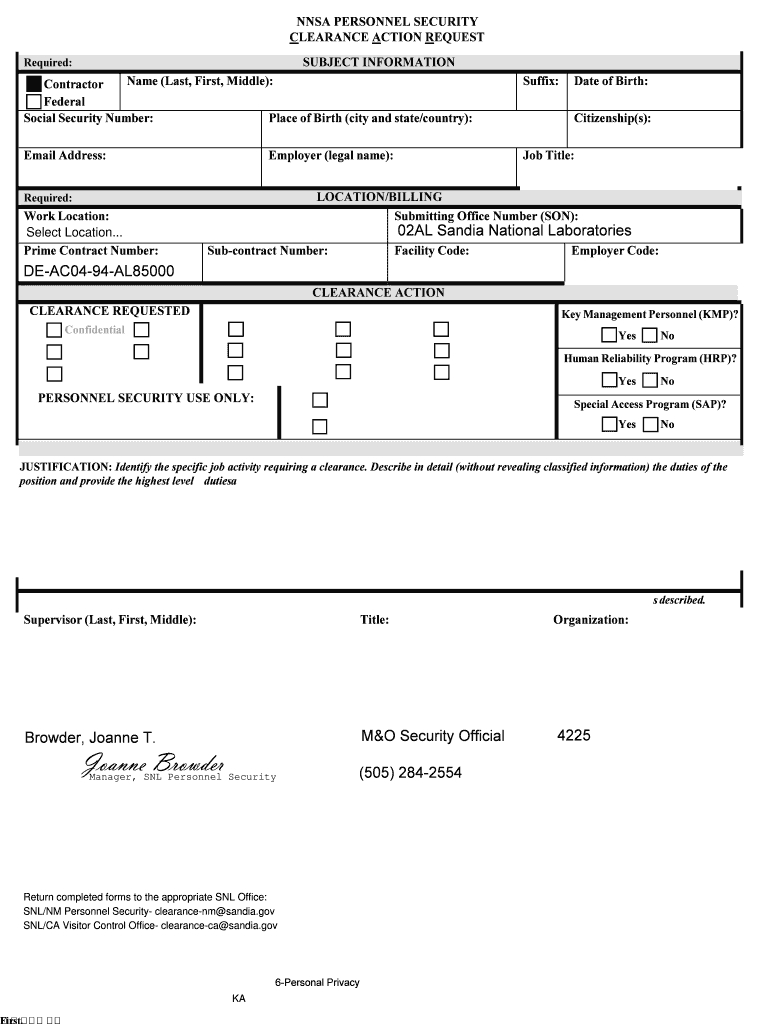
What is the Persec F?
The Persec F, or the Personnel Security Clearance Action Request, is a crucial document used in the United States to initiate the process of obtaining a security clearance for individuals working in sensitive positions. This form is essential for ensuring that personnel meet the necessary background checks and evaluations required for access to classified information. The Persec F is typically utilized by government agencies and contractors to assess the trustworthiness and reliability of employees.
How to Use the Persec F
Using the Persec F involves several steps to ensure the form is completed accurately and submitted correctly. First, gather all necessary personal information, including identification details and employment history. Next, fill out the form with precise information, ensuring that all required fields are completed. After completing the form, review it for any errors or omissions. Finally, submit the form according to the specific guidelines provided by your agency or organization, which may include online submission or mailing the document.
Steps to Complete the Persec F
Completing the Persec F requires careful attention to detail. Follow these steps:
- Gather personal information, including Social Security number and contact details.
- Provide a comprehensive employment history, detailing previous positions and responsibilities.
- Complete all sections of the form, ensuring accuracy in every entry.
- Review the form for completeness and correctness, checking for any missing information.
- Submit the form as directed, adhering to any specific submission protocols.
Legal Use of the Persec F
The Persec F must be used in compliance with federal regulations governing personnel security clearances. It is essential to ensure that the information provided is truthful and complete, as any discrepancies can lead to legal repercussions or denial of clearance. Organizations are responsible for safeguarding the information collected on the Persec F and using it solely for the purpose of evaluating security clearance eligibility.
Required Documents
When submitting the Persec F, additional documentation may be required to support your application. Commonly required documents include:
- A valid government-issued identification, such as a driver's license or passport.
- Proof of employment, such as an employment verification letter.
- Any previous security clearance documents, if applicable.
- Background check consent forms, if requested.
Form Submission Methods
The Persec F can typically be submitted through various methods, depending on the agency's requirements. Common submission methods include:
- Online submission via secure portals designated by the agency.
- Mailing the completed form to the appropriate office.
- In-person submission at designated locations, if required.
Quick guide on how to complete persec 563333 sandia national laboratories sandia
Uncover the easiest method to complete and authorize your Persec F
Are you still spending time preparing your official documents on paper instead of doing it online? airSlate SignNow offers an improved approach to finalize and sign your Persec F and related forms for public services. Our intelligent electronic signature platform equips you with everything required to process documentation swiftly and in compliance with regulatory standards - advanced PDF editing, managing, securing, signing, and sharing features all accessible within a user-friendly interface.
Only a few steps are needed to finalize and sign your Persec F:
- Add the editable template to the editor using the Get Form button.
- Review what information you are required to submit in your Persec F.
- Navigate between the fields using the Next button to ensure nothing is overlooked.
- Utilize Text, Check, and Cross tools to fill in the fields with your details.
- Update the content with Text boxes or Images from the upper toolbar.
- Emphasize what is important or Blackout sections that are no longer relevant.
- Select Sign to create a legally valid electronic signature using any option you prefer.
- Add the Date next to your signature and finalize your task with the Done button.
Store your finished Persec F in the Documents folder in your profile, download it, or upload it to your chosen cloud storage. Our platform also offers versatile file sharing options. There’s no need to print your forms when you need to send them to the relevant public office - do it via email, fax, or by requesting a USPS “snail mail” delivery from your account. Try it out now!
Create this form in 5 minutes or less
FAQs
-
How to decide my bank name city and state if filling out a form, if the bank is a national bank?
Somewhere on that form should be a blank for routing number and account number. Those are available from your check and/or your bank statements. If you can't find them, call the bank and ask or go by their office for help with the form. As long as those numbers are entered correctly, any error you make in spelling, location or naming should not influence the eventual deposit into your proper account.
Create this form in 5 minutes!
How to create an eSignature for the persec 563333 sandia national laboratories sandia
How to generate an eSignature for the Persec 563333 Sandia National Laboratories Sandia in the online mode
How to make an eSignature for your Persec 563333 Sandia National Laboratories Sandia in Chrome
How to make an eSignature for putting it on the Persec 563333 Sandia National Laboratories Sandia in Gmail
How to generate an electronic signature for the Persec 563333 Sandia National Laboratories Sandia from your smartphone
How to create an eSignature for the Persec 563333 Sandia National Laboratories Sandia on iOS devices
How to create an electronic signature for the Persec 563333 Sandia National Laboratories Sandia on Android OS
People also ask
-
What is Persec F and how does it enhance document signing?
Persec F is a key feature of airSlate SignNow that enhances the security and efficiency of document signing. It ensures that all signed documents are encrypted and securely stored, providing peace of mind for businesses. With Persec F, you can send and eSign documents confidently, knowing they meet the highest security standards.
-
How much does airSlate SignNow cost with Persec F features?
The pricing for airSlate SignNow varies based on the plan you choose, but all plans include the essential Persec F features. This means you can enjoy advanced security and easy document signing at a competitive price. You can find detailed pricing information on our website to choose the best option for your business needs.
-
What features are included with Persec F in airSlate SignNow?
Persec F includes robust features such as secure document storage, customizable templates, and audit trails for tracking document activity. These features ensure that your document signing process is not only secure but also efficient and user-friendly. With Persec F, you can streamline your workflows and improve productivity.
-
Can I integrate Persec F with other applications?
Yes, airSlate SignNow with Persec F can be integrated with a variety of applications, including CRM and project management tools. This integration allows you to automate your document workflows seamlessly. By using Persec F alongside your existing tools, you can enhance collaboration and efficiency within your team.
-
What benefits does using Persec F provide for businesses?
Using Persec F in airSlate SignNow offers numerous benefits, including enhanced security for sensitive documents and a simplified signing process. This can lead to faster turnaround times and improved customer satisfaction. By implementing Persec F, your business can operate more securely and efficiently.
-
Is Persec F compliant with industry regulations?
Yes, Persec F in airSlate SignNow is designed to comply with various industry regulations, including GDPR and HIPAA. This compliance ensures that your document signing processes meet legal standards for security and privacy. By utilizing Persec F, you can be confident that your business is adhering to necessary regulations.
-
How does Persec F improve the user experience for document signing?
Persec F enhances the user experience by providing a straightforward and intuitive interface for document signing. It simplifies the process, allowing users to eSign documents quickly and securely. With Persec F, both senders and signers can enjoy a seamless experience without compromising on security.
Get more for Persec F
Find out other Persec F
- eSign Virginia Government POA Simple
- eSign Hawaii Lawers Rental Application Fast
- eSign Hawaii Lawers Cease And Desist Letter Later
- How To eSign Hawaii Lawers Cease And Desist Letter
- How Can I eSign Hawaii Lawers Cease And Desist Letter
- eSign Hawaii Lawers Cease And Desist Letter Free
- eSign Maine Lawers Resignation Letter Easy
- eSign Louisiana Lawers Last Will And Testament Mobile
- eSign Louisiana Lawers Limited Power Of Attorney Online
- eSign Delaware Insurance Work Order Later
- eSign Delaware Insurance Credit Memo Mobile
- eSign Insurance PPT Georgia Computer
- How Do I eSign Hawaii Insurance Operating Agreement
- eSign Hawaii Insurance Stock Certificate Free
- eSign New Hampshire Lawers Promissory Note Template Computer
- Help Me With eSign Iowa Insurance Living Will
- eSign North Dakota Lawers Quitclaim Deed Easy
- eSign Ohio Lawers Agreement Computer
- eSign North Dakota Lawers Separation Agreement Online
- How To eSign North Dakota Lawers Separation Agreement