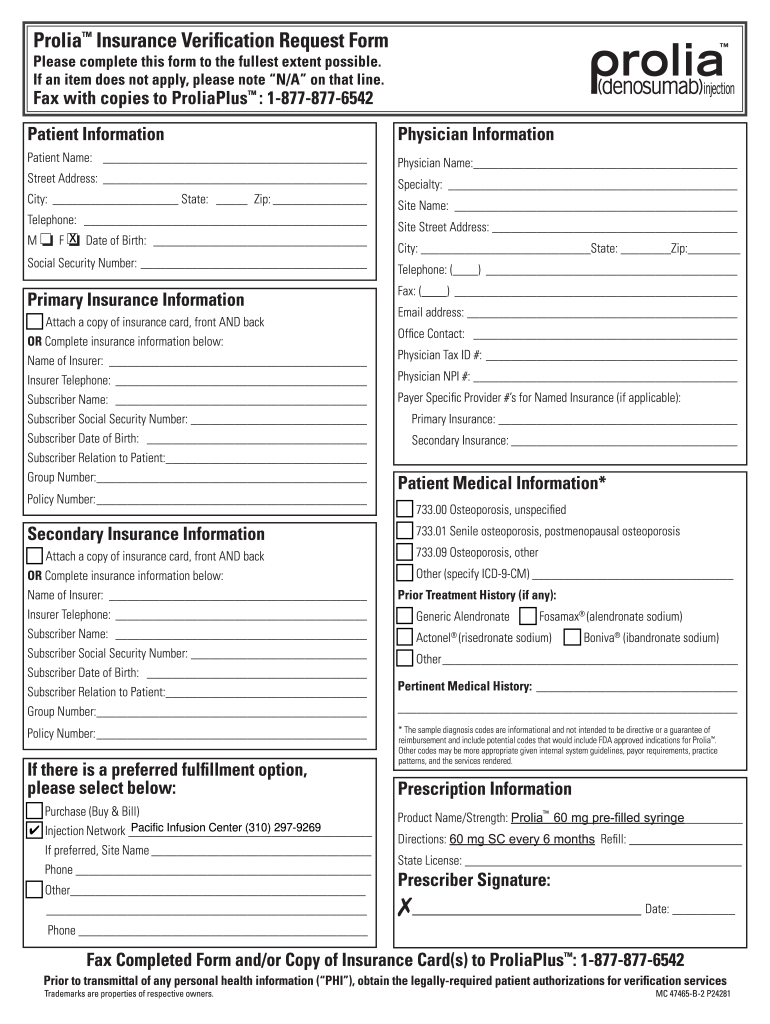
Insurance Verification and Prior Authorization Form


What is the insurance verification and prior authorization form?
The insurance verification and prior authorization form is a crucial document used in the healthcare industry to confirm a patient's insurance coverage for specific treatments or medications, such as Prolia. This form ensures that the healthcare provider receives approval from the insurance company before proceeding with treatment, which helps avoid unexpected costs for patients. It typically includes patient information, details about the prescribed treatment, and the provider's information.
Steps to complete the insurance verification and prior authorization form
Completing the insurance verification and prior authorization form involves several key steps:
- Gather patient information, including full name, date of birth, and insurance details.
- Provide details about the prescribed treatment, including the medication name, dosage, and frequency.
- Include the healthcare provider's information, such as name, contact number, and National Provider Identifier (NPI).
- Ensure all fields are filled out accurately to prevent delays in processing.
- Submit the form to the insurance company through the preferred method, which may include online submission, fax, or mail.
Key elements of the insurance verification and prior authorization form
Several key elements must be included in the insurance verification and prior authorization form to ensure its effectiveness:
- Patient Information: Full name, date of birth, and insurance policy number.
- Treatment Details: Specific medication or procedure being requested, including dosage and frequency.
- Provider Information: Name, contact information, and NPI of the healthcare provider.
- Insurance Company Details: Name of the insurance provider and any relevant contact information.
- Signature: A signature from the patient or their representative may be required to authorize the request.
Legal use of the insurance verification and prior authorization form
The legal use of the insurance verification and prior authorization form is governed by various regulations that ensure compliance with healthcare laws. This form must be filled out accurately to uphold the patient's rights and protect their personal health information. It is essential for healthcare providers to understand the legal implications of submitting this form, as inaccuracies can lead to denied claims or potential legal issues.
How to obtain the insurance verification and prior authorization form
Obtaining the insurance verification and prior authorization form can be done through several avenues:
- Contacting the healthcare provider's office, which may have the form readily available.
- Visiting the insurance company's website, where downloadable versions of the form may be provided.
- Requesting the form through patient portals, if available, which often streamline the process for patients.
Form submission methods
The insurance verification and prior authorization form can be submitted through various methods, depending on the preferences of the healthcare provider and the insurance company:
- Online Submission: Many insurance companies offer online portals for submitting forms directly.
- Fax: Sending the completed form via fax is a common method for quick submissions.
- Mail: Physical copies of the form can be mailed to the insurance provider’s address as specified on their website.
Quick guide on how to complete insurance verification request form pacific infusion center
The optimal method to obtain and endorse Insurance Verification And Prior Authorization Form
At the level of your whole organization, ineffective workflows concerning document approval can consume a signNow amount of work hours. Endorsing documents like Insurance Verification And Prior Authorization Form is an inherent aspect of operations in any enterprise, which is why the effectiveness of each agreement’s lifecycle signNowly impacts the overall performance of the company. With airSlate SignNow, endorsing your Insurance Verification And Prior Authorization Form is as simple and quick as possible. This platform provides you access to the latest version of nearly any form. Even better, you can endorse it immediately without needing to install additional applications on your computer or printing hard copies.
How to obtain and endorse your Insurance Verification And Prior Authorization Form
- Browse our collection by category or use the search bar to find the form you require.
- Check the form preview by clicking Learn more to confirm it’s the correct one.
- Click Get form to start editing right away.
- Fill out your form and input any mandatory information using the toolbar.
- When completed, click the Sign tool to endorse your Insurance Verification And Prior Authorization Form.
- Select the signature method that is most suitable for you: Draw, Generate initials, or include an image of your handwritten signature.
- Click Done to finalize editing and proceed to document-sharing options as needed.
With airSlate SignNow, you possess everything necessary to handle your documents effectively. You can locate, fill, edit, and even send your Insurance Verification And Prior Authorization Form in a single tab without any complications. Enhance your workflows with a single, intelligent eSignature solution.
Create this form in 5 minutes or less
FAQs
-
How do I respond to a request for a restraining order? Do I need to fill out a form?
As asked of me specifically;The others are right, you will likely need a lawyer. But to answer your question, there is a response form to respond to a restraining order or order of protection. Worst case the form is available at the courthouse where your hearing is set to be heard in, typically at the appropriate clerk's window, which may vary, so ask any of the clerk's when you get there.You only have so many days to respond, and it will specify in the paperwork.You will also have to appear in court on the date your hearing is scheduled.Most courts have a department that will help you respond to forms at no cost. I figure you are asking because you can't afford an attorney which is completely understandable.The problem is that if you aren't represented and the other person is successful in getting a temporary restraining order made permanent in the hearing you will not be allowed at any of the places the petitioner goes, without risking arrest.I hope this helps.Not given as legal advice-
-
Startup I am no longer working with is requesting that I fill out a 2014 w9 form. Is this standard, could someone please provide any insight as to why a startup may be doing this and how would I go about handling it?
It appears that the company may be trying to reclassify you as an independent contractor rather than an employee.Based on the information provided, it appears that such reclassification (a) would be a violation of applicable law by the employer and (b) potentially could be disadvantageous for you (e.g., depriving you of unemployment compensation if you are fired without cause).The most prudent approach would be to retain a lawyer who represents employees in employment matters.In any event, it appears that you would be justified in refusing to complete and sign the W-9, telling the company that there is no business or legal reason for you to do so.Edit: After the foregoing answer was written, the OP added Q details concerning restricted stock repurchase being the reason for the W-9 request. As a result, the foregoing answer appears to be irrelevant. However, I will leave it, for now, in case Q details are changed yet again in a way that reestablishes the answer's relevance.
-
I'm filling out the employment verification form online for KPMG and realized that it's not asking me for phone numbers to my previous employers. Just curious as to how they verify employment without me providing a contact number to call?
Many US employers today won’t allow individuals (coworkers, supervisors) at a company respond to any questions or write recommendations. Everything must go through HR and they will often only confirm dates of employment.I know this, so I’m not going to waste time contacting phone numbers/email lists of supposed former coworkers or managers. Fact is, if anyone answered and started responding to my questions, I’d be very suspicious. Instead, I just ask for the main number of the company — which I can look up on line and verify to be the actual number of the claimed company.Same deal with academic credentials. I’m not going to use your address for “Harvard” … the one with a PO Box in Laurel, KS. I’m going to look up the address for the registrar myself.Sorry to say, there’s far too much lying on resumes today, combined with the liability possible for a company to say anything about you. A common tactic is to lie about academic back ground while giving friends as your “former supervisor at XYZ.”
Create this form in 5 minutes!
How to create an eSignature for the insurance verification request form pacific infusion center
How to create an electronic signature for the Prolia Insurance Verification Request Form Pacific Infusion Center in the online mode
How to make an eSignature for your Prolia Insurance Verification Request Form Pacific Infusion Center in Google Chrome
How to generate an electronic signature for putting it on the Prolia Insurance Verification Request Form Pacific Infusion Center in Gmail
How to make an eSignature for the Prolia Insurance Verification Request Form Pacific Infusion Center right from your smartphone
How to generate an electronic signature for the Prolia Insurance Verification Request Form Pacific Infusion Center on iOS devices
How to generate an eSignature for the Prolia Insurance Verification Request Form Pacific Infusion Center on Android devices
People also ask
-
What is an Insurance Verification And Prior Authorization Form?
An Insurance Verification And Prior Authorization Form is a crucial document used to confirm a patient's insurance coverage and secure approval for specific treatments from their insurance provider. This form helps streamline the billing process and ensures that patients receive the necessary care without unexpected costs. By utilizing airSlate SignNow, you can easily create, send, and manage these forms efficiently.
-
How can airSlate SignNow help with Insurance Verification And Prior Authorization Forms?
airSlate SignNow simplifies the process of creating and managing Insurance Verification And Prior Authorization Forms. Our platform allows for easy document customization, e-signatures, and secure storage, ensuring compliance and efficiency in your workflow. With our solution, healthcare providers can expedite patient approvals and enhance their overall service delivery.
-
Is there a cost associated with using airSlate SignNow for Insurance Verification And Prior Authorization Forms?
Yes, airSlate SignNow offers a variety of pricing plans tailored to different business needs, including options for handling Insurance Verification And Prior Authorization Forms. Our pricing is competitive and designed to provide signNow value by increasing efficiency and reducing processing times. You can choose a plan that best suits your organization’s requirements.
-
What features does airSlate SignNow offer for managing Insurance Verification And Prior Authorization Forms?
airSlate SignNow provides a range of features for managing Insurance Verification And Prior Authorization Forms, including customizable templates, automated workflows, and real-time tracking. These features help ensure that your forms are completed accurately and promptly, reducing delays in patient care and enhancing your administrative processes.
-
Can airSlate SignNow integrate with other healthcare systems for Insurance Verification And Prior Authorization Forms?
Absolutely! airSlate SignNow offers seamless integrations with various healthcare systems and electronic health record (EHR) platforms. This integration capability allows you to streamline your workflow for Insurance Verification And Prior Authorization Forms, ensuring that all necessary data is synchronized and accessible in one place.
-
What are the benefits of using airSlate SignNow for Insurance Verification And Prior Authorization Forms?
Using airSlate SignNow for Insurance Verification And Prior Authorization Forms offers numerous benefits, including improved processing speed, enhanced accuracy, and reduced administrative burden. Our platform allows for easy collaboration among team members, ensuring that forms are completed and submitted swiftly, which ultimately leads to better patient care.
-
How secure is airSlate SignNow when handling Insurance Verification And Prior Authorization Forms?
Security is a top priority at airSlate SignNow. We employ advanced encryption and comply with HIPAA regulations to ensure that all Insurance Verification And Prior Authorization Forms and patient data are protected. You can trust that your sensitive information is safe and secure on our platform.
Get more for Insurance Verification And Prior Authorization Form
Find out other Insurance Verification And Prior Authorization Form
- Electronic signature Construction Form California Fast
- Help Me With Electronic signature Colorado Construction Rental Application
- Electronic signature Connecticut Construction Business Plan Template Fast
- Electronic signature Delaware Construction Business Letter Template Safe
- Electronic signature Oklahoma Business Operations Stock Certificate Mobile
- Electronic signature Pennsylvania Business Operations Promissory Note Template Later
- Help Me With Electronic signature North Dakota Charity Resignation Letter
- Electronic signature Indiana Construction Business Plan Template Simple
- Electronic signature Wisconsin Charity Lease Agreement Mobile
- Can I Electronic signature Wisconsin Charity Lease Agreement
- Electronic signature Utah Business Operations LLC Operating Agreement Later
- How To Electronic signature Michigan Construction Cease And Desist Letter
- Electronic signature Wisconsin Business Operations LLC Operating Agreement Myself
- Electronic signature Colorado Doctors Emergency Contact Form Secure
- How Do I Electronic signature Georgia Doctors Purchase Order Template
- Electronic signature Doctors PDF Louisiana Now
- How To Electronic signature Massachusetts Doctors Quitclaim Deed
- Electronic signature Minnesota Doctors Last Will And Testament Later
- How To Electronic signature Michigan Doctors LLC Operating Agreement
- How Do I Electronic signature Oregon Construction Business Plan Template