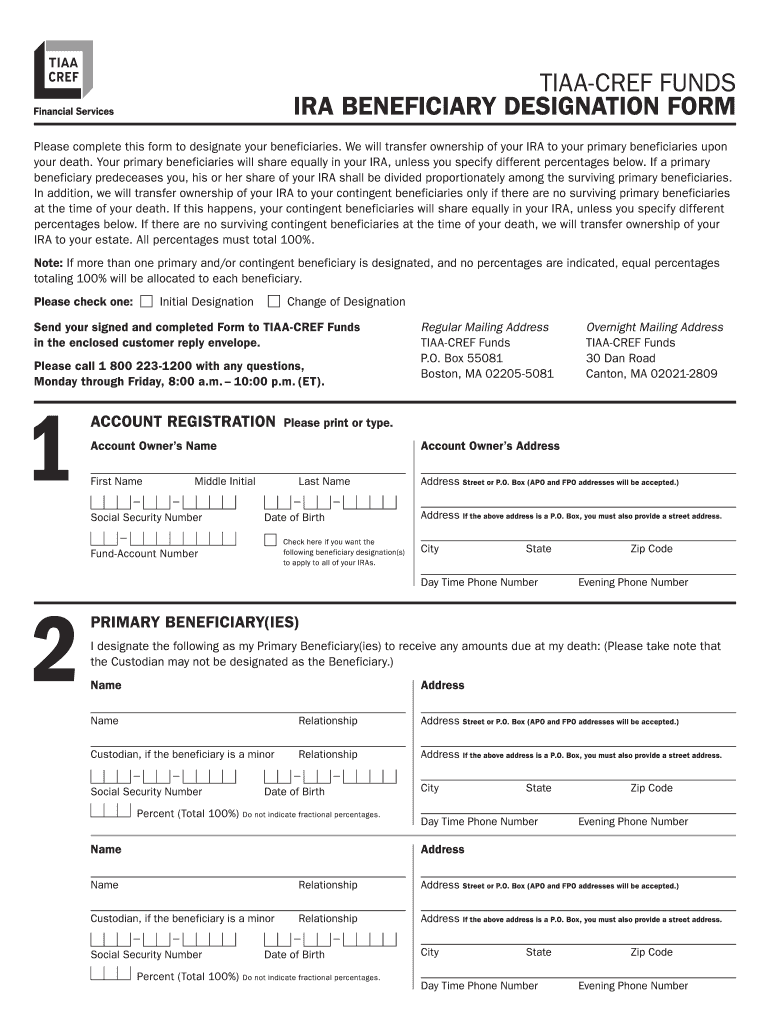
Tiaa Cref Beneficiary Designation Form


What is the TIAA CREF Beneficiary Designation Form?
The TIAA CREF Beneficiary Designation Form is a crucial document used by individuals to designate beneficiaries for their retirement accounts and insurance policies. This form ensures that assets are transferred according to the individual's wishes upon their passing. It is essential for individuals to complete this form accurately to avoid complications or disputes regarding the distribution of their assets. The form typically requires personal information, including the account holder's details and the chosen beneficiaries' names and relationships.
Steps to Complete the TIAA CREF Beneficiary Designation Form
Filling out the TIAA CREF Beneficiary Designation Form involves several important steps:
- Gather necessary information: Collect personal details such as your Social Security number, account numbers, and the full names and contact information of your beneficiaries.
- Complete the form: Fill in all required fields accurately, ensuring that the beneficiary designations reflect your intentions.
- Review the form: Double-check all entries for accuracy and completeness to prevent any issues during processing.
- Sign and date: Ensure that you sign and date the form where indicated, as this is necessary for it to be considered valid.
- Submit the form: Follow the submission guidelines provided, whether online, by mail, or in person, to ensure timely processing.
Legal Use of the TIAA CREF Beneficiary Designation Form
The TIAA CREF Beneficiary Designation Form serves a legal purpose by formally documenting the account holder's wishes regarding asset distribution. To be legally binding, the form must be completed accurately and signed by the account holder. It is important to ensure compliance with state laws governing beneficiary designations, as these can vary. The form's legal validity is further reinforced by adherence to regulations such as the Electronic Signatures in Global and National Commerce Act (ESIGN) and the Uniform Electronic Transactions Act (UETA).
Key Elements of the TIAA CREF Beneficiary Designation Form
Several key elements must be included in the TIAA CREF Beneficiary Designation Form to ensure it is complete and effective:
- Account holder information: Full name, address, and Social Security number.
- Beneficiary details: Names, relationships, and contact information of all beneficiaries.
- Contingent beneficiaries: Optional section to designate secondary beneficiaries in case the primary ones are unavailable.
- Signature and date: Required to validate the form.
How to Obtain the TIAA CREF Beneficiary Designation Form
The TIAA CREF Beneficiary Designation Form can be easily obtained through various channels. Individuals can visit the official TIAA website to download the form in PDF format. Alternatively, they may contact TIAA customer service for assistance in acquiring a physical copy. It is advisable to ensure that the most recent version of the form is used to comply with any updates or changes in regulations.
Form Submission Methods
Once the TIAA CREF Beneficiary Designation Form is completed, it can be submitted through multiple methods:
- Online submission: Many users prefer to submit the form electronically through the TIAA website, which may offer a streamlined process.
- Mail: The completed form can be mailed to the designated TIAA address provided on the form.
- In-person: Individuals may also choose to deliver the form in person at a local TIAA office for immediate processing.
Quick guide on how to complete tiaa cref ira beneficiary designation form
Complete Tiaa Cref Beneficiary Designation Form seamlessly on any device
Digital document management has gained traction among businesses and individuals. It serves as an ideal eco-friendly alternative to conventional printed and signed documents, allowing you to access the appropriate form and securely store it online. airSlate SignNow provides all the tools you need to create, modify, and eSign your documents rapidly without delays. Manage Tiaa Cref Beneficiary Designation Form on any device using airSlate SignNow's Android or iOS applications and enhance any document-driven workflow today.
How to modify and eSign Tiaa Cref Beneficiary Designation Form effortlessly
- Locate Tiaa Cref Beneficiary Designation Form and click Get Form to begin.
- Utilize the tools we offer to complete your form.
- Emphasize important sections of the documents or obscure sensitive information using tools that airSlate SignNow provides specifically for this purpose.
- Generate your signature with the Sign tool, which takes mere seconds and holds the same legal authority as a traditional ink signature.
- Review all the details and click the Done button to save your changes.
- Choose how you want to share your form, via email, text message (SMS), invitation link, or download it to your computer.
Eliminate concerns about lost or misplaced files, tedious form navigation, or mistakes that necessitate printing new document copies. airSlate SignNow meets your document management requirements with just a few clicks from any device you choose. Edit and eSign Tiaa Cref Beneficiary Designation Form and maintain excellent communication at every step of your form preparation process with airSlate SignNow.
Create this form in 5 minutes or less
FAQs
-
I need help filling out this IRA form to withdraw money. How do I fill this out?
I am confused on the highlighted part.
-
I recently opened a Fidelity Roth IRA and it says my account is closed and I need to submit a W-9 form. Can anyone explain how this form relates to an IRA and why I need to fill it out?
Financial institutions are required to obtain tax ID numbers when opening an account, and the fact that it's an IRA doesn't exempt them from that requirement. They shouldn't have opened it without the W-9 in the first place, but apparently they did. So now they had to close it until they get the required documentation.
-
How can I fill out Google's intern host matching form to optimize my chances of receiving a match?
I was selected for a summer internship 2016.I tried to be very open while filling the preference form: I choose many products as my favorite products and I said I'm open about the team I want to join.I even was very open in the location and start date to get host matching interviews (I negotiated the start date in the interview until both me and my host were happy.) You could ask your recruiter to review your form (there are very cool and could help you a lot since they have a bigger experience).Do a search on the potential team.Before the interviews, try to find smart question that you are going to ask for the potential host (do a search on the team to find nice and deep questions to impress your host). Prepare well your resume.You are very likely not going to get algorithm/data structure questions like in the first round. It's going to be just some friendly chat if you are lucky. If your potential team is working on something like machine learning, expect that they are going to ask you questions about machine learning, courses related to machine learning you have and relevant experience (projects, internship). Of course you have to study that before the interview. Take as long time as you need if you feel rusty. It takes some time to get ready for the host matching (it's less than the technical interview) but it's worth it of course.
-
How do I fill out the form of DU CIC? I couldn't find the link to fill out the form.
Just register on the admission portal and during registration you will get an option for the entrance based course. Just register there. There is no separate form for DU CIC.
-
How do you know if you need to fill out a 1099 form?
Assuming that you are talking about 1099-MISC. Note that there are other 1099s.check this post - Form 1099 MISC Rules & RegulationsQuick answer - A Form 1099 MISC must be filed for each person to whom payment is made of:$600 or more for services performed for a trade or business by people not treated as employees;Rent or prizes and awards that are not for service ($600 or more) and royalties ($10 or more);any fishing boat proceeds,gross proceeds of $600, or more paid to an attorney during the year, orWithheld any federal income tax under the backup withholding rules regardless of the amount of the payment, etc.
Create this form in 5 minutes!
How to create an eSignature for the tiaa cref ira beneficiary designation form
How to create an eSignature for your Tiaa Cref Ira Beneficiary Designation Form in the online mode
How to generate an electronic signature for the Tiaa Cref Ira Beneficiary Designation Form in Chrome
How to create an eSignature for signing the Tiaa Cref Ira Beneficiary Designation Form in Gmail
How to generate an eSignature for the Tiaa Cref Ira Beneficiary Designation Form right from your mobile device
How to generate an eSignature for the Tiaa Cref Ira Beneficiary Designation Form on iOS
How to generate an eSignature for the Tiaa Cref Ira Beneficiary Designation Form on Android devices
People also ask
-
What is the Tiaa Cref Beneficiary Designation Form?
The Tiaa Cref Beneficiary Designation Form is an essential document that allows you to specify who will receive your benefits in the event of your passing. This form ensures that your assets are distributed according to your wishes, providing peace of mind for you and your beneficiaries. Completing the Tiaa Cref Beneficiary Designation Form is a vital step in estate planning.
-
How can airSlate SignNow help with the Tiaa Cref Beneficiary Designation Form?
airSlate SignNow offers a seamless solution for completing the Tiaa Cref Beneficiary Designation Form electronically. Our platform allows you to fill out, sign, and send this important document securely, ensuring that your designation is processed quickly and efficiently. With airSlate SignNow, you can manage your forms from anywhere, at any time.
-
Is there a cost associated with using airSlate SignNow for the Tiaa Cref Beneficiary Designation Form?
Yes, airSlate SignNow provides a range of pricing plans that cater to different user needs, including options for individuals and businesses. You can access features specifically designed for managing the Tiaa Cref Beneficiary Designation Form and other documents at a competitive rate. We also offer a free trial so you can explore our services before committing.
-
What features does airSlate SignNow offer for the Tiaa Cref Beneficiary Designation Form?
airSlate SignNow includes features such as customizable templates, electronic signatures, and secure document storage specifically for the Tiaa Cref Beneficiary Designation Form. Additionally, our platform supports real-time tracking and reminders, ensuring that you stay organized and compliant throughout the signing process. These features streamline your experience and save you time.
-
How secure is my information when using airSlate SignNow for the Tiaa Cref Beneficiary Designation Form?
Security is a top priority at airSlate SignNow. When using the Tiaa Cref Beneficiary Designation Form, your data is encrypted and stored securely to prevent unauthorized access. Our platform complies with industry-standard security protocols, ensuring that your sensitive information remains confidential and protected.
-
Can I integrate airSlate SignNow with other applications for managing the Tiaa Cref Beneficiary Designation Form?
Absolutely! airSlate SignNow offers integrations with various applications, allowing you to streamline your document management process, including for the Tiaa Cref Beneficiary Designation Form. You can connect our platform with tools like Google Drive, Dropbox, and CRM systems to enhance your workflow and keep all your documents in one place.
-
What are the benefits of using airSlate SignNow for the Tiaa Cref Beneficiary Designation Form?
Using airSlate SignNow for the Tiaa Cref Beneficiary Designation Form offers numerous benefits, including time savings, enhanced security, and ease of use. Our platform simplifies the signing process, making it accessible from any device, which helps ensure your beneficiaries are designated quickly and efficiently. This convenience can alleviate the stress often associated with estate planning.
Get more for Tiaa Cref Beneficiary Designation Form
Find out other Tiaa Cref Beneficiary Designation Form
- How To Integrate Sign in Banking
- How To Use Sign in Banking
- Help Me With Use Sign in Banking
- Can I Use Sign in Banking
- How Do I Install Sign in Banking
- How To Add Sign in Banking
- How Do I Add Sign in Banking
- How Can I Add Sign in Banking
- Can I Add Sign in Banking
- Help Me With Set Up Sign in Government
- How To Integrate eSign in Banking
- How To Use eSign in Banking
- How To Install eSign in Banking
- How To Add eSign in Banking
- How To Set Up eSign in Banking
- How To Save eSign in Banking
- How To Implement eSign in Banking
- How To Set Up eSign in Construction
- How To Integrate eSign in Doctors
- How To Use eSign in Doctors