How to Register Ur Drama Group Online Form


Key elements of the drama membership form
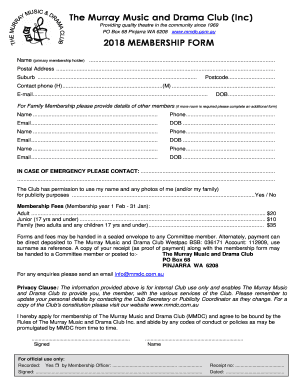
When writing a drama membership form, several key elements should be included to ensure clarity and completeness. These elements help streamline the application process and provide essential information for both the applicant and the organization.
- Personal Information: Collect the applicant's full name, address, phone number, and email. This information is crucial for communication and record-keeping.
- Membership Type: Specify the type of membership being applied for, such as full member, student member, or honorary member. This helps in categorizing applicants appropriately.
- Experience and Interests: Include a section where applicants can detail their previous experience in drama or related activities, as well as their specific interests within the drama group.
- Emergency Contact: Request the name and contact details of an emergency contact person. This is important for safety during rehearsals and performances.
- Signature: Ensure there is a space for the applicant's signature and date to validate the application. This confirms that the information provided is accurate and that the applicant agrees to the terms of membership.
Steps to complete the drama membership form
Completing a drama membership form can be straightforward when following a structured approach. Here are the essential steps to guide applicants through the process:
- Gather Information: Before starting the form, applicants should collect all necessary personal information and details about their drama experience.
- Fill Out the Form: Carefully enter all required information in the designated fields. It is important to be thorough and accurate to avoid delays in processing.
- Review the Information: After filling out the form, applicants should review all entries for accuracy and completeness. This step helps prevent errors that could lead to complications.
- Sign the Form: Applicants must provide their signature and the date, which confirms their agreement to the membership terms.
- Submit the Form: Depending on the drama group's submission guidelines, applicants can submit the form digitally or print it out for mailing or in-person delivery.
Legal use of the drama membership form
Understanding the legal aspects of a drama membership form is essential for both the organization and the applicant. The form serves as a binding agreement once signed, which means it must comply with relevant laws and regulations.
In the United States, electronic signatures are legally recognized under the ESIGN Act and UETA, ensuring that digital submissions are valid. Organizations should ensure that their forms include necessary disclaimers regarding privacy and data protection to comply with regulations such as FERPA and HIPAA.
Application process and approval time
The application process for joining a drama group typically involves several stages, which may vary by organization. Generally, the process includes:
- Submission: After completing the drama membership form, applicants submit it according to the specified method.
- Review: The organization reviews applications to ensure all information is complete and meets membership criteria.
- Interview or Audition: Some drama groups may require an interview or audition as part of the selection process, allowing them to assess the applicant's fit for the group.
- Notification: Once the review is complete, applicants are notified of their acceptance or any additional steps required.
The approval time can vary based on the organization's size and the number of applications received, but it typically ranges from a few days to several weeks.
Quick guide on how to complete how to register ur drama group online
Effortlessly prepare How To Register Ur Drama Group Online on any device
Digital document management has gained traction among businesses and individuals alike. It serves as an ideal eco-friendly alternative to traditional printed and signed documents, allowing you to access the required form and securely store it online. airSlate SignNow provides you with all the resources necessary to create, modify, and electronically sign your documents quickly and without delays. Manage How To Register Ur Drama Group Online on any device using the airSlate SignNow apps for Android or iOS, and streamline any document-related process today.
How to edit and electronically sign How To Register Ur Drama Group Online with ease
- Locate How To Register Ur Drama Group Online and then click Get Form to begin.
- Use the tools we provide to complete your document.
- Emphasize important sections of your documents or redact sensitive information with the tools specifically designed for that purpose by airSlate SignNow.
- Create your electronic signature using the Sign feature, which takes mere seconds and holds the same legal validity as a conventional wet ink signature.
- Review all the details, then click on the Done button to finalize your changes.
- Select your preferred method for sending your form—via email, SMS, invitation link, or download it to your computer.
Eliminate the hassle of lost or misplaced files, tedious document searches, or errors requiring new copies. airSlate SignNow addresses all your document management needs with just a few clicks from any device of your choice. Edit and electronically sign How To Register Ur Drama Group Online, ensuring excellent communication throughout your form preparation process with airSlate SignNow.
Create this form in 5 minutes or less
Create this form in 5 minutes!
How to create an eSignature for the how to register ur drama group online
How to create an electronic signature for a PDF online
How to create an electronic signature for a PDF in Google Chrome
How to create an e-signature for signing PDFs in Gmail
How to create an e-signature right from your smartphone
How to create an e-signature for a PDF on iOS
How to create an e-signature for a PDF on Android
People also ask
-
What is a drama membership form?
A drama membership form is a document that collects essential information from individuals wishing to join a drama club or organization. It typically includes sections for personal details, contact information, and any relevant experience. Understanding how to write a drama membership form correctly can streamline the membership process for both applicants and organizers.
-
How do I write a drama membership form using airSlate SignNow?
To write a drama membership form with airSlate SignNow, start by choosing a template or creating a new document. Use our intuitive interface to add fields for information like name, age, and contact details. Once your form is ready, you can eSign it easily to finalize and share with prospective members.
-
Can I customize my drama membership form on airSlate SignNow?
Yes, airSlate SignNow allows you to fully customize your drama membership form. You can add or remove fields and adjust the design to fit your branding. This flexibility ensures your form meets the specific needs of your drama organization.
-
What are the benefits of using airSlate SignNow for my drama membership form?
Using airSlate SignNow to create your drama membership form offers numerous benefits. It enables quick and secure eSigning, which is convenient for both you and your members. Additionally, it provides a cost-effective solution that enhances your organizational efficiency.
-
Is there a free trial for airSlate SignNow?
Yes, airSlate SignNow offers a free trial that allows you to explore features like creating a drama membership form. This trial provides access to essential tools and functionality, so you can evaluate how well it meets your organization's needs.
-
How can airSlate SignNow help with tracking drama membership submissions?
AirSlate SignNow includes features that help you track submissions of your drama membership form effectively. You can receive instant notifications when forms are filled out and signed, making it easy to manage and organize incoming membership requests.
-
What payment options are available for airSlate SignNow subscriptions?
AirSlate SignNow offers various payment options for subscriptions, including credit and debit cards. Flexible billing cycles let you choose what works best for your drama organization’s budgeting needs, allowing you to focus on how to write a drama membership form without financial distractions.
Get more for How To Register Ur Drama Group Online
Find out other How To Register Ur Drama Group Online
- How To Integrate Sign in Banking
- How To Use Sign in Banking
- Help Me With Use Sign in Banking
- Can I Use Sign in Banking
- How Do I Install Sign in Banking
- How To Add Sign in Banking
- How Do I Add Sign in Banking
- How Can I Add Sign in Banking
- Can I Add Sign in Banking
- Help Me With Set Up Sign in Government
- How To Integrate eSign in Banking
- How To Use eSign in Banking
- How To Install eSign in Banking
- How To Add eSign in Banking
- How To Set Up eSign in Banking
- How To Save eSign in Banking
- How To Implement eSign in Banking
- How To Set Up eSign in Construction
- How To Integrate eSign in Doctors
- How To Use eSign in Doctors