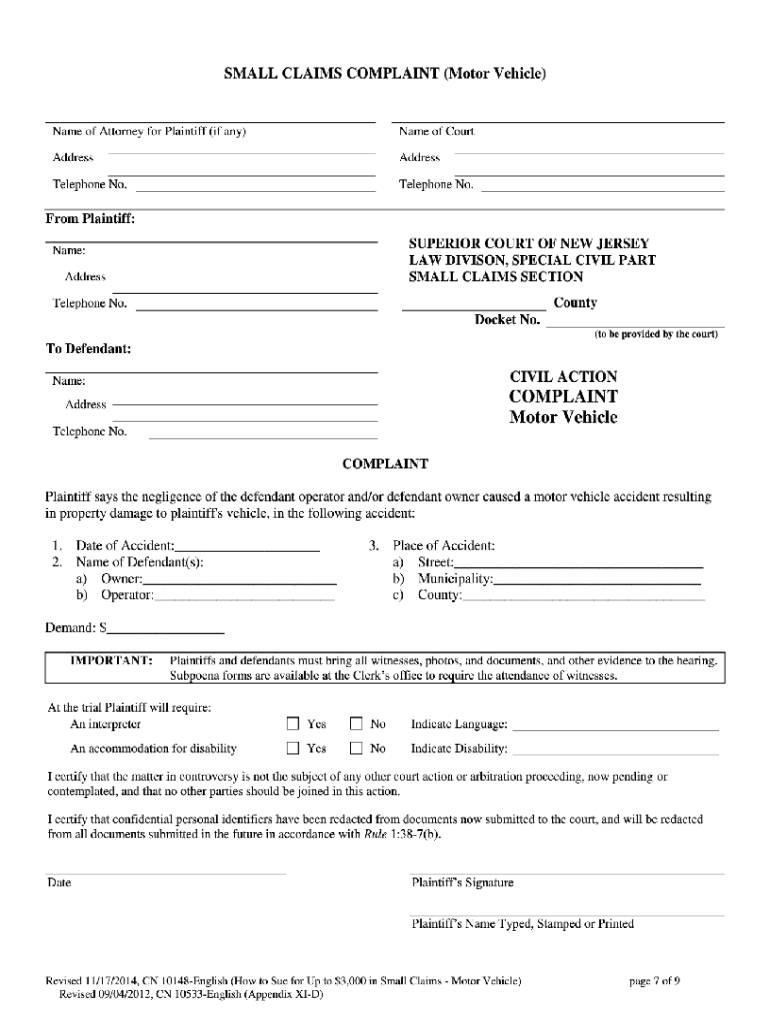
Small Claims Court Nj 2014


What is the small claims court in New Jersey?
The small claims court in New Jersey is a specialized court designed to handle disputes involving relatively small amounts of money. Typically, these cases involve claims of up to $3,000, although some courts may allow claims up to $5,000 for specific types of cases. The small claims process is intended to be more accessible and less formal than traditional court proceedings, allowing individuals to represent themselves without the need for an attorney.
Steps to complete the small claims court forms in New Jersey
Completing small claims court forms in New Jersey involves several key steps:
- Determine the appropriate form: Identify the specific form needed for your case, such as the NJ small claims complaint form.
- Gather necessary information: Collect all relevant details, including the names and addresses of all parties involved, a description of the dispute, and the amount being claimed.
- Fill out the form: Complete the form accurately, ensuring that all required fields are filled in and that the information is clear.
- Sign and date the form: Make sure to include your signature and the date, as these are essential for the form's validity.
- Submit the form: File the completed form with the appropriate small claims court, either in person, by mail, or online, depending on the court's options.
Required documents for small claims court in New Jersey
When filing a small claims case in New Jersey, certain documents are typically required:
- Completed small claims court forms, including the complaint form.
- Any supporting evidence relevant to your claim, such as contracts, receipts, or photographs.
- Proof of service, which demonstrates that the defendant has been notified of the claim.
Form submission methods for small claims court in New Jersey
In New Jersey, small claims court forms can be submitted through various methods:
- Online: Many courts offer online filing options, allowing you to complete and submit your forms digitally.
- By mail: You can send the completed forms to the appropriate court address via postal service.
- In-person: You may also choose to file your forms directly at the courthouse, where court staff can assist you with the process.
Eligibility criteria for small claims court in New Jersey
To file a claim in small claims court in New Jersey, you must meet certain eligibility criteria:
- The claim must be for an amount within the court's limit, typically up to $3,000 or $5,000 for specific cases.
- The dispute must involve a legal issue that the small claims court has jurisdiction over.
- The claimant must be an individual or a business entity; however, businesses may have different rules regarding representation.
Legal use of small claims court in New Jersey
The small claims court serves as a venue for resolving disputes efficiently and fairly. It is designed for cases involving minor financial disagreements, such as:
- Unpaid debts or loans.
- Property damage claims.
- Disputes over contracts or services rendered.
Using the small claims court can provide a quicker resolution than traditional court proceedings, making it an effective option for individuals seeking justice in minor disputes.
Quick guide on how to complete nj small claims complaint form
Complete and submit your Small Claims Court Nj swiftly
Essential tools for digital document exchange and endorsement are crucial for enhancing processes and the ongoing enhancement of your forms. When working with legal documents and signing a Small Claims Court Nj, the appropriate signature solution can save you a substantial amount of time and paper for each submission.
Search, fill out, modify, endorse, and distribute your legal paperwork with airSlate SignNow. This platform encompasses everything required to create smooth paper submission workflows. Its extensive legal forms repository and user-friendly navigation will assist you in obtaining your Small Claims Court Nj rapidly, and the editor featuring our signature capability will enable you to finalize and approve it instantly.
Endorse your Small Claims Court Nj in a few easy steps
- Locate the Small Claims Court Nj you require in our repository using the search function or catalog pages.
- Examine the form details and preview it to ensure it meets your requirements and state regulations.
- Click Obtain form to access it for editing.
- Fill in the form utilizing the all-inclusive toolbar.
- Verify the information you entered and click the Sign option to validate your file.
- Choose one of three options to append your signature.
- Complete the editing and save the document in your files, then download it onto your device or share it right away.
Optimize every aspect of your document preparation and endorsement with airSlate SignNow. Experience a more effective online solution that has thoroughly considered all elements of managing your documents.
Create this form in 5 minutes or less
Find and fill out the correct nj small claims complaint form
FAQs
-
How do I fill out the IT-2104 form if I live in NJ?
Do you work only in NY? Married? Kids? If your w-2 shows NY state withholding on your taxes, fill out a non-resident NY tax return which is fairly simple. If it doesn't, you don't fill out NY at all. If it shows out NYC withholding you enter that as well on the same forms.Then you would fill out your NJ returns as well with any withholding for NJ. Make sure to put any taxes paid to other states on your reciprocal states (nj paid, on NY return and vice versa)
-
I’m being sued and I’m representing myself in court. How do I fill out the form called “answer to complaint”?
You can represent yourself. Each form is different per state or county but generally an answer is simply a written document which presents a synopsis of your story to the court. The answer is not your defense, just written notice to the court that you intend to contest the suit. The blank forms are available at the court clerk’s office and are pretty much self explanatoryThere will be a space calling for the signature of an attorney. You should sign your name on the space and write the words “Pro se” after your signature. This lets the court know you are acting as your own attorney.
-
What's the most effective way to stop SEM brand-jacking on Bing and Google beyond going online to formally fill out a complaint?
I had experience with Bing and Google stopping our brand name usage in competitor's ads, in both cases I used online form to contact Bing and Google ad approval teams. The responses from Bing and Google reps were really fast, it took less than 2 business days.Another solution is to create a special group of keywords and ads that contain your brand name and to bid higher than average on these keywords. So when a person searches for your brand product, the first thing that pops up is your ad. Thus, you can supersede your competitors.Besides, if you have resellers or affiliates, you can set special rules for them and forbid online advertising on brand keywords.
-
If I open a small t-shirt store on Etsy or Storenvy, do I need to fill out a DBA form?
The short answer is no, however I would recommend that you do get yourself an LLC. A Limited Liability Corporation is very inexpensive and easy to get and will protect you in case of any sort of legal issue.In short if someone were to take legal action against you due to say defamation or creative license issues the LLC would help protect monies you make from your regular job or your personal belongings.Filling out the paperwork isn’t difficult and costs under $50 last I checked but if you don’t feel comfortable doing it yourself you can find several companies online (just google “get an llc”) that will do it for a fee of about $99 plus the fee for the LLC.
Create this form in 5 minutes!
How to create an eSignature for the nj small claims complaint form
How to generate an electronic signature for your Nj Small Claims Complaint Form online
How to create an electronic signature for your Nj Small Claims Complaint Form in Google Chrome
How to create an eSignature for putting it on the Nj Small Claims Complaint Form in Gmail
How to generate an eSignature for the Nj Small Claims Complaint Form right from your mobile device
How to create an eSignature for the Nj Small Claims Complaint Form on iOS
How to generate an eSignature for the Nj Small Claims Complaint Form on Android
People also ask
-
What are small claims court NJ forms?
Small claims court NJ forms are legal documents required to initiate a lawsuit in New Jersey's small claims court. These forms include complaints, answers, and various motions essential for the court's proceedings. Utilizing airSlate SignNow, you can easily prepare and eSign these forms online, streamlining your process.
-
How can I access small claims court NJ forms?
You can access small claims court NJ forms through the New Jersey Judiciary website or by using airSlate SignNow. Our platform provides templates for all necessary forms, making it simple to fill out and sign them electronically. This ensures you have everything needed for your case at your fingertips.
-
Are small claims court NJ forms available for free?
While some small claims court NJ forms may be available for free, additional services and tools for preparation often come at a cost. With airSlate SignNow, you gain access to an affordable subscription that offers a user-friendly interface and unlimited document eSigning, giving you great value for your money.
-
Can airSlate SignNow help me fill out small claims court NJ forms?
Absolutely! airSlate SignNow offers user-friendly templates specifically for small claims court NJ forms. You can easily fill out these forms with guided prompts, ensuring that you include all necessary information to support your case efficiently.
-
Is eSigning valid for small claims court NJ forms?
Yes, eSigning is valid for small claims court NJ forms in New Jersey as long as it complies with electronic signature laws. airSlate SignNow provides secure and legally binding eSigning capabilities, allowing you to sign and send documents without stepping foot into a court.
-
What features does airSlate SignNow offer for small claims court NJ forms?
airSlate SignNow offers numerous features that enhance the process of managing small claims court NJ forms. These include customizable templates, secure eSigning, and the ability to send documents for signature, ensuring you have a comprehensive tool for handling your legal paperwork effectively.
-
Can I integrate airSlate SignNow with other applications for managing small claims court NJ forms?
Yes, airSlate SignNow offers several integrations with popular applications, enabling you to manage small claims court NJ forms alongside your other business tools. This seamless integration facilitates smooth workflows and ensures that document management is efficient and organized.
Get more for Small Claims Court Nj
Find out other Small Claims Court Nj
- eSign Nevada Plumbing Business Letter Template Later
- eSign Nevada Plumbing Lease Agreement Form Myself
- eSign Plumbing PPT New Jersey Later
- eSign New York Plumbing Rental Lease Agreement Simple
- eSign North Dakota Plumbing Emergency Contact Form Mobile
- How To eSign North Dakota Plumbing Emergency Contact Form
- eSign Utah Orthodontists Credit Memo Easy
- How To eSign Oklahoma Plumbing Business Plan Template
- eSign Vermont Orthodontists Rental Application Now
- Help Me With eSign Oregon Plumbing Business Plan Template
- eSign Pennsylvania Plumbing RFP Easy
- Can I eSign Pennsylvania Plumbing RFP
- eSign Pennsylvania Plumbing Work Order Free
- Can I eSign Pennsylvania Plumbing Purchase Order Template
- Help Me With eSign South Carolina Plumbing Promissory Note Template
- How To eSign South Dakota Plumbing Quitclaim Deed
- How To eSign South Dakota Plumbing Affidavit Of Heirship
- eSign South Dakota Plumbing Emergency Contact Form Myself
- eSign Texas Plumbing Resignation Letter Free
- eSign West Virginia Orthodontists Living Will Secure