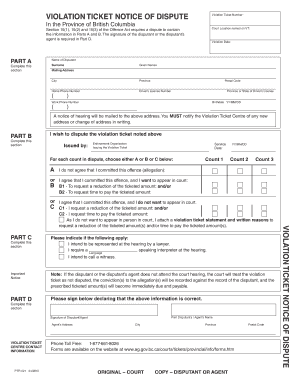
Ticket Dispute Form Bc


What is the notice of dispute form?
The notice of dispute form is a formal document used to communicate disagreements or disputes regarding various issues, such as billing errors, service dissatisfaction, or contractual disagreements. This form serves as a written record of the dispute and outlines the specific details surrounding the issue. It is essential for individuals and businesses to document disputes clearly to facilitate resolution processes. The form typically includes sections for the parties involved, a description of the dispute, and any relevant supporting information.
How to use the notice of dispute form
Using the notice of dispute form involves several straightforward steps. First, gather all necessary information related to the dispute, including relevant contracts, receipts, or communications. Next, fill out the form with accurate details, ensuring that you clearly describe the nature of the dispute. It is important to include any deadlines for responses or actions required. Once completed, submit the form to the appropriate party, whether it be a service provider, business partner, or legal entity. Keeping a copy of the submitted form for your records is advisable.
Steps to complete the notice of dispute form
Completing the notice of dispute form requires careful attention to detail. Follow these steps:
- Identify the parties involved in the dispute, including names and contact information.
- Provide a clear and concise description of the dispute, including dates and specific incidents.
- Attach any supporting documents that may help clarify the situation, such as invoices or correspondence.
- Specify any desired outcomes or resolutions you are seeking.
- Review the form for accuracy and completeness before submission.
Legal use of the notice of dispute form
The notice of dispute form is legally significant as it establishes a formal record of the disagreement. For it to be considered valid in legal contexts, it must be completed accurately and submitted to the relevant parties. The form may also need to comply with specific state or federal regulations, depending on the nature of the dispute. Utilizing a reliable digital tool, such as signNow, can ensure that the form is executed correctly and securely, providing necessary legal protections and compliance with eSignature laws.
Key elements of the notice of dispute form
Several key elements should be included in the notice of dispute form to ensure its effectiveness:
- Contact information for all parties involved.
- A detailed description of the dispute, including relevant dates and events.
- Supporting documentation that substantiates the claims made.
- A clear statement of the resolution sought by the disputing party.
- Signature or electronic confirmation of the form's completion.
Form submission methods
The notice of dispute form can typically be submitted through various methods, depending on the recipient's preferences. Common submission methods include:
- Online submission via a secure portal or email.
- Mailing a physical copy to the relevant party.
- In-person delivery to ensure immediate receipt.
Choosing the appropriate method may depend on the urgency of the dispute and the requirements of the receiving party.
Quick guide on how to complete ticket dispute form bc
Complete Ticket Dispute Form Bc effortlessly on any device
The management of online documents has become increasingly popular among businesses and individuals. It offers an excellent eco-friendly alternative to conventional printed and signed documents, allowing you to find the correct form and securely store it online. airSlate SignNow provides all the tools you need to create, modify, and eSign your documents quickly without delays. Handle Ticket Dispute Form Bc on any platform using airSlate SignNow's Android or iOS applications and simplify any document-related tasks today.
The easiest way to modify and eSign Ticket Dispute Form Bc seamlessly
- Find Ticket Dispute Form Bc and click on Get Form to commence.
- Utilize the tools we provide to fill out your form.
- Highlight important sections of the documents or obscure sensitive details with tools that airSlate SignNow specifically offers for that purpose.
- Generate your eSignature using the Sign tool, which takes just seconds and has the same legal validity as a traditional wet ink signature.
- Review all the details and click on the Done button to save your changes.
- Choose how you prefer to send your form, via email, text message (SMS), or an invite link, or download it to your computer.
No more worrying about lost or misplaced files, tedious form searching, or mistakes that require printing new document copies. airSlate SignNow fulfills your document management needs in just a few clicks from any device you prefer. Edit and eSign Ticket Dispute Form Bc and ensure outstanding communication at every stage of your form preparation process with airSlate SignNow.
Create this form in 5 minutes or less
Create this form in 5 minutes!
How to create an eSignature for the ticket dispute form bc
How to create an electronic signature for a PDF online
How to create an electronic signature for a PDF in Google Chrome
How to create an e-signature for signing PDFs in Gmail
How to create an e-signature right from your smartphone
How to create an e-signature for a PDF on iOS
How to create an e-signature for a PDF on Android
People also ask
-
What is the notice of dispute form BC?
The notice of dispute form BC is a legal document that allows individuals or businesses to formally dispute a claim or decision. It outlines the reasons for the dispute and serves as a notification to the involved parties. Using airSlate SignNow, you can easily create and send this form electronically, ensuring that your dispute is documented efficiently.
-
How can airSlate SignNow help with the notice of dispute form BC?
airSlate SignNow simplifies the process of creating and signing a notice of dispute form BC. Our platform allows you to customize the form to meet your specific needs, add e-signatures, and send it out for signing securely. This streamlines your workflow, saving time and reducing the likelihood of errors.
-
What are the pricing options for using airSlate SignNow for the notice of dispute form BC?
airSlate SignNow offers flexible pricing plans tailored to different business needs, including options for single users and larger teams. Each plan provides access to the tools necessary for creating a notice of dispute form BC and includes features like e-signatures and document management. For specific pricing details, visit our website or contact our sales team.
-
Is it safe to use airSlate SignNow for legal documents like the notice of dispute form BC?
Yes, airSlate SignNow prioritizes security and compliance. Our platform uses advanced encryption and security measures to protect your documents, including the notice of dispute form BC. Additionally, our solution complies with applicable laws, ensuring that your legal documents are handled safely.
-
Can I integrate airSlate SignNow with other applications for handling the notice of dispute form BC?
Absolutely! airSlate SignNow supports various integrations with popular business applications and tools, enhancing your ability to manage the notice of dispute form BC. Whether you use CRM systems, project management software, or cloud storage, our platform connects seamlessly to streamline your document workflows.
-
What features does airSlate SignNow provide for the notice of dispute form BC?
airSlate SignNow includes a range of features for managing the notice of dispute form BC, such as customizable templates, e-signature functionality, and document tracking. These features ensure that your document is completed accurately and is stored securely for future reference. You can also automate reminders for signers to expedite the process.
-
How quickly can I send a notice of dispute form BC using airSlate SignNow?
With airSlate SignNow, you can send a notice of dispute form BC in just a matter of minutes. Our user-friendly interface allows you to fill out the document, add necessary details, and send it for signing with minimal effort. This quick turnaround can help you address disputes without unnecessary delays.
Get more for Ticket Dispute Form Bc
- Quitclaim deed from individual to two individuals in joint tenancy west virginia form
- Joint tenant tenancy 497431596 form
- Notice of mechanics lien supplier to contractor or subcontractor individual west virginia form
- Quitclaim deed by two individuals to husband and wife west virginia form
- Warranty deed from two individuals to husband and wife west virginia form
- West virginia limited form
- Disclaimer property interest form
- Notice of mechanics lien laborer working for owner individual west virginia form
Find out other Ticket Dispute Form Bc
- How To Integrate Sign in Banking
- How To Use Sign in Banking
- Help Me With Use Sign in Banking
- Can I Use Sign in Banking
- How Do I Install Sign in Banking
- How To Add Sign in Banking
- How Do I Add Sign in Banking
- How Can I Add Sign in Banking
- Can I Add Sign in Banking
- Help Me With Set Up Sign in Government
- How To Integrate eSign in Banking
- How To Use eSign in Banking
- How To Install eSign in Banking
- How To Add eSign in Banking
- How To Set Up eSign in Banking
- How To Save eSign in Banking
- How To Implement eSign in Banking
- How To Set Up eSign in Construction
- How To Integrate eSign in Doctors
- How To Use eSign in Doctors