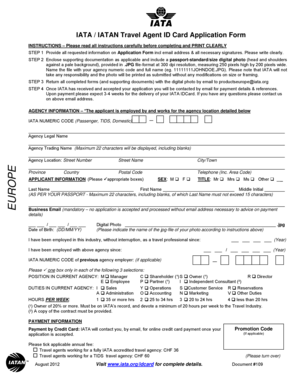
IATA IATAN Travel Agent ID Card Application Form Iata


What is the IATA IATAN Travel Agent ID Card Application Form?
The IATA IATAN Travel Agent ID Card Application Form is a crucial document for travel agents seeking to obtain the IATA (International Air Transport Association) ID card, also known as the IATAN card. This card serves as a form of identification that verifies a travel agent's professional status and affiliation with the travel industry. It provides access to various industry benefits, including discounted travel rates and exclusive offers from airlines and hotels. Completing this application form accurately is essential for ensuring a smooth approval process.
Steps to Complete the IATA IATAN Travel Agent ID Card Application Form
Completing the IATA IATAN Travel Agent ID Card Application Form involves several key steps:
- Gather necessary information, including personal identification and business details.
- Fill out the application form, ensuring all sections are completed accurately.
- Attach required documentation, such as proof of employment or affiliation with a recognized travel agency.
- Review the application for any errors or omissions before submission.
- Submit the application either online or by mail, depending on your preference.
Following these steps can help streamline the application process and increase the likelihood of a successful outcome.
How to Obtain the IATA IATAN Travel Agent ID Card Application Form
The IATA IATAN Travel Agent ID Card Application Form can be obtained through the official IATA website or by contacting IATA directly. It is important to ensure that you are using the most current version of the form to avoid any processing delays. Additionally, some travel agencies may provide the form to their employees as part of their onboarding process.
Legal Use of the IATA IATAN Travel Agent ID Card Application Form
The IATA IATAN Travel Agent ID Card Application Form is legally binding once submitted. It is essential to provide truthful and accurate information, as any discrepancies can lead to delays or denial of the application. The card itself is recognized within the travel industry and can be used to access various benefits, making it important to adhere to the guidelines set forth by IATA.
Eligibility Criteria for the IATA IATAN Travel Agent ID Card
To be eligible for the IATA IATAN Travel Agent ID Card, applicants must meet specific criteria, including:
- Being employed by a recognized travel agency or having a valid affiliation with one.
- Demonstrating a commitment to the travel industry through ongoing professional development.
- Providing necessary documentation to support the application, such as proof of employment.
Understanding these eligibility requirements can help applicants prepare their submissions effectively.
Required Documents for the IATA IATAN Travel Agent ID Card Application
When applying for the IATA IATAN Travel Agent ID Card, applicants must submit several key documents to support their application:
- A completed application form.
- Proof of employment or affiliation with a recognized travel agency.
- A valid form of identification, such as a driver's license or passport.
Ensuring that all required documents are included can help facilitate a smoother application process.
Quick guide on how to complete iata iatan travel agent id card application form iata
Complete IATA IATAN Travel Agent ID Card Application Form Iata effortlessly on any device
Managing documents online has become widely adopted by both businesses and individuals. It offers an ideal environmentally friendly substitute to traditional printed and signed documents, as you can easily access the right form and securely store it online. airSlate SignNow equips you with all the tools necessary to create, modify, and eSign your documents quickly without delays. Manage IATA IATAN Travel Agent ID Card Application Form Iata on any device using airSlate SignNow's Android or iOS applications and streamline any document-related process today.
The simplest way to edit and eSign IATA IATAN Travel Agent ID Card Application Form Iata effortlessly
- Locate IATA IATAN Travel Agent ID Card Application Form Iata and click on Get Form to begin.
- Utilize the tools we offer to complete your document.
- Highlight important sections of the documents or redact sensitive information with tools that airSlate SignNow provides specifically for this purpose.
- Create your eSignature with the Sign tool, which takes mere seconds and carries the same legal validity as a conventional wet ink signature.
- Review the details and click on the Done button to save your changes.
- Choose your preferred method for sending your form, whether by email, SMS, invitation link, or download it to your computer.
Eliminate issues with lost or misplaced files, tedious form searches, or errors that require printing new document copies. airSlate SignNow meets your document management needs in just a few clicks from any device you prefer. Alter and eSign IATA IATAN Travel Agent ID Card Application Form Iata to ensure excellent communication throughout your form preparation process with airSlate SignNow.
Create this form in 5 minutes or less
Create this form in 5 minutes!
How to create an eSignature for the iata iatan travel agent id card application form iata
How to create an electronic signature for a PDF online
How to create an electronic signature for a PDF in Google Chrome
How to create an e-signature for signing PDFs in Gmail
How to create an e-signature right from your smartphone
How to create an e-signature for a PDF on iOS
How to create an e-signature for a PDF on Android
People also ask
-
What is an IATA card and how does it work?
An IATA card is a professional identification card issued to travel agents and agents in the travel industry. It provides access to special fares, discounts, and benefits from airlines and travel companies. With the airSlate SignNow platform, you can easily manage and sign related documents electronically, streamlining processes associated with IATA card applications and renewals.
-
What are the benefits of using an IATA card?
Using an IATA card brings numerous benefits, such as access to exclusive travel deals, lower fares, and industry networking opportunities. Additionally, it enhances your credibility in the travel industry. airSlate SignNow allows you to quickly access and eSign necessary documents, ensuring that you can maximize your IATA card advantages without delay.
-
How can I apply for an IATA card?
To apply for an IATA card, you typically need to meet specific eligibility criteria and fill out an application form through the official IATA website. Once your application is approved, you'll receive your card. With airSlate SignNow, you can digitize your application process, ensuring all required documents are securely signed and submitted in a timely manner.
-
What is the cost of obtaining an IATA card?
The cost of obtaining an IATA card varies depending on the country and the specific requirements of the application. Generally, there may be a small fee involved. Using airSlate SignNow, you can manage and streamline your financial documents related to the IATA card application, ensuring cost efficiency and ease.
-
Does the IATA card offer travel insurance?
The IATA card itself does not directly provide travel insurance; however, IATA-affiliated agencies may offer coverage options for cardholders. It's essential to check with your travel agency or the benefits linked to your IATA card. With airSlate SignNow, you can easily sign any insurance documents needed, ensuring that you are protected while traveling.
-
Can businesses integrate airSlate SignNow with IATA card processes?
Yes, businesses can seamlessly integrate airSlate SignNow with their existing IATA card processes. This integration allows for the electronic signing of documents related to IATA card applications and renewals. It enhances efficiency, ensuring that businesses can handle all IATA-related documentation quickly and securely.
-
What features does airSlate SignNow offer for IATA card holders?
airSlate SignNow offers several features tailored for IATA card holders, including eSignature capabilities, document templates, and workflow automation. These features enhance the efficiency of managing documents related to the IATA card. With SignNow, you can conveniently track your documents and ensure they are signed and sent without any hassle.
Get more for IATA IATAN Travel Agent ID Card Application Form Iata
- Ocfs ldss 4433 form pdf 100257835
- Cafas assessment pdf form
- Equipment list lea form 6 roane jackson technical center
- Cr 180 form
- Cast clinic referral form dell childrens medical center of central
- Download and fill out the activation form texas childrens hospital texaschildrenshospital
- Patient registration form ecw
- Bodytalk consent form
Find out other IATA IATAN Travel Agent ID Card Application Form Iata
- eSignature Real Estate Form Louisiana Simple
- eSignature Louisiana Real Estate LLC Operating Agreement Myself
- Can I eSignature Louisiana Real Estate Quitclaim Deed
- eSignature Hawaii Sports Living Will Safe
- eSignature Hawaii Sports LLC Operating Agreement Myself
- eSignature Maryland Real Estate Quitclaim Deed Secure
- eSignature Idaho Sports Rental Application Secure
- Help Me With eSignature Massachusetts Real Estate Quitclaim Deed
- eSignature Police Document Florida Easy
- eSignature Police Document Florida Safe
- How Can I eSignature Delaware Police Living Will
- eSignature Michigan Real Estate LLC Operating Agreement Mobile
- eSignature Georgia Police Last Will And Testament Simple
- How To eSignature Hawaii Police RFP
- Can I eSignature Minnesota Real Estate Warranty Deed
- How Do I eSignature Indiana Police Lease Agreement Form
- eSignature Police PPT Kansas Free
- How Can I eSignature Mississippi Real Estate Rental Lease Agreement
- How Do I eSignature Kentucky Police LLC Operating Agreement
- eSignature Kentucky Police Lease Termination Letter Now