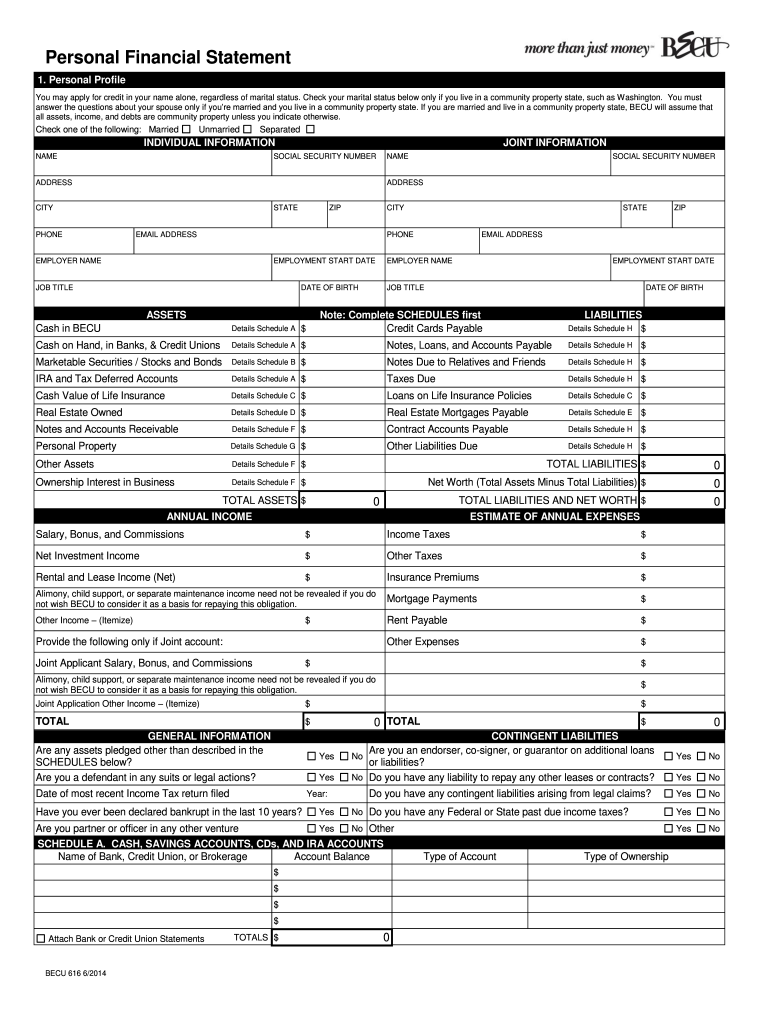
Chase Personal Financial Statement 2004-2026


What is the Chase Personal Financial Statement
The Chase Personal Financial Statement is a comprehensive document that outlines an individual's financial status. It includes details about assets, liabilities, income, and expenses. This form is often required by financial institutions, particularly when applying for loans or mortgages, as it provides a clear picture of a person's financial health. The information collected helps lenders assess creditworthiness and determine loan eligibility.
How to use the Chase Personal Financial Statement
Using the Chase Personal Financial Statement involves filling out the required sections accurately. Start by listing all your assets, including bank accounts, real estate, and investments. Next, detail your liabilities, such as loans and credit card debts. Include your monthly income and expenses to provide a complete overview of your financial situation. This statement can be used to apply for loans, credit, or even for personal financial planning.
Steps to complete the Chase Personal Financial Statement
Completing the Chase Personal Financial Statement requires careful attention to detail. Follow these steps:
- Gather all necessary financial documents, including bank statements, investment records, and bills.
- Begin with personal information, such as your name, address, and contact details.
- List your assets, ensuring to include current values for each item.
- Detail your liabilities, including outstanding debts and their amounts.
- Provide information on your income sources and monthly expenses.
- Review the completed statement for accuracy before submission.
Legal use of the Chase Personal Financial Statement
The Chase Personal Financial Statement is legally recognized and can be used in various financial transactions. When filled out correctly, it serves as a formal declaration of an individual's financial status. This document may be required for loan applications, credit assessments, or even legal proceedings involving financial matters. Ensuring accuracy and honesty in this statement is crucial, as discrepancies can lead to legal repercussions.
Key elements of the Chase Personal Financial Statement
Several key elements are essential when completing the Chase Personal Financial Statement:
- Assets: Include cash, real estate, investments, and personal property.
- Liabilities: Document all debts, including mortgages, loans, and credit card balances.
- Income: List all sources of income, such as salary, rental income, and dividends.
- Expenses: Provide a detailed account of monthly expenses, including housing, utilities, and other recurring costs.
Who Issues the Form
The Chase Personal Financial Statement is issued by JPMorgan Chase Bank. It is typically provided to customers who are applying for loans or credit products through the bank. The form may also be available on the bank's website or through financial advisors associated with Chase. It is important to ensure that you are using the most current version of the form to meet any specific requirements set by the bank.
Quick guide on how to complete j p morgan chase personal financial statement form
The optimal method to obtain and sign Chase Personal Financial Statement
At the level of an entire organization, ineffective procedures concerning document approval can take up a signNow amount of productive time. Signing documents such as Chase Personal Financial Statement is an integral aspect of operations in any enterprise, which is why the effectiveness of each agreement’s lifecycle signNowly impacts the overall performance of the company. With airSlate SignNow, signing your Chase Personal Financial Statement is as simple and swift as it can be. This platform provides you with the latest version of almost any form. Even better, you can sign it instantly without the requirement of installing external applications on your computer or printing anything as physical copies.
How to obtain and sign your Chase Personal Financial Statement
- Browse our collection by category or use the search bar to locate the document you require.
- View the form preview by clicking on Learn more to confirm it’s the correct one.
- Click Get form to begin editing right away.
- Fill out your form and incorporate any necessary information using the toolbar.
- Once finished, click the Sign tool to sign your Chase Personal Financial Statement.
- Choose the signature option that best fits your preference: Draw, Create initials, or upload a picture of your handwritten signature.
- Click Done to finalize editing and move on to document-sharing options as required.
With airSlate SignNow, you possess everything you need to manage your documents efficiently. You can find, complete, edit, and even send your Chase Personal Financial Statement in a single tab with minimal effort. Optimize your processes using one intelligent eSignature solution.
Create this form in 5 minutes or less
FAQs
-
When is it mandatory to fill out a personal financial statement for one's bank? The form states no deadline about when it must be returned.
The only time I know that financial statements are asked for is when one applies for a business or personal loan, or applying for a mortgage. Each bank or credit union can have their own document requirements, however for each transaction. It really is at their discretion.
-
Do I need to fill out a financial statement form if I get a full tuition waiver and RA/TA?
If that is necessary, the university or the faculty will inform you of that. These things can vary from university to university. Your best option would be to check your university website, financial services office or the Bursar office in your university.
-
How many application forms does a person need to fill out in his/her lifetime?
As many as you want to !
-
How long does it take to get the offer from J P Morgan Chase India? Application status is “Final Candidate”?
Never I by job portal status as it's not updated or won't show the correct status. Check with the HR if offer is on its way or not l. Post final interview it might take two to four weeks time based on approval workflow.But I suggest you should connect with your HR and move on.
-
What do you think of the impact of the cyber-hacking to J.P. Morgan Chase on the market (especially toward other financial institutions) and the political relationship between the United States and Russia?
I don't think it matters. I'm rather certain that any sort of hacking that the Russians are doing toward US companies, the US is doing toward Russian companies, only the US is a lot better at it, and is less likely to get caught.So in the end, the US is not going to make a big deal over this, because making a big deal over this is going to set up a rule that the US can't do something similar to Russian companies if it believes it to be in its national interests to do so.I also don't think this will be a big deal to most customers. If someone hacked my bank account and took money, I would be annoyed. If the Russian security services have a copy of all my financial transactions, they are welcome to that information.
Create this form in 5 minutes!
How to create an eSignature for the j p morgan chase personal financial statement form
How to make an electronic signature for the J P Morgan Chase Personal Financial Statement Form online
How to generate an electronic signature for your J P Morgan Chase Personal Financial Statement Form in Chrome
How to make an electronic signature for putting it on the J P Morgan Chase Personal Financial Statement Form in Gmail
How to create an electronic signature for the J P Morgan Chase Personal Financial Statement Form right from your mobile device
How to generate an electronic signature for the J P Morgan Chase Personal Financial Statement Form on iOS
How to make an electronic signature for the J P Morgan Chase Personal Financial Statement Form on Android devices
People also ask
-
What is a Chase Personal Financial Statement?
A Chase Personal Financial Statement is a comprehensive document that outlines your financial status, including assets, liabilities, income, and expenses. This statement is often required for loan applications and can help you gain better financial insights. Using airSlate SignNow, you can easily create and eSign your Chase Personal Financial Statement, making the process streamlined and efficient.
-
How can I create a Chase Personal Financial Statement using airSlate SignNow?
Creating a Chase Personal Financial Statement with airSlate SignNow is simple. You can start by using our customizable templates to input your financial information. Once completed, you can easily eSign the document and share it securely, ensuring that your financial data is handled safely and efficiently.
-
Are there any costs associated with using airSlate SignNow for a Chase Personal Financial Statement?
airSlate SignNow offers a variety of pricing plans to suit different needs. Whether you’re an individual or a business, you can choose a plan that fits your budget while gaining access to features that simplify the creation and signing of documents like the Chase Personal Financial Statement. Check our pricing page for detailed options.
-
What features does airSlate SignNow offer for managing a Chase Personal Financial Statement?
airSlate SignNow provides a range of features specifically designed for managing important documents like the Chase Personal Financial Statement. These include customizable templates, secure eSignature options, document tracking, and integration with other platforms to enhance your workflow. This ensures your financial statements are not only easy to create but also secure.
-
Can I integrate airSlate SignNow with other financial tools for my Chase Personal Financial Statement?
Yes, airSlate SignNow offers seamless integrations with various financial tools and software. This allows you to import data directly into your Chase Personal Financial Statement, making the process more efficient. By integrating with your preferred applications, you can enhance productivity and maintain accurate financial records.
-
What are the benefits of using airSlate SignNow for a Chase Personal Financial Statement?
Using airSlate SignNow for your Chase Personal Financial Statement offers numerous benefits, including time savings, enhanced security, and ease of use. The platform allows for quick eSigning and document sharing, ensuring your financial information is handled promptly and securely. Additionally, our user-friendly interface makes it accessible for anyone, regardless of technical skill.
-
Is my financial data secure when using airSlate SignNow for a Chase Personal Financial Statement?
Absolutely! airSlate SignNow prioritizes the security of your data, especially when handling sensitive documents like the Chase Personal Financial Statement. We employ advanced encryption technologies and comply with industry standards to ensure your financial information remains confidential and protected throughout the signing process.
Get more for Chase Personal Financial Statement
Find out other Chase Personal Financial Statement
- Sign Wisconsin Healthcare / Medical Contract Safe
- Sign Alabama High Tech Last Will And Testament Online
- Sign Delaware High Tech Rental Lease Agreement Online
- Sign Connecticut High Tech Lease Template Easy
- How Can I Sign Louisiana High Tech LLC Operating Agreement
- Sign Louisiana High Tech Month To Month Lease Myself
- How To Sign Alaska Insurance Promissory Note Template
- Sign Arizona Insurance Moving Checklist Secure
- Sign New Mexico High Tech Limited Power Of Attorney Simple
- Sign Oregon High Tech POA Free
- Sign South Carolina High Tech Moving Checklist Now
- Sign South Carolina High Tech Limited Power Of Attorney Free
- Sign West Virginia High Tech Quitclaim Deed Myself
- Sign Delaware Insurance Claim Online
- Sign Delaware Insurance Contract Later
- Sign Hawaii Insurance NDA Safe
- Sign Georgia Insurance POA Later
- How Can I Sign Alabama Lawers Lease Agreement
- How Can I Sign California Lawers Lease Agreement
- Sign Colorado Lawers Operating Agreement Later