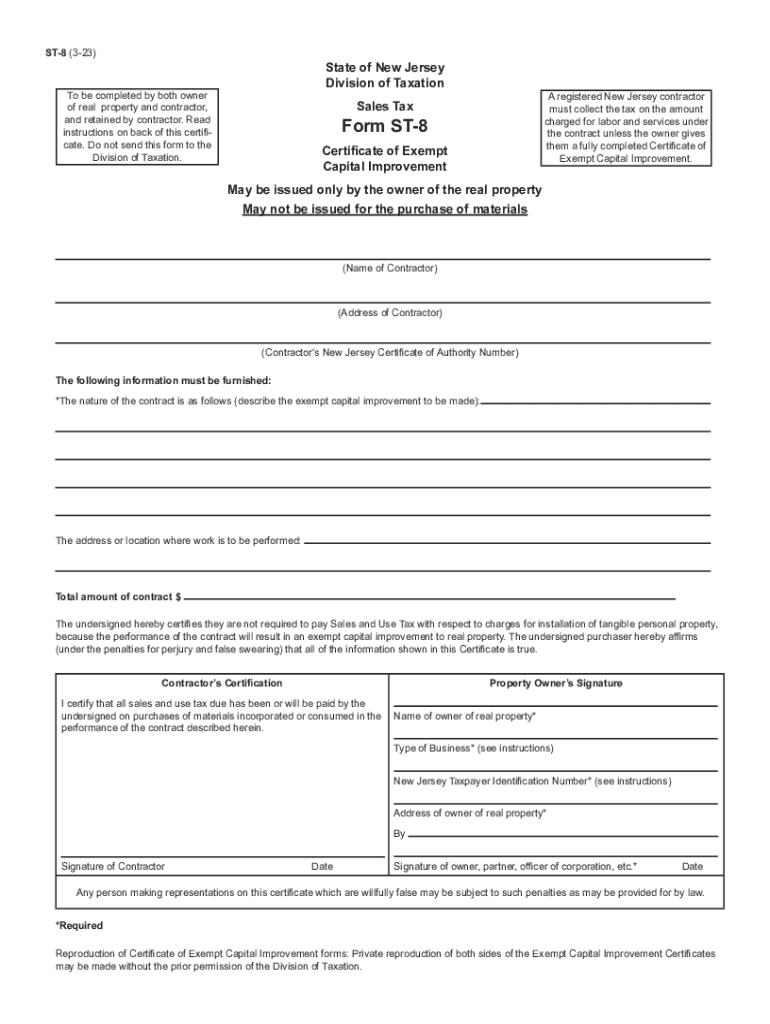
Form ST 8 Certificate of Exempt Capital Improvement 2017


What is the Form ST 8 Certificate of Exempt Capital Improvement
The NJ ST 8 form, also known as the Certificate of Exempt Capital Improvement, is a document used in New Jersey to certify that certain capital improvements are exempt from sales tax. This form is essential for contractors and property owners who are undertaking construction projects that qualify for tax exemption under New Jersey law. By providing this certificate, the buyer can avoid paying sales tax on materials and services related to the exempt improvements, which can lead to significant cost savings.
How to Use the Form ST 8 Certificate of Exempt Capital Improvement
To utilize the NJ ST 8 form effectively, the buyer must complete the certificate accurately before the purchase of materials or services. The form should be presented to the vendor at the time of purchase, indicating that the transaction is exempt from sales tax due to the nature of the capital improvement. It is important to ensure that all details are filled out correctly to avoid any issues with tax compliance. Vendors are required to keep a copy of the form for their records, as it serves as proof of the tax-exempt transaction.
Steps to Complete the Form ST 8 Certificate of Exempt Capital Improvement
Completing the NJ ST 8 form involves several key steps:
- Provide the name and address of the purchaser.
- Include the name and address of the seller or vendor.
- Specify the type of capital improvement being made.
- Sign and date the form to validate the exemption claim.
It is crucial to ensure that the information provided is accurate and complete to prevent any potential complications during the transaction.
Legal Use of the Form ST 8 Certificate of Exempt Capital Improvement
The NJ ST 8 form is legally recognized under New Jersey tax law as a valid document for claiming sales tax exemption on capital improvements. To be eligible for this exemption, the improvements must meet specific criteria outlined by the state. Misuse of the form, such as claiming exemptions for non-qualifying projects, can lead to penalties and back taxes owed. Therefore, it is essential to understand the legal implications and ensure compliance with all applicable regulations when using this form.
Eligibility Criteria for the Form ST 8 Certificate of Exempt Capital Improvement
To qualify for the NJ ST 8 form exemption, the capital improvements must meet certain eligibility criteria. These typically include:
- The improvement must be a permanent addition or alteration to real property.
- It must enhance the value or utility of the property.
- The work must be performed by a contractor or service provider.
Understanding these criteria helps ensure that the form is used correctly and that the exemption is valid.
Required Documents for Using the Form ST 8 Certificate of Exempt Capital Improvement
When preparing to use the NJ ST 8 form, certain documents may be required to support the exemption claim. These can include:
- Contracts or agreements with contractors.
- Invoices for materials and services related to the capital improvement.
- Any relevant permits or approvals from local authorities.
Having these documents on hand can facilitate a smoother transaction and provide necessary evidence of the exemption if questioned by tax authorities.
Quick guide on how to complete form st 8 certificate of exempt capital improvement
Effortlessly Prepare Form ST 8 Certificate Of Exempt Capital Improvement on Any Gadget
Digital document management has become increasingly popular among businesses and individuals. It offers an ideal eco-friendly substitute for conventional printed and signed documents, as you can access the right template and safely store it online. airSlate SignNow provides you with all the tools necessary to create, edit, and electronically sign your documents rapidly without delays. Manage Form ST 8 Certificate Of Exempt Capital Improvement on any gadget using airSlate SignNow's Android or iOS applications and enhance any document-centric process today.
How to edit and electronically sign Form ST 8 Certificate Of Exempt Capital Improvement with ease
- Find Form ST 8 Certificate Of Exempt Capital Improvement and click on Get Form to begin.
- Utilize the tools we offer to fill out your form.
- Emphasize pertinent sections of your documents or obscure sensitive information with tools specifically designed for that purpose by airSlate SignNow.
- Generate your eSignature using the Sign tool, which takes mere seconds and has the same legal validity as a traditional handwritten signature.
- Review all the details and click on the Done button to apply your changes.
- Select your preferred method for sending your form, whether by email, SMS, or invitation link, or download it to your computer.
Leave behind concerns about lost or mislaid documents, tedious form hunting, or errors that necessitate printing new copies. airSlate SignNow caters to all your document management requirements in just a few clicks from any device you choose. Edit and electronically sign Form ST 8 Certificate Of Exempt Capital Improvement while ensuring flawless communication at every stage of the form preparation process with airSlate SignNow.
Create this form in 5 minutes or less
Find and fill out the correct form st 8 certificate of exempt capital improvement
Create this form in 5 minutes!
How to create an eSignature for the form st 8 certificate of exempt capital improvement
How to create an electronic signature for a PDF online
How to create an electronic signature for a PDF in Google Chrome
How to create an e-signature for signing PDFs in Gmail
How to create an e-signature right from your smartphone
How to create an e-signature for a PDF on iOS
How to create an e-signature for a PDF on Android
People also ask
-
What is the NJ ST 8 form, and how can airSlate SignNow help with it?
The NJ ST 8 form is a vendor's certificate of exempt use, allowing businesses to purchase goods without paying sales tax in New Jersey. With airSlate SignNow, you can easily eSign and store the NJ ST 8 form securely, ensuring your documentation is always accessible and compliant.
-
Is there a cost associated with using airSlate SignNow for the NJ ST 8 form?
Yes, airSlate SignNow offers various pricing plans to cater to different business needs, including the ability to manage your NJ ST 8 form. Our plans are designed to be cost-effective, ensuring you can efficiently manage your documents without breaking the bank.
-
What features does airSlate SignNow offer for handling the NJ ST 8 form?
airSlate SignNow provides several features for handling the NJ ST 8 form, including customizable templates, easy eSigning, and automated workflows. These features streamline the process, allowing you to complete and send the NJ ST 8 form quickly and efficiently.
-
How does airSlate SignNow ensure the security of my NJ ST 8 form?
We prioritize security at airSlate SignNow, incorporating advanced encryption and compliance with industry standards to protect your NJ ST 8 form. Your documents are stored securely in the cloud, ensuring that they are safe from unauthorized access.
-
Can I integrate airSlate SignNow with other applications to manage my NJ ST 8 form?
Absolutely! airSlate SignNow seamlessly integrates with various applications such as CRM systems and cloud storage solutions, facilitating the smooth management of your NJ ST 8 form. This integration enhances your productivity by consolidating document management in one place.
-
How easy is it to eSign an NJ ST 8 form using airSlate SignNow?
ESigning an NJ ST 8 form with airSlate SignNow is incredibly straightforward. Our user-friendly interface allows you to electronically sign documents in just a few clicks, ensuring quick processing without the hassle of printing and scanning.
-
What benefits does using airSlate SignNow provide for my NJ ST 8 form processing?
Using airSlate SignNow to process your NJ ST 8 form offers numerous benefits, including time savings, reduced errors, and enhanced compliance. Our platform ensures that your documents are handled efficiently, allowing your business to operate smoothly.
Get more for Form ST 8 Certificate Of Exempt Capital Improvement
- Edward diao m form
- Important applications are part of the hiring process and form
- Www pdffiller com400269836 20170120applicationfillable online application south feather water ampamp power fax form
- Disability retirement application handbook kcera kcera form
- Certificate of attest experience private industry or government form
- Forms ampamp documents vacaville unified school district
- Pre registration form template
- Client name form
Find out other Form ST 8 Certificate Of Exempt Capital Improvement
- Electronic signature Maine Banking Permission Slip Fast
- eSignature Wyoming Sports LLC Operating Agreement Later
- Electronic signature Banking Word Massachusetts Free
- eSignature Wyoming Courts Quitclaim Deed Later
- Electronic signature Michigan Banking Lease Agreement Computer
- Electronic signature Michigan Banking Affidavit Of Heirship Fast
- Electronic signature Arizona Business Operations Job Offer Free
- Electronic signature Nevada Banking NDA Online
- Electronic signature Nebraska Banking Confidentiality Agreement Myself
- Electronic signature Alaska Car Dealer Resignation Letter Myself
- Electronic signature Alaska Car Dealer NDA Mobile
- How Can I Electronic signature Arizona Car Dealer Agreement
- Electronic signature California Business Operations Promissory Note Template Fast
- How Do I Electronic signature Arkansas Car Dealer Claim
- Electronic signature Colorado Car Dealer Arbitration Agreement Mobile
- Electronic signature California Car Dealer Rental Lease Agreement Fast
- Electronic signature Connecticut Car Dealer Lease Agreement Now
- Electronic signature Connecticut Car Dealer Warranty Deed Computer
- Electronic signature New Mexico Banking Job Offer Online
- How Can I Electronic signature Delaware Car Dealer Purchase Order Template