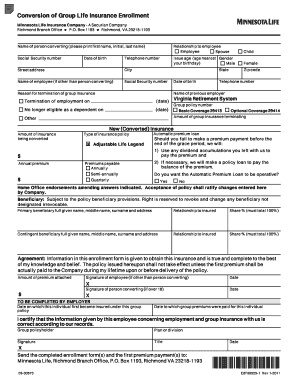
Election of Portable Term Coverage LifeBenefits Form


Understanding the Election of Portable Term Coverage LifeBenefits
The Election of Portable Term Coverage LifeBenefits is a specific option available to individuals who wish to maintain life insurance coverage after leaving an employer or when their group policy ends. This type of coverage allows for the continuation of life insurance benefits without the need for a medical examination, making it accessible for many individuals. It is designed to provide financial protection for beneficiaries in the event of the policyholder's death, ensuring peace of mind during transitions in employment or personal circumstances.
Steps to Complete the Election of Portable Term Coverage LifeBenefits
Completing the Election of Portable Term Coverage LifeBenefits involves several straightforward steps:
- Review your eligibility for portable coverage based on your previous employer's policy.
- Obtain the necessary forms from your employer or the insurance provider.
- Fill out the election form with accurate personal information and coverage details.
- Submit the completed form within the specified timeframe to ensure uninterrupted coverage.
- Keep a copy of the submitted form for your records and follow up with the insurance provider to confirm processing.
Legal Considerations for the Election of Portable Term Coverage LifeBenefits
When electing portable term coverage, it is essential to understand the legal implications involved. This coverage is subject to state laws and regulations, which can vary significantly. Individuals should ensure that they comply with any state-specific requirements regarding the continuation of insurance benefits. Additionally, reviewing the terms and conditions of the policy is crucial to understand any limitations or exclusions that may apply.
Eligibility Criteria for the Election of Portable Term Coverage LifeBenefits
Eligibility for the Election of Portable Term Coverage LifeBenefits typically requires that the individual was enrolled in a group life insurance plan through their employer. Other factors may include:
- Employment status at the time of election.
- Duration of coverage under the group policy.
- Compliance with any notification requirements set forth by the employer or insurer.
It is advisable to confirm eligibility directly with the insurance provider or human resources department for clarity.
Required Documents for the Election of Portable Term Coverage LifeBenefits
To successfully complete the election process, certain documents may be required. These often include:
- The election form provided by the insurance company.
- Proof of previous coverage, such as a policy number or group number.
- Identification documents, if necessary, to verify identity.
Gathering these documents in advance can streamline the process and ensure timely submission.
Form Submission Methods for the Election of Portable Term Coverage LifeBenefits
Submitting the election form can typically be done through various methods, depending on the insurer's policies:
- Online submission via the insurance provider's secure portal.
- Mailing the completed form to the designated address provided by the insurer.
- In-person submission at the insurance office or through the employer's human resources department.
Choosing the most convenient submission method can help ensure that the election is processed efficiently.
Quick guide on how to complete election of portable term coverage lifebenefits
Effortlessly prepare [SKS] on any device
Online document management has become increasingly popular among businesses and individuals alike. It serves as an ideal eco-friendly alternative to traditional printed and signed documents, enabling you to find the correct form and securely store it online. airSlate SignNow provides you with all the essential tools to create, modify, and electronically sign your documents rapidly without any delays. Manage [SKS] seamlessly on any platform using the airSlate SignNow Android or iOS applications and streamline any document-related task today.
How to modify and electronically sign [SKS] effortlessly
- Obtain [SKS] and click Get Form to begin.
- Utilize the tools we provide to complete your document.
- Emphasize important sections of the documents or redact sensitive information with tools specifically designed for that purpose by airSlate SignNow.
- Craft your eSignature using the Sign tool, which takes just seconds and has the same legal validity as a conventional wet ink signature.
- Review all the details and click on the Done button to finalize your changes.
- Choose your preferred method for delivering your form, whether by email, text message (SMS), or invite link, or download it to your computer.
Say goodbye to lost or misplaced files, tedious form searching, or errors that necessitate reprinting new document copies. airSlate SignNow meets all your document management requirements in just a few clicks from any device you choose. Modify and electronically sign [SKS] while ensuring excellent communication at every stage of the form preparation process with airSlate SignNow.
Create this form in 5 minutes or less
Related searches to Election Of Portable Term Coverage LifeBenefits
Create this form in 5 minutes!
How to create an eSignature for the election of portable term coverage lifebenefits
How to create an electronic signature for a PDF online
How to create an electronic signature for a PDF in Google Chrome
How to create an e-signature for signing PDFs in Gmail
How to create an e-signature right from your smartphone
How to create an e-signature for a PDF on iOS
How to create an e-signature for a PDF on Android
People also ask
-
What is the Election Of Portable Term Coverage LifeBenefits?
The Election Of Portable Term Coverage LifeBenefits allows policyholders to maintain their life insurance coverage even after leaving their job. This feature provides added financial security and peace of mind for individuals and their families.
-
How does the Election Of Portable Term Coverage LifeBenefits work?
This coverage enables you to convert your group term life insurance policy into an individual policy when you leave your employer. By electing this option, you can continue your coverage without needing to undergo a medical examination.
-
What are the pricing options for the Election Of Portable Term Coverage LifeBenefits?
Pricing for the Election Of Portable Term Coverage LifeBenefits varies based on your age, health status, and the amount of coverage you select. It's important to compare quotes and consider the terms offered by your specific provider to find an optimal plan.
-
What are the benefits of choosing the Election Of Portable Term Coverage LifeBenefits?
The primary benefit of the Election Of Portable Term Coverage LifeBenefits is the security it provides in maintaining insurance coverage during life transitions. This ensures that you and your family are protected without interruption, even if your job status changes.
-
Can I customize my plan with the Election Of Portable Term Coverage LifeBenefits?
Yes, the Election Of Portable Term Coverage LifeBenefits typically offers several customization options, allowing you to adjust your coverage amount and beneficiary details. This customization ensures that your policy matches your specific needs and circumstances.
-
Are there any limitations to the Election Of Portable Term Coverage LifeBenefits?
While the Election Of Portable Term Coverage LifeBenefits is flexible, there may be limitations, such as a time frame within which you must elect this coverage after leaving your employer. Additionally, rates may change based on your current health status.
-
How can I apply for the Election Of Portable Term Coverage LifeBenefits?
To apply for the Election Of Portable Term Coverage LifeBenefits, you'll typically need to contact your insurance provider directly within the specified election period after ending your employment. They will guide you through the process and provide necessary documentation.
Get more for Election Of Portable Term Coverage LifeBenefits
- School transportation change letter form
- Privately owned atm questionnaire form
- Present perfect alison bailey read online form
- Lpa 73 11 in word format
- Referee report form heriot watt
- Staar science tutorial 25 answer key form
- Environmental questionnaire sba loans today form
- Excelsior outage map form
Find out other Election Of Portable Term Coverage LifeBenefits
- Can I eSignature South Dakota Doctors Lease Agreement Form
- eSignature New Hampshire Government Bill Of Lading Fast
- eSignature Illinois Finance & Tax Accounting Purchase Order Template Myself
- eSignature North Dakota Government Quitclaim Deed Free
- eSignature Kansas Finance & Tax Accounting Business Letter Template Free
- eSignature Washington Government Arbitration Agreement Simple
- Can I eSignature Massachusetts Finance & Tax Accounting Business Plan Template
- Help Me With eSignature Massachusetts Finance & Tax Accounting Work Order
- eSignature Delaware Healthcare / Medical NDA Secure
- eSignature Florida Healthcare / Medical Rental Lease Agreement Safe
- eSignature Nebraska Finance & Tax Accounting Business Letter Template Online
- Help Me With eSignature Indiana Healthcare / Medical Notice To Quit
- eSignature New Jersey Healthcare / Medical Credit Memo Myself
- eSignature North Dakota Healthcare / Medical Medical History Simple
- Help Me With eSignature Arkansas High Tech Arbitration Agreement
- eSignature Ohio Healthcare / Medical Operating Agreement Simple
- eSignature Oregon Healthcare / Medical Limited Power Of Attorney Computer
- eSignature Pennsylvania Healthcare / Medical Warranty Deed Computer
- eSignature Texas Healthcare / Medical Bill Of Lading Simple
- eSignature Virginia Healthcare / Medical Living Will Computer