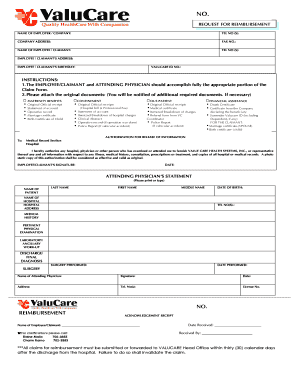
Valucare Reimbursement Form


What is the Valucare Reimbursement Form
The Valucare Reimbursement Form is a crucial document used by individuals and businesses seeking reimbursement for eligible healthcare expenses. This form is specifically designed to facilitate the reimbursement process, ensuring that all necessary information is collected and submitted correctly. By using this form, applicants can streamline their reimbursement requests, making it easier for both the claimant and the processing entity to manage claims efficiently.
How to use the Valucare Reimbursement Form
Using the Valucare Reimbursement Form involves several straightforward steps. First, ensure you have all required documentation, including receipts and any supporting paperwork. Next, fill out the form accurately, providing all requested details such as personal information, the nature of the expenses, and the total amount being claimed. Once completed, review the form for accuracy before submission to avoid delays in processing.
Required Documents
To successfully complete the Valucare Reimbursement Form, certain documents must be included. These typically include:
- Itemized receipts for all expenses being claimed
- Proof of payment, such as bank statements or credit card statements
- Any additional documentation that supports the claim, such as medical records or service agreements
Having these documents ready will help ensure a smooth reimbursement process.
Steps to complete the Valucare Reimbursement Form
Completing the Valucare Reimbursement Form involves a series of methodical steps:
- Gather all necessary documentation, including receipts and proof of payment.
- Download or obtain the Valucare Reimbursement Form from the appropriate source.
- Fill out the form with accurate personal and expense information.
- Attach all required documents to the completed form.
- Review the entire submission for completeness and accuracy.
- Submit the form via the designated method, whether online, by mail, or in person.
Form Submission Methods
The Valucare Reimbursement Form can be submitted through various methods to accommodate different preferences. Options typically include:
- Online submission through the Valucare portal, allowing for quick processing.
- Mailing the completed form and supporting documents to the designated address.
- In-person submission at a local Valucare office, providing immediate confirmation of receipt.
Choosing the right submission method can impact the speed of processing your reimbursement request.
Eligibility Criteria
To qualify for reimbursement using the Valucare Reimbursement Form, applicants must meet specific eligibility criteria. Generally, these criteria include:
- Being a registered participant in the Valucare program.
- Submitting claims for eligible healthcare expenses as defined by Valucare guidelines.
- Providing all necessary documentation to support the claim.
Understanding these criteria is essential to ensure that your reimbursement request is valid and processed without issues.
Quick guide on how to complete valucare reimbursement form
Complete Valucare Reimbursement Form effortlessly on any device
Web-based document management has become increasingly popular among companies and individuals alike. It offers an ideal eco-friendly substitute for traditional printed and signed documents, as you can easily find the correct form and securely store it online. airSlate SignNow equips you with all the tools necessary to create, modify, and electronically sign your documents swiftly without any delays. Manage Valucare Reimbursement Form on any platform using airSlate SignNow Android or iOS applications and streamline any document-related process today.
The easiest way to modify and eSign Valucare Reimbursement Form with ease
- Obtain Valucare Reimbursement Form and click Get Form to begin.
- Utilize the tools we offer to complete your form.
- Highlight important sections of your documents or redact sensitive information with tools specifically provided by airSlate SignNow for that purpose.
- Create your eSignature using the Sign tool, which takes mere seconds and has the same legal validity as a traditional handwritten signature.
- Review all the details and click the Done button to save your modifications.
- Select your preferred method to send your form, whether by email, SMS, or invite link, or download it to your computer.
No more worrying about lost or misplaced files, tedious form searches, or mistakes that necessitate printing new document copies. airSlate SignNow meets your document management needs in just a few clicks from any device you choose. Edit and eSign Valucare Reimbursement Form and ensure excellent communication at every stage of the form preparation process with airSlate SignNow.
Create this form in 5 minutes or less
Create this form in 5 minutes!
How to create an eSignature for the valucare reimbursement form
How to create an electronic signature for a PDF online
How to create an electronic signature for a PDF in Google Chrome
How to create an e-signature for signing PDFs in Gmail
How to create an e-signature right from your smartphone
How to create an e-signature for a PDF on iOS
How to create an e-signature for a PDF on Android
People also ask
-
What are Valucare reimbursement requirements?
Valucare reimbursement requirements refer to the specific documentation and procedures necessary to effectively process claims for reimbursement. Understanding these requirements is crucial for businesses looking to ensure compliance and smooth operations in their reimbursement processes.
-
How can airSlate SignNow help meet Valucare reimbursement requirements?
airSlate SignNow simplifies the process of managing the necessary documentation related to Valucare reimbursement requirements. Our platform allows you to easily create, send, and eSign the documents ensuring that your business adheres to these requirements efficiently.
-
Are there any additional costs associated with Valucare reimbursement requirements using airSlate SignNow?
There are no hidden fees when managing Valucare reimbursement requirements with airSlate SignNow. Our pricing structure is transparent and designed to be cost-effective, allowing you to manage all your eSigning needs without unexpected expenses.
-
What features does airSlate SignNow offer for managing Valucare reimbursement requirements?
airSlate SignNow provides several features tailored to handle Valucare reimbursement requirements, including customizable templates, secure eSigning, and tracking capabilities. These tools help in streamlining document workflows, making compliance easier.
-
Can I integrate airSlate SignNow with other tools to meet Valucare reimbursement requirements?
Yes, airSlate SignNow integrates seamlessly with various software applications that can assist in managing Valucare reimbursement requirements. This integration capability enhances workflows and makes the documentation process more efficient.
-
What benefits can I expect from using airSlate SignNow for Valucare reimbursement requirements?
By using airSlate SignNow for Valucare reimbursement requirements, you can expect increased efficiency, reduced paperwork, and improved accuracy in documentation. These benefits lead to faster reimbursement cycles and better cash flow management.
-
Is airSlate SignNow user-friendly for managing Valucare reimbursement requirements?
Absolutely! airSlate SignNow is designed with user-friendliness in mind, making it easy for all team members to understand and manage Valucare reimbursement requirements. Its intuitive interface ensures a smooth experience for document handling.
Get more for Valucare Reimbursement Form
Find out other Valucare Reimbursement Form
- How To Integrate Sign in Banking
- How To Use Sign in Banking
- Help Me With Use Sign in Banking
- Can I Use Sign in Banking
- How Do I Install Sign in Banking
- How To Add Sign in Banking
- How Do I Add Sign in Banking
- How Can I Add Sign in Banking
- Can I Add Sign in Banking
- Help Me With Set Up Sign in Government
- How To Integrate eSign in Banking
- How To Use eSign in Banking
- How To Install eSign in Banking
- How To Add eSign in Banking
- How To Set Up eSign in Banking
- How To Save eSign in Banking
- How To Implement eSign in Banking
- How To Set Up eSign in Construction
- How To Integrate eSign in Doctors
- How To Use eSign in Doctors